
K-55XR80M2 - SONY - Free user manual and instructions
Find the device manual for free K-55XR80M2 SONY in PDF.

 FR
FR
 AR
AR
 BG
BG
 CS
CS
 DA
DA
 DE
DE
 EL
EL
 EN
EN
 ES
ES
 ET
ET
 FI
FI
 HE
HE
 HR
HR
 HU
HU
 IT
IT
 JA
JA
 LT
LT
 LV
LV
 NL
NL
 NO
NO
 PL
PL
 PT
PT
 RO
RO
 RU
RU
 SK
SK
 SL
SL
 SV
SV
 TH
TH
 UK
UK
 VI
VI
 ZH
ZH
| Product type | Flat-screen television with wall-mounting bracket |
| Brand | Sony |
| Model | K-55XR80M2 |
| Screen size | 138.8 cm (55 inches) diagonal |
| Compatible wall mount | Sony SU-WL900 |
| Approximate dimensions (W x H x D) | 1224 mm x 707 mm x 37 mm |
| Approximate weight | Approximately 20 kg |
| Power supply | 220-240 V AC, 50/60 Hz |
| Installation | Must be carried out by a certified professional installer |
| Required wall strength | Capable of supporting at least 4 times the weight of the television |
| Special features | The television tilts slightly forward once mounted on the wall |
| Care and cleaning | Soft, dry cloth, without pressure on the screen |
| Safety | Do not lean on or hang from the television, do not remove the screws after mounting |
| Included accessories | Plates WM1, WM2, WM3, WM5, WM6, WM7, M3/M4/M6 screws, WT1 spacers |
| Repairability | Spare parts available from Sony customer service |
| Manual | 558-page manual, downloadable for free |
| Available languages | French, English, German, Spanish, Italian, etc. |
Frequently Asked Questions - K-55XR80M2 SONY
User questions about K-55XR80M2 SONY
0 question about this device. Answer the ones you know or ask your own.
Ask a new question about this device
Download the instructions for your in PDF format for free! Find your manual K-55XR80M2 - SONY and take your electronic device back in hand. On this page are published all the documents necessary for the use of your device. K-55XR80M2 by SONY.
USER MANUAL K-55XR80M2 SONY

K-65XR80M2 / 55XR80M2

https://rd1.sony.net/help/tv/mga1/h_ga/


(mm/毫米) 1 (kg/千克) 1
| A | B | C | W | |
| K-65XR80M2 | 1443 | 830 | 34 | 22.9 |
| K-55XR80M2 | 1224 | 707 | 34 | 17.2 |
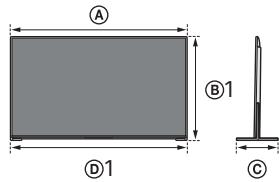


| (mm/毫米)*1 | (kg/千克)*1 | ||||||
| A | B1 | B2 | C | D1 | D2 | W | |
| K-65XR80M2 | 1443 | 844 | 905 | 339 | 1442 | 1442 | 24.2 |
| K-55XR80M2 | 1224 | 722 | 783 | 275 | 1223 | 1223 | 18.4 |
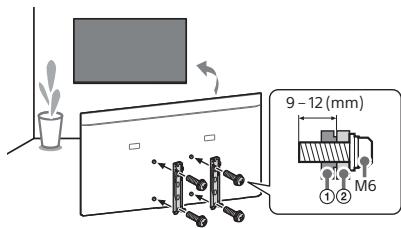
① TV's rear cover / 電視機後蓋
② Wall-Mount Bracket / 壁掛式支架
(mm)/(毫米)


K-65XR80M2


K-55XR80M2
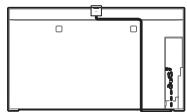
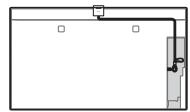
Optional Camera and Microphone Unit (not supplied) Cable Management /
選購的攝影機與麥克風組件(非附帶)線材管理
© 2025 Sony Corporation

EN
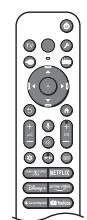
The remote control shape, layout, availability and function of remote control buttons may vary depending on your region/country/TV model/TV settings.
1 ⏻ (Power)
TV: Display TV channel list or switch to input.
(Quick Settings): Display Quick Settings.
→ (Input select): Display and select the input source, etc.
MENU(Control menu): Display the Control menu.
2 ▲/▼/◄/►/ ⏻: On screen menu navigation and selection.
←(Back)
Home
(Google Assistant / Microphone): Use Google Assistant*1*2 or voice search*2.
3 + / - (Volume)
O × (Mute)*3
CH + / - (Channel)
(Dashboard): Display Dashboard.
▶ II
(Guide): Display the digital programme guide.
4 App buttons
*1 Only for limited region/country/model/language.
*2 Google Assistant or voice search requires an Internet connection.
*3 Accessibility shortcut is available by pressing and holding ☑ (Mute).
CT
遙控器外形、按鈕的佈局、可用性與功能視您的國家/區域/電視機型號或設定而可能略有不同。
1 (電源)
TV: 顯示電視機頻道清單或切換為輸入。
(快速設定):顯示快速設定。
→(輸入選擇):顯示並選擇輸入來源等。
MENU(控制選單):顯示控制選單。
2 ▲/▼/◄/►/ ⊕:在螢幕選單導航和選擇上。
←(返回)
(主選單)
(Google 助理 / 麥克風):使用 Google 助理*1*2 或語音搜尋*2。
3 + / - (音量)
呎 (靜音)*3
CH + / - (频道)
☆(資訊主頁):顯示資訊主頁。
▶
(指南)·顯示數位節目指南。
4 應用按鈕
*1 僅限用於有限區域 / 國家 / 型號 / 語言。
*2 使用 Google 助理或語音搜尋需要網際網路連線。
*3 按住 咧(静音)可使用輔助使用快捷鍵。
EN
Note
- Instructions about "Installing the TV to the Wall" are included within this TV's instruction manual.
- Read the supplied safety documentation for additional safety information.
Location of the identification label
Labels for the TV Model No. and Power Supply rating are located on the rear of the TV. They can be found by removing the terminal cover.
This television is designed for use in Hong Kong and ensured the usage in Hong Kong only.
Installing the TV to the Wall
Using the optional Wall-Mount Bracket (SU-WL850 or SU-WL450)*1 (not supplied) To Customers:
For product protection and safety reasons, Sony strongly recommends that installation of your TV be performed by Sony dealers or licensed contractors. Do not attempt to install it yourself.
To Sony Dealers and Contractors:
Provide full attention to safety during the installation, periodic maintenance and examination of this product.
Wall-Mount Bracket Installation Information
For instructions on Wall-Mount Bracket installation, see the Installation Information (Wall-Mount Bracket) on the product page for your TV model. https://www.sony-asia.com/support
- Follow the instruction guide provided with the Wall-Mount Bracket for your model. Sufficient expertise is required in installing this TV, especially to
determine the strength of the wall for withstanding the TV's weight. - Sony is not liable for any damage or injury caused by mishandling or
- Only qualified service personnel should carry out wall-mount installations. - For safety reasons, it is strongly recommended that you use Sony accessories, including:
Wall-Mount Bracket SU-WL850
- Be sure to use the screws supplied with the Wall-Mount Bracket when attaching the Wall-Mount Bracket to the TV set. The supplied screws are designed as indicated by illustration when measured from the attaching surface of the Wall-Mount Bracket. The diameter and length of the screws differ depending on the Wall-Mount Bracket model.
Use of screws other than those supplied may result in internal damage to the TV set or cause it to fall, etc.
- Be sure to store the unused screws and Table-Top Stand in a safe place until you are ready to attach the Table-Top Stand. Keep the screws away from children.
*1 Only for limited region/country/model.
Troubleshooting
General troubleshooting for issues like: black screen, no sound, frozen picture, TV does not respond, or network is lost, do the following steps.
1 Restart your TV by pressing the power button on the remote control for about five seconds. The TV will restart. If the TV does not recover, try unplugging the AC power cord (mains lead) then press the power button on the TV and release it. Wait for two minutes, and plug in the AC power cord (mains lead).
Or, press the power button on the TV for about 40 seconds until the TV turns off.
2 Refer to the Help menu shown below.
3 Connect your TV to the Internet and perform a software update. Sony recommends you to keep your TV software updated. Software updates provide new features and performance improvements.
4 Visit Sony support website (information provided at the end of the supplied safety documentation).
When you plug in the TV, the TV may not be able to turn on for a while even if you press the power button on the remote control or the TV.
It takes time to initialize the system. Wait for about one minute, then operate it again.
The remote control does not function. - Replace the batteries.
The parental lock password has been forgotten. - Enter 9999 for the PIN and enter the new PIN.
The screen becomes darker while watching TV.
- If the whole image or part of the image remains still, the screen brightness will be gradually reduced to prevent image retention. This is not a malfunction of the TV.
You are concerned about image retention.
If the same image is displayed repeatedly or for long periods of time, image retention may occur. To reduce image retention, we recommend that you turn off the TV normally by pressing the power button on the remote control or the TV.
Note
- Images that include logos and bright colours (including white) easily cause image retention. Avoid displaying these types of images for long periods of time, otherwise image retention may occur.
The message [Panel refresh did not finish...] is displayed.
- When i) the TV is turned on, ii) the AC power cord (mains lead) is unplugged, or iii) the room temperature falls outside of the range between 10°C and 40°C during the Panel refresh, the Panel refresh is not completed. Please avoid the above three conditions during the Panel refresh.
For more information, refer to the Help Guide. Press 🔔 (Quick Settings) on the remote control and select [Help]. If [Help] does not exist, select [Edit] and add [Help].
Specifications
System
Panel system
OLED (Organic Light Emitting Diode) Panel
IV system
Analogue: Digital: DTM
Colour system
PAL/SECAM/NTSC3.58/NTSC4.43
Channel coverage
Analogue: UHF/VHF/Cable
Digital: UHF
Sound output (w)
15 + 15 + 10 + 10 Wireless to schools
Wireless technology ProtocelIEEE 802.1
Bluetooth® Version 5.3
Input/Output jacks
Antenna (aerial)/cable
75 ohm external terminal for RF input
HDMI IN 172/3/4 (HDMI IN 3 eARC/ARC)
HDMI IN 3 and 4 support 120 Hz DIGITAL AUDIO CUT (OPTICAL) /C
DIGITAL AUDIO OUT (OPTICAL) / 3-CENTER SPEAKER IN
Two channel linear PCM: 48 kHz 16 bits, Dolby Audio, DTS USB 1/2
USB 1(USB 2.0,500 mA) USB 2(USB 3.2 Gen 1,900 mA)
LAN (10BASE-T/100BASE-TX)
Power and others
Power requirements
220 V - 240 V AC, 50 Hz
Screen size (measured diagonally) (Approx.) (inches/cm)
K-65XR80M2: 65 / 163.9
K-55XR80M2: 55 /
Power consumption Indicated on the rear of the TV
indicated on the fear of the TV Standby power consumption*1*2 (W)
0.5
Display resolution (horizontal × vertical) (pixels)
3 840 × 2 160
Output rating 500 A (5 - USD 1) 200 A (5 - USD 2)
300 TMA (10F USB 1), 900 TMA (10F USB 2)
Others
Operating temperature
0°C=40°C
Operating humidity 10% - 80% RH/pc
10% - 30% RM (non-condensing) Optional accessories
Wall-Mount Bracket: SUI-WI 850, SUI-WI 450
Camera and Microphone Unit: CMU-BC
*1 Specified standby power is reached after the TV finishes necessary internal processes.
*2 Standby power consumption will increase when your TV is connected to
the network.
Note
- Optional accessories availability depends on countries/region/TV model/stock.
- Design and specifications are subject to change without notice.
- Subscriptions for services and applications may be required and additional terms are conditioned and/or show the application of Google Assistant
• Power consumption will increase when the built-in MIC is enabled as it is
always listening.
- Visit Sony website for more information on product specifications.
Trademark Information
- Dolby, Dolby Vision, Dolby Atmos, Dolby Audio, and the double-D symbol are trademarks of Dolby Laboratories Licensing Corporation. Manufactured under license from Dolby Laboratories. Confidential unpublished works. Copyright © 1992-2024 Dolby Laboratories. All rights reserved.
- Manufactured under license from IMAX Corporation. IMAX® is a registered trademark of IMAX Corporation in the United States and/or other countries. For DTS patents, see https://xperi.com/dts-patents/. Manufactured under license from DTS, Inc. and its affiliates. DTS, DTS:X, the DTS:X logo, Virtual:X, and the DTS Virtual:X logo are registered trademarks or trademarks of DTS, Inc. and its affiliates in the United States and/or other countries. © DTS, Inc. and its affiliates. ALL RIGHTS RESERVED.
- TUXERA is a registered trademark of Tuxera Inc. in the US and other countries.
CT
註
有關“將電視機安裝在牆上”的指示已包含在這台電視機的使用說明書。
• 有關其他安全資訊,請閱讀隨附的安全檔案。
識別標籤的位置
電視機型號和電源等級的標籤位於電視機背面。拆除端子蓋即可找到這些標籤。
本電視設計在香港使用,只保證能在香港使用。
將電視機安裝在牆上
使用選購的壁掛式支架(SU-WL850 或 SU-WL450)*1(非附帶)
致客户:
出於產品保護及安全原因,Sony 強烈建議由 Sony 經銷商或授權的承包商安裝電視機。請勿嘗試自行安裝電視機。
致 Sony 經銷商和承包商·
安裝、定期維護及檢查本產品時,請充分注意安全。
壁掛式支架安裝資訊
有關壁掛式支架安裝的說明,請參閱您的電視機型號的產品頁上的安裝訊息(壁掛式支架)。
https://www.sony-asia.com/support
- 請遵循適合您的型號的壁掛式支架隨附的使用說明手冊。安裝本電視機須具備
充足的專業知識,確定牆壁是否能夠承受電視重量時尤為如此
- 對於因錯誤操作或安裝不當引致的任何
- 僅可由合格的維修人員執行掛壁安裝。
- 為了安全起見,強烈建議您使用 Sony 配件,包括:
壁掛式支架 SU-WL850
- 將壁掛式支架安裝於電視機上時,務必要使用隨附於壁掛式支架的螺絲。隨附螺絲如插圖所示設計從壁掛式支架安裝表面量起。
螺絲的直徑和長度會因為壁掛式支架的型號而有所不同。
使用隨附螺絲以外的螺絲可能會造成電視機內部損壞或者掉落等等。
- 務必將未使用的螺絲及桌面底座存放於安全位置,直到您已準備好連接桌面底座。請將螺絲存放在兒童接觸不到的位置。
*1 僅限用於有限區域 / 國家 / 型號。
故障排除
以下問題的一般故障排除:黑螢幕、沒有聲音、凍結畫面、電視機沒有反應或網絡丟失,請依照以下步驟操作。
1 按遙控器上的電源按鈕大約五秒重新啟動電視機。電視機將重新啟動。如果電視機未恢復正常,請嘗試拔下 AC 電源線,然後按電視機上的電源按鈕再鬆開此按鈕。等候兩分鐘,隨後插入 AC 電源線。
或者按電視機上的電源按鈕約四十秒,直到電視機關閉。
2 請參閱如下所示的說明選單。
3 將電視機連接至網路,然後執行軟件更新。Sony 建議您不斷更新您的電視機軟件。軟件更新將提供新功能和效能改善。
4 造訪 Sony 支援網站(提供的資訊在隨附安全文檔末尾)。
在插入電視機時,即使按遙控器或電視機上的電源按鈕,電視機也可能在
一定時間不能開就
系統初始化需要一定時間。等待大約一分鐘,然後再次操作。
遙控器無效。
- 更換電池。
忘記家長鎖定的密碼。
• PIN 碼輸入 9999,然後輸入新的 PIN 碼。
觀看電視機時,螢幕變得更黑了
- 如果整個影像或部分影像保持靜止,螢幕亮度將逐漸降低以防止影像殘留。這不是電視機故障。
您擔心影像残留。
如果相同影像重複顯示或長時間顯示,可能出現影像殘留。為了減少圖像殘留,我們建議您透過按下遙控器或電視上的電源按鈕來正常關閉電視機。
註
- 包括標誌及亮色(包括白色)的影像很容易導致影像殘留。避免長時間顯示這些類型的影像,否則可能出現影像殘留。
將顯示[面板重新整理未完成…]訊息。
- 當 i)開啟電視時,ii)拔下 AC 電源線(主電源線),或者 iii)在面板更新期間,室內溫度在 10 °C 至 40 °C 之外,面板更新未完成。面板更新時,請避免上述三種情況。
![SONY K-55XR80M2 - 將顯示[面板重新整理未完成…]訊息。 - 1](/content/2026/08/1720185/images/01e7cfda17f8c580264d8415d73ade68813e51c9e815037689ffd359bbfc8e1a.jpg)
有關更多資訊,請參閱說明指南。 按遙控器上的 📋(快速設定),選擇 [說明]。如果 [說明] 不存在,請選擇 [編輯] 並添加 [說明]。
規格
系统
面板系統
OLED(有機發光二極管)面板
電視系統
模
數位:DTMB
彩色系統
PAL/SECAM/NTSC3.58/NTSC4.43
須道涵蓋範圍
模擬:UHF/VHF/纜線
數位:UHF
聲音輸出
15 + 15 + 10 + 10
無線技術
IEEE 802.11a/b/g/n/ac/ax 協議
蓝牙® 版本 5
输入/1
天線/纜線
用於 RF 輸入的 75 歐姆外部端子
HDMI IN 1/2/3/4 (HDMI IN 3 eARC/ARC)
HDMI IN 3 和 4 支援 120 Hz
DIGITAL AUDIO OUT (OPTICAL) / S-CENTER SPEAKER IN
兩聲道線性 PCM: 48 kHz 16 位元, Dolby Audio, DTS
USB 1/2
USB 1 (USB 2.0, 500 mA), USB 2 (USB 3.2 Gen 1, 900 mA)
AN (10BASE-1/100BASE-IX)
電源和其他規格
電源需求
220 V - 240 V AC, 50 Hz
螢幕尺寸(對角測量)(大約)(英寸/厘米)
K-65XR80M2: 65 / 163.9
K-55XR80M2·55/138.8
耗雷景
目雲祖機背面
待機耗電量*1*2(瓦)
0.5
顯示解析度(水平×垂直)(素素)
3 840 × 2 160
輸出率
500 mA(對於 USB 1),900 mA(對於 USB 2)
其他
作業溫度
0 °C - 40 °C
操作湿度
10% - 80% 相對濕度(非冷凝)
選用的配件
壁掛式支架:SU-WI 850,SU-WI 450
攝影機與麥克風組件:CMU-BC1
*1 露視機完成所需的內部處理后,達到規定的待機功率。
*2 當您的電視機連接至網絡時,待機耗電量將有所增加。
註
- 選購配件的供應視國家/區域/電視機型號/存貨而定。
- 設計與規格可能變更而不事先通知
- 使用 Google 助理時,可能需要訂購服務和應用程式,並可能新增適用的條
款、條件和/或費用。
- 内建麥克風啟用,一直在聆聽時,耗電量會增加。
- 請造訪 Sony 網站以獲取更多有關產品規格的更多資訊。
商標資訊
- Dolby, Dolby Vision, Dolby Atmos, Dolby Audio, and the double-D symbol are trademarks of Dolby Laboratories Licensing Corporation. Manufactured under license from Dolby Laboratories. Confidential unpublished works. Copyright © 1992-2024 Dolby Laboratories. All rights reserved.
- Manufactured under license from IMAX Corporation. IMAX® is a registered
trademark of IMAX Corporation in the United States and/or other
countries. For DTS patents, see https://xperi.com/dts-patents/
Manufactured under license from DIS, Inc. and its affiliates. DIS,
DIS:x, the DIS:x logo, virtual:x, and the DIS virtual:x logo are
registered trademarks of trademarks of DIS, Inc. and its affiliates in the United States and/or other countries © DTS, Inc.
In the United States and/or other countries. © DIS, Inc. and its affiliates. ALL RIGHTS RESERVED.
ATTITTATES: ALL RIGHTS RESERVED. THYFRA 是 T. 有英国及其
• TOXLRA 是 Tuxela Inc. 在美國及其他國家/地區的註而同様。
Dolby
VISION·ATMOS
IMAX®
ENHANCED
dtsx™
TUXERA
- NOTE
- CT
- 註
- 識別標籤的位置
- 將電視機安裝在牆上
- 使用選購的壁掛式支架(SU-WL850 或 SU-WL450)*1(非附帶)
- 致客户:
- 致 SONY 經銷商和承包商
- 壁掛式支架安裝資訊
- 壁掛式支架 SU-WL
- 故障排除
- 請參閱如下所示的說明選單。
- 在插入電視機時,即使按遙控器或電視機上的電源按鈕,電視機也可能在
- 一定時間不能開就
- 遙控器無效。
- 更換電池。
- 忘記家長鎖定的密碼。
- 觀看電視機時,螢幕變得更黑了
- 您擔心影像残留。
- 將顯示[面板重新整理未完成…]訊息。
- 規格
- 系统
- 面板系統
- 输入
- 天線/纜線
- 電源和其他規格
- 電源需求
- 其他
- 作業溫度
- 商標資訊
- DOLBY
- IMAX®
- DTSX™
- TUXERA
Brand : SONY
Model : K-55XR80M2