
SP003V2 - Bluetooth speaker SWEEX - Free user manual and instructions
Find the device manual for free SP003V2 SWEEX in PDF.


| Product type | 5.1 speaker system with subwoofer |
| Brand | SWEEX |
| Model | SP003V2 |
| Satellite power (RMS) | 1.5 W per satellite (4 satellites) |
| Subwoofer power (RMS) | 10 W |
| Center speaker power (RMS) | 2 W |
| Satellite speakers | 4 × 2.5" |
| Subwoofer speaker | 1 × 3" |
| Center speaker | 1 × 2.5" |
| Satellite frequency response | 120 Hz - 20 kHz |
| Subwoofer frequency response | 50 Hz - 140 Hz |
| Center frequency response | 120 Hz - 20 kHz |
| Magnetic shielding | Yes |
| Built-in amplifier | Yes, stereo |
| Input connection | 9-pin DIN 5.1 audio |
| Output connection | RCA jack (via included cable) |
| Included cable | 9-pin DIN to 3 × 3.5 mm audio cable |
| Power supply | Mains, built-in power supply |
| Front panel controls | On/Off, Volume, Bass |
| Status LED | Blue (lit when powered on) |
| Supported operating systems | Windows 98SE, 2000, XP |
| Warranty | 3 years |
Frequently Asked Questions - SP003V2 SWEEX
User questions about SP003V2 SWEEX
0 question about this device. Answer the ones you know or ask your own.
Ask a new question about this device
Download the instructions for your Bluetooth speaker in PDF format for free! Find your manual SP003V2 - SWEEX and take your electronic device back in hand. On this page are published all the documents necessary for the use of your device. SP003V2 by SWEEX.
USER MANUAL SP003V2 SWEEX
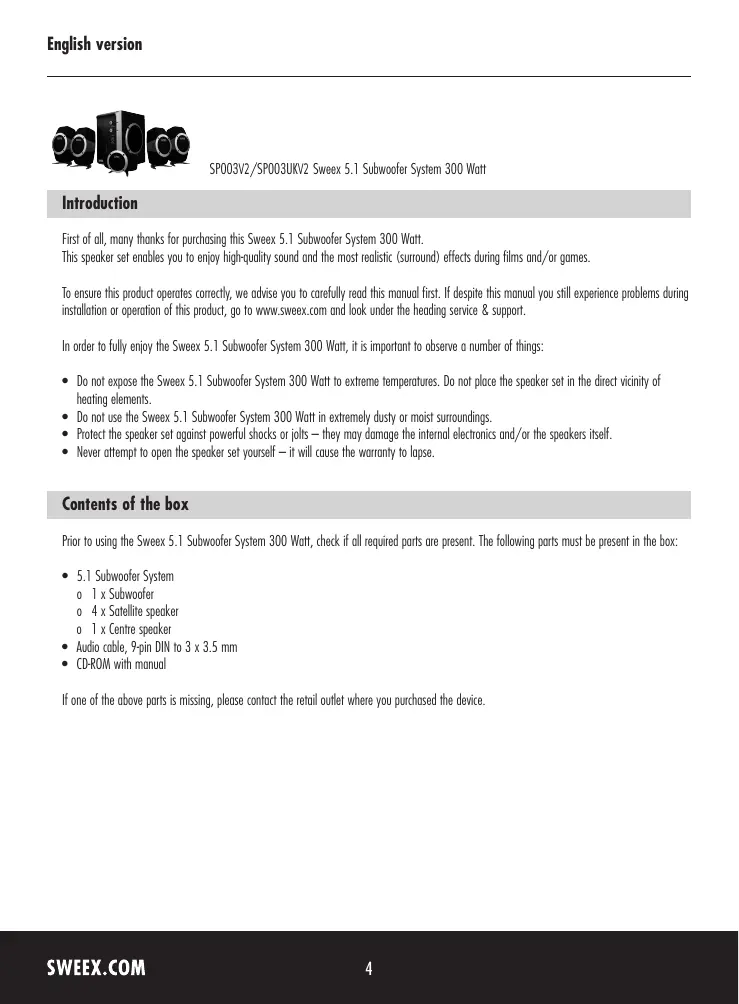
SP003V2/SP003UKV2 SweeX 5.1 Subwoofer System 300 Watt
Introduction
First of all, many thanks for purchasing this Sweex 5.1 Subwoofer System 300 Watt.
This speaker set enables you to enjoy high-quality sound and the most realistic (surround) effects during films and/or games.
To ensure this product operates correctly, we advise you to carefully read this manual first. If despite this manual you still experience problems during installation or operation of this product, go to www.sweex.com and look under the heading service & support.
In order to fully enjoy the Sweex 5.1 Subwoofer System 300 Watt, it is important to observe a number of things:
- Do not expose the Sweex 5.1 Subwoofer System 300 Watt to extreme temperatures. Do not place the speaker set in the direct vicinity of heating elements.
- Do not use the Sweex 5.1 Subwoofer System 300 Watt in extremely dusty or moist surroundings.
- Protect the speaker set against powerful shocks or jolts - they may damage the internal electronics and/or the speakers itself.
- Never attempt to open the speaker set yourself - it will cause the warranty to lapse.
Contents of the box
Prior to using the Sweex 5.1 Subwoofer System 300 Watt, check if all required parts are present. The following parts must be present in the box:
5.1 Subwoofer System
o 1 x Subwoofer
0 4 x Satellite speaker
0 1 x Centre speaker
Audio cable, 9-pin DIN to 3 × 3.5 ~mm
- CD-ROM with manual
If one of the above parts is missing, please contact the retail outlet where you purchased the device.
Specifications
Maximum power satellite speakers: 1.5 Watt RMS
Maximum power woofer: 10 Watt RMS
Maximum power centre: 2 Watt RMS
- Magnetically shielded
Built-in stereo amplifier
- 4 × 2.5^ satellite speaker
- 1 x 3" woofer speaker
- 1 × 2.5^ centre speaker
Volume and bass controls
- Plug and Play
Built-in power supply
- Input: 9-pin DIN 5.1 audio
Output: Plug (RCA)
Frequency range satellite: 120Hz - 20kHz
Frequency range woofer: 50Hz - 140Hz
Frequency range centre: 120Hz - 20kHz
Supports:Windows 98SE,2000 and XP
Installation of hardware
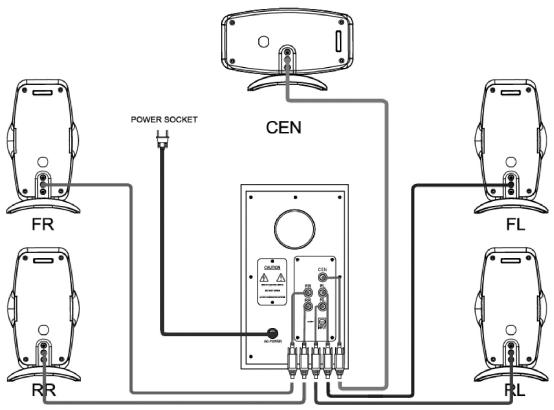
First connect the centre and satellite speakers to the woofer. The two upright speakers with the red connection are FR: "front right" (short wire) and RR: "right surround" (long wire). The two upright speakers with the white connection are FL: "front left" (short wire) and RL: "left surround" (long wire). The flat "centre" speaker also has a white connection and must be connected to CEN.
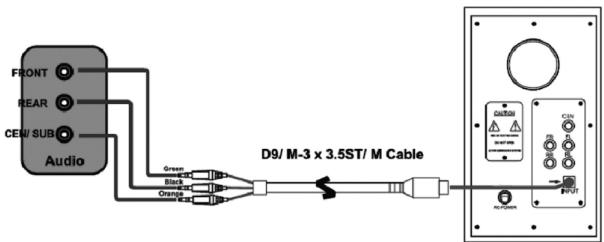
Subsequently, the woofer must be connected to the sound source. Note the connection in the woofer: this is a so-called 9-pin DIN connection, which can be fitted in only one way (check the notch in the plug). Connect it to 'INPUT'.
When connecting to the (5.1) sound source, note the colour codes of the audio cable. The 3.5mm green/orange/black audio plug must be connected to the corresponding colours of the outputs at the sound source. In the event that the sound source does not show any colours, or e.g., when you use a 7.1 sound source, you can use the diagram below in order to find the right connection:
| 3.5 mm audio colour | Type of sound | Colour of sound source |
| Green | FR “front right” and FL “front left” | Green |
| Orange | CEN “centre” and the woofer | Orange |
| Black | RR “right surround” and RL “left surround” | Black |
Plug into the mains and switch on the woofer by pressing the 'POWER' button at the front. The woofer lights up in blue.
Operation
The front of the Sweex 5.1 Subwoofer System 300 Watt features 3 buttons:
| Button | LED Colour | Function |
| POWER | Blue | Switching the Sweeex 5.1 Subwoofer System 300 Watt on and off |
| VOLUME | Blue | Volume control |
| BASS | Blue | Controls the intensity of the low tones (bass) |
LED indicators
The Sweex 5.1 Subwoofer System 300 Watt contains a blue LED. This is lit continuously, indicating that the speaker set is switched on.
Warranty
All products under the Sweex brand are warranted for a period of three years. We do not grant support or warranties for any software and/or (rechargeable) batteries included. If one of the above parts is missing, please contact the retail outlet where you purchased the device.
The rightful owner has and retains title to all brand names and related rights mentioned in this manual.