
GA102 - Game controller SWEEX - Free user manual and instructions
Find the device manual for free GA102 SWEEX in PDF.


| Product type | Video game controller |
| Brand | SWEEX |
| Model | GA102 |
| Compatibility | PC (Windows), PlayStation 2 |
| Connectivity | Wireless via receiver station (USB for PC, direct on PS2) |
| Power source | 3 AAA batteries (not included) |
| Estimated battery life | Several hours depending on usage (auto-sleep for power saving) |
| Wireless range | Approximately 10 meters (not officially specified) |
| Buttons | 12 digital buttons (including L1, R1, L2, R2, Start, Select, Analog, Turbo, Clear, Connect, Rumble) |
| Joysticks | 2 analog joysticks with press function |
| Vibration | Yes (Rumble), enable/disable via dedicated button |
| Turbo | Yes, configurable via Turbo button + target button |
| Analog mode | Yes, switchable via Analog button (LED indicator) |
| Auto sleep | Yes, after several minutes of inactivity (reactivate by long pressing a joystick or turning off/on) |
| Estimated weight | Approximately 250 g (with batteries) |
| Estimated dimensions | 155 x 100 x 60 mm |
| Color | Black |
| Warranty | 3 years (excluding software, batteries, and rechargeable batteries) |
| Package contents | Wireless controller, receiver station, driver CD-ROM, USB cable (for station), user manual |
| Maintenance | Clean with a soft, dry cloth; avoid moisture and dust |
| Safety | Do not expose to extreme temperatures, shocks, or open the casing (risk of voiding warranty) |
| Repairability | Not user-serviceable; contact customer service or point of sale |
Frequently Asked Questions - GA102 SWEEX
User questions about GA102 SWEEX
0 question about this device. Answer the ones you know or ask your own.
Ask a new question about this device
Download the instructions for your Game controller in PDF format for free! Find your manual GA102 - SWEEX and take your electronic device back in hand. On this page are published all the documents necessary for the use of your device. GA102 by SWEEX.
USER MANUAL GA102 SWEEX
natural_image
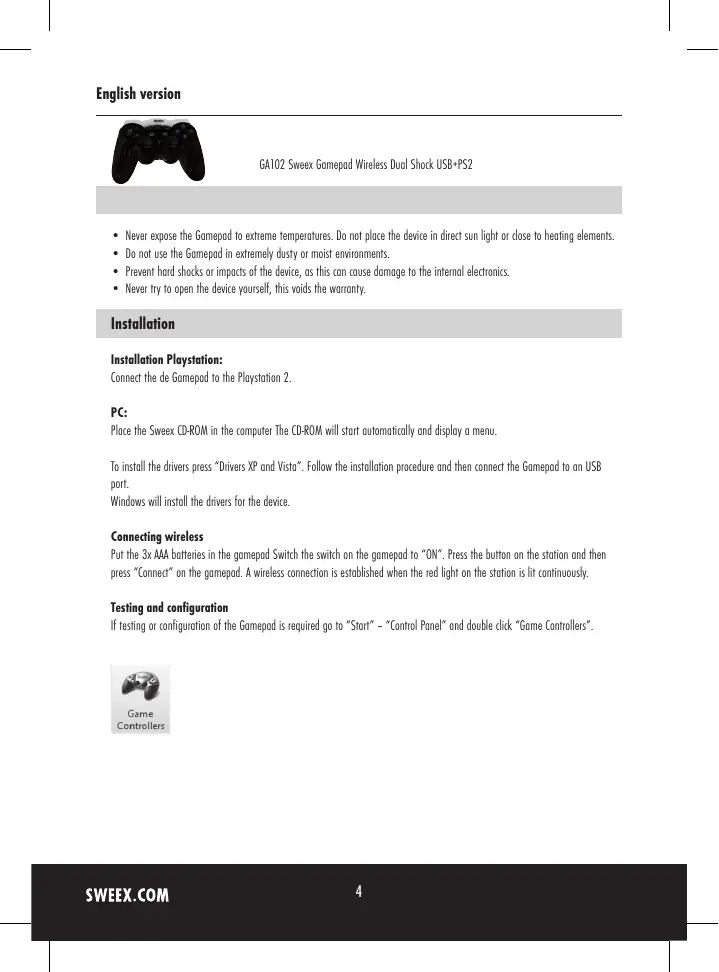
Black PlayStation controller with multiple scroll motors (no visible text or symbols)GA102 Sweex Gamepad Wireless Dual Shock USB+PS2
- Never expose the Gamepad to extreme temperatures. Do not place the device in direct sun light or close to heating elements.
- Do not use the Gamepad in extremely dusty or moist environments.
- Prevent hard shocks or impacts of the device, as this can cause damage to the internal electronics.
- Never try to open the device yourself, this voids the warranty.
Installation
Installation Playstation:
Connect the de Gamepad to the Playstation 2.
PC:
Place the Sweex CD-ROM in the computer The CD-ROM will start automatically and display a menu.
To install the drivers press "Drivers XP and Vista". Follow the installation procedure and then connect the Gamepad to an USB port.
Windows will install the drivers for the device.
Connecting wireless
Put the 3x AAA batteries in the gamepad Switch the switch on the gamepad to "ON". Press the button on the station and then press "Connect" on the gamepad. A wireless connection is established when the red light on the station is lit continuously.
Testing and configuration
If testing or configuration of the Gamepad is required go to "Start" - "Control Panel" and double click "Game Controllers".

Game
Controllers
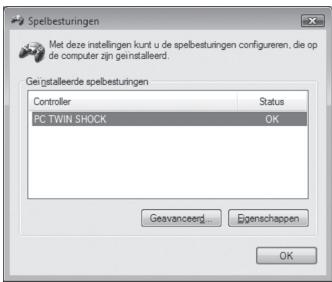
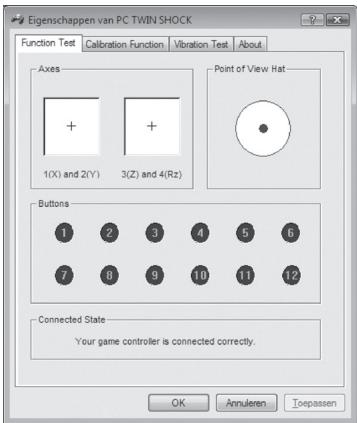
Press "Properties" to test and configure the Gamepad.
text_image
Eigenschappen van PC TWIN SHOCK Function Test Calibration Function Vibration Test About Axes + 1(X) and 2(Y) + 3(Z) and 4(Rz) Point of View Hat Buttons 1 2 3 4 5 6 7 8 9 10 11 12 Connected State Your game controller is connected correctly. OK Annulero ToepassenVibration function (Rumble)
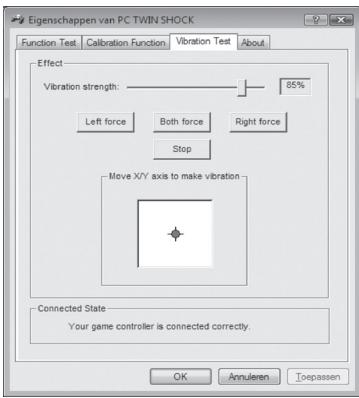
On the Gamepad there is a "Rumble" button to switch the vibration function on and off. This function only works when the drivers are installed correctly.
text_image
Eigenschappen van PC TWIN SHOCK Function Test Calibration Function Vibration Test About Effect Vibration strength: 85% Left force Both force Right force Stop Move X/Y axis to make vibration Connected State Your game controller is connected correctly. OK Annuleren ToepassenVibration test
Turbo function
With the turbo function it is possible to fire repeatedly by holding down the button. To set a button to turbo press the turbo whilst pressing the button.
To remove the turbo function press "Clear" whilst pressing the button.
The Analog button switches the analog mode on and off. When the light is lit the analog mode is on.
Automatic stand-by
When the gamepad is not used for several minutes, it will go into stand-by mode. This saves the batteries. To re-activate the gamepad press one of the two joysticks for three seconds, or you can turn off the gamepad for three seconds and then turn it back on.
Warranty
For all Sweex products a warranty period of 3 years applies. We do not give support or warranty on supplied software, rechargeable batteries and batteries. Transaction of warranty only takes place at the sales point where the product is bought.
All brand names and associated rights mentioned in this manual are and stay property of the rightful owner.