
GA102 - Manette de jeu vidéo SWEEX - Notice d'utilisation et mode d'emploi gratuit
Retrouvez gratuitement la notice de l'appareil GA102 SWEEX au format PDF.


| Type de produit | Manette de jeu vidéo |
| Marque | SWEEX |
| Modèle | GA102 |
| Compatibilité | PC (Windows), PlayStation 2 |
| Connectivité | Sans fil via station de réception (USB pour PC, direct sur PS2) |
| Alimentation | 3 piles AAA (non incluses) |
| Autonomie estimée | Plusieurs heures selon usage (veille automatique pour économie) |
| Portée sans fil | Environ 10 mètres (non spécifié officiellement) |
| Boutons | 12 boutons numériques (dont L1, R1, L2, R2, Start, Select, Analog, Turbo, Clear, Connect, Rumble) |
| Joysticks | 2 joysticks analogiques avec fonction de pression |
| Vibration | Oui (Rumble), activable/désactivable via bouton dédié |
| Turbo | Oui, configuration par bouton Turbo + touche cible |
| Mode analogique | Oui, commutable via bouton Analog (voyant lumineux) |
| Veille automatique | Oui, après plusieurs minutes d'inactivité (réactivation par appui long sur un joystick ou arrêt/redémarrage) |
| Poids estimé | Environ 250 g (avec piles) |
| Dimensions estimées | 155 x 100 x 60 mm |
| Couleur | Noire |
| Garantie | 3 ans (hors logiciel, piles et batteries rechargeables) |
| Contenu de l'emballage | Manette sans fil, station de réception, CD-ROM de pilotes, câble USB (pour la station), manuel d'utilisation |
| Entretien | Nettoyer avec un chiffon doux et sec ; éviter l'humidité et la poussière |
| Sécurité | Ne pas exposer à des températures extrêmes, chocs, ou ouvrir le boîtier (sous peine d'annulation de la garantie) |
| Réparabilité | Non réparable par l'utilisateur ; contacter le SAV ou le point de vente |
FOIRE AUX QUESTIONS - GA102 SWEEX
Questions des utilisateurs sur GA102 SWEEX
0 question sur cet appareil. Repondez a celles que vous connaissez ou posez la votre.
Poser une nouvelle question sur cet appareil
Téléchargez la notice de votre Manette de jeu vidéo au format PDF gratuitement ! Retrouvez votre notice GA102 - SWEEX et reprennez votre appareil électronique en main. Sur cette page sont publiés tous les documents nécessaires à l'utilisation de votre appareil GA102 de la marque SWEEX.
MODE D'EMPLOI GA102 SWEEX
natural_image
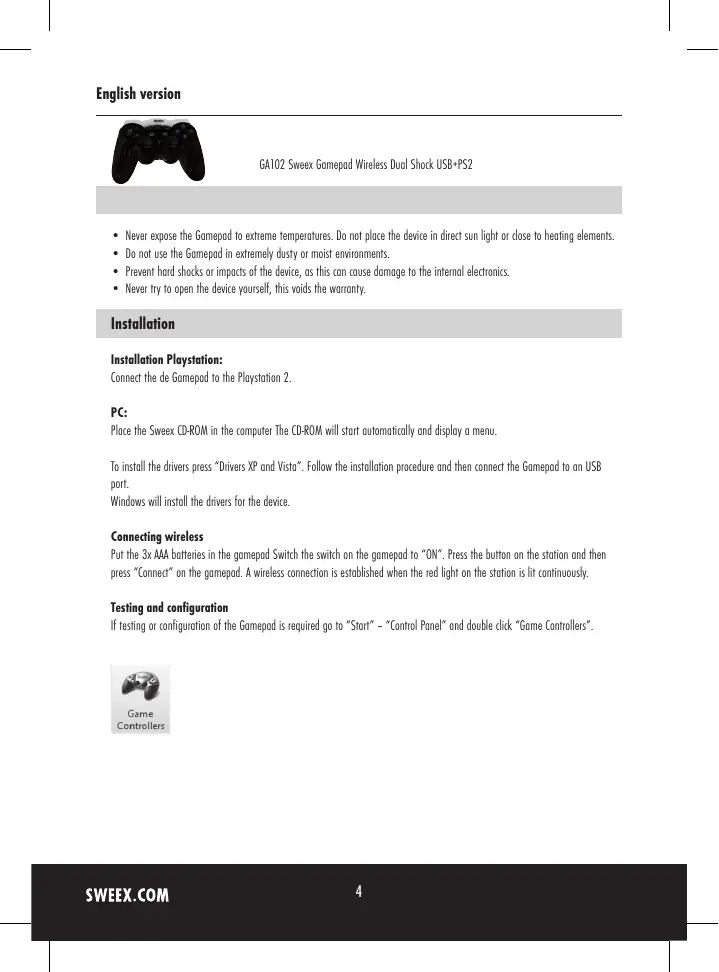
Black PlayStation controller with multiple scroll motors (no visible text or symbols)GA102 Sweex Gamepad Wireless Dual Shock USB+PS2
- Never expose the Gamepad to extreme temperatures. Do not place the device in direct sun light or close to heating elements.
- Do not use the Gamepad in extremely dusty or moist environments.
- Prevent hard shocks or impacts of the device, as this can cause damage to the internal electronics.
- Never try to open the device yourself, this voids the warranty.
Installation
Installation Playstation:
Connect the de Gamepad to the Playstation 2.
PC:
Place the Sweex CD-ROM in the computer The CD-ROM will start automatically and display a menu.
To install the drivers press "Drivers XP and Vista". Follow the installation procedure and then connect the Gamepad to an USB port.
Windows will install the drivers for the device.
Connecting wireless
Put the 3x AAA batteries in the gamepad Switch the switch on the gamepad to "ON". Press the button on the station and then press "Connect" on the gamepad. A wireless connection is established when the red light on the station is lit continuously.
Testing and configuration
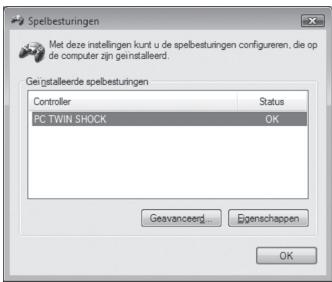
If testing or configuration of the Gamepad is required go to "Start" - "Control Panel" and double click "Game Controllers".

Game
Controllers
text_image
Spelbesturingen Met deze instellingen kunt u de spelbesturingen configureren, die op de computer zijn geinstalleerd. Geigstalleerde spelbesturingen Controller Status PC TWIN SHOCK OK Geavanceerd... Egenschappen OKPress "Properties" to test and configure the Gamepad.
text_image
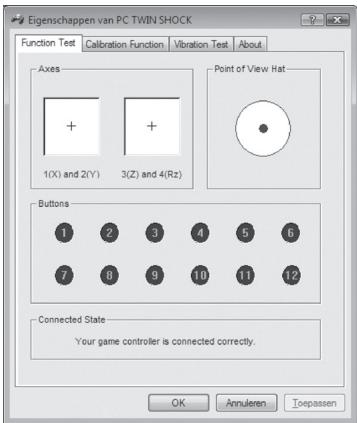
Eigenschappen van PC TWIN SHOCK Function Test Calibration Function Vibration Test About Axes + 1(X) and 2(Y) + 3(Z) and 4(Rz) Point of View Hat Buttons 1 2 3 4 5 6 7 8 9 10 11 12 Connected State Your game controller is connected correctly. OK Annulero ToepassenVibration function (Rumble)
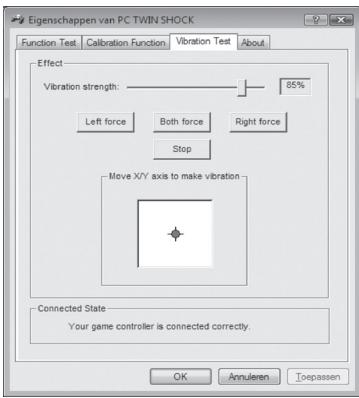
On the Gamepad there is a "Rumble" button to switch the vibration function on and off. This function only works when the drivers are installed correctly.
text_image
Eigenschappen van PC TWIN SHOCK Function Test Calibration Function Vibration Test About Effect Vibration strength: 85% Left force Both force Right force Stop Move X/Y axis to make vibration Connected State Your game controller is connected correctly. OK Annuleren ToepassenVibration test
Turbo function
With the turbo function it is possible to fire repeatedly by holding down the button. To set a button to turbo press the turbo whilst pressing the button.
To remove the turbo function press "Clear" whilst pressing the button.
The Analog button switches the analog mode on and off. When the light is lit the analog mode is on.
Automatic stand-by
When the gamepad is not used for several minutes, it will go into stand-by mode. This saves the batteries. To re-activate the gamepad press one of the two joysticks for three seconds, or you can turn off the gamepad for three seconds and then turn it back on.
Warranty
For all Sweex products a warranty period of 3 years applies. We do not give support or warranty on supplied software, rechargeable batteries and batteries. Transaction of warranty only takes place at the sales point where the product is bought.
All brand names and associated rights mentioned in this manual are and stay property of the rightful owner.