
HA-830 E - Vacuum Cleaner TEKA - Free user manual and instructions
Find the device manual for free HA-830 E TEKA in PDF.


| Product type | Cylinder vacuum cleaner |
| Brand | TEKA |
| Model | HA-830 E |
| Maximum power | 2000 W |
| Filter type | Washable HEPA filter |
| Container capacity | 1.5 L |
| Cord length | 8 m |
| Operating radius | 10 m |
| Noise level | 75 dB(A) |
| Weight | 5.2 kg |
| Dimensions (L x W x H) | 40 x 28 x 24 cm |
| Included accessories | Main brush, crevice tool, dusting brush |
| Power adjustment | Electronic dial on body |
| Cyclonic system | Yes, cyclonic separation |
| Maintenance | Clean the filter regularly, empty the container after each use |
| Safety | Automatic shut-off in case of overheating |
| Repairability | Spare parts available via after-sales service |
| Power supply | 220-240 V, 50-60 Hz |
| Certification | CE |
Frequently Asked Questions - HA-830 E TEKA
User questions about HA-830 E TEKA
0 question about this device. Answer the ones you know or ask your own.
Ask a new question about this device
Download the instructions for your Vacuum Cleaner in PDF format for free! Find your manual HA-830 E - TEKA and take your electronic device back in hand. On this page are published all the documents necessary for the use of your device. HA-830 E by TEKA.
USER MANUAL HA-830 E TEKA
(*) Depending on the model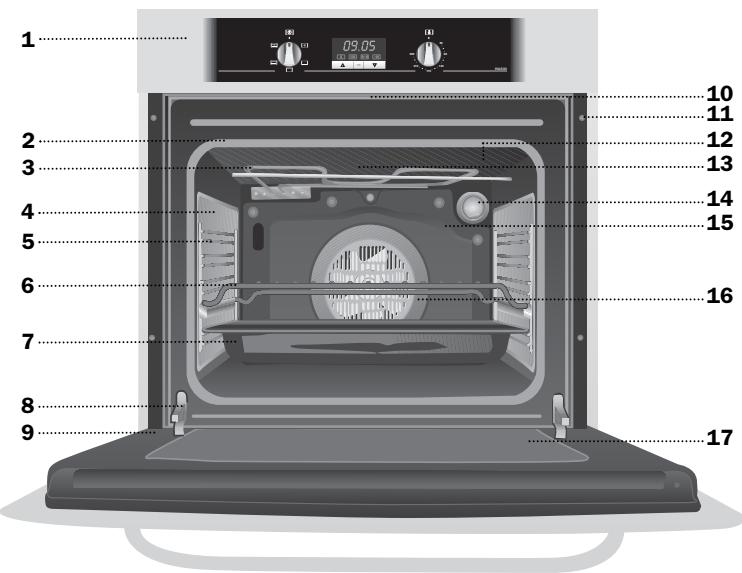
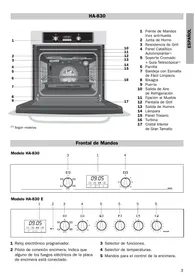
1 Stainless Steel Control Panel with anti finger-mark 2 Oven Seal 3 Grill Element 4 Catalytic Side Wall 5 Chrome Support + Telescopic Guide(*) 6 Grid 7 Tray with Easy-cleaning Enamel 8 Hinge 9 Door 10 Air Outlet 11 Fixing to Unit 12 Grill Screen 13 Smoke Outlet 14 Light 15 Back Wall Panel 16 Fan 17 Large Interior Glass Door
Control Panel
Model HA-830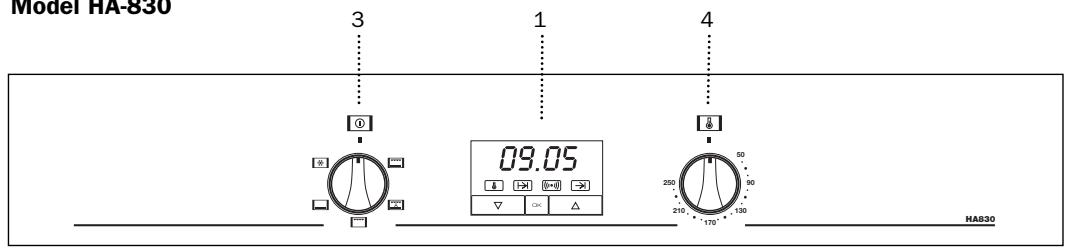
Model HA-830 E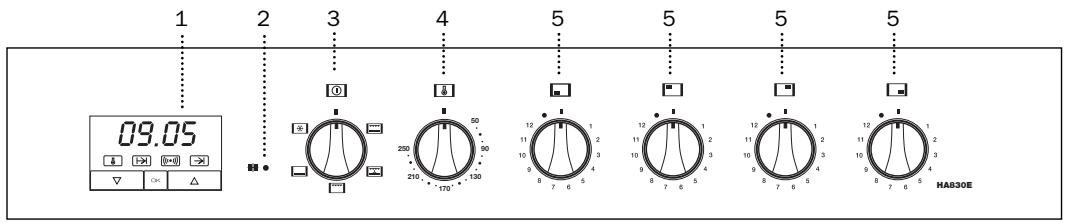
1 Electronic clock. 2 Cooker indicator light. It indicates that one or more of the electric hotplates are on.
3 Function selector. 4 Temperature selector. 5 Control knobs for the hob.
Oven Functions
Switch off oven

Grill and Lower element
Special for roasts. It can be used for any piece, whatever its size.

Conventional with fan
Appropriate for roasts and cakes. The fan spreads the heat uniformly inside the oven.

Grill
For preparing dishes with superficial roasting. It allows the outer layer to be browned without affecting the inside of the food. Ideal for flat food, such as steaks, ribs, fish, toast.
Caution
While using the Grill the door must be kept closed.

Lower element
Heats only from beneath. Suitable for heating dishes and raising pastry and similar.

Defrosting
This cooking mode is suitable for gently defrosting of food. In special food to be consumed unwarmed, e.g.: cream, custard, pastry, tarts, cakes, fruit,...
Note
The pilot light remains on in any cooking function.
Use of the Oven
Setting the time on the Electronic Clock
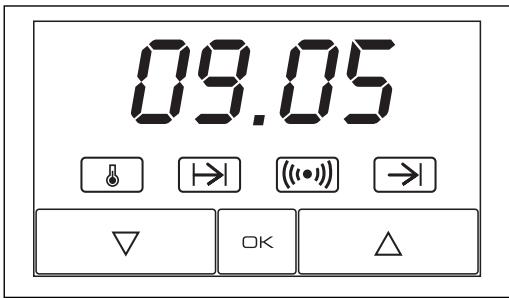
When the oven is connected to the power supply, the indication 00:00 flash on the display. Press ▽ or △ to set the time on the clock. The clock beeps twice to confirm the selected time.
If you wish to modify the time, press ▽ or △ until the current time flash on the screen. Press OK. Then press ▽ or △ to modify the time. The clock beeps twice to confirm the modification.
Manual Operation
The oven is ready to be used when the clock has been set. Select a cooking function and a temperature.
When you begin cooking, symbol lights up to indicate that the oven is heating the contents; the symbol goes out when the selected temperature is reached.
Set the controls to to turn the oven off.
Functions of the Electronic Clock
Alarm: Creates an alarm signal when the period of time finishes; the oven does not need to be in use in order to use this function.
Cooking Time: To cook for a selected length of time; the oven turns itself off automatically when the time finishes.
End Cooking Time: To cook until a set time; the oven turns itself off automatically when the time finishes.
Cooking time and End Cooking Time: To cook for a selected length of time and end at a set time. When this function is set, the oven comes on automatically at the time required in order to cook for the set length of time (Cooking time) and end automatically at the indicated time (End Cooking Time)
Programming the Alarm
1 Press until symbol ( ) lights up. Press K . 2 Set the period of time after which you wish the alarm to sound by pressing or . 3 The clock beeps twice, the current time is displayed and symbol (()) lights up permanently to indicate that the alarm has been set. 4 When the set period of time comes to an end, the alarm sounds and symbol (()) starts to flash. 5 Press any button to stop the alarm; symbol (()) goes out.
You can consult the remaining time at any moment by pressing or until symbol ( ) flashes and then pressing K . You can also modify the set time at this point by pressing or . The clock beeps twice to confirm the change.
If you wish the remaining time to be displayed until the end of the set period of time, press or until symbol [(())] flashes and then press OK and keep it pressed in. Symbol [(())] flashes. Keep OK pressed in again to return to the real time.
Setting the Cooking Time
1 Press or until symbol → lights up. Press OK. 2 Select the period of time you wish to cook for by pressing or . 3 The clock beeps twice, the current time is displayed and symbol lights up permanently to indicate that the oven will turn itself off automatically.
nently to indicate that the oven will turn itself off automatically.
4 Select a cooking function and temperature. 5 When the cooking time comes to an end, the oven turns itself off, the alarm sounds and symbol 1→ 1 flashes. 6 Press any button to stop the alarm and turn the oven back on again. 7 Set the controls to to turn the oven off.
You can consult the remaining cooking time at any moment by pressing ▽ or △ until symbol □ flashes and then pressing OK. You can also modify the set time at this point by pressing ▽ or △. The clock beeps twice to confirm the change.
If you wish the remaining time to be displayed until the end of the set period of time, press \(\nabla\) or \(\triangle\) until symbol \(\boxed{\rightarrow}\) flashes and then press OK and keep it pressed in. Symbol \(\boxed{\rightarrow}\) flashes. Keep OK pressed in again to return to the real time.
Setting the End Cooking Time
1 Press \(\nabla\) or \(\triangle\) until symbol \(\rightarrow\) lights up. Press OK. 2 Select the time you wish the cooking process to finish at by pressing \(\nabla\) or \(\triangle\). 3 The clock beeps twice, the current time is displayed and symbol \(\rightarrow\) lights up permanently to indicate that the oven will turn itself off automatically. 4 Select a cooking function and temperature. 5 When the set time is reached, the oven turns itself off, the alarm sounds and symbol \(\rightarrow\) flashes. 6 Press any button to stop the alarm and turn the oven back on again. 7 Set the controls to \(\square\) to turn the oven off. You can consult the end cooking time at any moment by pressing \(\nabla\) or \(\triangle\) until symbol \(\rightarrow\) flashes and then pressing \(\square K\). You can also modify the end cooking time at this point by pressing \(\nabla\) or \(\triangle\). The clock beeps twice to confirm the change.
This function can be used even when you are already using the oven. To do this, follow the instructions indicated above except point number 4.
Setting the Cooking Time and the End Cooking Time
1 Press \(\nabla\) or \(\triangle\) until symbol \(\boxed{ \begin{array}{c}\text{灯}\ \text{光} \end{array} }\) lights up. Press OK. 2 Select the period of time you wish to cook for by pressing \(\nabla\) or \(\triangle\). 3 The clock beeps twice, the current time is displayed and symbol \(\boxed{1\rightarrow 1}\) lights up permanently. 4 Press \(\nabla\) or \(\triangle\) until symbol \(\rightarrow\) lights up. Press OK. 5 Select the time you wish the cooking process to finish at by pressing \(\triangledown\) or \(\triangle\). 6 The clock beeps twice, the current time is displayed and symbol \(\rightarrow\) lights up permanently. 7 Select a cooking function and temperature. 8 The oven remains off with symbols \(\boxed{1\rightarrow}\) and \(\boxed{\rightarrow}\) lit up. Your oven is set. 9 When the time to start cooking is reached, the oven starts up and cooks for the set period of time. 10 When the set end cooking time is reached, the oven turns itself off, the alarm sounds and symbols \(\boxed{ \begin{array}{rl} \end{array} }\) and \(\boxed{\rightarrow}\) flash.
11 Press any button to stop the alarm and turn the oven back on again. 12 Set the controls to \(\square\) to turn the oven off.
You can modify the end cooking time by pressing \(\nabla\) or \(\triangle\) until symbol \(\rightarrow\) lights up and then pressing \(\square \kappa\). You can now modify the end cooking time by pressing \(\nabla\) or \(\triangle\). The clock beeps twice to confirm the change.
Important
In the event of a power cut, all the electronic clock settings are deleted and the indication 00:00 flashes on the display. It is necessary to set the time and programme the clock again.
(*) Depending on the model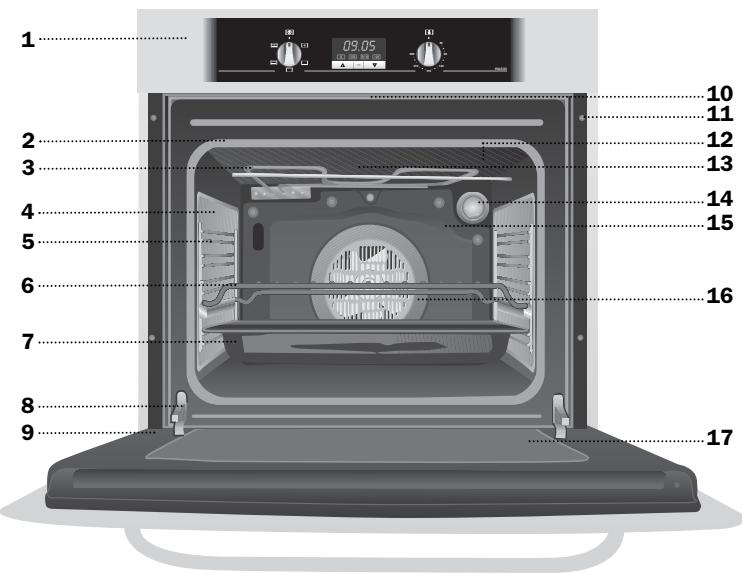
- CONTROL PANEL
- OVEN FUNCTIONS
- SWITCH OFF OVEN
- GRILL AND LOWER ELEMENT
- CONVENTIONAL WITH FAN
- GRILL
- CAUTION
- LOWER ELEMENT
- DEFROSTING
- NOTE
- USE OF THE OVEN
- SETTING THE TIME ON THE ELECTRONIC CLOCK
- MANUAL OPERATION
- FUNCTIONS OF THE ELECTRONIC CLOCK
- PROGRAMMING THE ALARM
- SETTING THE COOKING TIME
- SETTING THE END COOKING TIME
- SETTING THE COOKING TIME AND THE END COOKING TIME
- IMPORTANT
Brand : TEKA
Model : HA-830 E
Category : Vacuum Cleaner