
CUT (MKII) - Mixer Mixars - Free user manual and instructions
Find the device manual for free CUT (MKII) Mixars in PDF.


| Product type | DJ mixer |
| Brand | Mixars |
| Model | CUT (MKII) |
| Category | Mixer |
| Channels | 2 stereo channels |
| Fader type | Galileo Kallisto Contactless Fader |
| Crossfader curve | Adjustable |
| Reverse function | Yes, on the crossfader |
| Phono/line inputs | 2 switchable Phono/Line inputs |
| Per-channel equalizer | 3-band (+12 / -26 dB) |
| Input level indicator | Yes, for each stereo channel |
| Microphone input | 1 input with gain and 2-band equalizer |
| Main outputs | 1 Master XLR output (balanced), 1 Master RCA output, and 1 Rec RCA output |
| Headphone output | 2 outputs (6.3 mm and 3.5 mm) with Cue and Master Cue control |
| Master section | Dual level meter |
| Power supply | Mains via AC-In with Power switch |
| Cleaning | Dry cloth only |
| Usage precautions | Do not expose to rain, moisture, or splashes |
| Repairability | Have any repairs done by qualified personnel |
| Ventilation requirements | Do not block ventilation openings |
Frequently Asked Questions - CUT (MKII) Mixars
User questions about CUT (MKII) Mixars
0 question about this device. Answer the ones you know or ask your own.
Ask a new question about this device
Download the instructions for your Mixer in PDF format for free! Find your manual CUT (MKII) - Mixars and take your electronic device back in hand. On this page are published all the documents necessary for the use of your device. CUT (MKII) by Mixars.
USER MANUAL CUT (MKII) Mixars
CUT (MKII)
Professional 2 Channel Scratch - Dj Mixer with integrated mini InnoFader
Safety Instructions
- Read these Instructions.
- Keep these Instructions.
- Heed all Warnings.
- Follow all Instructions.
- Do not use this apparatus near water.
- Clean only with dry cloth.
- Do not block any ventilation openings. Install in accordance with the manufacturer's instructions.
- Do not install near any heat sources such as radiators, heat registers, stoves, or other apparatus (including amplifiers) that produce heat.
- Do not defeat the safety purpose of the polarized plug. A polarized plug has two blades with one winder than the other. The wide blade is provided for your safety. If the provided plug does not fit into your outlet, consult an electrician for replacement of the obsolete outlet.
- Protect the power cord from being walked on or pinched particularly at plugs, convenience receptacles, and the point where they exit from the apparatus.
- Only use attachments/accessories specified by the manufacturer.
- Use only with the cart, stand, tripod, bracket, or table specified by the manufacturer, or sold with the apparatus. When a cart is used, use caution when moving the cart/apparatus combination to avoid injury from tip-over.
- Unplug this apparatus during lightning storms or when unused for long periods of time.
- Refer all servicing to qualified service personnel. Servicing is required when the apparatus has been damaged in any way, such as power-supply cord or plug is damaged, liquid has been spilled or objects have fallen into the apparatus, the apparatus has been exposed to rain or moisture, does not operate normally, or has been dropped.
- WARNING: To reduce the risk of fire or electric shock, do not expose this apparatus to rain or moisture.
- Where an appliance coupler is used as the disconnect device, the disconnect device shall remain readily operable.
- The ventilation should not be impeded by covering the ventilation openings with items, such as newspapers, table-cloths, curtains, etc.
- No naked flame sources, such as lighted candles, should be placed on the apparatus.
- The apparatus should be used in moderate climate.
- The apparatus shall not be exposed to dripping or splashing and that no objects filled with liquids, such as vases, shall be placed on the apparatus.
WARNING
To reduce the risk of fire or electric shock, do not expose this apparatus to rain or moisture. The apparatus shall not be exposed to dripping or splashing and that no objects filled with liquids, such as vases, shall be placed on the apparatus.
CAUTION:
To reduce the risk of electric shock, do not remove any cover. No user-serviceable parts inside. Refer servicing to qualified service personnel only.

CAUTION
RISK OF ELECTRIC SHOCK
DO NOT OPEN


The lightning flash with arrowhead symbol within the equilateral triangle is intended to alert the use to the presence of un-insulated “dangerous voltage” within the product’s enclosure that may be of sufficient magnitude to constitute a risk of electric shock.

The exclamation point within the equilateral triangle is intended to alert the user to the presence of important operation and maintenance (servicing) instructions in the literature accompanying this appliance.
CAUTION
To prevent electric shock, do not use this polarized plug with an extension cord, receptacle or other outlet unless the blades can be fully inserted to prevent blade exposure.
Introduction
Features
High performance 2-channel scratch DJ mixer with Integrated premium quality contactless Galileo Kallisto Fader and Master Cue. Superb scratch performance with adjustable crossfader curve and reverse switch.
Rear, Front and Top Panel Features
1 AC-In and Power On / Off switch
2 1 x Balanced Master XLR output + 1 x unbalanced Master and 1 x Unbal. Rec outputs
3 2x switchable Phono / Line inputs. With Trim, 3-band EQ (+12/-26dB) and input level meter for both stereo channels.
4 1 x Mic input with Gain and 2-band EQ.
5 Powerful headphones output with both 6,3mm and 3,5mm stereo jacks, cue control and master cue.
6 Master Section with dual level meter.
7 Smooth Galileo Kallisto Fader with adjustable curve and reverse switch.


Specifications
| AC In (EU version) | AC220-250V~ 50Hz |
| AC In (US version) | AC110-120V~ 60Hz |
| Power consumption | max. 18W |
| Dimensions | W240xH290xD104mm (85mm mounting depth) |
| Weight (net) | 2.7 kg |
| Signal/Noise | >80dB (Line) |
| Crosstalk | <65dB (Line) |
| THD | <0.07% |
| Frequency response | 20Hz - 20 kHz |
| AC In (EU version) | AC220-250V~ 50Hz |
| AC In (US version) | AC110-120V~ 60Hz |
| Power consumption | max. 18W |
| Dimensions | W240xH290xD104mm (85mm mounting depth) |
| Weight (net) | 2.7 kg |
| Signal/Noise | >80dB (Line) |
| Crosstalk | <65dB (Line) |
| THD | <0.07% |
| Frequency response | 20Hz - 20 kHz |
| AC In (EU version) | AC220-250V~ 50Hz |
| AC In (US version) | AC110-120V~ 60Hz |
| Power consumption | max. 18W |
| Dimensions | W240xH290xD104mm (85mm mounting depth) |
| Weight (net) | 2.7 kg |
| Signal/Noise | >80dB (Line) |
| Crosstalk | <65dB (Line) |
| THD | <0.07% |
| Frequency response | 20Hz - 20 kHz |
AVVERTENZE DI SICUREZZA
| AC In (EU version) | AC220-250V~ 50Hz |
| AC In (US version) | AC110-120V~ 60Hz |
| Power consumption | max. 18W |
| Dimensions | W240xH290xD104mm (85mm mounting depth) |
| Weight (net) | 2.7 kg |
| Signal/Noise | >80dB (Line) |
| Crosstalk | <65dB (Line) |
| THD | <0.07% |
| Frequency response | 20Hz - 20 kHz |
| AC In (EU version) | AC220-250V~ 50Hz |
| AC In (US version) | AC110-120V~ 60Hz |
| Power consumption | max. 18W |
| Dimensions | W240xH290xD104mm (85mm mounting depth) |
| Weight (net) | 2.7 kg |
| Signal/Noise | >80dB (Line) |
| Crosstalk | <65dB (Line) |
| THD | <0.07% |
| Frequency response | 20Hz - 20 kHz |


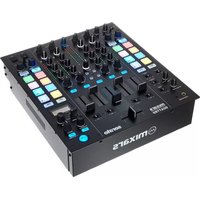
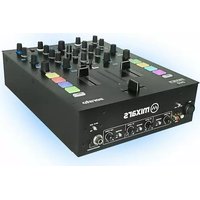
Brand : Mixars
Model : CUT (MKII)
Category : Mixer