
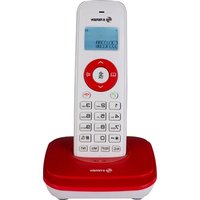
TEL-2492 - Telephone Steren - Free user manual and instructions
Find the device manual for free TEL-2492 Steren in PDF.


Pick your language and provide your email: we'll send you a specifically translated version.
| Product Type | Corded Telephone |
| Brand | Steren |
| Model | TEL-2492 |
| Display | LCD with caller ID and clock |
| Caller ID | Up to 60 numbers with time and date |
| Answering System | Digital, with up to 15 minutes of recording time |
| Phonebook | 50 entry memory with one-touch and speed dial |
| Speakerphone | Hands-free with volume control |
| Ringtones | 10 selectable polyphonic tones |
| Power Supply | AC adapter 9V DC, 300 mA |
| Battery Backup | 2 AAA alkaline batteries for display and clock |
| Dimensions (W x H x D) | 20.5 x 15.0 x 6.0 cm |
| Weight | 0.45 kg |
| Mounting | Wall mountable design |
| Maintenance | Clean with a soft, dry cloth |
| Safety | Do not expose to moisture or extreme temperatures |
| Spare Parts & Repairability | Available through Steren service network |
| Warranty | 1 year limited warranty |
Frequently Asked Questions - TEL-2492 Steren
How do I connect the TEL-2492 to my phone line?
Connect the included telephone cable into the wall jack and the other end into the LINE port on the base unit. Then connect the AC adapter to power.
How can I set the date and time on the display?
Press MENU on the base, navigate with the arrow keys to DATE/TIME, and enter the correct values using the keypad.
How do I record an outgoing announcement for the answering machine?
Press MENU, select ANNOUNCEMENT, then press RECORD. After the beep, speak your message and press STOP. You can also use the default announcement.
Why is the screen blank even though the phone is plugged in?
Check that the AC adapter is securely connected and the outlet works. If the phone loses power, replace the AAA batteries for the backup display.
How many numbers can I store in the phonebook and how do I add entries?
The phonebook stores up to 50 contacts. Press PHONEBOOK, select ADD, enter the name and number, then press SAVE.
Can I use the TEL-2492 with a modem or fax on the same line?
Yes, the TEL-2492 is compatible with standard analog lines. Use the AUX port to connect additional devices like a modem or fax.
What should I do if I hear static or interference during calls?
Ensure the handset cord is fully inserted and untangled. Keep the phone away from electronic devices such as computers and televisions to reduce interference.
How do I change the ringer volume?
While in idle mode, press the VOLUME + or - buttons on the base. The ringer offers several levels including OFF.
Is the phone hearing aid compatible?
Yes, the TEL-2492 is HAC rated, complying with FCC rules for hearing aid compatibility.
Where can I buy replacement parts, like the handset cord?
Original accessories are available at Steren stores and through their official website. Check the user manual for part numbers.
User questions about TEL-2492 Steren
0 question about this device. Answer the ones you know or ask your own.
Ask a new question about this device
No questions yet. Be the first to ask one.
Download the instructions for your Telephone in PDF format for free! Find your manual TEL-2492 - Steren and take your electronic device back in hand. On this page are published all the documents necessary for the use of your device. TEL-2492 by Steren.
USER MANUAL TEL-2492 Steren


Manual assistant
Powered by Anthropic
Waiting for your message
Product information
Brand : Steren
Model : TEL-2492
Category : Telephone