
CARE620 - Telephone Oricom - Free user manual and instructions
Find the device manual for free CARE620 Oricom in PDF.


Pick your language and provide your email: we'll send you a specifically translated version.
| Product Type | DECT Cordless Telephone |
| Brand | Oricom |
| Model | CARE620 |
| Handset Type | Cordless handset with base station |
| Display | Backlit graphical LCD display |
| Frequency Band | DECT 1.88 GHz |
| Wireless Range | Up to 50 m indoors, 300 m outdoors |
| Phonebook Capacity | Up to 100 contacts |
| Caller ID Capability | Yes, with call waiting support |
| Redial Memory | Last 10 numbers |
| Ringtones | Polyphonic ringtones |
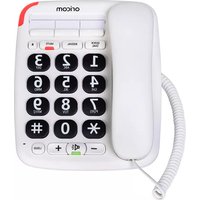
| Handset Keypad | Large, easy-to-use keys |
| Power Supply - Base | AC/DC adapter (included) |
| Power Supply - Handset | 2 x AAA rechargeable Ni-MH batteries |
| Battery Talk Time | Up to 10 hours |
| Battery Standby Time | Up to 100 hours |
| Base Dimensions | Approx. 110 x 80 x 65 mm |
| Handset Dimensions | Approx. 165 x 45 x 30 mm |
| Weight (Handset) | Approx. 130 g |
| Weight (Base) | Approx. 90 g |
| Mounting Options | Desktop or wall-mountable base |
| Installation | Plug-and-play telephone line connection |
| Cleaning and Care | Wipe with a soft, dry cloth; avoid solvents and moisture |
| Safety Instructions | Indoor use only; keep away from water and heat sources |
| Spare Parts and Repairability | Contact Oricom support for spare parts; no user-serviceable parts |
Frequently Asked Questions - CARE620 Oricom
How do I set up the Oricom CARE620 cordless phone?
Connect the base unit to a telephone socket and power outlet. Insert the rechargeable batteries into the handset, place it on the base to charge for at least 12 hours before first use. Then follow the on-screen prompts to set the date, time, and dialing mode.
How can I extend the battery life of my handset?
To maximize battery life, keep the handset on the base when not in use, avoid frequent exposure to extreme temperatures, and use only the recommended Ni-MH rechargeable batteries. Fully charge the handset before the first use and repeat complete charge cycles if performance drops.
What does the 'Range' specification mean and how can I improve it?
The range is the maximum distance between the handset and the base within which the phone can operate. Indoors the range is typically up to 50 m and outdoors up to 300 m. Keep the base unit away from large metal objects and Wi-Fi routers to reduce interference.
How do I store contacts in the phonebook?
Press the phonebook key, choose 'Add entry', then enter the name and number using the keypad. Save the entry to store it. The CARE620 supports up to 100 contacts; see the manual for copying contacts from SIM or other sources if supported.
Does the CARE620 support caller ID and call waiting?
Yes, the CARE620 supports caller ID and call waiting. You can view the caller's number and name on the display. If you subscribe to these services from your telephone provider, make sure the 'Caller ID' option is enabled in the base settings.
How do I adjust the ringer and earpiece volume?
During a call or when the handset is idle, press the volume up/down keys to adjust the earpiece or ringer volume. You can also access the 'Sound' or 'Audio' menu to set separate ringer volume, earpiece volume, and choose a ringtone.
What should I do if the handset shows 'No Base' or 'Out of Range'?
Move the handset closer to the base unit, ensure the base is connected to mains power and the telephone line, and check the handset has enough battery. If the message persists, re-register the handset by pressing the paging/handset finder button on the base for a few seconds, then follow the registration steps in the manual.
How should I clean and maintain my telephone?
Unplug the base before cleaning. Wipe the surfaces with a soft, slightly damp cloth, then dry with a lint-free cloth. Do not use abrasive cleaners, alcohol, or solvents. Avoid exposing the phone to moisture, direct sunlight, or high heat.
Can I wall-mount the base unit?
Yes, the base unit has wall-mounting holes. Use the mounting template provided in the manual to mark the screw positions, insert screws into standard wall plugs, then hang the base onto the screws. Ensure the telephone cable can reach the socket without pulling the unit off the wall.
What are the spare parts available for this device?
Replacement batteries, battery covers, and telephone cords are the main spare parts. For any other component, contact Oricom support or an authorized service center. Because the device contains no user-serviceable parts, repairs should be carried out by qualified personnel to maintain safety and performance.
User questions about CARE620 Oricom
0 question about this device. Answer the ones you know or ask your own.
Ask a new question about this device
No questions yet. Be the first to ask one.
Download the instructions for your Telephone in PDF format for free! Find your manual CARE620 - Oricom and take your electronic device back in hand. On this page are published all the documents necessary for the use of your device. CARE620 by Oricom.
USER MANUAL CARE620 Oricom


Manual assistant
Powered by Anthropic
Waiting for your message
Product information
Brand : Oricom
Model : CARE620
Category : Telephone