
SG6654XHP - Switch TP-LINK - Free user manual and instructions
Find the device manual for free SG6654XHP TP-LINK in PDF.


Pick your language and provide your email: we'll send you a specifically translated version.
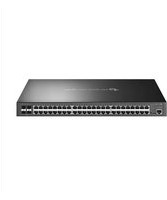
| Product Type | 54-Port Gigabit L2+ Managed PoE+ Switch |
| Total Ports | 48 PoE+ RJ45 + 4 10G SFP+ + 2 Combo Gigabit SFP/TP |
| PoE Budget | 740W |
| PoE Standard | IEEE 802.3af/at (PoE+) |
| Switching Capacity | 176 Gbps |
| Forwarding Rate | 130.9 Mpps |
| MAC Address Table | 16K entries |
| Dimensions | 440 x 360 x 44 mm (1U) |
| Weight | 6.7 kg |
| Power Supply | AC 100-240V, 50/60Hz |
| Management Interfaces | Web GUI, CLI, SNMP, RMON, LLDP |
| VLAN | Up to 4K VLANs |
| QoS | 8 queues, 802.1p/DSCP |
| Security | ACL, IP-MAC-Port Binding, Storm Control |
| Layer 2 | LACP, STP/RSTP/MSTP, IGMP Snooping |
| Routing | Static IPv4/IPv6 Routing |
| Operating Temperature | 0°C to 50°C |
| Cooling | Intelligent fan speed control |
| Mounting | 1U Rack-mount kit included |
| Warranty | 5 years |
Frequently Asked Questions - SG6654XHP TP-LINK
What is the PoE power budget of the TP-Link SG6654XHP switch?
The SG6654XHP provides a total PoE power budget of 740W, enough to power many IP cameras, wireless access points, and other PoE devices. It supports IEEE 802.3af/at standards.
How many ports does the SG6654XHP have and what are their types?
It has 48 RJ45 ports with Gigabit speeds and PoE+, 4 10G SFP+ slots for high-speed uplinks, and 2 combo Gigabit SFP/TP ports, totaling 54 ports.
Can the switch be mounted in a standard server rack?
Yes, the switch is 1U rack-mountable and includes a rack-mount kit. It also supports desktop placement with rubber feet.
What management options does the SG6654XHP support?
The switch supports Web-based GUI, Command Line Interface (CLI) via console and SSH, SNMP for network management, and RMON for monitoring.
Does the switch support VLANs and QoS?
Yes, it supports up to 4K VLANs including 802.1Q tagging and QoS with 8 priority queues based on 802.1p and DSCP.
What is the power consumption of the SG6654XHP?
The maximum power consumption depends on the PoE load. The switch itself consumes about 40W, and the total with PoE can reach up to 780W.
How do I reset the switch to factory defaults?
You can press and hold the RESET button on the front panel for about 10 seconds. This restores all settings to the factory defaults and reboots the switch.
Does the SG6654XHP support static routing?
Yes, as a L2+ managed switch, it supports static routing for IPv4 and IPv6, enabling inter-VLAN routing without a dedicated router.
What do the LED indicators on the front panel represent?
The front panel has LEDs for power, system, PoE status, and link/activity for each port. They help in quick diagnostics.
How should I ensure proper ventilation for the switch?
Keep at least 10 cm clearance on all sides, ensure the air vents are not blocked, and operate within 0-50°C. The internal fans automatically adjust speed.
User questions about SG6654XHP TP-LINK
0 question about this device. Answer the ones you know or ask your own.
Ask a new question about this device
No questions yet. Be the first to ask one.
Download the instructions for your Switch in PDF format for free! Find your manual SG6654XHP - TP-LINK and take your electronic device back in hand. On this page are published all the documents necessary for the use of your device. SG6654XHP by TP-LINK.
USER MANUAL SG6654XHP TP-LINK
Manual assistant
Powered by Anthropic
Waiting for your message
Product information
Brand : TP-LINK
Model : SG6654XHP
Category : Switch