
Omada SG3218XP-M2 - Switch TP-LINK - Free user manual and instructions
Find the device manual for free Omada SG3218XP-M2 TP-LINK in PDF.


Pick your language and provide your email: we'll send you a specifically translated version.
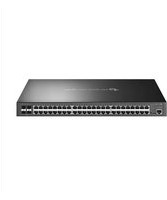
| Product Type | Managed Ethernet Switch for Enterprise Networks |
| Brand | TP-LINK |
| Model | Omada SG3218XP-M2 |
| Ports | 16 x 10G SFP+ and 2 x 10G RJ45 |
| Switching Capacity | 360 Gbps |
| Forwarding Rate | 268 Mpps |
| Management Features | Web, CLI, SNMP, Omada SDN and Cloud |
| Layer Support | Layer 2+ (L2/L3 Lite) Switching |
| VLAN Features | 802.1Q VLAN, Port-based VLAN, Voice VLAN |
| QoS Features | Port Priority, TOS/DSCP Priority |
| Link Aggregation | Static Link Aggregation and LACP (FE, GE, 10GE) |
| Security Features | ACL, IP-MAC-Port Binding, SSH/SSL |
| Rack Mounting | 1U Rack-Mountable (19-inch) |
| Dimensions (W x D x H) | 442 x 220 x 44 mm |
| Weight | 3.5 kg (7.72 lb) |
| Power Supply | AC 100-240V, 50/60Hz |
| Power Consumption | Maximum 30 W |
| Cooling | 2 x Built-in Fans |
| Operating Temperature | 0°C to 45°C (32°F to 113°F) |
| Storage Temperature | -40°C to 70°C (-40°F to 158°F) |
| Maintenance | Dust cleaning with dry cloth and firmware updates |
| Safety Compliance | CE, FCC, RoHS |
| Spare Parts and Repairability | Modular design for easy replacement of fans and power supply |
| Documentation | Free user manual in PDF available on notice-facile.com |
Frequently Asked Questions - Omada SG3218XP-M2 TP-LINK
What are the port specifications of the TP-LINK Omada SG3218XP-M2?
The switch offers 16 10G SFP+ ports for fiber connections and 2 10G RJ45 copper ports for high-speed twisted-pair connections, summing up to 18 ports.
How do I access the web management interface?
You can access the web interface by assigning the switch a management IP address (default 192.168.0.1), then entering it in a browser. The default username is admin with a blank password initially.
Does the SG3218XP-M2 support Power over Ethernet (PoE)?
No, this switch does not support PoE. It is designed for data switching with separate power input, so you will need injectors or a PoE switch for powered devices.
How can I reset the switch to factory defaults?
To reset, press and hold the RESET button on the front panel for 10 seconds. The switch will reboot and restore all settings to factory defaults. Alternatively, use the CLI command restore default.
What is the switching capacity of this model?
With 18 ports each operating at 10 Gbps full duplex, the total switching capacity is 360 Gbps. This ensures non-blocking throughput for high-bandwidth applications.
Can the SG3218XP-M2 be mounted in a server rack?
Yes, the unit is 1U rack-mountable and comes with rack-mount brackets. It fits a standard 19-inch rack installation.
How do I update the firmware?
Firmware updates can be performed via the web interface under System Tools > Firmware Upgrade. Download the latest firmware file from TP-Link's official website, upload it, and the switch will install it automatically.
Does this switch support VLAN configuration?
Yes, it supports 802.1Q VLAN tagging, port-based VLANs, and voice VLAN. You can create up to 4096 VLANs for network segmentation and improved security.
Is the Omada SG3218XP-M2 compatible with Omada SDN and cloud management?
Absolutely. It integrates with the Omada SDN platform, allowing centralized management through the Omada hardware controller, Omada Cloud, or the web interface. This enables zero-touch provisioning and remote management.
What is the warranty period for this product?
TP-LINK typically provides a limited lifetime warranty for enterprise networking products. However, please check with your reseller or TP-LINK support for exact warranty terms applicable in your region.
User questions about Omada SG3218XP-M2 TP-LINK
0 question about this device. Answer the ones you know or ask your own.
Ask a new question about this device
No questions yet. Be the first to ask one.
Download the instructions for your Switch in PDF format for free! Find your manual Omada SG3218XP-M2 - TP-LINK and take your electronic device back in hand. On this page are published all the documents necessary for the use of your device. Omada SG3218XP-M2 by TP-LINK.
USER MANUAL Omada SG3218XP-M2 TP-LINK
Manual assistant
Powered by Anthropic
Waiting for your message
Product information
Brand : TP-LINK
Model : Omada SG3218XP-M2
Category : Switch