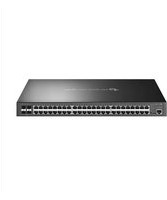
SG3452P - Switch TP-LINK - Free user manual and instructions
Find the device manual for free SG3452P TP-LINK in PDF.


Pick your language and provide your email: we'll send you a specifically translated version.
| Product Type | Managed Gigabit PoE+ Switch |
| Ports | 48 Gigabit PoE+ ports (802.3af/at), 4 SFP+ slots |
| PoE Budget | 740W total, up to 30W per port |
| Switching Capacity | 176 Gbps |
| Dimensions (W x D x H) | 440 x 330 x 44 mm |
| Weight | 5.5 kg |
| Power Supply | Internal, 100-240V AC, 50/60Hz |
| Management | Web, CLI, SNMP, RMON |
| VLAN Support | 802.1Q VLAN, up to 4K VLANs |
| Quality of Service | 8 priority queues, strict priority/WRR |
| Security Features | Port security, ACL, 802.1X, DHCP snooping |
| Layer 3 Features | Static routing, RIP, OSPF |
| Cooling | Built-in fans, side-to-side airflow |
| Operating Temperature | 0°C to 40°C |
| Humidity | 10% to 90% non-condensing |
| Entretien et Nettoyage | Clean with dry cloth; avoid liquids and solvents |
| Sécurité | Use surge protection, ensure proper grounding, do not open casing |
| Pièces détachées | No user-serviceable parts; contact TP-Link support for replacement |
| Informations générales | Designed for indoor use, rack-mountable, includes rackmount kit |
Frequently Asked Questions - SG3452P TP-LINK
How many PoE+ ports does the SG3452P have?
The SG3452P has 48 Gigabit PoE+ ports supporting IEEE 802.3af/at.
What is the total PoE power budget?
The total PoE power budget is 740W, allowing up to 30W per port.
Does the SG3452P support VLANs?
Yes, it supports 802.1Q VLAN with up to 4K VLANs, including voice VLAN and GVRP.
What SFP+ modules are compatible?
It accepts standard 10G SFP+ modules from TP-Link or third-party, but compatibility should be verified.
How do I reset the switch to factory defaults?
Press and hold the Reset button on the front panel for at least 5 seconds, then release. The switch will reboot with factory settings.
Can I manage the switch via a web browser?
Yes, the switch offers a web-based management interface accessible via the default IP address (192.168.0.1).
Does it support stacking?
No, the SG3452P does not support physical stacking; it can be managed individually or via SNMP.
What is the warranty period?
TP-Link typically offers a limited lifetime warranty for this model. Check your local support site for details.
How to troubleshoot PoE not working?
Ensure the total power draw is below 740W, check cable lengths, and verify the connected device is standards-compliant. Update firmware if needed.
Can I update firmware via TFTP?
Yes, the switch supports TFTP and HTTP firmware upgrades through the web interface or CLI.
User questions about SG3452P TP-LINK
0 question about this device. Answer the ones you know or ask your own.
Ask a new question about this device
No questions yet. Be the first to ask one.
Download the instructions for your Switch in PDF format for free! Find your manual SG3452P - TP-LINK and take your electronic device back in hand. On this page are published all the documents necessary for the use of your device. SG3452P by TP-LINK.
USER MANUAL SG3452P TP-LINK


Manual assistant
Powered by Anthropic
Waiting for your message
Product information
Brand : TP-LINK
Model : SG3452P
Category : Switch