
TL-SG2218P - Switch TP-LINK - Free user manual and instructions
Find the device manual for free TL-SG2218P TP-LINK in PDF.


Pick your language and provide your email: we'll send you a specifically translated version.
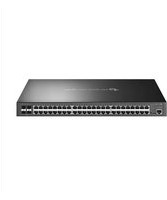
| Product Type | Gigabit Smart Switch with PoE+ |
| Ports | 16 x 10/100/1000 Mbps RJ45 (8 with PoE+), 2 x SFP |
| PoE Budget | 150W total PoE power budget |
| Switching Capacity | 36 Gbps |
| Dimensions | 440 x 220 x 44 mm (19-inch rack mount, 1U) |
| Weight | 2.5 kg |
| Power Supply | 100-240V AC, 50/60Hz |
| Management | Web-based GUI, SNMP, CLI via telnet/SSH |
| VLAN Support | 802.1Q VLAN, up to 4K VLAN groups |
| Quality of Service | 802.1p CoS, DSCP, queue scheduling (SP, WRR) |
| Security | 802.1X authentication, ACL, IP-MAC-Port Binding |
| L2 Features | IGMP Snooping, Link Aggregation, Port Mirroring, Loop Protection |
| Cooling | Fanless design or built-in fan (depending on version) |
| Standards | IEEE 802.3, 802.3u, 802.3ab, 802.3z, 802.3x, 802.3af/at |
| Maintenance | Clean with dry cloth; avoid liquids and dust accumulation |
| Repairability | No user-serviceable parts; contact TP-Link support for repairs |
| Mounting | 19-inch rack mountable, ears and brackets included |
| Firmware Upgrade | Supports TFTP/HTTP upgrade via web interface |
Frequently Asked Questions - TL-SG2218P TP-LINK
How do I access the web management interface of the TL-SG2218P?
Connect your computer to any of the switch's ports, then set your computer's IP address in the same subnet as the switch. The default IP is 192.168.0.1. Open a web browser and enter this address. Log in using the default username admin and password admin (or as printed on the device label).
How can I reset the switch to factory defaults?
Press and hold the RESET button on the front panel for about 10 seconds until the system LED blinks rapidly. Release the button, and the switch will reboot with all settings restored to factory defaults.
What is the total PoE budget of the TL-SG2218P?
The TL-SG2218P provides a total PoE power budget of 150W across all PoE+ ports. Each port can deliver up to 30W (PoE+ standard 802.3at), allowing you to power devices such as IP cameras, VoIP phones, and wireless access points.
How do I enable PoE on a specific port?
In the web interface, go to PoE > Port Config. Select the port you want to configure, set PoE Status to Enabled, and choose the desired power limit. Click Apply to save the configuration.
Can I create VLANs to isolate network traffic?
Yes, the switch supports 802.1Q VLAN tagging. Go to VLAN > 802.1Q VLAN in the web interface, create a new VLAN ID, assign ports to the VLAN with the desired tagged or untagged membership, and apply the changes.
How do I update the firmware?
Download the latest firmware from the TP-Link website. In the web interface, go to System Tools > Firmware Upgrade. Click Browse to select the firmware file, then click Upgrade. Do not power off the switch during the upgrade process.
What are the LED indicators on the front panel?
The switch has a PWR (power) LED, a PoE Max LED (indicates PoE power budget exceeded), and per-port Link/Act LEDs. The LED colors indicate link status: green for 1000 Mbps, amber for 100 Mbps, and off for no link.
Can I mount the TL-SG2218P on a wall?
The TL-SG2218P is designed primarily for 19-inch rack mounting, but it also comes with wall-mount brackets if you prefer. Install the brackets on the sides using the provided screws and fix the switch to a flat wall surface.
What should I do if the switch does not power up?
First, check the power cord connection and ensure the outlet works. Verify that the PWR LED lights up. If not, try a different power cable. If the issue persists, the power adapter might be faulty. Contact TP-Link technical support for advanced troubleshooting.
Is the switch fanless?
The TL-SG2218P uses a smart fan design that operates only when needed, keeping noise low. Under normal load, the fan remains off. Ensure proper ventilation around the switch to maintain optimal operating temperatures.
User questions about TL-SG2218P TP-LINK
0 question about this device. Answer the ones you know or ask your own.
Ask a new question about this device
No questions yet. Be the first to ask one.
Download the instructions for your Switch in PDF format for free! Find your manual TL-SG2218P - TP-LINK and take your electronic device back in hand. On this page are published all the documents necessary for the use of your device. TL-SG2218P by TP-LINK.
USER MANUAL TL-SG2218P TP-LINK
Manual assistant
Powered by Anthropic
Waiting for your message
Product information
Brand : TP-LINK
Model : TL-SG2218P
Category : Switch