
LabelWorks LW-Z5010BE - Label printer EPSON - Free user manual and instructions
Find the device manual for free LabelWorks LW-Z5010BE EPSON in PDF.


Pick your language and provide your email: we'll send you a specifically translated version.
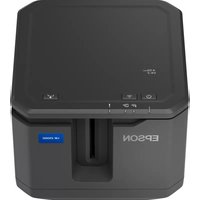
| Product Type | Label Printer |
| Brand | EPSON |
| Model | LabelWorks LW-Z5010BE |
| Dimensions | Approx. 200 x 165 x 98 mm |
| Weight | Approx. 1.2 kg |
| Power Supply | AC Adapter 100–240V, 50/60Hz |
| Printing Method | Thermal printing (no ink/toner required) |
| Print Resolution | 180 dpi |
| Print Speed | Up to 25 mm/sec |
| Label Tape Width Support | 6, 9, 12, 18, 24 mm |
| Display | LCD display with backlight (16-digit, 3-line) |
| Keyboard | Full QWERTY keyboard |
| Connectivity | USB 2.0 port for PC/Mac |
| Auto Cutter | Built-in auto cutter |
| Barcode Printing | Linear (Code 39, Code 128, etc.) and 2D (QR, Data Matrix) |
| Memory | Stores up to 99 label formats |
| Maintenance | Clean print head with cotton swab and isopropyl alcohol |
| Safety | For indoor use; keep away from water and humidity |
| Spare Parts & Repairability | Original EPSON tape cartridges and AC adapters widely available; service by certified centers |
| General Information | Ideal for office, home, and professional labeling tasks |
Frequently Asked Questions - LabelWorks LW-Z5010BE EPSON
How do I load the label tape cartridge into the LW-Z5010BE?
Open the tape compartment by sliding the cover, insert the tape cartridge with the tape and ink ribbon oriented correctly, and press firmly until it clicks. Close the cover and run a test print. Ensure the tape end is free and passes through the tape guide.
Can I connect the LabelWorks LW-Z5010BE to my computer?
Yes, the printer can be connected via USB to a PC or Mac. You can use the bundled label editing software to design and print labels from your computer, or you can print directly from the printer's keyboard.
How do I print barcodes with this printer?
Press the Barcode key, select the barcode type (e.g., Code 39, QR Code), enter the data, and print. On screen you can preview the barcode before printing.
What types of label tapes are compatible with this model?
The LW-Z5010BE works with EPSON LabelWorks tape cartridges in widths from 6mm to 24mm. Use original EPSON tapes for best quality and durability.
How do I clean the print head of my label printer?
Turn off the printer, open the tape compartment, and use a cotton swab lightly moistened with isopropyl alcohol to wipe the print head. Allow it to dry for a few minutes before installing a new tape.
Why is my printed label not sharp or has missing dots?
This usually indicates a dusty print head or a damaged tape cartridge. Clean the print head first. If the issue persists, replace the tape cartridge or check that you are using the correct print intensity setting in the menu.
How can I change the language of the display?
Go to the Settings Menu, select Language, and choose your preferred language from the list. The on-screen instructions and menus will immediately update.
Can I save labels for future use?
Yes, you can store frequently used label formats in the Built-in Memory. Press the Save/Memory key, assign a number, and recall it whenever needed.
Is the LW-Z5010BE suitable for home organization?
Absolutely, it is perfect for creating cable labels, file tags, storage labels and more. With a wide range of tape colors and widths, you can create weather-resistant and durable labels for multiple purposes.
How do I reset the printer to factory defaults?
Press the Menu key, scroll to 'Reset', and confirm 'Factory Reset'. This will erase all custom settings and stored labels. Be careful to back up any important data before resetting.
User questions about LabelWorks LW-Z5010BE EPSON
0 question about this device. Answer the ones you know or ask your own.
Ask a new question about this device
No questions yet. Be the first to ask one.
Download the instructions for your Label printer in PDF format for free! Find your manual LabelWorks LW-Z5010BE - EPSON and take your electronic device back in hand. On this page are published all the documents necessary for the use of your device. LabelWorks LW-Z5010BE by EPSON.
USER MANUAL LabelWorks LW-Z5010BE EPSON

Manual assistant
Powered by Anthropic
Waiting for your message
Product information
Brand : EPSON
Model : LabelWorks LW-Z5010BE
Category : Label printer