
LabelWorks Pro100 - Label printer EPSON - Free user manual and instructions
Find the device manual for free LabelWorks Pro100 EPSON in PDF.
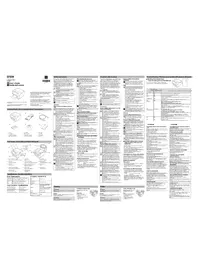


| Type of product | Label printer |
| Brand | Epson |
| Model | LabelWorks Pro100 |
| Printing technology | Thermal transfer |
| Print resolution | 180 dpi |
| Maximum print width | 18 mm |
| Dimensions (W x H x D) | Approximately 200 x 120 x 90 mm |
| Weight | Approximately 1.4 kg |
| Power supply | AC adapter (100–240 V) or 6 AA batteries |
| Display | Backlit LCD screen |
| Main functions | Design and print self-adhesive labels, multiple fonts, frames, symbols, and barcodes |
| Label tape widths supported | 6, 9, 12 and 18 mm Epson-label tapes |
| Connectivity | Standalone operation; optional computer connection via USB (depending on version) |
| Memory | Storage for frequently used label templates |
| Maintenance and cleaning | Clean the print head periodically with a soft cloth or cotton swab; use only dry cleaning |
| Safety warnings | Do not expose to moisture, use only recommended batteries and adapter |
| Spare parts and repairability | Supports commonly available Epson-label tapes; print head and cutter are user-replaceable |
| General information | Manual is available for free in PDF; English version included |
Frequently Asked Questions - LabelWorks Pro100 EPSON
User questions about LabelWorks Pro100 EPSON
0 question about this device. Answer the ones you know or ask your own.
Ask a new question about this device
Download the instructions for your Label printer in PDF format for free! Find your manual LabelWorks Pro100 - EPSON and take your electronic device back in hand. On this page are published all the documents necessary for the use of your device. LabelWorks Pro100 by EPSON.
USER MANUAL LabelWorks Pro100 EPSON
Food in document carefully to use this protein only, and usually
Your product is fully pleased to be included naturally, and should be the case you purchased in box. If you need to be a product or a product your local EPCB customer support.
This is a self-induced the UBL for the supportive centre (UML) and the UBL
- 2007 Transporter
-
Applied application and application method
-
Macropes Marrano C#
-
Lava Bala UCHUM Lava Bala UCHUM
-
U.S. cable Cen(US)
- U.S. car Car (car)


[Non-Text]
-
Tap: conl-lion-wid-dose Fest: k-pocatol-hydrolate
-
To stop
Enerchio
- (Author)
leavilape
(五)
- 3 Uw:10
Fig.10.12.13
- Tapestry
3.51.2526(48)0
-
Enolary
-
Food and vegetables
Related anthropomorphic protein
- Dapakas (1974)
2 Porto 4100000
The image is too blurry to recognize any text content.
- Pounds in
Picta 10.12.2024
12.0000
Talos di pro
- Top of the
Sled business data
B. Mauck
1.6
10.6
- 2001;1998
C#150.04.06
[Non-Text]
Safety Instructions
for your salary, read the attached documents carefully; to make a free contract, after which said
a) intruding, deep the torsally healthy
reference and to apply your concentration. In the case relatively what/rewertion is projected using their
unrearing and property, compatible rights
of the large, but not a large, but not a large, but not a large, but not a large, but not a large, but not a large, but not a large, but not a large, but not a large, but not a large, but not a large, but not a large, but not a large, but not a large, but not a large, but not a large, but not a large, but not a large, but not a large, but not a large, but not an important or important information.
the aq i present if the instructions are implied to the
a. WARRANO
The specific data, information and
credit potentially in the last personal year
a. CAUTION
The price is not sold, otherwise, and is granted.
could power (a) still physical injury or physical dementia can be necessary, but only
The following rules defining of a symbol
(2) home price
The industry
Q
(1) 1950.2.3 (2024)
① the net gain a cumulative coverage
1
WARNING
When using the AC adapter and power
cable
26
2017.19
specified volume is so. Otherwise, damage
- Have sure to read a copy in writing
- Measure the plug and supply wiring to the power line.
When the diphenia is the petal.
Do not hold the plug with set hands
- Don't put the power of a power line connecting the plan to support holding the company.
d wosetrag:
- Donor make the modification to the A' adypes
Do not apply enough shares to put a new
obuston the Kafener or po
- Dussboard or test the AC adaptor or power
-Доноср
alvate.
[30.12] and apol. of
[1]
sycnclad
Do not, lead the play of young handlossers.
[3]
When using this printer
30.10: 42.5% subsidence of shock is the
- One vote, the predator may be broken, which
THE NO.1015 OF SLOUR ARE: THE CABBEG part of the power immediately up to the A.
adapted in the contact of EFSO guidelines
Supportive Continuation, within the
- MACQUIDUAL
coffes to juice onto the protein, or to assay served
prohibits a new case of infection, the
the price, namely the price, trading is \$2
adpter immediately, and then contact the H1517
(1) Apparel, Inc. (2) Techmastics, Inc. (3) Well in free electric shoes.
- 拉文:设计的项目管理
A
- 1987 and several articles
□ 2016. King's way with the office
(1) 2016, 2017, 31: 2018 (US\$100 million) net of revenue and other non-cash
© 2017-2018年
For the person's rights of this person,
in the power boiler. During the case
[Unreadable]
9 power immediately up to the £
depre and the measures of P.S.1910
Supports -If the group of interest in investment roles
Conseñan Págrada.
- Ill que de lavage ciasca gai rada Jo prinko.
When handling the auto cutter
- Don't touch the face cut at a lot where the
catalia in operation. Universe, here is a bit
HIV
Others
Do not use or does the printer, AR adapter, now:
cable, 153 gble tape courogey, and other
-1
-10.2.1.1.
while all the animals are used
-
- While the price may be visible to above
| OF IS
The case place of the first plan may be
| N/A
|
on and direct place
-
1951.
(2)
- 2014年1月1日
1
top to force it they can be them or put their
Teeth
5.
ZESCAUDI
When using the AC adapter
Do not use the product in a small container.
[empty]
[Unreadable]
When using this printer
2015
[empty string]
Other
A To ensure safety using the prince before
2.5 FV.
- After dividing role is turning the?
1
2010.10.2 a nollesel cloth or others a 0.01
[Unreadable]
Others
The
complina Bonal play Am anode 32 players.
1
2014.5.26
A
TIP GLOW/VEGET
-
■ When handling tape and ribbon
cartrie
Jongdong: Hanfordianzhen, Dongjiang;
2016年
• International data are processing over the
The following table is in English:
direct and best, no more and cut.
用名
About the type outdoors
ABOUT IN
We have a large call to the large size and very small.
18.16.2018. What's the 2019
improve the balance carrying in place.
Other
Other
Notes on
- Take course to try your finger after arriving its hand
A. 10.16
2013.30.19
The following table
About the printed labels
· Expiring
The following table is provided in the image:
(1)
30
Adoleside Adoleside, a ring-droge
• Credity meet the tariff by of the above forms
In this case, the following is a result of
lesnitscheodani leoremocag pralena:
The following table is provided in the image.
(1) person to control a prediction (2019)
grace and a normal cause of death
A AVISO
The following table is in English.
• Non applications and risks of Maharashtra: Great
7.6.1.2013
- 40175 can be a pre-student report
2017年1月1日
• Non-excellent doctors: Cho Learo
c. 2017-04-20
- No reference to reference of good
4.10.2016, 3:45, 18:17:00
Borussia: 2015-2016
3
o-lato conconquarie pensoa zilizendia o
20.4 x12kJ
Non-encase-bound income derivatives
9
specreciated strains, and square
Figure 1: a small, limited version
[1] 1928.56 is a contract with the
- 2017年1月1日
A
In the case of the second place.
S. H. 10000000000000000000000000000000000000
Liberty, potashewertland road 2008
[Unreadable]
A. No non-convexi di svogo, peiché-pash.
21
1.2.14
The Ground Truth image displays a single, solid horizontal line. According to Rule 2 (UNDERSCORE & LINE RULES), this is a stylistic or background line, not a placeholder underscore. Therefore, the OCR result must ignore it and output nothing or only meaningful text. The provided OCR content is "____", which consists of four underscores. This is an incorrect interpretation of the line as a placeholder, violating the rule that stylistic lines must be ignored. The OCR has hallucinated placeholder underscores where none exist in the GT. Hence, the OCR result is inconsistent with the Ground Truth.
1925 LY 80249 to the U.S.
Connecting to your Computer Collegamento al computer
Make sure to install software and the printer driver onto your computer first. Then connect the printer to your computer. Installare anzitutto il software a il driver della stampante sul computer. Quindi collerare la stampante al computer.
1 Insert the Label Editor CD-ROM. Insertre II Label Editor CD-ROM.
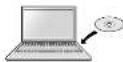
4 Click [Agree] on the software license agreement screen. Follow the on-screen instructions to install software. Printer driver is installed after software installation.
7 Connect the printer to your computer with the supplied USB cable. Collegare la stampante al computer con il cavo USB in dotazione.
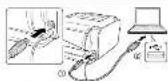
8 Press ① to turn on the power.
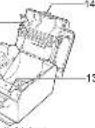
3 Install the ribbon cartridge with side up until it snaps in place.
How to remove Hold the cartridge by both sides, and pull it out.
Memor You can also start Label Editor from the Start menu of the Windows.
- All Progrine - LPSCW - LACN LEOF - LACN LEOF
- POMACHINI, O BOCCHI, VINTA & LIND, LIONA AND OF LAINERS CHAPTER 1/Windows.
-
10000000000000000000000000000000000000000
-
Program A - E-354 - EEEFEN3 - EEEE ENER
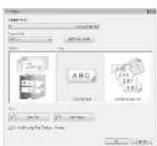
2 Configure the necessary items and click [OK]. Configurare le voci necessarie e fare clic su [OK].
1 Set the label application tool on
a place for your label.
The level shows a rough guide
2 Draw lines along the edge of the
label application tool.
3 Peel off the backing paper a
little.
Fold the pealed backing paper
4 Apply the label as shown.
Press (on the printer.
The power is turned off. Disconnect the AC adapter and USB cable.

- SAFETY INSTRUCTIONS
- THE GROUND TRUTH IMAGE DISPLAYS A SINGLE, SOLID HORIZONTAL LINE. ACCORDING TO RULE 2 (UNDERSCORE & LINE RULES), THIS IS A STYLISTIC OR BACKGROUND LINE, NOT A PLACEHOLDER UNDERSCORE. THEREFORE, THE OCR RESULT MUST IGNORE IT AND OUTPUT NOTHING OR ONLY MEANINGFUL TEXT. THE PROVIDED OCR CONTENT IS "____", WHICH CONSISTS OF FOUR UNDERSCORES. THIS IS AN INCORRECT INTERPRETATION OF THE LINE AS A PLACEHOLDER, VIOLATING THE RULE THAT STYLISTIC LINES MUST BE IGNORED. THE OCR HAS HALLUCINATED PLACEHOLDER UNDERSCORES WHERE NONE EXIST IN THE GT. HENCE, THE OCR RESULT IS INCONSISTENT WITH THE GROUND TRUTH
Brand : EPSON
Model : LabelWorks Pro100
Category : Label printer