
CAR RADIO DANCE - Car stereo SKODA - Free user manual and instructions
Find the device manual for free CAR RADIO DANCE SKODA in PDF.


User questions about CAR RADIO DANCE SKODA
0 question about this device. Answer the ones you know or ask your own.
Ask a new question about this device
Download the instructions for your Car stereo in PDF format for free! Find your manual CAR RADIO DANCE - SKODA and take your electronic device back in hand. On this page are published all the documents necessary for the use of your device. CAR RADIO DANCE by SKODA.
USER MANUAL CAR RADIO DANCE SKODA
Anti-theft protection 3
Basic setting 3
Special functions 5
Radio mode 6
The CD changer 9
Using the system 9
External CD changer 11
External sources 12
Technical short description 12
Radio
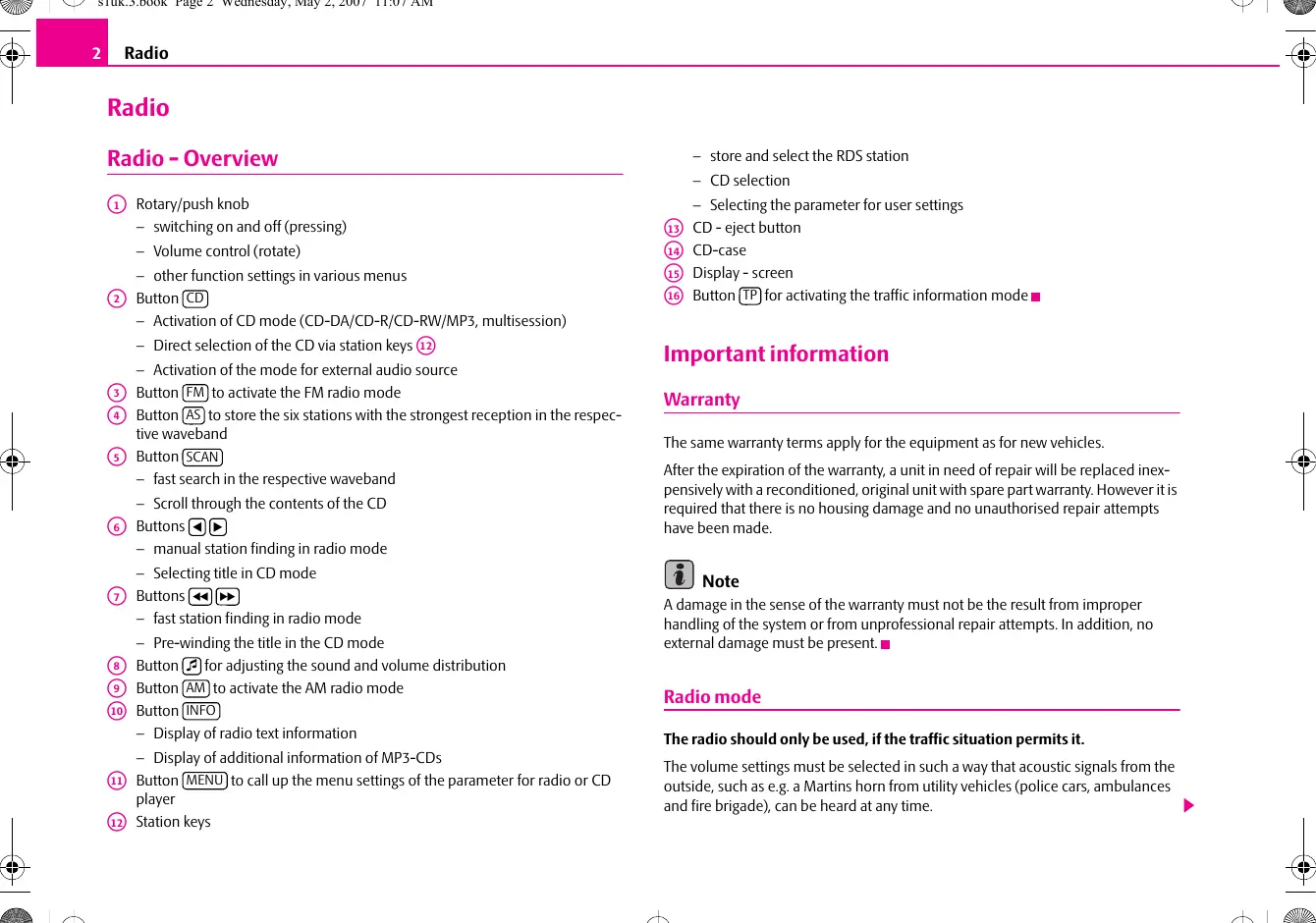
Radio - Overview
① Rotary/push knob
- switching on and off (pressing)
Volume control (rotate) - other function settings in various menus
② Button CD
- Activation of CD mode (CD-DA/CD-R/CD-RW/MP3, multisession)
- Direct selection of the CD via station keys 12
- Activation of the mode for external audio source
3 Button FM to activate the FM radio mode
4 Button AS to store the six stations with the strongest reception in the respective waveband
⑤ Button SCAN
fast search in the respective waveband
- Scroll through the contents of the CD
6 Buttons
- manual station finding in radio mode
- Selecting title in CD mode
⑦ Buttons
fast station finding in radio mode
- Pre-winding the title in the CD mode
8 Button for adjusting the sound and volume distribution
9 Button AM to activate the AM radio mode
10 Button (INFO)
Display of radio text information
- Display of additional information of MP3-CDs
11 Button (MENU) to call up the menu settings of the parameter for radio or CD player
12 Station keys
store and select the RDS station
- CD selection
- Selecting the parameter for user settings
13 CD - eject button
14 CD-case
15 Display - screen
16 Button TP for activating the traffic information mode
Important information
Warranty
The same warranty terms apply for the equipment as for new vehicles.
After the expiration of the warranty, a unit in need of repair will be replaced inexpensively with a reconditioned, original unit with spare part warranty. However it is required that there is no housing damage and no unauthorised repair attempts have been made.

Note
A damage in the sense of the warranty must not be the result from improper handling of the system or from unprofessional repair attempts. In addition, no external damage must be present.
Radio mode
The radio should only be used, if the traffic situation permits it.
The volume settings must be selected in such a way that acoustic signals from the outside, such as e.g. a Martins horn from utility vehicles (police cars, ambulances and fire brigade), can be heard at any time.

WARNING
Please always pay full attention to the traffic situation around you! As the driver you are fully responsible for the traffic safety. Only use the functions in such a way that you always maintain the control over your vehicle in all traffic situations!
Using the display
Carefully handle the display because dents and scratches can occur through pressure of the finger or contact with sharp objects.
The display can be cleaned with a soft cloth and finger marks can be wiped away with pure alcohol.

Note
Do not use solvent such as turpentine or petrol as they will corrode the display surface.
Anti-theft protection
Anti-theft coding
Your radio is equipped with a convenience coding. If the radio is being operated for the first time, the safety code is not only stored in the radio but also in the vehicle.
After disconnecting and reconnecting the battery, first of all switch on the ignition and then the radio.
If you wish to install the radio in another vehicle, the safety code must be entered. In this case, please do not hesitate to contact a Škoda Service Partner or a Škoda importer.
As the unit only functions after entering the safety code, this practically excludes its use after a theft - a contribution to increased anti-theft safety.

Note
The code is stored in the instrument cluster. Through this it is automatically decoded (convenience coding). A manual entry of the code is normally not necessary.
Code entry
- Switch on the radio if the ignition is on. SAFE is displayed and then 0000.
- Enter the safety code using the station keys ⑫.
- Confirm the safety code by pressing the button
If you have confirmed a wrongly entered code, you can repeat once again the entire process.
If the code number is entered incorrectly for the second time, the unit will be blocked for approx. one hour. It is only possible to repeat the entry of the safety code after an hour has expired and while the unit is switched on and the ignition key remains in the ignition lock.
The cycle - two attempts, blocked for an hour - furthermore applies.
Basic setting
Switching the unit on and off
- The system is switched on or off by pressing the rotary/push knob ①.
If the key is pulled out of the ignition lock when the system is switched on, the system switches off automatically. You can switch on again the unit by pressing the rotary/push knob ①. If the engine is switched off, the unit (protection of the vehicle battery before discharging) switches off automatically after approx. one hour.
If you have switched off the radio by withdrawing the ignition key, the radio switches on again once the ignition is on.
Audio settings
- Select the desired parameter after pressing the button and then the station key.
- Set the desired value by turning the rotary/push knob ①.
You can select the following parameters:
- TREBLE - treble setting;
- MIDTONE - midtone setting;
BASS - bass setting; - LOUD - in case of low volume level, this function reinforces the range of bass and treble frequencies;
- MONO.
The selection OFF of the stereo coder is automatically regulated. If the signal is strong, a stereo reception is made.
The selection ON - under certain circumstances the reception of the stereo signals can be distorted, even if the signal is strong. e.g. while driving through urbanization. The stereo coder is deactivated and the reception quality is clearly improved by activating the force Mono reception.

Note
The text on the display goes out 10 seconds after the last press. After pressing any button, except the station keys ⑫, the setting is finished and the selected values are stored.
Second level of the audio settings
- You can call up the second level of the audio settings by pressing the button and by subsequently pressing the station key.
You can select between the following parameters:
BALANCE - setting of the volume ratio between the right and left side;
- FADER - setting of the volume ratio between the front and the rear.
Third level of the audio settings
- You can call up the third level of the audio settings by pressing the station key 12 again.
You can select between the following parameters:
GALA
Your radio increases automatically its volume with the increasing vehicle speed. A higher setting value results in a stronger volume increase.
PDC VOL
If your vehicle is equipped with "parking aid", the volume is automatically decreased to a pre-defined value, when the "parking aid" is active.
PH VOL
If your vehicle is equipped with a handsfree system, you can set the desired volume of the mobile phone calls.
TA VOL
The setting of the minimum volume for receivable traffic reports.
The volume is increased by the value set by this parameter, if its current value is lower. Otherwise the volume is not changed.
ON VOL
Your radio stores the last volume set before switching off. If the volume is higher than the value set in the ONVOL, the volume is reduced to this value after switching on the radio again.
BACK
You can return to the second level of the audio settings by pressing this button.
Special functions
Setting the special functions
More and more broadcasting companies, mainly USW stations transmit RDS information in addition to the program. E.g the station name and the traffic status of the set station belong to this information.
Setting the radio functions
- If you press the button (MENU), the menu for setting the special functions is shown on the display.
LEARN
This function enables an interference-free and clear reception as well as a fast station finding. The radio has its own list of receivable frequencies, which are arranged according to program identification (PI) and signal strength. This makes it possible to change to another frequency of the station which can be taken from a list containing the alternative frequencies of the stations covering the area.
- LEARN ON - the radio constantly updates and classifies all available frequencies depending on the area in which you are located. This leads to short signal failures;
- LEARN OFF - under certain circumstances the updating of the Learn list can cause disturbances. Then the radio tests each frequency for switch-over.
REGIONAL
Certain programs of the broadcasting companies are divided into regional programs at specific times. That is why in individual regions the regional programs of a station can broadcast different contents.
First of all the unit attempts to set only alternative frequencies of the selected station.
If the quality is however so low, that there is a risk of a "program loss", the unit also accepts "related" frequencies.
- REGIONAL ON - the receiver switches to a regional "related" station, if the reception of the current station could be interrupted;
- REGIONAL OFF - the receiver can access the regional "related" station unlimited.
SEEK
- SEEK LOCAL - stops the station finding on the local stations with the strongest signal;
- SEEK DX - stops the station finding on all available stations.
AUX
Your radio is equipped with a connection which enables the play function of external sources.
AF
The function alternative frequency (AF) ensures that the best receivable frequency of the selected station is automatically and precisely set. The replay of the broadcast can be muted briefly during the search process according to the best receivable frequency. If no alternative frequency of the set station can be found and the station no longer offers a satisfactory quality, then please select another station.
Second level for setting the special functions
- You can call up the second level of the setting for special functions by pressing the button (MEN) and by subsequently pressing the station key.
PDC
If your vehicle is equipped with "parking aid" and after it is activated, the distance to the obstacle is shown on the display. The distance is shown by a column.
BEEP
Switching on or off the tone signal when storing the radio stations.
PHONE
If your vehicle is equipped with a handsfree system, the volume of the radio is automatically reduced during a phone call.
ILLUM
Switch on (value 1) or switch off (value 2) illumination of the controls for the radio.
BACK
You can return to the previous level of the setting by pressing this button.
External amplifier
If you have connected an external amplifier, you can choose between six audio effects.
- Press the button and select with the station keys 12 between the offered audio effects:
- LINEAR - Standard play function without special weighting, adapted to all music types and voice play function;
- SPEECH - suppresses surrounding noises so that the voice can be clearly heard;
- ROCK - suitable for play function of rock music;
CLASSIC - suitable for play function of classic music; - POP - suitable for play function of pop music;
- LIVE - suitable for play function of Live concerts or recording.
Radio mode
Display contents
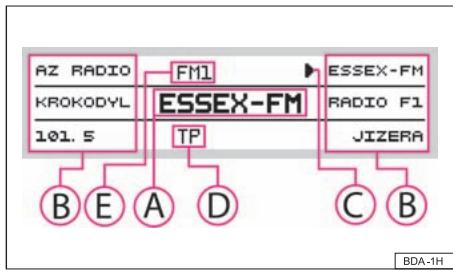
Fig.1 Radio mode
The display shows the following content:
A the selected radio station (its frequency or designation);
the frequencies or the designations of the radio stations in the memory of the radio;
the symbol points to the already selected radio station;
Activation for the reception of traffic reports;
selected waveband.
Waveband switch-over
Your radio is equipped with FM and AM wavebands. They are divided in 6 memory levels, i.e. 3 levels for the FM waveband and 3 levels for the AM waveband. There are each 6 memory spaces available on these levels.
Activation of the FM waveband
The FM waveband is activated when pressing the button . By pressing the button several times, you can move between the memory levels FM1, FM2 and FM-AS.
Activation of the AM waveband
The AM waveband is activated when pressing the button . By pressing the button several times, you can move between the memory levels AM1, AM2 and AM-AS.
The process of searching for and storing the radio stations
Manual search
- Set the frequency of the desired radio station by pressing the button or
Automatic station finding SEEK
- The radio searches for the next radio station in the selected waveband by pressing the button or .
Store station
- After selecting the radio station, hold the station key ⑫, on which it should be stored until it briefly switches to mute and a brief signal sounds.
Automatic station finding with storing the radio stations
- Press the button AS. An automatic station finding is started during which the 6 stations with the strongest signal are stored. The display STORING appears on the display and the volume is reduced.
When storing the radio stations on the station keys (12) is finished, you can call up the desired radio station by pressing a station key (12) .

Note
The stored radio stations are updated and stored once again by repetitively pressing the button AS.
Radio text
Certain radio stations transmit additional text information - called radio text.
- The information of the radio text is displayed by pressing the button INFO.

Note
The text information must not be available to all radio stations.
- Depending upon the quality of the received signal, the radio needs a specific time, in order to correctly read all the illustrated characters.
- If the selected radio station does not transmit any radio text, the message TEXT UNAVAILABLE appears.
Traffic reports
Activating and deactivating the traffic information
Press the button , TP appears in the display. If a set radio station does not transmit a traffic report, the radio searches for a station which transmits the traffic report. TP SEEK is displayed on the display.
If no radio station which transmits the traffic reports is found, NOINFO is shown on the display.
An incoming traffic report automatically interrupts the CD play function or listening to a radio station, which at that moment is not transmitting a traffic report. TRAFFIC is displayed on the display. At the end of the traffic report, the radio automatically returns to the original play function.
If you wish to deactivate the traffic information, press once again the button , TP goes out on the display.

Note
The information emitted by a radio station can be received while listening to another radio station. If no reception of traffic reports is possible, NO INFO appears on the display.
Function SCAN
Stations of a waveband can be played briefly one after the other (for ten seconds).
- Press the button , the radio searches automatically all available stations of the current waveband.
If you wish to select other radio stations, press the button 12 or - End the automatic finding by pressing the button ⑫ OK. The current radio station remains selected.
- In order to call up the original radio station, press the station key 12 CANCEL.
Program types (PTY)
This function enables a finding of radio stations with the desired program type.
Selecting program types (PTY)
- Press the button SCAN and then the station key 12 PTY. Rotate the rotary/push knob 1 and select the desired program type, which is shown on the display.
-
Confirm the selection of the program type by pressing the station key OK, the radio is switched to mute and starts to search for radio stations with the desired program type.
-
To end the finding and to listen to the found radio station, press the station key OK or CANCEL, in order to return to the previous program.
You can select between the following program types:
| NONE - not specified | WEATHER - weather |
| NEWS - news | FINANCE - finance |
| AFFAIRS - affairs | CHILDREN - children |
| INFO - information | SOCIAL - social |
| SPORT - sport | RELIGION - religious program |
| EDUCATE - education | PHONE IN - phone in live |
| DRAMA - drama | TRAVEL - travel programs |
| CULTURE - culture | LEISURE - leisure |
| VARIED - various music | COUNTRY - country music |
| POP - pop music | JAZZ - jazz music |
| ROCK - rock music | NATION - nation music |
| EASY - easy music | OLDIES - oldies |
| LIGHT - light music | FOLK - folk music |
| CLASSICS - classic music | DOCUMENT - documentaries |
| OTHER - other program types | SCIENCE - science |

Note
- If you have selected NONE as program type, the station finding stops on each radio station.
- If no radio station with the desired program type was found, the radio returns to the original station.
- The selection of the program type is only possible in the FM waveband.
The program type ALARM is emitted in case of a national or local threat.
The CD changer
Using the system
Inserting the CD
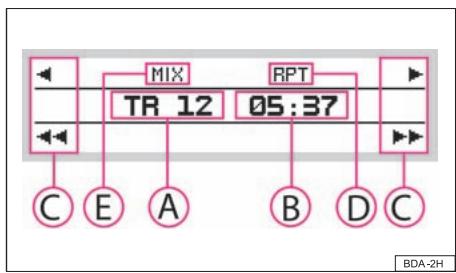
Fig.2 CD mode
Your radio is fitted with a player, which enables the play function of CD-DA/CD-R/RW/MP3, multisession.
- Press the button CD. If no CD is inserted, NO CD appears in the display. If a CD has already been inserted, the play function begins at the point where the last play function was interrupted.
The display shows the following content:
A current title number;
Information for playing time;
Assignment of the station keys 12;
Display of the active REPEAT mode;
E Display of the active MIX mode.
Operating the CD player
Select track
- Press the button or during the play function of the CD, in order to select the previous and/or the next title.
- Press the button or for the fast finding, the reverse or forward search starts after releasing the button.
Function SCAN
- Press the button SCAN, in order to scroll through the CD. The first 10 seconds of each title are played. At the same time the title number is displayed in the display.
- In order to call up the automatic station finding, press the station key OK. The found title is replayed.
End the play function of the CD
- Press the button FM or AM in order to end the play function of the CD.

Note
If the ejected CD is not removed, it is drawn in again for safety reasons.
Play function of MP3 data
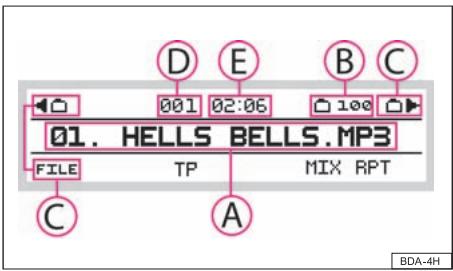
Fig.3 Play function of MP3 data
Button SCAN
- Press the button SCAN, in order to scroll through the CD. The first 10 seconds of each title are played. At the same time the title number is displayed in the display.
- In order to select a folder and to scroll through its content, press the relevant station key ⑫.
- In order to call up the automatic station finding, press the station key OK. The found title is replayed.
Button (INFO)
- Press the button INFO, the information for the current folder and title is displayed under MP3 INFO on the display.
Display of additional information
- Press the station key ID3 INFO, the additional information for the current title is displayed on the display.
The display shows the following content:
Information for title. If no information was stored on the CD, UNAVAILABLE appears in the display;
the number of the folder, from which the current title is replayed;
Assignment of the station keys 12, selection of the previous or next folder, selection of the information display for current title FILE;
Display of the currently played title;
Expiration of play function time.
Selective functions in CD mode
- Press the button (MENU) during the CD play function.
The display shows the following functions:
MIX
Play function of titles in random order.
- OFF - Play function in continuous order;
- TRACK - Play function of titles in random order in a certain folder;
- FOLDER - is a CD inserted with MP3 data, the titles in random order are played from randomly selected folders.
REPEAT
Selection of the mode for repeating the title.
- OFF - Play function in continuous order;
- TRACK - repeated play function of the selected title;
- FOLDER - is a CD inserted with MP3 data, the titles are repeated from the folder, which was active when starting the repeat mode.
AUX
Your radio is equipped with a connection which enables the play function of external sources.
Information on how to use a CD
CD to jump
Uneven road surfaces and strong vibrations may cause the CD to jump.
Formation of condensation
When it is cold and after rain showers, moisture can deposit in the CD drive (condensation). This can effect the CD jump or impair the play function. In such cases wait until the moisture has dissipated.
Notes for the care of the CDs
If a CD is soiled, please never clean the CD in the direction of a circle but rather with a soft fluffy cloth from inside to outside. In case of severe layers of dirt we recommend to clean the CD with a commercially available CD cleaner. Also in this case do not clean the CD in the direction of a circle but rather from inside to outside and then let it dry off.

Caution
- Never use liquids such as gasoline, paint thinner or disk cleaner, otherwise the surface of the CD could get damaged.
- Never expose CDs to direct sun rays!
- Please never write or affix the CD!

Note
Dirt or damage of a CD can lead to difficulties when "reading" the information. The difficulty in reading the error depends on the dirt or on the severity of the mechanical damage. Severe scratches cause reading errors which can make the CD jump or "get stuck". All CDs must be treated carefully and always be stored in a protective case.
External CD changer
Using the system

Fig.4 Mode of the external CD changer
Your radio can be equipped with an original CD changer which can be installed in your vehicle.
- In the mode of the integrated CD player, press the button CD, so that the play function of the external CD changer is activated. If no external CD changer is connected, NO CDC appears in the display.
- Select a CD with a station key ① . NO CD is displayed for not assigned positions.
The display shows the following content:
A current title number;
Information for playing time;
Assignment of the station keys to the CDs, select the relevant CD by pressing;
Display of the currently replayed CD;
E Display of the active MIX mode.
Selective functions of the external CD changer
- Press the button (MENU) during the CD play function.
The display shows the following functions:
MIX
Set the desired parameter by pressing the station key 12.
- OFF - Play function in continuous order;
- TRACK - Play function of titles in random order in a certain folder.

Note
You can call up the second level for radio settings page 5 by pressing the station key (12)▶.
External sources
Your radio enables the connection of audio units from a wide range, e.g. portable player.
Activating an external audio source
- By repetitively pressing the button activate the external input, AUX IN... is displayed. The play function starts automatically after connecting the external source.
- If you wish to set the input sensitivity depending on the signal output level of the external source, press the station key 12
End play function of the external source
- Press button or . It starts the play function of the last selected radio station.
- Press the button CD, in order to start the play function of the CD.
Setting of the input sensitivity
- AUX LEV 1 - high level, used in particular for notebooks;
- AUX LEV 2 - middle level, used for cassettes or CD player;
- AUX LEV 3 - low level, used for MP3 player;

Note
- Your radio has no control over the level setting of the external source. Make sure that the highest quality is achieved by a suitable combination of input sensitivity and output sensitivity of the external source (volume control). You will find detailed information for this setting in the operating instructions of the units.
Technical short description
Power output
4x20 W at 14.4 V; 25^ ; 10% THD (Total Harmonic Distation)
4x35 W peak power
Digital audio processor with Equalizer according to vehicle model.
Display
Positive FSTN (Film Super Twisted Nematic)
Graphic 200x47 active points
Škoda Auto pursues a policy of constant product and model development. We trust that you will understand that changes to models in terms of shape, equipment and engineering, may be introduced at any time. The information about scope of delivery, appearance, performances, dimensions, weight, fuel consumption, standards and functions of the vehicle is only correct at the time of publication. Certain items of equipment might only be installed later on (information given by the local authorised Škoda Service Partner) and only envisaged for particular markets. It is therefore not possible for legal claims to be made based on the data, illustrations and descriptions contained in this Owner's Manual.
Reprinting, reproduction or translation, either in whole or in part, is not permitted without the written consent of Škoda Auto.
Skoda Auto expressly reserves all rights relating to copyright laws.
We reserve the right to make changes to this document.
Issued by: SKODA AUTO a.s.
SKODA AUTO a.s. 2009
www.skoda-auto.com
Autorádio Dance
Fabia, Roomster anglicky 11.07
S00.5610.51.20
5J7 012 095 F