SKODA AUTORADIO BLUES - Car radio

AUTORADIO BLUES - Car radio SKODA - Free user manual and instructions

Find the device manual for free AUTORADIO BLUES SKODA in PDF.

📄 16 pages English EN Download 💬 AI Question 10 questions ⚙️ Specs
Notice SKODA AUTORADIO BLUES - page 13
View the manual : Français FR English EN
Pick your language and provide your email: we'll send you a specifically translated version.
Brand Skoda
Model CAR RADIO BLUES
Product type Car radio with CD player and AUX input
Dimensions (DIN standard) 1 DIN (approx. 18 x 5 cm)
Weight Approx. 0.5 kg
Power supply 12 V DC (vehicle battery)
Output power 4 x 20 W
Wavebands FM / AM
Number of presets 6 per band (FM1/FM2, AM1/AM2)
Radio functions RDS, TP (traffic messages), SCAN, AS (auto store)
CD player CD audio and MP3
Supported formats CD-R, CD-RW, ISO 9660, Joliet
MP3 bitrates 32 to 320 kbit/s, variable bit rate
Auxiliary input AUX-IN (3.5 mm jack)
Audio functions Bass, treble, balance, fader, loudness, GALA (speed-dependent volume)
Anti-theft Comfort coding with vehicle memorization
Cleaning Soft cloth, pure alcohol for screen
Thermal protection Shutdown at 85°C
Warranty New vehicle warranty conditions
General information User manual available in PDF

Frequently Asked Questions - AUTORADIO BLUES SKODA

How to turn the car radio on and off?
Press the rotary/push button to turn the device on or off.
How to adjust the volume?
Turn the rotary knob to increase or decrease the volume.
How to save a radio station?
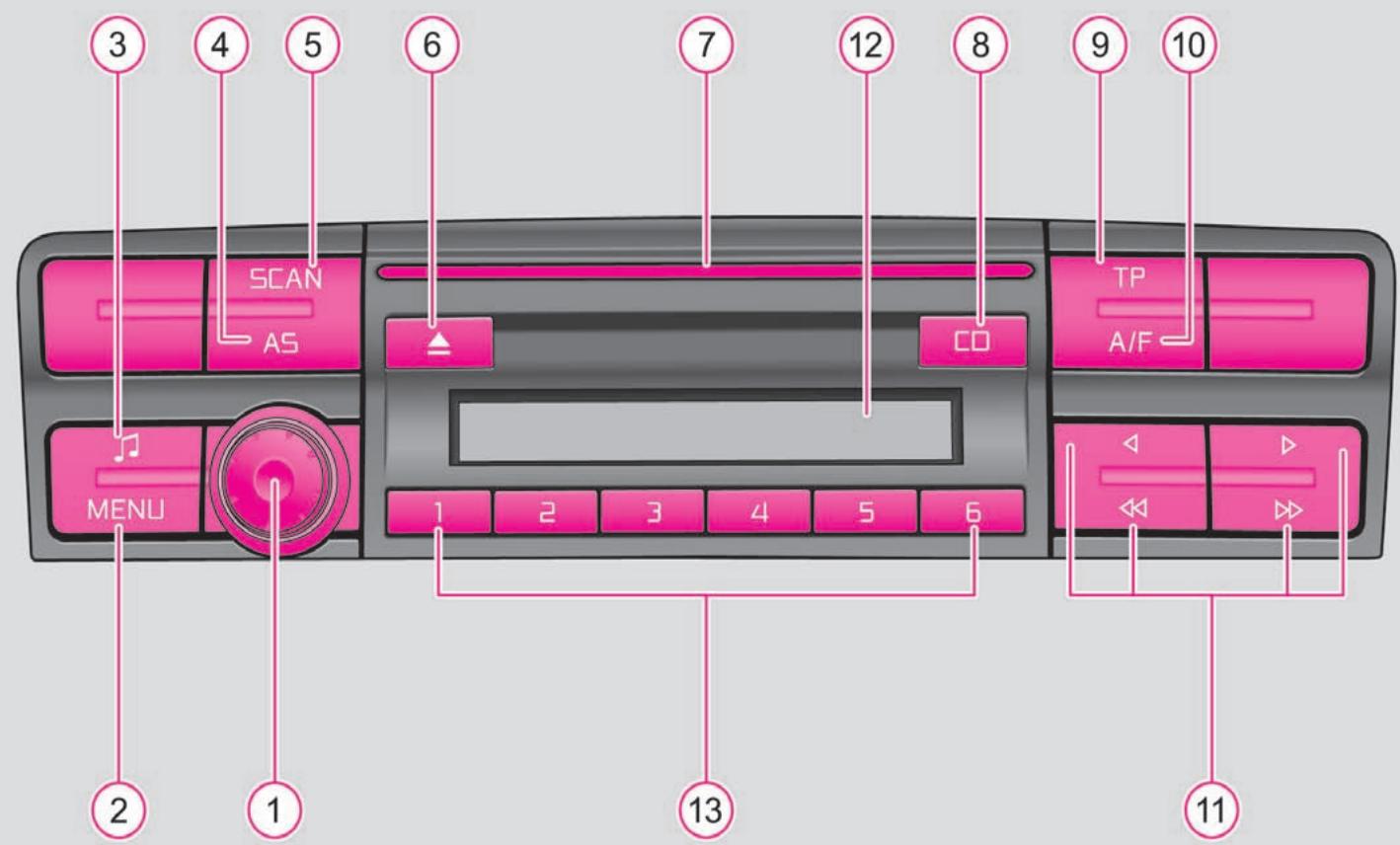
Select the desired station, then press and hold one of the preset buttons ① to ⑥ until a beep sounds.
How to use the CD player?
Press the CD button (⑧), insert a CD into the slot (⑦) with the printed side facing up. Playback starts automatically.
How to play MP3 files?
Insert an MP3 CD. Use the ◀▶ buttons to change tracks, ◀◀▶▶ to change folders. The playback order follows the folder structure (see figure 1 of the manual).
How to connect an external device via AUX?
Connect your device (MP3 player, smartphone) to the AUX-IN jack under the front armrest using a 3.5 mm audio cable. Press CD (⑧) repeatedly until AUX is displayed.
What to do if the car radio displays SAFE?
The device is locked. Enter the 4-digit code using buttons ① to ④, then confirm by pressing and holding button .
How to activate traffic information (TP)?
Press the TP switch (⑨). The TP icon appears. Traffic messages interrupt current playback.
How to adjust the sound?
Press the button (③) to access settings: treble (TRE), bass (BASS), balance (BAL), fader (FAD). Turn the knob to adjust.
How to clean the screen and CDs?
Clean the screen with a soft cloth moistened with pure alcohol. For CDs, wipe from the center outwards with a lint-free cloth. Do not use solvents.

User questions about AUTORADIO BLUES SKODA

0 question about this device. Answer the ones you know or ask your own.

Ask a new question about this device

The email remains private: it is only used to notify you if someone responds to your question.

No questions yet. Be the first to ask one.

Download the instructions for your Car radio in PDF format for free! Find your manual AUTORADIO BLUES - SKODA and take your electronic device back in hand. On this page are published all the documents necessary for the use of your device. AUTORADIO BLUES by SKODA.

USER MANUAL AUTORADIO BLUES SKODA

ŠkodaAuto

AUTORADIO BLUES
3 4 5 6 7 12 8 9 10 SCAN AS CD TP A/F MENU 1 2 3 4 5 6 2 1 13 11

Table of contents

Car radio 2

Car radio - Overview 2

Important information 2

Anti-theft device 3

Basic settings 4

Radio mode 5

CD player 7

Operation 7

Car radio

Car radio - Overview

Manual assistant
Powered by Anthropic
Waiting for your message
Product information

Brand : SKODA

Model : AUTORADIO BLUES

Category : Car radio