POVS220S - Vacuum packaging Point - Free user manual and instructions
Find the device manual for free POVS220S Point in PDF.


Pick your language and provide your email: we'll send you a specifically translated version.
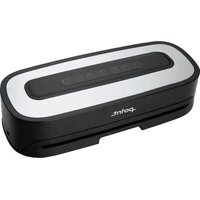
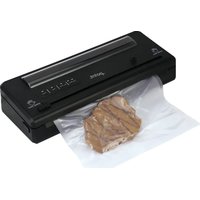
| Type of product | Vacuum packaging machine |
| Brand | Point |
| Model | POVS220S |
| Category | Vacuum packaging |
| Power supply | 220-240 V ~ 50/60 Hz |
| Power consumption | 200 W |
| Sealing width | 30 cm |
| Vacuum pressure | -0.8 bar |
| Dimensions (W x D x H) | 40 x 15 x 8 cm |
| Weight | 1.6 kg |
| Material | ABS plastic, stainless steel sealing strip |
| Functions | Vacuum seal, seal only, pulse mode for delicate foods |
| Controls | Touch buttons with LED indicators |
| Bag compatibility | Ribbed vacuum bags or rolls, max width 30 cm |
| Accessories included | 10 vacuum bags, removable drip tray, vacuum hose |
| Cleaning and maintenance | Wipe exterior with damp cloth; clean sealing strip and drip tray after each use |
| Safety features | Overheating protection, automatic shut-off, insulated sealing element |
| Spare parts and reparability | Sealing gasket and vacuum pump available as spare parts |
| Certifications | CE marked, RoHS compliant |
| Warranty | 2 years |
Frequently Asked Questions - POVS220S Point
How do I use the pulse feature on the POVS220S?
The pulse mode is designed for delicate foods. Press the pulse button intermittently to control the vacuum level manually, preventing crushing soft items.
Can I seal liquids or moist foods?
Yes, but we recommend using the pulse function and freezing liquids first. Always use a vacuum bag designed for liquids and leave extra space at the top.
What type of vacuum bags should I use?
Use ribbed vacuum bags or rolls with a smooth surface. The bag width should not exceed 30 cm. Avoid using non-compatible bags as they may not seal properly.
How do I clean the vacuum sealing machine?
Unplug the machine first. Wipe the exterior with a damp cloth. Remove the drip tray and wash it with warm soapy water. Clean the sealing strip and the vacuum chamber with a dry cloth to remove any debris.
Why is my vacuum sealer not creating a proper vacuum?
Check that the bag is placed correctly in the vacuum chamber, the sealing strip is clean, and the bag is not too thick. Ensure the lid is fully closed and latched before starting.
Can I store the vacuum sealer in a small space?
Yes, the compact dimensions of 40 x 15 x 8 cm allow it to fit in most kitchen cabinets. Always unplug and let it cool before storing.
Does the POVS220S come with a warranty?
Yes, this model includes a 2-year manufacturer's warranty covering defects in materials and workmanship.
What is the maximum sealing time for thick bags?
The sealing strip automatically adjusts to the thickness. For vacuum bags up to 0.3 mm thick, the sealing time is around 8 seconds. Always allow the machine to cool between uses.
Are replacement parts available for the POVS220S?
Yes, you can order spare parts such as the sealing gasket and vacuum pump. Contact Point customer service for availability.
Can I use the vacuum hose to vacuum containers or jars?
Yes, the included vacuum hose can be used with compatible vacuum containers that have a valve. Insert the hose into the port on the machine and follow the container's instructions.
User questions about POVS220S Point
0 question about this device. Answer the ones you know or ask your own.
Ask a new question about this device
No questions yet. Be the first to ask one.
Download the instructions for your Vacuum packaging in PDF format for free! Find your manual POVS220S - Point and take your electronic device back in hand. On this page are published all the documents necessary for the use of your device. POVS220S by Point.
USER MANUAL POVS220S Point
Manual assistant
Powered by Anthropic
Waiting for your message
Product information
Brand : Point
Model : POVS220S
Category : Vacuum packaging