POVSVS04 - Vacuum packaging Point - Free user manual and instructions
Find the device manual for free POVSVS04 Point in PDF.


Pick your language and provide your email: we'll send you a specifically translated version.
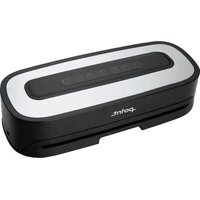
| Product Type | Vacuum Packaging Machine |
| Brand | Point |
| Model | POVSVS04 |
| Material | ABS Plastic and Stainless Steel |
| Color | Black/Silver |
| Dimensions (W x D x H) | Approx. 380 x 160 x 90 mm |
| Weight | Approx. 1.5 kg |
| Power Supply | AC 220-240V, 50/60Hz |
| Power Consumption | 130 W |
| Vacuum Pressure | Up to -60 kPa |
| Sealing Width | 30 cm |
| Sealing Time | Automatic with sensor |
| Operation Modes | Dry / Moist / Pulse / Seal Only |
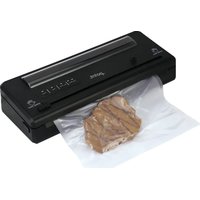
| Functions | Auto vacuum and seal, canister hose port, built-in bag cutter |
| Included Accessories | 1 bag roll, 5 vacuum bags, canister hose, drip tray |
| Bag Compatibility | Embossed and smooth bags up to 30 cm width |
| Control Type | Push-button with LED indicators |
| Cleaning and Maintenance | Removable drip tray and sealing gasket, washable |
| Safety Features | Overheat protection, automatic switch-off |
| Spare Parts | Replaceable sealing strip and gasket available |
| Repairability | Modular design, spare parts accessible |
| Certifications | CE-marked |
Frequently Asked Questions - POVSVS04 Point
How do I clean my Point POVSVS04 vacuum sealer?
Unplug the device and wipe the exterior with a damp cloth. The drip tray and sealing gasket are removable and can be washed with warm soapy water. Dry all parts completely before reassembling.
What types of vacuum bags can I use with the POVSVS04?
You can use both embossed and smooth vacuum bags as long as they are compatible with the 30 cm sealing width. The included bag roll lets you cut custom sizes.
Why is my vacuum sealer not sealing properly?
Check that the sealing gasket is clean and correctly seated. Ensure the bag is placed flat on the sealing strip. If the device overheated, allow it to cool. Use Moist mode for wet foods and Dry mode for dry foods.
Can I vacuum seal liquids or soups?
Yes, use the Pulse function to manually stop the vacuum before liquid is sucked into the machine. For soups, consider freezing them first or using a canister with the hose.
How does the pulse feature work?
The Pulse function gives you manual control over the vacuum process. Press and hold the Pulse button to evacuate air, and release it instantly when you see liquid rising or delicate food compressing. This prevents over-vacuuming.
What maintenance is required for my vacuum sealer?
Clean the drip tray and sealing gasket after each use. Replace the sealing strip when it shows signs of wear. Store with the lid unlatched to prevent the gasket from becoming compressed.
Is there a risk of overheating during extended use?
The device features built-in overheat protection. It automatically switches off to cool down. Wait a few minutes between consecutive cycles for consistent performance.
What is included in the package?
The box contains the vacuum sealer, one vacuum bag roll, five reusable vacuum bags, a canister hose, and a drip tray. An instruction manual is also provided.
Can I use the sealer with canisters and containers?
Yes, the canister hose port allows you to vacuum-seal compatible canisters. Insert the hose into the port and connect the other end to the canister lid, then select the vacuum function.
How do I seal a bag without vacuuming?
Simply press the Seal Only button. This is useful for resealing chip bags or making custom-sized bags. The device seals the film without removing air, ensuring a tight seal.
User questions about POVSVS04 Point
0 question about this device. Answer the ones you know or ask your own.
Ask a new question about this device
No questions yet. Be the first to ask one.
Download the instructions for your Vacuum packaging in PDF format for free! Find your manual POVSVS04 - Point and take your electronic device back in hand. On this page are published all the documents necessary for the use of your device. POVSVS04 by Point.
USER MANUAL POVSVS04 Point
Manual assistant
Powered by Anthropic
Waiting for your message
Product information
Brand : Point
Model : POVSVS04
Category : Vacuum packaging