
COCOON 85 - Cordless phone TOPCOM - Free user manual and instructions
Find the device manual for free COCOON 85 TOPCOM in PDF.



| Product Type | Cordless Phone |
| Brand and Model | TOPCOM COCOON 85 |
| Base Unit Power Supply | Power adapter 220/230 V, 50 Hz |
| Handset Batteries | 3 x 1.2 V, 600 mAh, Ni-MH rechargeable AAA |
| Standby Time | Approximately 60 hours |
| Talk Time | Up to 5.5 hours |
| Outdoor Range | Up to 300 m in open area |
| Indoor Range | Up to 50 m indoors |
| Number Display (CLIP) | Yes (requires operator subscription) |
| Call List | Up to 30 numbers |
| Phonebook | 10 memory locations (numbers up to 24 digits) |
| Baby Call Function | Yes (auto-dial of memory 0) |
| Outgoing Call Lock | Yes (by PIN code, up to 3 digits) |
| Keypad Lock | Yes |
| Auto Pick-up | Yes (programmable) |
| Last Number Redial | Yes |
| Volume and Ringtone | Adjustable volume, 4 ringtones, volume high/low/off |
| Out of Range Signal | Yes (warning every 2 seconds, stops after 10 s) |
| Maintenance | Slightly damp or antistatic cloth, no detergents |
| Safety | Use only the provided adapter; do not expose to water; do not use near medical devices |
| Operating Temperature | +5°C to +45°C |
| Relative Humidity | 25% to 85% |
| Warranty | 24 months |
Frequently Asked Questions - COCOON 85 TOPCOM
User questions about COCOON 85 TOPCOM
0 question about this device. Answer the ones you know or ask your own.
Ask a new question about this device
Download the instructions for your Cordless phone in PDF format for free! Find your manual COCOON 85 - TOPCOM and take your electronic device back in hand. On this page are published all the documents necessary for the use of your device. COCOON 85 by TOPCOM.
USER MANUAL COCOON 85 TOPCOM
natural_image
Black and white photo of a vintage 981 LooFbox mobile phone on a stand (no visible text or symbols on device body)Gebruiksaanwijzing
Mode d'emploi
Operating guide
Bedienungsanleitung
DECLARATION OF CONFORMITY
We, TTS Nv, Grauwmeer 17, 3001 Heverlee, Belgium, declare that our product :
Product name: TOPCOM
Model type: Cocoon 85/95
is in conformity with the essential requirements of the R&TTE directive 1999/5/EC and carries the CE mark accordingly.
Supplementary information:
The product complies with the requirements of:
Low Voltage Directive 73/23/EEC
EMC Directive 89/336/EEC
Date: 28/08/2001
Place: Heverlee, Belgium
Name: Verheyden Geert
Function: Technical Director
Signature:

European contact: TTS Nv, R&D department, Research Park, Grauwmeer 17, 3001
Heverlee, Belgium. Tel : +32 16 398920 , Fax : +32 16 398939
!! Belangrijk !!
To use 'Caller ID' (display caller), this service has to be activated on your phone line. Normally you need a separate subscription from your telephone company to activate this function.
If you don't have the Caller ID function on your phone line, the incoming telephone numbers will NOT be shown on the display of your telephone.
!! Wichtig!!
GB The features described in this manual are published with reservation to modifications.
4.1 Outgoing calls 28
4.1.1 Making a phone call 28
4.1.2 Call setup with dial preparation 28
4.2 Incoming calls 28
4.3 Last number redial 29
4.4 Programming memory numbers 29
4.5 Calling a memory number 29
4.6 Babycall 29
4.7 Mute function 30
4.8 Setting the volume 30
4.9 Paging 30
4.10 Handset lock 30
4.11 Keypad lock 30
4.12 Out of range warning 31
4.13 Flash button (R) 31
4.13.1 Setting the Flash time 31
4.14 Activate/deactivate key tones 31
4.15 Setting the ring melody 31
4.16 Setting the ring volume 31
4.17 Automatic answering 32
4.18 Default settings (Reset) 32
4.19 Programming the PIN code 32
4.20 Setting the display contrast 32
5 CALLER-ID FUNCTION (CLIP) 33
5.1 New calls 33
5.2 Consulting the Call list 33
5.3 Calling a number from the Call list 33
5.4 Erasing a number from the Call list 33
6 WARRANTY 34
Safety Instructions
- Only use the charger plug supplied. Do not use other chargers, as this may damage the battery cells.
- Only insert rechargeable batteries of the same type. Never use ordinary, non-rechargeable batteries. Insert rechargeable batteries so they connect to the right poles (indicated in the battery compartment of the handset).
- Do not touch the charger and plug contacts with sharp or metal objects.
- The operation of some medical devices may be affected.
- The handset may cause an unpleasant buzzing sound in hearing aids.
- Do not place the basic unit in a damp room or at a distance of less than 1.5 m away from a water source. Keep water away from the handset.
- Do not use the telephone in environments where there is a risk of explosions.
- Dispose of the batteries and maintain the telephone in an environment-friendly manner.
- As this telephone cannot be used in case of a power cut, you should use a mains-independent telephone for emergency calls, e.g. a mobile phone.
Cleaning
Clean the telephone with a slightly damp cloth or with an anti-static cloth. Never use cleaning agents or abrasive solvents.
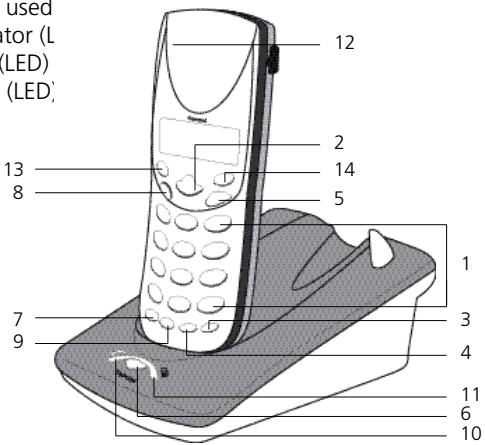
1 BUTTONS
1 Numerical buttons
2 Line button
3 Redial button
4 Flash button R
5 Memory button
6 Paging button (to retrieve the handset) •
7 Mute button
8 Set button
9 This button is not used
10 Paging/Line indicator (L
11 Charge indicator (LED)
12 Handset indicator (LED)
13 Button
14 → Button
2 INSTALLATION
- Plug one end of the phone cable into the phone unit and the other end into the telephone line wall socket.
- Connect the small plug of the AC adaptor to the phone and the other end of the adapter cable to the electric socket.
- Insert 3 rechargeable batteries (AAA) inside the battery compartment of the handset.
Put the handset on the base unit. The red Charge LED 📄 will burn. Charge the handset for a period of 24 hours before using the handset for the first time. To extend the battery life time, discharge the batteries completely from time to time. As soon as the handset emits a warning tone, you have to put it back on the base unit.
3 BATTERY EMPTY INDICATION
When the battery is empty, the handset no longer carries out operations. When a battery is completely empty and you have put the handset on the base unit for a short period of time, the Battery symbol will appear to be fully charged but this is actually not the case. The battery capacity will decrease rapidly. We advise you to put the handset on the base unit for the entire night so that it can be recharged thoroughly.
- Full battery [ ]
- Empty battery [ ]
When you are in the middle of a conversation and the battery is almost empty, the handset will emit a warning signal every 8 seconds. After 2 minutes the handset will be deactivated. Place the handset on the base unit to charge (the keypad upwards).
- Press the Line button ↗. You will hear the dial tone.
- Enter the desired telephone number.
- Press the Line button ↗ when you want to terminate the call.
4.1.2 Call setup with dial preparation
- Enter the desired telephone number. An incorrect number can be corrected by means of the Mute button ☑. When you haven't pressed a button for 20 seconds, the number you've already entered will disappear and the handset returns to standby mode.
- Press the Line button ↗. The number will be dialled automatically.
- Press the Line button ↗ when you want to terminate the call.
4.2 Incoming calls
- When a call comes in, only the handset will start to ring. The PHONE symbol 📞 blinks on the display.
- Press the Line button ↗ to answer the incoming call.
- When you pick up the handset from the base unit you are immediately connected to the caller. You do not need to press the Line button ↗.
This function has to be programmed before it can be used (see 4.17 Automatic answering).
4.3 Last number redial
- Press the Redial button ☐. The last number dialled appears on the display.
- Press the Line button. The number will be dialled automatically.
- Press the Line button when you want to terminate the call.
4.4 Programming memory numbers
You can program 10 indirect numbers (of max. 24 digits) in the phone's memory.
- Press the Set button →, followed by the Memory button →.
- Enter the memory location (0-9).
- Enter the telephone number you wish to save on this memory location.
- Press the Memory button ➤. You will hear a confirmation tone.
Remarks :
- All memory numbers will be erased when the default settings have been reset (see 4.18).
- If you wish to insert a pause, press the Redial button ☐ on the location where you want a pause.
4.5 Calling a memory number
- Press the Line button ↗.
- Press the Memory button →, followed by the number of the memory location (0-9).
- The memory number will be dialled automatically.
- Press the Line button ↗ when you want to terminate the call.
4.6 Babycall
This function allows you to program one specific number (memory location 0) that will be dialled automatically no matter what key has been pressed, except for the Set button. To activate this function, do the following :
- Press the Set button ↗.
- Press numerical button '6'.
- Press numerical button '1' to activate/deactivate this function.
- Press the Memory button ➤. You hear a confirmation tone.
Default setting : not activated
Important : Memory number [0] has to be programmed for this function. This function is not valid when "mem 0" is not programmed.
4.7 Mute function
It is possible to deactivate the microphone during a conversation. Now you can speak openly without being heard by your correspondent.
- Press the Mute button ⚙ during a conversation. The microphone will be deactivated. The MUTE symbol ⚙ appears on the display.
- Press the Mute button ✅ again when you want to continue the conversation.
4.8 Setting the volume
During a conversation you can set the volume by pressing the Set button ➕. The indication 'Loud Hi/Lo' appears on the display.
4.9 Paging
When you press the Paging button on the base unit, the handset emits a ringing signal for 1 minute. This signal helps you find a lost handset. The symbol 📋 blinks on the base unit. The message "PAGE" appears on the display.
4.10 Handset lock
When a particular number has been locked, every phone number, starting with this number, will be blocked and cannot be called.
- Press the Set button ↗.
- Press numerical button '8'.
- Enter the 4 digit PIN code (default 0000).
- Enter the number you want to lock (max. 3 digits). You can erase a digit by means of the Mute button Ⓧ.
- Press the Memory button ➤. The unit emits a confirmation tone. Default setting : no handset lock.
As soon as you dial the blocked number, "BARRING" is shown on the display. To remove a blocked number, follow the same instructions but erase the blocked number by pressing the Mute button Ⓧ.
4.11 Keypad lock
When the keypad is locked, the keypad buttons can no longer be pressed, except for the Set button ↗.
- Press the Set button ↗.
- Press numerical button '7'.
- '@' and 'Hold' are shown on the display.
Default setting : no keypad lock.
Follow the same instructions to deactivate this function.
4.12 Out of range warning
When the handset is out of the working range of the base unit during a conversation, the unit will emit a warning signal every two seconds to warn the user that he has to move closer towards the base unit. If the user is not in the working range of the base unit within 10 seconds, the connection will be broken.
4.13 Flash button (R)
When you press the R button, also called flash or recall, the unit generates a line interruption (of 100 ms). It gives you the possibility to use the special services of your telephone provider and/or to transfer calls when you have a telephone exchange.
4.13.1 Setting the Flash time
- Press the Set button ↗.
- Press the R button.
- The actual flash time is shown on the display.
- Press numerical button '1' several times to change the flash time (100ms, 260ms en 600ms).
- Press the Memory button → to confirm.
4.14 Activate/deactivate key tones
- Press the Set button ↗.
- Press numerical button '1'.
- Press numerical button '1' again to activate/deactivate this function.
- Press the Memory button →. The unit emits a confirmation tone.
Default setting : key tones activated.
4.15 Setting the ring melody
- Press the Set button ↗.
- Press numerical button '2'.
- Select the desired ring melody (1-4).
- Press the Memory button ➤. The unit emits a confirmation tone.
Default setting : ring melody 2
4.16 Setting the ring volume
- Press the Set button ➕.
- Press numerical button '3'.
- Select the desired ring volume (off, low, high) by pressing numerical button 1 repeatedly.
- Press the Memory button →. The unit emits a confirmation tone.
Default setting : ring volume high
4.17 Automatic answering
It is possible to program the unit in such a way that, when you receive a call, you only have to pick up the handset to connect directly to the external caller. It is no longer necessary to press the Line button ↗ first to accept the call.
- Press the Set button ➕.
- Press numerical button '4'.
- Press numerical button '1' to activate/deactivate this function.
- Press the Memory button ➤. The unit emits a confirmation tone. Default setting : off
Note : When a call comes in and the handset is not lying on the base unit, you always have to press the Line button ↗ to accept the call, even when the function 'Automatic answering' is activated.
4.18 Default settings (Reset)
If you want to reset the default settings of the unit, please take the following steps :
- Press the Set button ↗.
- Press numerical button '0'.
- Enter the 4 digit PIN code.
- Press numerical button '1' to select whether or not you want to reset the default settings, indicated by (y) yes or (n) no.
- Press the Memory button ➤. The unit emits a confirmation tone.
Note : When you reset the default settings, all memory numbers will be erased.
4.19 Programming the PIN code
When you change the PIN code, it is very important not to forget the new PIN code!
- Press the Set button ↗.
- Press button '#'.
- Enter the present 4 digit PIN code.
- Enter the new 4 digit PIN code.
- Press the Memory button ➤. The unit emits a confirmation tone.
Default setting : '0000'
4.20 Setting the display contrast
- Press the Set button ↗.
- Press numerical button '9'.
- Enter the desired contrast (1-9) by pressing numerical button '1' several times.
- Press the Memory button →.
5 CALLER-ID FUNCTION (CLIP)
The Cocoon 85/95 displays the telephone numbers of incoming calls. This function is only possible if you are subscribed to a telephone operator that provides this service. Contact your telephone provider for more information. When you receive a call, the numbers are saved in a call list. This list can hold 30 telephone numbers (each of max. 16 digits).
5.1 New calls
When you've received a new incoming call, the CLIP symbol 📋 appears on the display.
5.2 Consulting the Call list
When you consult the Call list, you will notice that the list always starts with the last call received.
- Press the Set button ➕.
- Press numerical button '5'.
- The number of new calls (ne) and the total number of calls (tot) appear on the display.
- Use numerical buttons 📁 and → to scroll through the list.
- When you reach the beginning of the Call list, 'END OF LIST' is shown on the display.
- When you reach the end of the Call list, 'TOP OF LIST' is shown on the display.
- When the telephone number is longer than the available space on the display, ‘->’ appears on the display. Press button ‘#’ to see the remainder of the number.
- You can leave the Call list by pressing the R button.
5.3 Calling a number from the Call list
- Scroll through the Call list until the desired number is shown on the display.
- Press the Line button ↗. The number will be dialled automatically.
5.4 Erasing a number from the Call list
(a) Erasing one telephone number
- Scroll through the Call list until the desired number is shown on the display.
- Press the Mute button ☑ twice to erase the number.
(b) Erasing the complete Call list
- Enter the Call list.
- Press the Mute button ☑ for 1 second. 'ERASE ALL?' appears on the display.
- Press the Mute button Ⓧ once again to erase the complete list.
6 WARRANTY
- This equipment comes with a 24-month warranty. The warranty will be honoured on presentation of the original bill or receipt, provided the date of purchase and the unit type are indicated.
- During the time of the warranty Topcom will repair free of charge any defects caused by material or manufacturing faults. Topcom will at its own discretion fulfil its warranty obligations by either repairing or exchanging the faulty equipment.
- Any warranty claims will be invalidated as a result of intervention by the buyer or unqualified third parties.
- Damage caused by inexpert treatment or operation, and damage resulting from the use of non-original parts or accessories not recommended by Topcom is not covered by the warranty.
- The warranty does not cover damage caused by outside factors, such as lightning, water and fire, nor does it apply if the unit numbers on the equipment have been changed, removed or rendered illegible.
Note: Please do not forget to enclose your receipt if you return the equipment.
Technical Data
| Range: | max. 300 m in open space |
| max. 50 m in buildings | |
| Dialling options: | DTMF (tone) or PULSE |
| Batteries: | 3 x 1.2V, 600 mAh AAA Type NiMh rechargeable |
| Max. standby time: | approx. 60 hours |
| Max. talk time: | 5,5 hours |
| Ambient temperature: | +5 °C to +45 °C |
| Permitted relative air humidity: | 25 to 85 % |
| Power supply base adapter: | 220/230V , 50 Hz |
1 TASTEN 37
2 INSTALLATION 37
3 BATTERIE LEER-ANZEIGE 38
4 BETRIEB TELEFON 38
4.1 Telefonieren 38
it's nice talking to you
www.topcom.be