
BIL69Tb2-B9-09 - Oven Vevor - Free user manual and instructions
Find the device manual for free BIL69Tb2-B9-09 Vevor in PDF.


Pick your language and provide your email: we'll send you a specifically translated version.
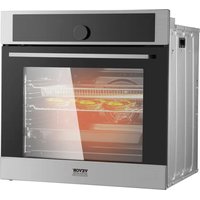
| Product Type | Oven |
| Brand | Vevor |
| Model | BIL69Tb2-B9-09 |
| Power Source | Electric |
| Temperature Range | 50 to 300 degrees Celsius (122 to 572 degrees Fahrenheit) |
| Heating Mode | Fan-assisted convection baking |
| Control Type | Rotary temperature dial, function selector, timer |
| Timer | 0-120 minutes with end-of-cycle bell |
| Interior Light | Yes |
| Capacity | Approximately 69 liters |
| Number of Shelves | 3 adjustable wire racks |
| Door Type | Drop-down door with heat-resistant glass |
| Safety Features | Overheat protection, temperature limiter, cool-touch handle |
| Temperature Indicator | Built-in heating indicator light |
| Interior Coating | Enamel-coated cavity for easy cleaning |
| Crumb Tray | Removable, dishwasher-safe crumb tray |
| Cooking Functions | Bake, roast, grill and convection modes |
| Voltage / Frequency | 220-240 V, 50/60 Hz |
| Rated Power | 2000 W |
| Dimensions (W x D x H) | Approximately 59.5 x 52.5 x 59.5 cm |
| Net Weight | Approximately 36.5 kg |
| Placement | Freestanding countertop or built-in style (check clearance) |
| Accessories Included | Wire racks, baking tray and crumb tray |
| Durability | Stainless steel body and tempered glass door |
| Servicing | Replacement heating elements and thermostats available from Vevor |
Frequently Asked Questions - BIL69Tb2-B9-09 Vevor
How do I clean the oven after use?
Wait for the oven to cool completely, remove the crumb tray and wash it with warm soapy water. Wipe the enamel cavity with a damp cloth. Do not use abrasive cleaners on the stainless steel finish.
Why does the oven give off a smell the first time I use it?
New ovens often emit a harmless odor caused by protective oils evaporating during the first high-temperature use. Run the oven at 230 degrees Celsius for about 30 minutes while empty in a ventilated room.
Can I use the oven and the grill at the same time?
Depending on the switch position, the oven may operate in combined modes. Always follow the function selector positions indicated in the manual and do not force the dial.
What do I do if the oven does not heat up?
Check the power cord, the mains socket and the circuit breaker. Make sure the thermostat is set above room temperature and that the function selector is not in the off position. If the fault persists, contact Vevor support.
How do I set the cooking timer?
Turn the timer dial clockwise to the desired minutes, up to 120, then set the thermostat and function selector to the required cooking mode. A bell rings at the end of the countdown.
What is the maximum temperature of this Vevor oven?
The temperature range is from 50 to 300 degrees Celsius, allowing gentle heating as well as high-heat roasting and baking.
How do I replace the interior light bulb?
Unplug the oven and let it cool. Remove the glass cover, take out the old bulb and install a new E14 heat-resistant bulb rated for 300 degrees Celsius. Refit the cover securely.
Can I put metal trays directly on the bottom of the oven?
No, always place trays or pans on wire racks. Placing cookware on the bottom can scratch the enamel and block heat circulation.
How do the heating modes work?
The function selector lets you choose top heat, bottom heat, top and bottom heat, plus the fan-assisted convection mode. Use the matching position for cakes, roasts or grilling.
What spare parts are available for the BIL69Tb2-B9-09?
Vevor offers replacement heating elements, thermostats, door gaskets, handles and knobs. Always use genuine parts to preserve safety and performance.
User questions about BIL69Tb2-B9-09 Vevor
0 question about this device. Answer the ones you know or ask your own.
Ask a new question about this device
No questions yet. Be the first to ask one.
Download the instructions for your Oven in PDF format for free! Find your manual BIL69Tb2-B9-09 - Vevor and take your electronic device back in hand. On this page are published all the documents necessary for the use of your device. BIL69Tb2-B9-09 by Vevor.
USER MANUAL BIL69Tb2-B9-09 Vevor
Manual assistant
Powered by Anthropic
Waiting for your message
Product information
Brand : Vevor
Model : BIL69Tb2-B9-09
Category : Oven