KH 2257 - Portable CD player EBENCH - Free user manual and instructions
Find the device manual for free KH 2257 EBENCH in PDF.


User questions about KH 2257 EBENCH
0 question about this device. Answer the ones you know or ask your own.
Ask a new question about this device
Download the instructions for your Portable CD player in PDF format for free! Find your manual KH 2257 - EBENCH and take your electronic device back in hand. On this page are published all the documents necessary for the use of your device. KH 2257 by EBENCH.
USER MANUAL KH 2257 EBENCH
Operating Instructions
Operating Instructions
eBench KH 2257/2258/2259/2260
Portable MP3-CD Player with electronic digital anti-shock system
Contents
- Technical data 4
- Included 4
3.Use 4 - Functions 5
- Controls, displays and connections 6
5.1. Controls on the CD player 6
5.2. Displays on the CD player 7
5.3. Connections on the CD player 7
KH 2257 8
KH 2259. 8
KH 2258. 9
KH 2260 9
5.4. Controls on the remote control 10
5.5. Displays on the remote control 10
5.6. Connections on the remote control 10 - Point of installation, operating conditions and safety instructions 11
- Getting started 13
7.1. Connecting to the power supply 13
7.1.1.Mains operation 13
7.1.2. Battery operation 14
7.1.2.1.Exchanging batteries 15
7.1.2.2. Charging rechargeable batteries 16 - Conventional audio CDs 18
8.1.Playback 18
8.2.Setting the playback volume 20
8.3. Switching on Bass Boost 21
8.4. Stopping playback (PAUSE mode) 21
8.5.Ending playback 22
8.6. Selecting a track 22
8.6.1. Skip forward/back to the beginning of a track 22
8.6.2. Skip 10 tracks forward 23
8.7. Fast search forward/back 24
8.8. Programming a compilation of tracks (PROGRAM function) 24
8.9.Intro play function 26
8.10.Random playback (SHUFFLE) 27
8.11. Repeat functions 28
8.11.1. Repeat playback of a single track 28
8.11.2. Repeat playback of all CD tracks 28
9.MP3-CDs. 29
9.1.Playback 29
9.2. Title selection 30
9.3. Skip forward by 10 titles 31
9.4.Intro play function 32
9.5.Random playback (SHUFFLE) 32
9.6. Repeat functions 33
9.6.1. Repeated playback of a single title 33
9.6.2. Repeated playback of a title of a directory 34
9.6.3. Repeated playback of all MP3-CD titles 34
9.7. Programming a compilation of titles (PROGRAM function) 35
9.8. Selecting tracks by their name 37
10. Equalizer function 38
11. Button lock (HOLD) 39
12. Switching off the MP3-CD player 40
13. Connecting and using the accessories 40
13.1. Remote control 40
13.2. Line-OUT cable 41
13.3.Caradapter set 42
13.3.1. Function 42
13.3.2.Use 43
13.3.3.Setting up 43
13.3.4.After use 44
14. Cleaning 45
15. Functional faults 45
1. Technical data
Mains:
AC adapter/alternating current: 230V 50Hz or DC/direct current: 1.2V - 2× AA -type
Laser
3-beam laser
Frequency
response
100 Hz to 16 kHz
2. Included
- MP3-CD player
- Mains adapter
- Headphones
- Remote cable control
- Line-OUT cable (chinch to 3.5mm jack plug)
- Two rechargeable NiCd batteries (AA-type, 1.2 V)
- Protective bag
- Auto-adapter set:
a) CD cassette adapter
b) Mains adapter for in-car cigarette lighter socket
3.Use
The eBench KH 2257/2258/2259/2260 Portable MP3-CD Player is intended exclusively for ...
An entertainment electronics system
To playback audio CDs, CR-Rs and CR-RW with data in audio CD format (.cda) and MP3 format (.mp3)
- For stationary and mobile use (e.g. in a car)
For private, non-commercial use
The following can be used for the output of speech or music ...
- The supplied headphones or headphones with a 3.5mm jack plug connection
- Loudspeakers with a 3.5mm jack plug connection
- Other external HiFi units (connection by way of the supplied line-OUT cable)
4. Functions
- Playback of audio CDs, CD-Rs and CD-RWs with data in audio-CD format (.cda) and MP3 format (.mp3) up to 256 kbps.
- "ESP" Electronic digital anti-shock system with 45 seconds (conventional audio CDs) and 120 seconds (MP3 CDs) interim storage.
- Track name display with up to 11 characters (ISO Level 1) or 31 characters (ISO Level II).
Automatic display of title information ("ID 3 days"). - Skip and fast search function forward/back
- Program function for individually programmed track compilations
- Repeat functions for repeated playback of individual tracks, programmed track compilations, directories and all CD tracks.
Shuffle function for random playback. - Intro Play to playback the beginning of all CD tracks
-
Bass Boost System.
Automatic switch-off (30 seconds). -
Battery change indication on the LCD display.
- Charging suitable batteries in the unit, incl. charge indication.
Key lock.
Warning!
We do not accept any liability/warranty for damage incurred as a result of incorrect use!
5. Controls, displays and connections
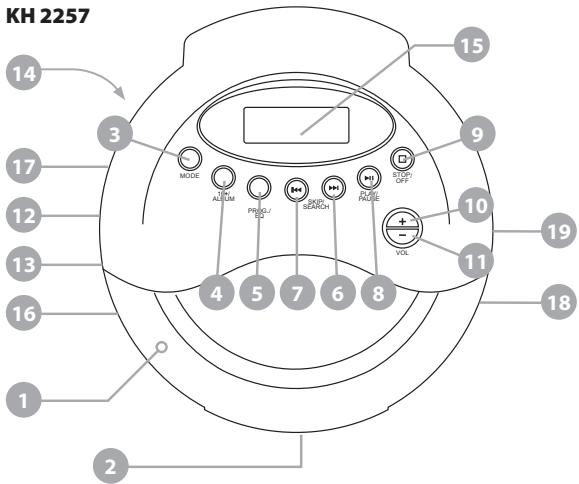
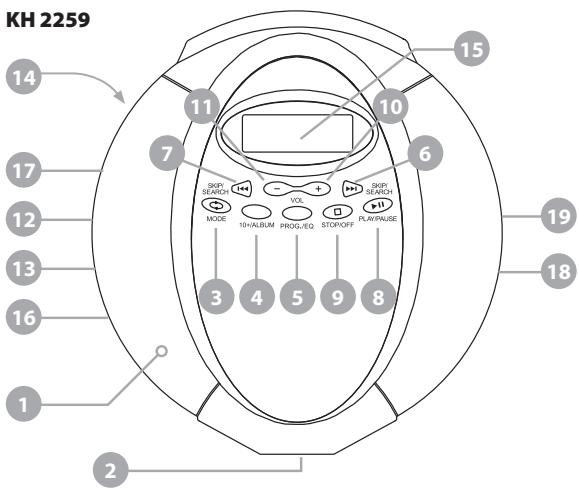
5.1. Controls on the CD player
- CD compartment
- "OPEN" slide
- "MODE" button
- "10+/ALBUM" button
- "PROG./EQ" button
- "SKIP/SEARCH▶" button
- "SKIP/SEARCH ←" button
- "PLAY/PAUSE II" button
- "STOP ■" button
- "VOLUME +" button
- "VOLUME - " button
- "HOLD" slide
- "Bass Boost OFF/ON" slide
- "CHARGE" slide
5.2. Displays on the CD player
- LCD display
- "CHARGE" display
5.3. Connections on the CD player
- "DC 4.5V" connection for mains adapter
- "PHONES" socket for headphones or remote cable control
- "Line OUT" socket for chinch cable
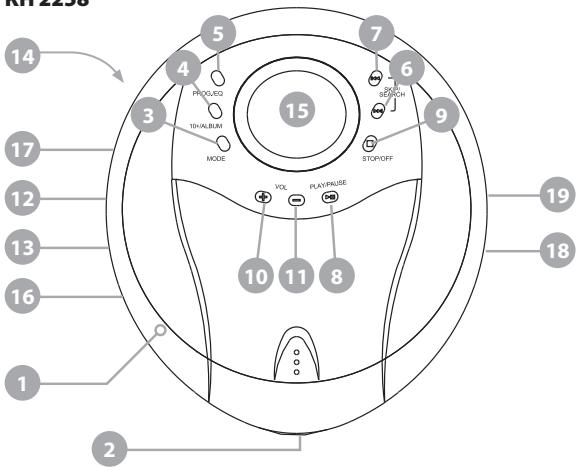
KH 2258
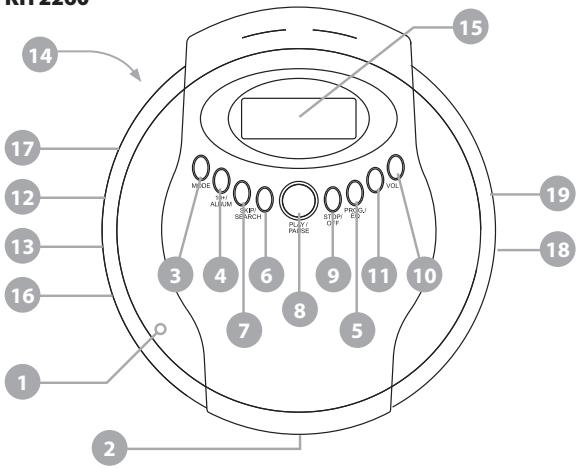
KH 2260
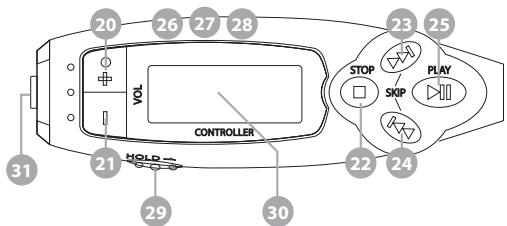
5.4. Controls on the remote control
- "+" button
- "--" button
- "■" button
- "▶" button
- "▶" button
- " II" button
- "MODE" button
- "10+/ALBUM" button
- "PROG./EQ" button
- "HOLD" slide
5.5. Displays on the remote control
- LCD display
5.6. Connections on the remote control
- Headphones socket
6. Point of installation, operating conditions and safety instructions
Place the MP3-CD player, be it for stationary use, - e.g. at home or when en route, on a level, smooth non-slip base so that the CD player cannot slip. This applies particularly when the CD player is operated in a car.
To prevent damage, functional interference and the danger of an electric shock do not use the set ...
- ... In the immediate vicinity of heat sources such as stoves, fan heaters and similar appliances! Exposure to heat can cause the set to overheat and the risk of melting plastic parts, thereby causing irreparable damage!
Do not leave the MP3-CD player at high temperatures in the car, particularly on sunny days when the interior of the car can become very hot!
Ensure that the MP3-CD player is not exposed to direct sunlight in a car (e.g. directly behind the windscreen).
Warning!
Set overheating gives rise to the danger of a fire!
- ... In damp surroundings, for instance in basements or in a sauna! Moisture entering the CD player can cause functional problems and irreparable damage!
- ... Not in the immediate vicinity of water, for instance in a bathroom or near a swimming pool. Never place any water-filled containers, for instance a flower vase, on the CD player.
Warning!
Moisture entering the CD player can result in the danger of electric shock!
Please note!
No liability/warranty is accepted for damage to the player as a result of the following:
- Exposure to moisture
Water entering the set
Overheating
7. Getting started
7.1. Connecting to the power supply
The Portable MP3-CD player can be operated with ...
the supplied mains adapter plugged into a mains socket
or with batteries
7.1.1. Mains operation
To operate the Portable MP3-CD player from the mains ...
1 Insert the plug on the cable of the mains adapter in the "DC 4.5V" socket on the left-hand side of the portable MP3-CD player.
2 Plug the mains adapter into a mains socket. The Portable MP3-CD player is automatically switched over to mains operation. This means that any batteries which may be in the battery compartment do not have to be removed.
The portable CD player is now operational.
Warning!
The use of unsuitable mains cables from other appliances can give rise to the danger of an electric shock!
Please note!
Only use the supplied mains adapter to connect the Portable MP3-CD player to the mains! The use of mains adapters that were not intended for the Portable MP3-CD player can result in irreparable damage to the player!
7.1.2. Battery operation
Proceed as follows to operate the Portable MP3-CD player with batteries ...
1 Set "OFF" with the "CHARGE" slide on the underside of the MP3-CD player.
2 Open the CD compartment by pushing the "OPEN" slide to the right.
3 Open the battery compartment cover inside the CD compartment and remove.
4 Place the supplied rechargeable NiCd batteries (AA-type, 1.2 V), or conventional NiMh batteries (AA-type, 1.5 V, non-rechargeable) in the battery compartment. Ensure that the batteries are inserted into the battery compartment according to their polarity – as indicated inside the battery compartment
Warning!
Never try to recharge conventional, non-rechargeable NiMh batteries! Ensure that the "CHARGE" slide on the underside
of the MP3-CD player is definitely set at "OFF" beforehand otherwise the player and the batteries will suffer irreparable damage!
5 Return the battery compartment cover and press down until it becomes audibly locked in place. Close the CD compartment by pressing down the cover until it is audibly locked in place.
The portable CD player is now operational.
7.1.2.1. Exchanging batteries
The batteries must be exchanged when the battery symbol on the LCD display flashes.

Always exchange both batteries to operate the Portable MP3-CD player with full power or connect the player with the mains adapter to the mains socket.
Please note:
Spent batteries must not be disposed of in the domestic waste. Hand in spent batteries at collecting or waste-disposal points or return them to the place where they were purchased. If you eventually dispose of the Portable MP3-CD player yourself, then ensure that the batteries are removed beforehand!
7.1.2.2. Charging rechargeable batteries
Rechargeable NiCd batteries, AA-type 1.5 V, can be recharged in the battery compartment of the MP3-CD player within approx. 15 hours.
Rechargeable batteries must first be recharged prior to their use if they are ...
- New (as the included batteries) or
- Have not been used for an extended period (more than 60 days).
Proceed as follows to charge the rechargeable batteries in the MP3-CD player ...
1 Open the CD compartment by pushing to the right the "OPEN" slide on the front of the CD player.
2 Open the battery compartment inside the CD compartment and insert two rechargeable NiCd batteries, AA-type 1.2V , in the battery compartment. Ensure that the batteries are inserted into the battery compartment according to their polarity – as indicated inside the battery compartment.
3 Return the battery compartment cover and press down until it is audibly locked in place. Close the CD compartment by pressing down the cover until it is audibly locked in place.
4 Insert the plug on the mains adapter cable into the "DC
4.5V" socket on the left-hand side of the Portable MP3-CD player.
5 Plug the mains adapter into a mains socket.
6 To start charging the batteries set "ON" with the "CHARGE" slide on the underside of the MP3-CD player. The "CHARGE" display on the left-hand side will now light up in red.
Warning!
Only use the supplied mains adapter to charge the rechargeable batteries in the MP3-CD player!
Battery charging continues ...
During CD playback or
after the MP3-CD player has been switched off.
7 After 15 hours charging set "OFF" with the "CHARGE" slide and disconnect the mains adapter from the mains socket.
Info:
Rechargeable batteries should always be fully discharged before they are recharged, otherwise they can suffer a serious decline of their storage capacity (Memory Effect)!
If the performance of the MP3-CD player declines drastically during battery operation, even through the rechargeable
batteries have been correctly recharged, then all batteries should be exchanged for new rechargeable NiCd batteries or non-rechargeable NiMh batteries.
Following first-time charging, or if the CD player has not been used for an extended period, the playback time may be shorter. In this case the batteries should be fully discharged and fully recharged several times.
8. Conventional audio CDs
8.1. Playback
1 Open the CD compartment by pushing to the right the "OPEN" slide on the front of the player.
Prior to first-time use:
Remove the cardboard transport protection from the CD compartment.
2 Insert the jack plug of the supplied headphones into the "PHONES" socket on the right-hand side of the MP3-CD player.
3 Place a CD - label side up - on the axle in the middle of the CD compartment. Press the CD down lightly until it is perceptibly engaged.
4 Close the CD compartment by pressing down the cover until it is perceptibly engaged.
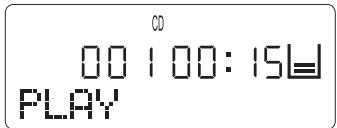
5 Press the "PLAY/PAUSE" button. "READING" now appears on the display and the MP3-CD player now reads in the information from the loaded CD.
The first track of the loaded audio CD is then automatically played.
The following is indicated on the display:
Info
ESP is the abbreviation for "Electronic Shock Protection" system of the eBench KH 2257/2258/2259/2260 Portable MP3-CD Player. The ESP system is automatically switched on when playing audio and MP3 CDs. The system ensures that playback of CDs, MP3-CDs, CD-Rs and CD-RWs is not impaired when the player is exposed to shocks and vibrations.

The digital data of the loaded CD, equalling a playback period of 40 seconds, is temporarily stored in a read-ahead memory buffer. As soon as this memory is full – recognisable by the bar in the memory display of the LCD display – the
next data from the loaded CD is overwritten (once again 40 seconds of playback).
If the player is exposed to a shock during playback, then the data stored in the read-ahead memory buffer is read out for interference-free playback. This gives the laser scanner time to re-stabilise and read in new data from the CD. After the data from the read-ahead memory buffer have been collected, new data are transferred to the memory.
Please note!
The ESP system cannot prevent damage to the MP3-CD player as a result of jolts or vibrations or if the player is dropped! Ensure that the MP3-CD player is transported or stands as vibration-free as possible and that it cannot fall down from its location point.
The MP3 DC player can be irreparably damaged by shocks and vibrations or if it falls down!
6 The first track on the audio CD is then played.
The following is then possible ...
8.2. Setting the playback volume
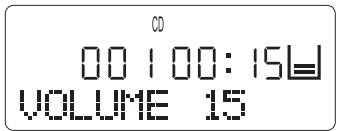
Set the required playback volume with "VOLUME+" (for louder) and "VOLUME -" (for softer). The currently set volume is indicated between "Volume 01" (sound OFF) and "Volume 32" (maximum volume).
8.3. Switching on Bass Boost
Switching on the Bass Boost system ensures more faithful rendi tion of the low frequencies (bass) to produce a more "saturated" sound of greater volume.
Set "ON" with the "Bass Boost" slide on the left-hand side of the MP3-CD player to switch on the Bass Boost system.
Set "OFF" with the "Bass Boost" slide to switch off the Bass Boost system.
8.4. Stopping playback (PAUSE mode)
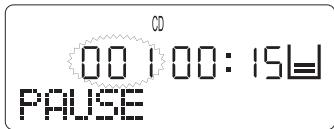
To stop audio CD playback press the "PLAY/PAUSE" button once. The MP3-CD player is then in PAUSE mode. "PAUSE" is indicated on the LCD display and the number of the currently stopped track flashes.
Press the "PLAY/PAUSE" button once to continue playback.
The current track is continued from the point it was stopped.
8.5. Ending playback
Press the "STOP/OFF" button once to end playback. The MP3-CD player is then in STOP mode and the following is indicated on the display ...
The total number of tracks on the loaded CD
The total playing time of all tracks on the loaded CD

8.6. Selecting a track
8.6.1. Skip forward/back to the beginning of a track
Proceed in the following manner to skip within a track on an audio CD forward/back to the beginning of a track ...
a) ... during CD playback:
1 Continue pressing the "SKIP/SEARCH " button (skip forward to the beginning of the next track) or "SKIP/SEARCH " button (skip back to the beginning of the last track), until the number of the desired track is indicated on the display.
2 Track playback commences immediately without having to press the "PLAY/PAUSE" button.
b) ... during stopped CD playback (PAUSE mode):
1 Continue pressing the "SKIP/SEARCH " button (skip forward to the beginning of the next track) or "SKIP/SEARCH " button (skip back to the beginning of the last track), until the number of the desired track is indicated on the display.
2 Track playback commences immediately without having to press the "PLAY/PAUSE" button.
c) ... during stopped CD playback (STOP mode):
1 Continue pressing the "SKIP/SEARCH " button (skip forward to the beginning of the next track) or "SKIP/SEARCH " button (skip back to the beginning of the last track), until the number of the desired track is indicated on the display.
2 Press the "PLAY/PAUSE" button once to start playback.
8.6.2. Skip 10 tracks forward
Press the "10+/Album" button to skip 10 tracks forward on the loaded CD during playback.
If the "10+/Album" button is pressed during playback or PAUSE mode, then playback of the selected track is instant without having to press the "PLAY/PAUSE" button.
If the "10+/Album" button is pressed in STOP mode, then the "PLAY/PAUSE" button has to be depressed to playback the selected track.
8.7. Fast search forward/back
Proceed in the following manner to select a certain section within a track that is being played in fast search forward/back ...
1 Keep the "SKIP/SEARCH " button depressed during playback of the desired track for rapid forward search.
Keep the "SKIP/SEARCH "button depressed during playback of the desired track for rapid back search.
2 Release the "SKIP/SEARCH "or "SKIP/SEARCH "button as soon as the desired section within the track is reached.
Playback of the track at the selected point starts automatically.
8.8. Programming a compilation of tracks (PROGRAM function)
You can compile your own music programme with the program function merely by selecting certain tracks on the loaded audio CD for repeat. Moreover, you can decide the sequence in which the titles are to be played.
Proceed in the following manner to program your own track compilation for playback ...
1 In the event that a CD is loaded in the CD compartment of the MP3-CD player and is already being played, then press the "STOP/OFF" button to terminate playback.
2 Press the "PROG./EQ" button once. The display indicates the following:
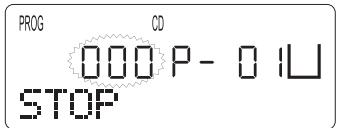
3 Continue pressing the "SKIP/SEARCH" or "SKIP/SEARCH" button until the number of the first program storage place for the desired track is indicated on the LCD display.
4 Then press the "PROG./EQ" button once to program the selected track. "P-O2" is indicated on the display for the second program storage place that is to be programmed.
5 Repeat steps 3. and 4. until all tracks for your compilation of tracks have been programmed in the desired sequence. Up to 99 tracks can be programmed in this manner.
6 Press the "PLAY/PAUSE" button once to start playback of the programmed compilation of tracks.
To end playback of the compiled tracks press the "STOP/OFF" button once. The programmed compilation of tracks continues to be stored and the display continues to indicate "PROG".
To renew playback of the programmed compilation of tracks press the "PLAY/PAUSE" button once again.
To switch off the program function press the "STOP/OFF"
button twice during playback. This ends the program function, "PROG" is faded out on the display and the programmed compilation of titles is deleted.
The player is automatically transferred to STOP mode after all programmed tracks have been played. The programmed tracks continue to be stored until ...
You open the CD compartment
- You switch off the player by depressing the "STOP" button.
- The MP3-CD player is automatically switched off after 30 seconds.
8.9. Intro play function
The first 10 seconds of all tracks of the loaded CD are played one after the other in the Intro play function.
Proceed in the following manner to switch on the Intro play function ...
1 If a CD is being played, then end playback by pressing the "STOP" button once.
1 Press the "MODE" button three times. "INTRO" appears on the display. Then press the "PLAY/PAUSE" button once to start the Intro play function.
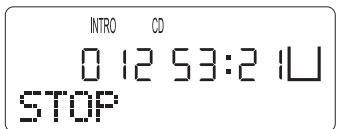
To end the Intro play function press the "STOP" button once; "INTRO" is faded out on the display.
8.10.Random playback (SHUFFLE)
With the "SHUFF" function it is possible to play all tracks of a loaded CD in a random sequence.
Proceed in the following manner to switch on random playback ...
1 In the event that a CD is being played, then first end playback by pressing the "STOP" button once.
2 Press the "MODE" button four times; "SHUFF" appears on the display.
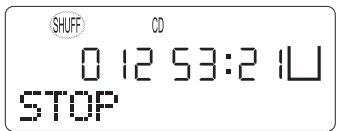
3 Press the "PLAY/PAUSE" button to start random playback.
Proceed in the following manner to end "SHUFF" random playback ...
- Press the "MODE" button once. "SHUFF" is faded out on the display and playback of the current track is continued. or
- Press the "STOP" button once. "SHUFF" is faded out on the
display and playback of the current track is terminated. The MP3-CD player is now in STOP mode.
8.11. Repeat functions
The following can be set with the repeat functions ...
- Repeat a single track of an audio CD and
repeat the entire audio CD
8.11.1. Repeat playback of a single track
To repeat playback of a single track on the loaded CD press the "MODE" button once during playback of the desired title. "REPT 1" appears on the LCD display.
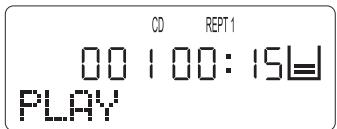
The selected track continues to be repeated until ...
- Press the "STOP" button once to end repeat playback.
- Press the "MODE" button four times to return to normal playback mode.
8.11.2. Repeat playback of all CD tracks
To repeat all tracks on the loaded CD press the "MODE" button twice during playback of a track. "REPT ALL" appears on the LCD display.
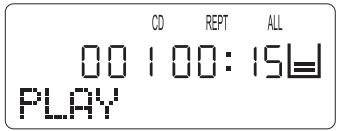
The entire loaded CD continues to be repeated until ...
- The "STOP" button is pressed once to end playback. or
- The "MODE" button is pressed three time to return to normal playback mode.
9. MP3-CDs
9.1. Playback
1 Open the CD compartment, load an MP3-CD and close the CD compartment.
2 Then press the PLAY/PAUSE" button.
"READING" appears on the display and the MP3-CD player now reads the information on the loaded MP3-CD.
Please note:
Due to the enormous recording capacity of MP3 discs the read-in/scanning times are somewhat longer than with conventional audio CDs.
3 The first title in the first directory of the loaded MP3-CD is
now automatically played and the following is indicated on the display:
MP3
0100100:09国
TRACKNAME
If the title designation under which a currently playing PM3-file was stored on the loaded CD (e.g. song title and artist) is too long to be shown in its entirety on the display, then the title designation is continuously scrolled to the left during playback.
9.2. Title selection
Titles in MP3 mode can be selected with the "SKIP/SEARCH " or "SKIP/SEARCH " button in a similar manner as with audio CD playback.
To select a title first select in MP3 mode the file in which the desired title is located, and then select the desired title.
1 Hold down the "10+/Album" button during playback in PAUSE or STOP mode until the number of the current file starts to flash on the LCD display.
MP3

00100:09国
TRACKNAME
2 Continue pressing the "SKIP/SEARCH" or "SKIP/SEARCH"
button until the number and designation of the desired file is indicated on the display.
3 Then press the "PLAY/PAUSE" button to playback the first title of the selected file.
4 Continue pressing the "SKIP/SEARCH " or "SKIP/SEARCH " button until the number and designation of the desired file is indicated on the display.
Track playback starts immediately without having to press the "PLAY/PAUSE" button.
If the title currently indicated on the display is the last title in the current file, then the MP3 player will change over to the first title of the next file when if the "SKIP/SEARCH " button is depressed.
9.3. Skip forward by 10 titles
Press the "10+/Album" button to skip 10 titles forward during playback in STOP and PAUSE mode within the music titles of a directory on the loaded MP3-CD.
If the "10+/Album" button is pressed during playback or when in PAUSE mode, then playback of the selected titles starts instantly without having to press the "PLAY/PAUSE" button.
If the "10+/Album" button is pressed in STOP mode, then the "PLAY/PAUSE" button must be pressed to start playback of the selected title.
9.4. Intro play function
The first 10 seconds of all tracks of the loaded CD are played one after the other in the Intro play function.
Proceed in the following manner to switch on the Intro play function ....
1 If a CD is being played, then end playback by pressing the "STOP" button once.
2 Press the "MODE" button four times. "INTRO" appears on the display.
3 Then press the "PLAY/PAUSE" button once to start the Intro play function.
To end the Intro play function ...
- press the "STOP" button once; "INTRO" is faded out on the display.
The MP3-CD player is now in STOP mode.
9.5. Random playback (SHUFFLE)
With the "SHUFF" random playback function it is possible to play all tracks of a loaded CD in a random sequence.
Proceed in the following manner to switch on random playback ...
1 In the event that a CD is being played, then first end playback by pressing the "STOP" button once.
2 Press the "MODE" button five times; "SHUFF" appears on the display.
3 Press the "MODE" button to start random playback.
Proceed in the following manner to end "SHUFF" random playback ...
- Press the "MODE" button once. "SHUFF" is faded out on the display and playback of the current title continues or
- press the "STOP" button once. "SHUFF" is faded out on the display and playback of the current title is terminated. The MP3-CD player is now in STOP mode.
9.6. Repeat functions
The following can be set with the repeat functions ...
Repeat a single title of an MP3-CD
Repeat all titles of an MP3-CD directory
Repeat the entire MP3-CD
9.6.1. Repeated playback of a single title
To repeat a single music title of a loaded MP3-CD press the "MODE" button during playback of the desired title. "REPT 1" appears on the LCD display.
The selected title will then be continuously repeated until ...
- The "STOP" mode is pressed to end playback or
- Press the "MODE" button five times to return to normal playback mode.
9.6.2. Repeated playback of a title of a directory
To repeat playback of all titles of a directory on a loaded MP3-CD, press the "MODE" button twice during playback of a title from the desired directory; "REPT DIR" is indicated on the LCD display.
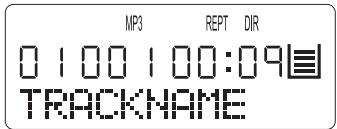
The titles of the selected directory will be played one after the other until ...
The "STOP" button is pressed to end playback or
- The "MODE" button is pressed four times to return to normal playback mode
9.6.3. Repeated playback of all MP3-CD titles
To repeat playback of all titles of a loaded MP3-CD, press the "MODE" button three times during playback of a title; "REPT ALL" is indicated on the LCD display.
The entire loaded CD will continue to be played until ...
- The "STOP" button is pressed to end playback or
the "MODE" button is pressed three times to return to normal playback mode
9.7. Programming a compilation of titles (PROGRAM function)
Proceed as follows to program your own compilation of titles for playback ...
1 In the event that an MP3-CD is being played, then press the "STOP" button once to terminate playback.
2 Press the "PROG./EQ" button once. "01" will flash on the display.
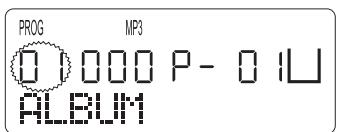
3 Select with the "SKIP/SEARCH " or "SKIP/SEARCH " button the directory holding the first title that you wish to program.
4 Press the "PROG./EQ" button once again. The title number
"000" will flash on the display.
5 Select with the "SKIP/SEARCH " or "SKIP/SEARCH " button the desired title within the selected directory.
6 Press the "PROG./EQ" button once again to program the selected title.
7 Repeat steps 3. to 6. until all music titles for your compilation have been programmed in the desired sequence. Up to 99 tracks can be programmed in this manner.
8 Press the "PLAY/PAUSE" button once to start playback of the programmed compilation of titles.
To end playback of the compilation press the "STOP/OFF" button once. The programmed compilation continues to be stored and the display continues to indicate "PROG".
To renew playback of the programmed compilation press the "PLAY/PAUSE" button once again.
To switch off the program function press the "STOP/OFF" button twice during playback. This ends the program function, "PROG" is faded out on the display and the programmed compilation of titles is deleted.
The player is automatically transferred to STOP mode after all programmed titles have been played. The programmed tracks continue to be stored until ...
You open the CD compartment
- You switch off the player by depressing the "STOP" button.
- The MP3-CD player is automatically switched off after 30 seconds in STOP mode.
9.8. Selecting tracks by their name
With MP3-CDs it is possible to search for tracks on the loaded MP3-CD by entering the beginning of the track name.
The entry is then compared with the first 8 places of the track names on the MP3-CD. Consequently it is necessary to ensure that you are aware of the title designation system of the loaded MP3-CD (e.g. whether the name of the artist or the name of the title has been stored).
Conducting a search by track names ...
If an MP3-CD is being played, then end playback by pressing the "STOP" button once.
2 Then hold down the "MODE" button; "SEARCH NAME" briefly appears on the display after which the letter "A" will start to flash at the first place of the track name.
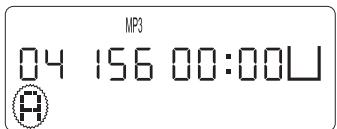
3 Continue pressing the "SKIP/SEARCH" or "SKIP/SEARCH" button until the first letter, the first numeral or the first char-
acter of the desired title is indicated on the display.
4 Press the "MODE" button to select the displayed letters, numerals or characters.
5 A second "A" will then flash on the display at the second place of the track name. Repeat the steps 3. and 4. to enter further letters, numerals or characters of the desired track name.
Between one and eight letters, numerals or characters can be entered. The more letters, numerals and/or characters that are entered, the greater the accuracy of the search.
6 When entry has been completed press the "PLAY/PAUSE" button to start the search.
7 When a title is found that corresponds with the given entry, then it will appear on the display, followed by automatic playback.
If several titles are found that correspond with the given entry, then all located titles are played one after the other.
If no title is found that corresponds with the given entry, then "NOT FOUND" appears on the display.
10. Equalizer function
The music can be played with differing equalizer curves. It is possible to choose between DBB, Pop, Classic, Jazz, Rock and Normal. Each equalizer curve has its own characteristic
enhancement of the treble tone, middle tone and bass so that the different styles of music can be played according to personal preference.
Proceed in the following manner to set different equalizer curves ...
1 Press during playback the "PROG./EQ" button. "DBB" will appear for three seconds on the display instead of "PLAY".
This indicates that the "DBB" equalizer curve has been switched on.
2 With each further depression of the "PROG./EQ" button another equalizer curve is set in the following sequence:
DBB Pop Classic Jazz Rock Normal
The designation of the selected equalizer curve is shown for approx. three seconds on the display instead of "PLAY".
The equalizer function is turned off in the "Normal" setting.
11. Button lock (HOLD)
All buttons on the MP3-CD player are blocked when the button lock is activated, thereby excluding the possibility of accidental operation, e.g. when the MP3-CD player is placed in a pocket.
To activate button lock set "HOLD" by pushing the slide on the left-hand side of the MP3-CD player to the right; "HOLD"
appears on the display.
To switch off button lock push the "HOLD" slide back towards the left. The "HOLD" symbol disappears from the display.
12. Switching off the MP3-CD player
To switch off the MP3-CD player press the "STOP" button once during title playback. The MP3-CD player is then in "STOP" mode.
Press the "STOP/OFF" button once again in STOP mode. The display indicates "POWER OFF" and the MP3-CD player switches itself off.
The MP3-CD player automatically switches itself off ...
30 seconds after all tracks of the loaded audio or MP3-CD have been played.
30 seconds after all titles of a programmed compilation have been played.
30 seconds after the STOP mode was switched on.
13. Connecting and using the accessories
13.1. Remote control
When the remote control is connected to the MP3-CD player all functions of the player can be operated by the remote control.
Functions of the remote control buttons equivalent to...
Button on the remote control Button on the player
| + | Vol + |
| - | Vol - |
| ► II | Play/Pause► II |
| ■ | Stop/Off■ |
| ► | Skip/Search► |
| ← | Skip/Search← |
To connect the supplied remote control with the MP3-CD player insert the plug on the remote control cable in the "PHONES" headphones socket on the right-hand side of the MP3-CD player.
When the remote control is connected to the MP3-CD player, then...
The headphones
The speaker with the 3.5mm jack plug
must be connected with the headphones socket of the remote control instead of the "PHONES" headphones socket on the MP3-CD player.
13.2. Line-OUT cable
The supplied Line-OUT cable (chinch to 3.5mm jack plug) can be used to connect external HiFi units to the MP3-CD player.
For this purpose proceed as follows ...
1 Insert the 3.5mm jack plug of the line-OUT cable into the Line-OUT socket on the right-hand side of the MP3-CD player.
2 Insert the chinch plug in the chinch sockets of the HiFi system that is to be connected to the MP3-CD player.
13.3.Caradapterset
13.3.1. Function
The car adapter set consists of ...
CD cassette adapter
Cigarette lighter power adapter
The car adapter set is used to operate the MP3-CD player inside a car. Use the ...
- CD cassette adapter to connect the MP3-CD player to a car radio with cassette deck so that the in-car speakers can be used to reproduce speech and music.
- Cigarette lighter adapter to operate the MP3-CD player connected to the car's radio from the car's power system instead of with batteries.
Warning!
The eBench KH 2257/2258/2259/2260 portable MP3-CD player must only be used with the supplied cigarette lighter power adapter. The use of any other cigarette lighter po
wer adapter could cause irreparable damage to the portable MP3-CD player.
13.3.2.Use
The CD cassette adapter is exclusively intended for the operation of the portable MP3-CD player in connection with an existing in-car cassette radio and its speakers.
The cigarette lighter power adapter is exclusively intended for supplying power to the eBench KH 2257/2258/2259/2260 portable MP3-CD player from the car's cigarette lighter socket.
13.3.3.Setting up
1 Remove the car's cigarette light from its socket.
2 Insert the large plug of the cigarette lighter adapter cable firmly into the cigarette lighter socket.
Please note!
If the inside of the cigarette lighter socket is found to be dirty - e.g. cigarette ashes - then ensure that it is thoroughly cleaned before the adapter cable is inserted! Otherwise, overheating may arise and this could cause irreparable damage to the MP3-CD player and the cigarette lighter adapter!
3 Insert the plug at the other end of the adapter cable into the "DC 4.5V" socket on the left-hand side of the portable MP3-CD player.
The MP3-CD player will then be supplied with power from the car's electrical system.
4 Insert the car cassette adapter into the cassette deck of the car's radio in such a manner that the side with the connecting cable is pointing towards you.
5 Insert the plug of the connecting cable into the "PHONES" headphones socket of the MP3-CD player.
6 Set "OFF" with the "CHARGE" slide underneath the MP3-CD player.
7 Open the CD compartment, insert an audio CD or MP3-CD, and then close the CD compartment.
8 Switch on the car radio and set the volume to a minimum level.
9 Switch on the MP3-CD player and set the volume at a middle level.
10 Start playback of the loaded CD/MP3-CD.
11 Set the required playback volume on the car radio and PM3-CD player.
13.3.4. After use
After use remove the car cassette adapter from the cassette deck of the car radio and disconnect the connecting cable from the "PHONES" headphones socket of the MP3-CD player.
After use disconnect the cigarette lighter power adapter from the cigarette lighter socket and from the "DC 4.5V" socket of the MP3-CD player.
14. Cleaning
Only use a slightly moist cloth and a mild washing-up liquid to clean the case surface of the MP3-CD player. Ensure when cleaning that no moisture enters the player.
Warning!
Moisture penetrating the set can give rise to the danger of an electric shock!
The inside of the CD compartment and the laser scanning lens must only be cleaned (if necessary) with a clean, dry brush (e.g. lens brush available from photographic dealers). NEVER moist clean the inside of the CD compartment! NEVER touch the laser scanning lens with bare hands!
Please note!
Fingerprints and moisture on the laser scanning lens will cause faulty CD playback!
15. Functional faults
In the event that functional faults arise during operation of the MP3-CD player, then first disconnect the mains adapter from the player or, alternatively, remove the batteries.
Proceed in the following manner if the display remains blank when the "PLAY/PAUSE" button is pressed ...
With mains operation
First check that the mains adapter is correctly inserted in the mains socket and the plug on the cable of the mains adapter has been correctly inserted in the "DC 4.5V" socket on the left-hand side of the MP3-CD player.
If both have been correctly inserted, then check whether the mains socket is conducting power by connecting another electrical appliance to the same mains socket.
With battery operation
Check whether the batteries have been correctly loaded into the player. If this is the case then check whether the batteries are discharged or defective.
Rechargeable batteries must be recharged in the battery compartment of the MP3-CD player. Non-rechargeable batteries must be exchanged or, alternatively, change the MP3-CD player over to mains operation.
If playback of audio/MP3-CDs does not function or is faulty, then check whether a film of condensation has formed on the laser scanning lens of the MP3-CD player.
This can happen if the MP3-CD player has been exposed to wide temperature fluctuations.
Proceed in the following manner if this is the case ...
1 Place the MP3-CD player in a dry environment with a normal room temperature.
2 Remove a loaded audio CD/MP3-CD from the CD compartment.
3 Leave the MP3-CD player switched on for at least one hour without using it to allow the condensation film to evaporate.
In the event that the MP3-CD player does not react when buttons on the player or the remote control are pressed, then check whether the "HOLD" slide on the left-hand side of the MP3-CD player, or on the remote control, has been pushed to its left-hand setting. If the slide is in its right-hand setting, then this means that button lock has been activated!
Consult our nearest service partner in the event of the following ...
If the functional faults cannot be remedied in the described manner.
If functional faults occur which have not been described.
Warning!
NEVER open the case of the MP3-CD player! It does not con
tain any parts that can be repaired by the user. The warranty becomes null and void if the set's case has been opened.
We do not accept any liability/warranty for damage resulting from opening the case or repair attempts that were not carried out by qualified personnel!