KH 2254 CD CLOCK RADIO - Alarm clock radio EBENCH - Free user manual and instructions
Find the device manual for free KH 2254 CD CLOCK RADIO EBENCH in PDF.


| Product Type | Clock radio with CD player |
| Brand | EBENCH |
| Model | KH 2254 CD CLOCK RADIO |
| Dimensions (L × W × H) | 18.1 × 23 × 9 cm |
| Weight | Approx. 1200 g |
| Power Supply | 230-240 V~, 50 Hz |
| Power Consumption | 9 W (operation), 2.8 W (standby) |
| Backup Battery | 9 V type 6LR61 (not included) |
| Radio Frequency Ranges | FM 87.5-108 MHz, AM 530-1600 kHz |
| Main Functions | FM/AM radio, CD player, dual alarm, sleep timer |
| Alarm Type | Radio or buzzer |
| Sleep Timer | 15, 30, 60, 90 minutes |
| CD Functions | Play, skip, repeat, random, program (20 tracks) |
| Display | Digital with LED indicators |
| Built-in Speaker | Yes |
| FM Antenna | Telescopic antenna |
| Protection | Class II, laser class 1 |
| Operating Temperature | +5°C to +40°C |
| Humidity | 5-90% (without condensation) |
| Maintenance | Clean with a dry or slightly damp cloth; CD compartment with a dry brush |
| Safety | Do not open the casing, risk of electric shock, keep out of reach of children |
| Warranty | 3 years |
| Importer | KOMPERNASS GMBH, Germany |
Frequently Asked Questions - KH 2254 CD CLOCK RADIO EBENCH
User questions about KH 2254 CD CLOCK RADIO EBENCH
0 question about this device. Answer the ones you know or ask your own.
Ask a new question about this device
Download the instructions for your Alarm clock radio in PDF format for free! Find your manual KH 2254 CD CLOCK RADIO - EBENCH and take your electronic device back in hand. On this page are published all the documents necessary for the use of your device. KH 2254 CD CLOCK RADIO by EBENCH.
USER MANUAL KH 2254 CD CLOCK RADIO EBENCH
natural_image
Digital alarm clock resting on a desk with CD and DVD, no visible text or symbols on the device itself.GB CD CLOCK RADIO
IE
CY
Operating instructions
FI CD-KELLORADIO
Käyttöohje
Intended Usage 2
Technical data 2
Safety information 2
Information regarding the handling of batteries ....3
Operating Elements 4
Commissioning 5
Providing mains power 5
Battery Back-up System in Case of Power Failures 5
Setting the Time ....5
Radio operation 6
Use of the CD Player 6
Further Functions of the CD Player 6
SKIP/SEARCH 6
REPEAT: Repeat - Playback RANDOM: Random playback 6
PROGRAM: For preprogramming tracks in any order 7
Setting the Alarm Time and Alarm Type 7
Setting the alarm time 7
Switching the alarm OFF 8
Sleep timer 8
Cleaning 8
Disposal 8
Warranty and Service 9
Importer 9
Read these operating instructions carefully before using the appliance for the first time and preserve this booklet for future reference. Pass this booklet on to whoever might acquire the appliance at a future date.
Intended Usage
The intended uses for this appliance are the reception of FM / AM radio transmissions and as an alarm clock, using signal tones or the radio itself. This appliance is intended for use only in domestic settings. It is not suitable for use in commercial or industrial areas.
Technical data
This consumer electronics appliance, being in conformity with their fundamental requirements and directions, complies with the regulations of both the EMC Guidelines 2004/108/EG and the Guidelines for Low Voltage Appliances 2006/95/EG.
Mains voltage: 230 -240 V \~ / 50 Hz
Back-up power : 9 V Block battery Type 6LR61
(Batteries not included)
Power consumption : 9 W
Standby: 2,8 W
Protection class: II / ☐
CD player:
Frequency range (+/- 3dB) 100 Hz to 16 kHz
Laser: d = 760 nm Pmax = 0.4 mW
Radio frequency ranges:
Radio: FM (USW) : 87.5 - 108 MHZ
AM (MW) : 530 - 1600 KHz
Alarm functions : Radio, alarm signal
Operating temperature range: +5° - +40°C
Humidity: 5 – 90% (no condensation)
Dimensions
Weight : approx. 1200 gr
Safety information
- This appliance is not intended for use by individuals (including children) with restricted physical, physiological or intellectual abilities or deficiencies in experience and/or knowledge unless they are supervised by a person responsible for their safety or receive from this person instruction in how the appliance is to be used.
- Children should be supervised in order to make sure that they do not play with the device.
- Keep batteries away from children. Children can put batteries into their mouths and swallow them. Should a battery ever be swallowed, you MUST call for medical assistance IMMEDIATELY.
⚠️ To avoid potentially fatal electric shocks:
- Connect the appliance only to correctly installed and properly earthed power sockets. Ensure that the rating of the local power supply tallies completely with the details given on the rating plate of the appliance.
- Ensure that the power cable never becomes wet or damp during operation. Lay the cable such that it does not get clamped or otherwise damaged.
- Arrange for defective power plugs and/or cables to be replaced at once by qualified technicians or our Customer Service Department.
- Arrange for Customer Services to repair or replace connecting cables and/or appliances that are not functioning properly or have been damaged.
- Only use the appliance in dry rooms.

NEVER submerse the appliance in water. Wipe it only with a slightly damp cloth.
- Ensure that liquids and miscellaneous objects are never able to penetrate into the device.
- Do not place water-filled receptacles (e.g. flower vases) on the appliance.
- Position the appliance close to an electrical wall-socket. Make sure that the wall socket is easily accessible
- To avoid the risks of tripping, do not use an extension cable. In the event of danger, the plug must be quickly and easily accessible.
- You may not open or repair the appliance casing yourself. Should you do so, appliance safety is no longer assured and the warranty becomes void.
Repairs are to be carried out exclusively by a specialist firm or the service centre.
⚠️ Notice regarding separation from mains-power
The ON/OFF button for this appliance does NOT completely separate it from the mains-power source. Additionally, the appliance consumes power when in standby-mode. To completely separate the appliance from mains power, the power plug MUST be removed from the wall socket.
⚠ Information regarding the handling of batteries
The appliance uses batteries for memory conservation. For the handling of batteries please observe the following:
⚠️ Risk of explosion!
Do not throw batteries into a fire. Do not recharge the batteries.
- Never open batteries, never solder or weld batteries.
The risk of explosions and injuries exists!
- Regularly check the condition of the batteries. Leaking batteries can cause damage to the appliance.
- If you do not intend to use the appliance for an extended period, remove the batteries.
- In the event of the batteries leaking acids, wear protective gloves.
- Clean the battery compartment and the battery contacts with a dry cloth.
⚠️ To avoid the risks of fire or injury:
- Do not place candles or other open fire sources on the appliance.
- Do not use the appliance near hot surfaces.
- Do not keep the device in places that are exposed to direct sunlight. If you do, it may overheat and become irreparably damaged.
- Place the instrument in a location with adequate ventilation to prevent heat build up.
- Never cover the ventilation openings!
- Avoid any additional heat build up, e.g. direct sunlight, heaters, other devices, etc.
- Keep children away from the connecting cable and the appliance. Children frequently underestimate the dangers of electrical appliances.
- Provide for a safe location for the appliance.
- Do not operate the appliance if it has sustained a fall or is damaged. Arrange for the appliance to be checked and/or repaired by qualified technicians.
- Keep batteries away from children. Children can put batteries into their mouths and swallow them. Should a battery be swallowed, seek medical attention IMMEDIATELY.
⚠ Thunderstorm warning!
Before a storm and/or a thunderstorm with a risk of lightning, please separate the appliance from the electrical power source!
⚠️ Notice regarding electrical power surges (EFT / electrical fast transient) and electrostatic discharges:
In a case of malfunction due to an electrical fast transient (power surge) and/or electrostatic discharge, the appliance must be returned to default settings in order to re-establish normal operation. Possibly the power supply must be separated and then reconnected.
Electro-magnetic fields
This appliance complies with the statutory limits for electro-magnetic compatibility! If you still have any doubts regarding its use in bedrooms:
It is completely safe to install the clock at a distance of half a meter away from the bed. From this distance the fields are not present even for electro sensitive people.
(i) Note:
Check the battery for power-outage protection annually, and replace it if necessary.
(i) Note:
This appliance is equipped with non-slip rubber feet. As furniture surfaces may be made of a variety of materials and are treated with many different types of cleaning agents, it cannot be completely ruled out that some substances contain ingredients which may corrode the rubber rests and soften them. If possible place an anti-slip material under the feet of the appliance.
⚠️ Danger - Laser Beams!
The appliance is fitted with a "Class 1 Laser".
• Never open the device.
- Never attempt to repair the device. There is invisible laser radiation inside the device.
- Avoid all direct optical contact with the laser beam, it could lead to serious eye injuries.
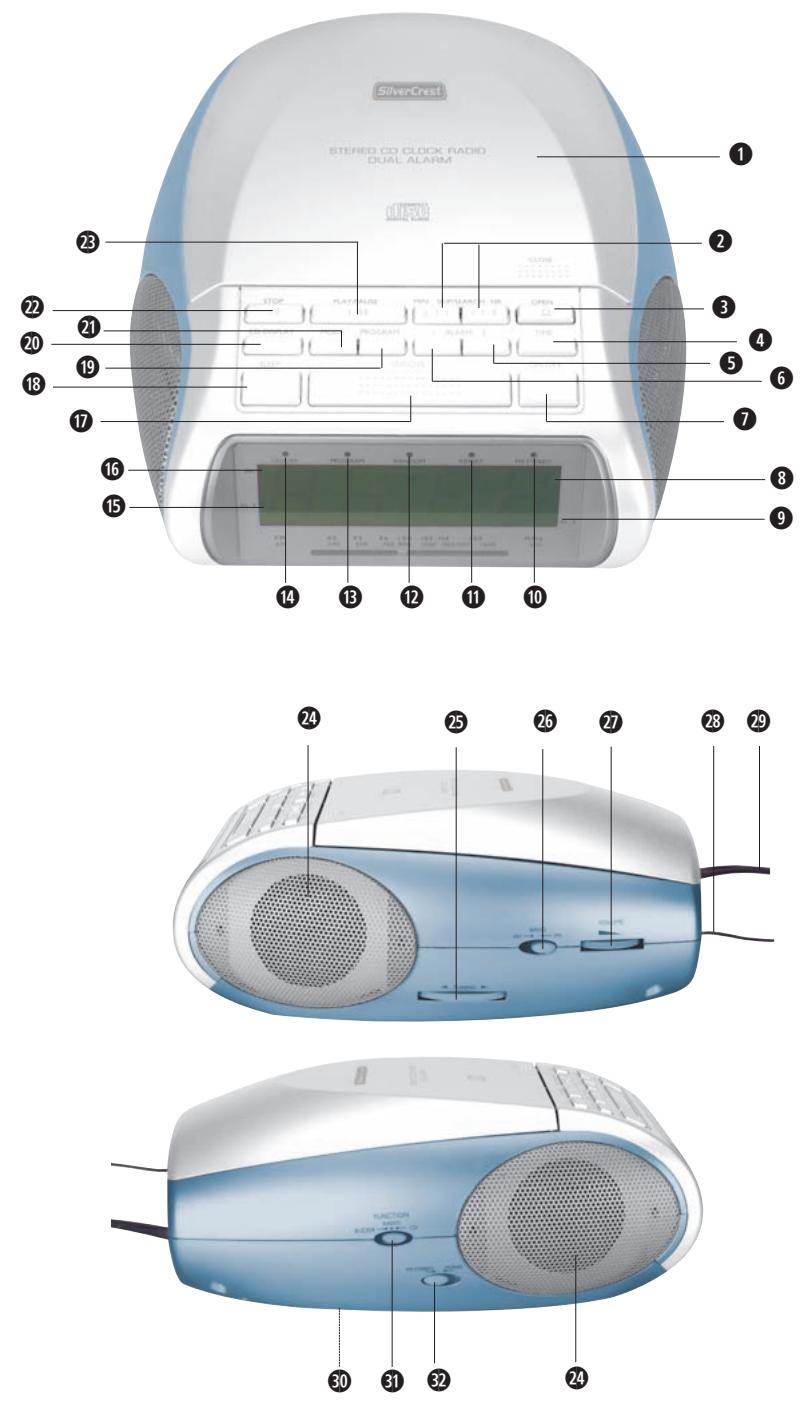
Operating Elements
① CD compartment
② Button SKIP/SEARCH MIN ◀ and SKIP/SEARCH HR ▶
Skip button and fast search within a title,
Time adjustment (minutes and hours)
③ Button OPEN
④ Button TIME: Time Adjustment
⑤ Button ALARM 2: Setting
6 Button ALARM 1: Setting
⑦ Button ON/OFF
8 Display
⑨ LED indicator for AL2
10 LED indicator for FM (VHF) Stereo
11 LED indicator for CD function REPEAT
12 LED indicator for CD function random replay RANDOM
13 LED indicator for CD function PROGRAM
14 ON/OFF LED indicator
(glows when appliance switched on)
15 LED indicator for AL1
16 LED indicator for PM
17 Button SNOOZE: Snooze mode
18 Button SLEEP: Sleep timer
19 Button PROGRAM: Preprogramming of CD titles
20 Button CD-DISPLAY
21 Button MODE
22 Button STOP: To switch off playback
23 Button PLAY/PAUSE: To start the CD playback or to briefly interrupt the CD playback
24 Loudspeaker
25 TUNING regulator: For selecting the radio station
26 Waveband selector switch AM/FM
27 Volume regulator
28 FM (VHF) Aerial
29 Power cable
30 Battery compartment (on the underside)
31 Function selector switch BUZZER - RADIO - CD
32 Switch FM STEREO/MONO
Unpack the appliance
Remove all packing material. Remove also the transportation lock from the CD compartment.

Attention!
Do not permit small children to play with the plastic packaging. There is a risk of suffocation!
Check the items supplied
Whilst unpacking, check to ensure that all of the following items are available:
- World Receiver
- Connector power pack
• Operating Instructions with Warranty Card
Providing mains power
This CD clock radio is operated with 230 - 240 Volt alternating current (AC), 50 Hz. It is additionally equipped with a back-up system for use in the event of a power failure, for which a 9 V block battery (not supplied) is required to be inserted.
- Connect the plug of the power pack with a wall power socket (AC).
- Insert the 9 V block battery into the battery compartment 30 on the underside of the appliance.

Take note:
The use of an alkaline battery is recommended. In order to ensure optimum functioning, the battery should be changed every 6 months. Batteries are not charged in the battery compartment!
Battery Back-up System in Case of Power Failures
The battery ensures that the clock continues to function in the event of a power failure. To prolong the life, however, the time is not shown in the display.
If a battery is not inserted, after a power failure
12:00 appears on the display. This means that you have to carry out the time and alarm settings again.
Setting the Time
For setting the time, the appliance must be switched off with the button ON/OFF ⑦.
Setting the time when switching on for the first time:
- Hold the button TIME ④ pressed down to switch between the 12h or 24h mode.

Take note:
In the display appears "12h" for the 12 hour mode resp. "24h" for the 24 hour mode. For the afternoon hours, an additional LED showing "PM" now appears at the top left of the display.
- The time blinks. Using the buttons SKIP/SEARCH MIN ◀ and SKIP/SEARCH HR ▶▶② programme in the desired time.
- When you re-press the button TIME ④ the programming is saved. The time display no longer flashes.
Setting the time at some later point:
- Hold the button TIME ④ pressed down to switch between the 12h or 24h mode.
- Press the button TIME ④. The time blinks. Using the buttons SKIP/SEARCH MIN ◀ and SKIP/SEARCH HR ▶▶ ② programme in the desired time.
- When you re-press the button TIME 4 the programming is saved. The time display no longer flashes.
Radio operation
- Slide the function selector switch 31 to the position RADIO.
- Slide the waveband selector switch ② to the position FM (VHF) or AM (MW).
- To optimise reception, extend the FM aerial ^28 to its full length. For the AM waveband, the appliance needs to be fine-tuned to achieve optimum reception.
- Switch the appliance on with the ON/OFF ⑦ button. The LED indicator ⑭ glows when the appliance is switched on.
- Set the desired volume level with the volume controller 27.
- Select the desired radio station using the TUNING-regulator ②5. Should a programme be transmitted in stereo and the appliance is set for stereo reception, the LED indicator FM STEREO ⑩ glows. For this, the switch FM STEREO/MONO ③2 must be positioned at FM STEREO.
- To switch off the radio, press the button ON/OFF ⑦. The ON/OFF LED indicator extinguishes.
Use of the CD Player
- Open the CD compartment ① by pressing the button OPEN ③ and then press the hole of the CD (with the labelling uppermost) lightly onto the cone in the CD compartment until it engages.
- Slide the function selector switch 27 into the CD position.
- After pressing the power button ON/OFF ⑦ the total number of titles on the CD is shown in the display ⑧. After a brief moment, the time is displayed again.
- To display the CD titles once again, press the button CD DISPLAY 20.
- Press the button PLAY/PAUSE 23 to start playback of the first title. In the Display 8 first appears 01, shortly thereafter the time is however displayed once again.
① Take note:
You can also use the button PLAY/PAUSE 23 to temporarily interrupt the playback of a title. Playback is continued by once again pressing the button PLAY/PAUSE 23.
- Set the desired volume level with the volume controller 27.
- The playback can be stopped by pressing button STOP 22.
Further Functions of the CD Player
/ SKIP/SEARCH
- Press the button SKIP/SEARCH HR ➕ to skip to the next title, or press the button SKIP/SEARCH HR ➕ several times to skip forward over several titles. Press SKIP/SEARCH MIN ➕ to go back to the start of a title, or press the button SKIP/SEARCH MIN ➕ several times to skip back over several titles. When SKIP/SEARCH MIN ➕ or SKIP/SEARCH HR ➕ are held down, particular points within a title can be quickly searched for and found.
REPEAT: Repeat - Playback RANDOM: Random playback
- Press the button MODE 21 once to repeat the playback of a particular title. The REPEAT indicator 11 blinks.
- Press the button MODE 21 once more to repeat playback of the whole CD. The REPEAT indicator 11 glows.
- Pressing once more on the button MODE 21 can erase this function. The REPEAT indicator 11 extinguishes.
- The RANDOM indicator 12 glows. The CD tracks are played in random order.
- Pressing once more on the button MODE 21 can erase this function. The RANDOM indicator 12 extinguishes.
PROGRAM: For preprogramming tracks in any order
- Insert the CD.
- Press the button ON/OFF ⑦. The total number of tracks appears briefly in the display ⑧.
- After pressing the button PROGRAM 19, the display shows p01. The programme indicator 13 blinks.
- Using the buttons SKIP/SEARCH MIN ◀ and SKIP/SEARCH HR ▶ select the desired titles. Then press the button PROGRAM ⑲ to save the title. Proceed as described above to program further tracks. A total of 20 tracks can be programmed.
- Press the button PLAY/PAUSE 23 to start playback. The LED indicator PROGRAM 13 glows.
- Press the button STOP 22 to stop playback.
If you wish to repeat the programming later:
- Press the button PROGRAM ⑲ again to activate the programming. The LED indicator PROGRAM ⑬ blinks.
- Press the button PLAY/PAUSE 19 to play back the programmed titles. The LED indicator PROGRAM 13 glows.
- To erase the programming, open the CD compartment ① or switch the appliance off and then back on.
Setting the Alarm Time and Alarm Type
With this appliance you can set two different wake-up times that can be used individually or simultaneously:
- AL 1 or AL 2
- AL 1 and AL 2
Setting the alarm time
Alarm (AL 1):
- Press the button ALARM 1 ⑥.
- Using the buttons SKIP/SEARCH MIN ◀ and SKIP/SEARCH HR ▶▶ ②, programme in the desired time.
The alarm time is stored as soon as you press the button ALARM 1 ⑥. The indicator for Alarm 1 appears in the display. - If you wish to check the alarm time, press once more on the button ALARM 1 6.
Alarm (AL 2):
Press the button ALARM 2 5 and carry out the same steps as described above. The indicator for Alarm 2 appears in the display.
- Now select the alarm mode by using the function selector switch 31 (RADIO, CD or BUZZER).
Alarm mode BUZZER
- Slide the function selector switch 31 to the position BUZZER.
Alarm mode Radio
- Carry out the steps 1 to 7 described under "Radio operation" to tune in to the radio station of your choice for the radio alarm.
Alarm mode CD Player
- Open the CD compartment ① in that you press the button OPEN ③, then insert a CD (with the labelling uppermost) into the CD compartment.
2.Slide the function selector switch 31 into the position CD.
① Take note:
The total playing time of the CD player in alarm mode is 60 minutes.
If no CD is inserted and alarm mode CD player is set, the alarm signal of the setting BUZ-ZER sounds automatically.
Switching the alarm OFF
The alarm period is programmed for 60 minutes.
- SNOOZE: Press the button SNOOZE ⑰ to switch the alarm off temporarily. The alarm will repeat itself again after roughly 6 minutes.
- ON/OFF: Press the button ON/OFF ⑦. The alarm is switched off, but will sound again after 24 hours.
- ALARM 1/ALARM 2: Press the button ALARM 1 ⑥/ALARM 2 ⑤ to switch the alarm off permanently.
Sleep timer
- Slide the function selector switch 31 to CD or RADIO.
- After you have pressed the button SLEEP 18, "90" appears in the display.
- Press the button SLEEP 18 again to set the desired sleep time (90, 60, 30 or 15 minutes). The sleep time countdown starts after a few seconds.
- To stop playback earlier, press the button ON/OFF ⑦.
① Take note:
If the playing time of the CD is shorter than the sleep time you have set, the music ends as soon as all the tracks on the CD have been played.
Cleaning
- Clean the housing of the appliance only with a slightly moist cloth and a mild detergent. Ensure that moisture cannot permeate into the appliance during cleaning!
- If necessary, clean the inside of the disc tray exclusively with a clean dry brush (i.e. a lens brush, obtainable from a photographic dealer). NEVER use moisture to clean the inside of the CD compartment!
Warning!
Moisture penetrating into the appliance creates the risk of electric shock! Additionally, the appliance could be irreparably damaged!
Disposal

Do not dispose of the appliance in your normal domestic waste. This product is subject to the European directive 2002/96/EG.
Dispose of the appliance through an approved disposal centre or at your community waste facility. Observe the currently applicable regulations. In case of doubt, please contact your waste disposal centre.
Disposal of batteries/accumulators
Used batteries/accumulators may not be disposed of in household waste. Every consumer is legally obligated to dispose of batteries at a collection site of his community / city district or at a retail store.
The purpose of this obligation is to ensure that batteries are disposed of in a non-polluting manner. Only dispose of batteries when they are fully discharged.

Dispose of the packaging materials in an environmentally responsible manner.
Warranty and Service
The warranty for this appliance is for 3 years from the date of purchase. Should you have grounds for complaint, despite our high quality standards, please contact our Service Hotline.
In the event that the processing of your complaint is not possible by telephone, you will receive
• a processing number (RMA number) as well as
- an address to which you can send your product for warranty processing.
In the event of a mail despatch, please enclose a copy of the purchase receipt (sales slip). The appliance must be securely packed and the RMA number clearly visible. Products sent in without an RMA number cannot be processed.
i Note:
The warranty provisions cover only material or factory defects.
The warranty is not valid;
- worn out parts
- for damages to breakable parts such as switches and batteries.
The appliance is intended for domestic use only, NOT for commercial purposes. If this product has been subjected to improper or inappropriate handling, abuse, or modifications not carried out by one of our authorised sales and service outlets, the warranty will be considered void.
Your statutory warranty claims are not restricted by this warranty.
Importer
KOMPERNASS GMBH
Burgstrasse 21
44867 BOCHUM, GERMANY
www.kompernass.com
SilverCrest
CD Clock Radio
KH 2254
In order to obtain a cost free repair procedure, please get in touch with our Service Hotline. Make sure you have your receipt handy.
Sender, please write clearly:
Last name
First name
Street
Postcode/Place
Country
Telephone
Date/Signature
Description of fault:
Warranty
GB DES Ltd
Tel.: 0870/787-6177
Fax: 0870/787-6168
e-mail: support.uk@kompernass.com
IE Irish Connection
Tel: 00353 (0) 87 99 62 077
Fax: 00353 18398056
e-mail: support.ie@kompernass.com
www.mysilvercrest.de