
BSK500XL - Kitchen appliance BREVILLE - Free user manual and instructions
Find the device manual for free BSK500XL BREVILLE in PDF.


| Brand | Breville |
| Model | BSK500XL |
| Product type | Electronic kitchen scale with temperature probe and timer |
| Maximum weighing capacity | 5 kg / 11 lb |
| Graduation (accuracy) | 1 g / 0.1 oz |
| Units of measurement | Grams (g), kilograms (kg), ounces (oz), pounds (lb) |
| Power supply | 1 alkaline 9V battery (included) |
| Zero/tare function | Yes, ZERO button to tare and weigh multiple ingredients |
| Built-in timer | Yes, up to 99 minutes 59 seconds with audible alarm |
| Temperature probe | Yes, measures from -40 °C to 150 °C (-40 °F to 302 °F) |
| Display | LCD screen with tare, unit, low battery, and temperature indicators |
| Auto off | Yes, after 2 minutes of inactivity |
| Low battery indicator | Yes, "LO" icon on the screen |
| Platform material | Metal (weighing platform) |
| Cleaning | Wipe with a damp cloth; do not immerse or put in dishwasher |
| Safety | Instructions: flat, dry surface; avoid shocks; do not expose to heat; remove battery if not used for extended period |
| Warranty | 1 year limited (parts and labor) |
| Spare parts | Available via Breville customer service |
| Intended use | Household use only |
Frequently Asked Questions - BSK500XL BREVILLE
User questions about BSK500XL BREVILLE
0 question about this device. Answer the ones you know or ask your own.
Ask a new question about this device
Download the instructions for your Kitchen appliance in PDF format for free! Find your manual BSK500XL - BREVILLE and take your electronic device back in hand. On this page are published all the documents necessary for the use of your device. BSK500XL by BREVILLE.
USER MANUAL BSK500XL BREVILLE
on the purchase of your new Breville ikon™ Kitchen Scale
CONTENTS
2 Breville Recommends Safety First
4 Know Your Breville ikonTM Kitchen scales
7 Operating Your Breville ikon™ Kitchen Sales
11 Care, Cleaning and Storage
BREVILLE RECOMMENDS SAFETY FIRST
We at Breville are very safety conscious. We design and manufacture consumer products with the safety of you, our valued customer foremost in mind. In addition we ask that you exercise a degree of care when using this product and adhere to the following precautions:
IMPORTANT SAFEGUARDS
- Carefully read all instructions before operation and save for future reference.
- Remove and safely discard any packaging material and promotional stickers and labels before using the ikon™ kitchen scale for the first time.
- To eliminate a choking hazard for young children, remove and safely discard the protective rubber grommets fitted below the weighing platform.
- Do not place the ikon™ kitchen scale near the edge of a bench or table. Always ensure that the surface is level, clean and free of water, flour, etc.
-
This scale is a precision instrument. Do not dismantle the scale and avoid strong vibrations and shocks.
-
Any significant spillage onto the surface under or around the appliance, or onto the appliance itself, should be cleaned and dried before continuing to use the appliance.
- Do not place the ikon™ kitchen scale on or near a hot gas or electric burner, or where it could touch a heated oven. Do not place it in direct sunlight.
- When moving the scale to a new location where the temperature of the new location differs by more than 50^ ( 10^ ), leave the scale in the new location for at least 2 hours before turning it on.
Always remove the battery if the scale will not be used within the next 6 months or longer. -
Always ensure a 9V alkaline battery is properly inserted into the scale before use. The appliance will not operate unless properly assembled.
-
Ensure the temperature probe is handled with care because the pointed end is sharp.
- Keep the appliance clean. Refer to care and cleaning.
- Do not use harsh abrasives or caustic cleaners when cleaning this appliance.
- Young children should be supervised to ensure that they do not play with this scale.
- Any maintenance other than cleaning should be performed at an authorised Breville Service Center.
- This scale is for household use only.
SAVE THESE INSTRUCTIONS
KNOW
your Breville ikon™ Kitchen Scale
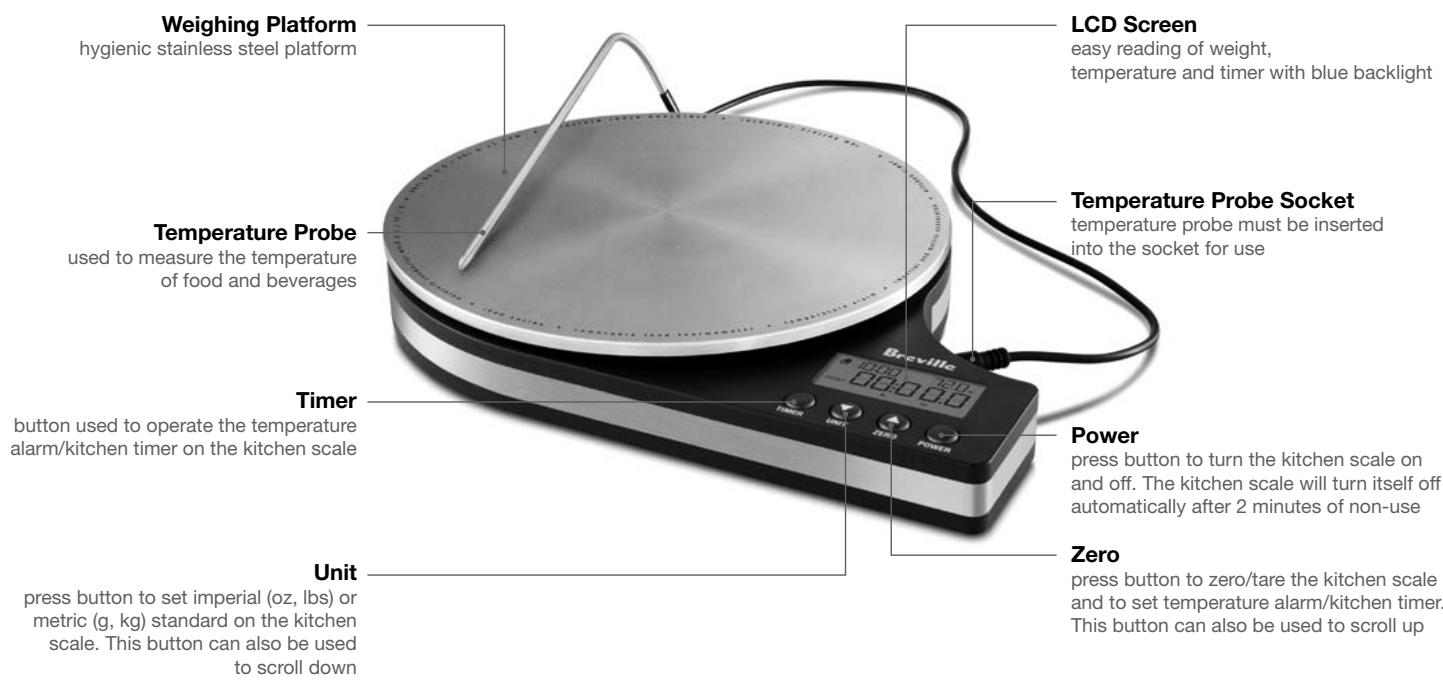
Celsius/Fahrenheit conversion table
located on the underside of the unit for your convenience
9 Volt alkaline Battery
included for your convenience
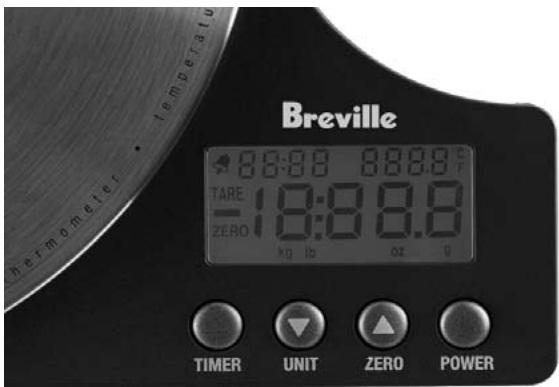
| SPECIFICATIONS | |
| Battery Type | 1 x 9V Alkaline |
| Graduation | 0.1oz/1g |
| Scale Maximum Capacity (Zero/Tare) | 11Lbs/5Kg |
| Maximum Timer | 99 min 59 sec |
| Maximum Temperature | 302°F/150°C |
OPERATING
your Breville ikon™ Kitchen Scale
OPERATING YOUR BREVILLE ikon™ KITCHEN SCALE
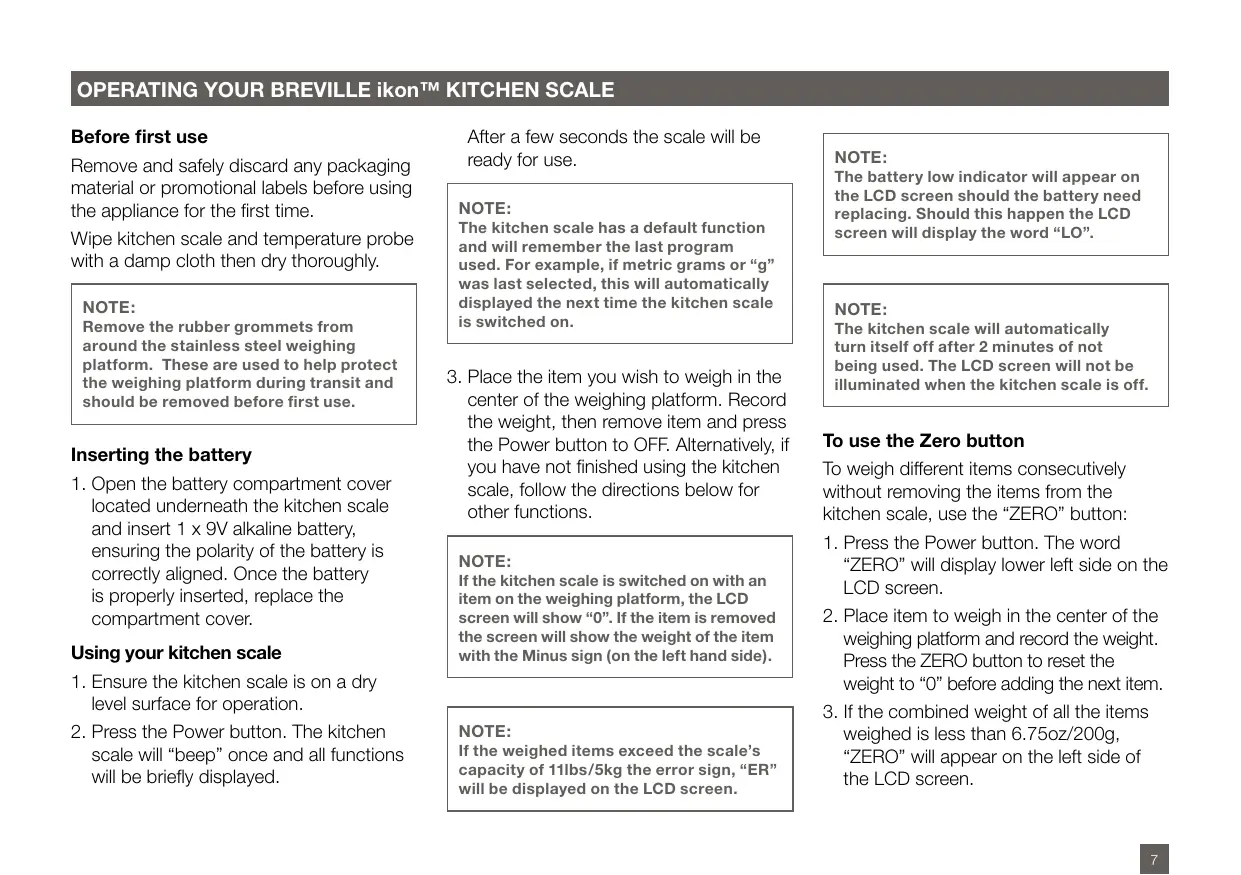
Before first use
Remove and safely discard any packaging material or promotional labels before using the appliance for the first time.
Wipe kitchen scale and temperature probe with a damp cloth then dry thoroughly.
NOTE:
Remove the rubber grommets from around the stainless steel weighing platform. These are used to help protect the weighing platform during transit and should be removed before first use.
Inserting the battery
- Open the battery compartment cover located underneath the kitchen scale and insert 1 x 9V alkaline battery, ensuring the polarity of the battery is correctly aligned. Once the battery is properly inserted, replace the compartment cover.
Using your kitchen scale
- Ensure the kitchen scale is on a dry level surface for operation.
- Press the Power button. The kitchen scale will "beep" once and all functions will be briefly displayed.
After a few seconds the scale will be ready for use.
NOTE:
The kitchen scale has a default function and will remember the last program used. For example, if metric grams or "g" was last selected, this will automatically displayed the next time the kitchen scale is switched on.
- Place the item you wish to weigh in the center of the weighing platform. Record the weight, then remove item and press the Power button to OFF. Alternatively, if you have not finished using the kitchen scale, follow the directions below for other functions.
NOTE:
If the kitchen scale is switched on with an item on the weighing platform, the LCD screen will show "0". If the item is removed the screen will show the weight of the item with the Minus sign (on the left hand side).
NOTE:
If the weighed items exceed the scale's capacity of 11lbs/5kg the error sign, "ER" will be displayed on the LCD screen.
NOTE:
The battery low indicator will appear on the LCD screen should the battery need replacing. Should this happen the LCD screen will display the word "LO".
NOTE:
The kitchen scale will automatically turn itself off after 2 minutes of not being used. The LCD screen will not be illuminated when the kitchen scale is off.
To use the Zero button
To weigh different items consecutively without removing the items from the kitchen scale, use the "ZERO" button:
- Press the Power button. The word "ZERO" will display lower left side on the LCD screen.
- Place item to weigh in the center of the weighing platform and record the weight. Press the ZERO button to reset the weight to "0" before adding the next item.
- If the combined weight of all the items weighed is less than 6.75oz/200g, "ZERO" will appear on the left side of the LCD screen.
OPERATING YOUR BREVILLE ikon™ KITCHEN SCALE
For example, when baking a cake that calls for 8.5oz / 250g butter and 10oz / 300g sugar: Place an empty mixing bowl in the center of the weighing platform, then press the ZERO button. The weight will display 0g and the word "TARE" will be displayed on the LCD screen. Begin to add the butter until the desired 8.5oz / 250g is displayed on the LCD screen. Then, press the ZERO button again. Add sugar to mixing bowl until the desired 10oz / 300g is displayed on the LCD screen.
To remove the word "TARE" and set the kitchen scale back to 0oz / 0g at any time, ensure the item is removed from the kitchen scale and press the ZERO button again. The word "TARE" will disappear and the word "ZERO" will display on the LCD screen.
If the combined weight of all the objects measured is greater than 6.75oz / 200g, the word "TARE" will appear in the upper left side of the LCD screen.
NOTE:
The kitchen scale's maximum capacity is 11lbs/5.0kg. Each time an item is added using the ZERO button, the weight of the previous item is counted towards the maximum capacity.
For example, if you weigh a 9lb / 4kg bowl of soup and then press the ZERO button to weigh in some onions, the maximum amount the onions can weigh is 2lb / 1kg. 9lb / 4kg + 2lb / 1kg = 11lb / 5kg (11lb / 5kg is the maximum weight of the kitchen scale).
Converting Imperial to Metric Measures
- Press the UNIT button before weighing the item to change the scale imperial system (oz/lbs) to the metric system (g/kg) if required.
- Place item to weigh in the center of the weighing platform. Record the weight, then remove item and press the Power button to OFF if you have finished with the kitchen scale. Alternatively follow the below directions for other functions.
Setting the Timer
- Press the Timer button once (a bell icon will appear in the upper left hand corner).
- Using the UNIT and ZERO buttons, scroll either down or up to select the desired amount of time. Begin setting the timer by pressing the Timer button after each correct digit is displayed on the LCD screen.
Maximum time countdown is "99:59".
- After the last correct digit is selected, press the Timer button to start the timer.
- To turn the alarm off press the Timer button. A continuous "beep" alarm will sound when the count down is finished.
NOTE:
To turn the timer off before it sounds, press the Timer button.
To use the Temperature Probe
- Insert the temperature probe into the temperature probe socket located at the side of the kitchen scale.
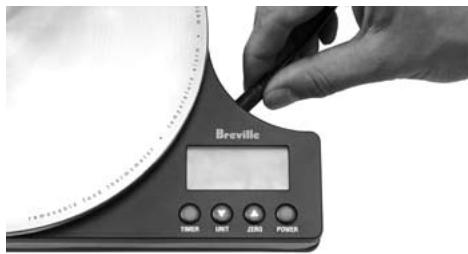
NOTE:
Do not place the Temperature Probe cable on or near a hot gas or electric burner, or where it could touch a heated oven.
OPERATING YOUR BREVILLE ikon™ KITCHEN SCALE
- Insert the pointed end of the temperature probe into the food/ beverage to record temperature.
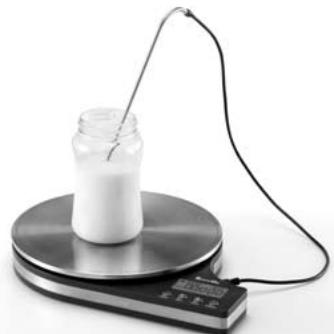
- Temperature is displayed in Fahrenheit on the upper right side of the LCD screen and will begin to increase or decrease until the correct temperature is shown on the LCD screen.
Monitoring Ambient Temperature
The room/air temperature will always be displayed on the upper right side on the LCD screen unless the temperature probe is connected to the socket and inserted into a food or liquid of a different temperature. Temperature is recorded in degrees Fahrenheit, for example 73^ .
Setting the Temperature Alarm
The temperature alarm can be used with or without the temperature probe in place. If the temperature probe is in place, the alarm will sound when the temperature of the probe inserted into a food or liquid has been reached. If the temperature probe is not in place, the alarm will sound when the ambient temperature has been reached.
To turn the Temperature Alarm ON:
- Ensure the power to the kitchen scale is turned off.
- To turn the Temperature Alarm ON, press and hold down both the Power and Timer buttons at the same time until the words 'ON' or 'OFF' appear.
- Press the UNIT or ZERO buttons to select "ON".
- Press the Timer button to confirm.
- Press the UNIT or ZERO buttons to select the temperature for which you would like the alarm to sound at.
- Press the Timer button to confirm.
- The kitchen scale will take a moment to program the temperature and the alarm will sound when the desired temperature is reached.
To turn the Temperature Alarm OFF:
- Ensure power to the kitchen scale is turned off.
- To turn the Temperature Alarm OFF, press and hold down both the Power and Timer buttons at the same time until the words 'ON' or 'OFF' appear.
- Press the UNIT or ZERO buttons to select "OFF".
- Press the Timer button to confirm.
TO SET TEMPERATURE ALARM


Hold down at the same time

UNIT
OR
(1)
ZERO
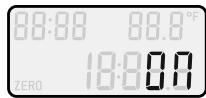

to confirm
to select "ON"

UNIT
OR

ZERO
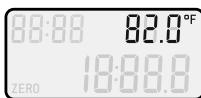

to confirm
to select temperature
CARE, CLEANING AND STORAGE
of your Breville ikon™ Kitchen Scale
CARE AND CLEANING
Always ensure the kitchen scale is kept clean after each use to prevent a build up of foods on the weighing scale and temperature probe to avoid inaccurate recordings.
Before cleaning, ensure the power to scale is turned off using the Power button.
Wipe the weighing platform and temperature probe with a clean, damp cloth after each use. Mild detergents can also be used to clean the weighing platform and temperature probe. Do not use harsh abrasives or caustic cleaners when cleaning this appliance.
NOTE:
Never immerse the kitchen scale in water or any other liquid. Do not place the scale or temperature probe in the dishwasher.
Ensure the kitchen scale and temperature probe is thoroughly dry after cleaning.
Storing
Store the kitchen scale on a flat, dry, level surface. Do not place anything on top, as this may damage the appliance.
Always remove the battery if the kitchen scale will not be used for 6 months or longer.
Breville one year limited warranty
Breville®* warrants this Breville® appliance against defects that are due to faulty material or workmanship for a period of one (1) year from the date of original consumer purchase. This warranty does not cover damage from abuse, neglect, use for commercial purposes, or any other use not found in the printed "Instructions for use" booklet. There is no warranty for glass parts, glass containers, filter basket, blades and agitators. HWI Breville® expressly disclaims all responsibility for consequential damages for incidental losses caused by use of this appliance.
Some states or provinces do not allow this exclusion or limitation for incidental or consequential losses, so the foregoing disclaimer may not apply to you.
ANY WARRANTY OF MERCHANTABILITY OR FITNESS WITH RESPECT TO THIS PRODUCT IS ALSO LIMITED TO THE ONE YEAR LIMITED WARRANTY PERIOD.
Some states or provinces do not allow disclaimer of the implied warranty with respect to consumer goods, so the foregoing disclaimer may not apply to you.
This warranty gives you specific legal rights and you may also have other legal rights which vary from state to state or province to province.
If the appliance should become defective within the warranty period, do not return the appliance to the store. Please contact our Customer Service Center.
Toll free phone number:
1-866-BREVILLE (1-866-273-8455)
Internet email:
AskUs@BrevilleUSA.com
AskUs@Breville.ca (in Canada)
ORIGINAL RECEIPT IS REQUIRED FOR ALL RETURNS
*HWI Breville® products are distributed in Canada by Anglo Canadian Housewares, L.P. and in USA by Metro/Thebe Inc.
FÉLICITATIONS
Breville Customer Service Center
US Customers
Mail: 19400 S.Western Ave Torrance CA 90501-1119
Phone: Customer Service 1 (866) BREVILLE
Email: Customer Service askus@brevilleusa.com
Canada Customers
Mail: Anglo Canadian 2555, Avenue de l'Aviation Pointe-Claire (Montreal) Quebec H9P 2Z2
Phone: Customer Service: 1 (866) BREVILLE
Email: Customer Service askus@breville.ca
www.breville.com