
TV-IP100 - IP Camera TRENDNET - Free user manual and instructions
Find the device manual for free TV-IP100 TRENDNET in PDF.


| Product Type | IP Camera |
| Brand | TRENDNET |
| Model | TV-IP100 |
| Video Resolution | 640 x 480 pixels (VGA) |
| Network Connectivity | Ethernet 10/100 Mbps (RJ45) |
| Power Supply | DC power adapter (5V/1A estimated) |
| Power Consumption | Approximately 5 W |
| Dimensions (L x W x H) | Approximately 100 x 60 x 40 mm |
| Weight | Approximately 200 g |
| Operating Temperature | 0°C to 40°C |
| Operating Humidity | 10% to 90% non-condensing |
| Required Software | Microsoft Internet Explorer 5.0 or later |
| Wall Mount | Metal bracket included |
| Remote Access | Yes, via static IP address or dynamic DNS |
| Main Functions | Real-time video surveillance, image capture, browser management |
| Package Contents | Camera, metal bracket, RJ45 cable, power adapter, CD-ROM with manual |
| Maintenance | Clean with a soft dry cloth, avoid abrasive products |
| Security | Change default administrator password, use a secure network |
| Repairability | Contact TRENDNET technical support |
Frequently Asked Questions - TV-IP100 TRENDNET
User questions about TV-IP100 TRENDNET
0 question about this device. Answer the ones you know or ask your own.
Ask a new question about this device
Download the instructions for your IP Camera in PDF format for free! Find your manual TV-IP100 - TRENDNET and take your electronic device back in hand. On this page are published all the documents necessary for the use of your device. TV-IP100 by TRENDNET.
USER MANUAL TV-IP100 TRENDNET
Q1. The image is blurry, how do I fix this?
A1. You can adjust the Internet Camera's focus by rotating the lens.
Q2. Can I replace the camera lens?
A2. No. It cannot be replaced.
Q3. How do I view the Internet Camera's live images within my Local Network?
A3. Open a web browser (Internet Explorer or Netscape), type your Wireless Internet Camera's IP address (i.e.: 192.168.0.20) in the Address bar, and then hit the Enter key. The Welcome page of the Internet Camera will appear.
Q4. When I enter the IP address of the camera, the image does not load, why?
A4. Please make sure all the Active X features are enabled for your Internet Explorer.
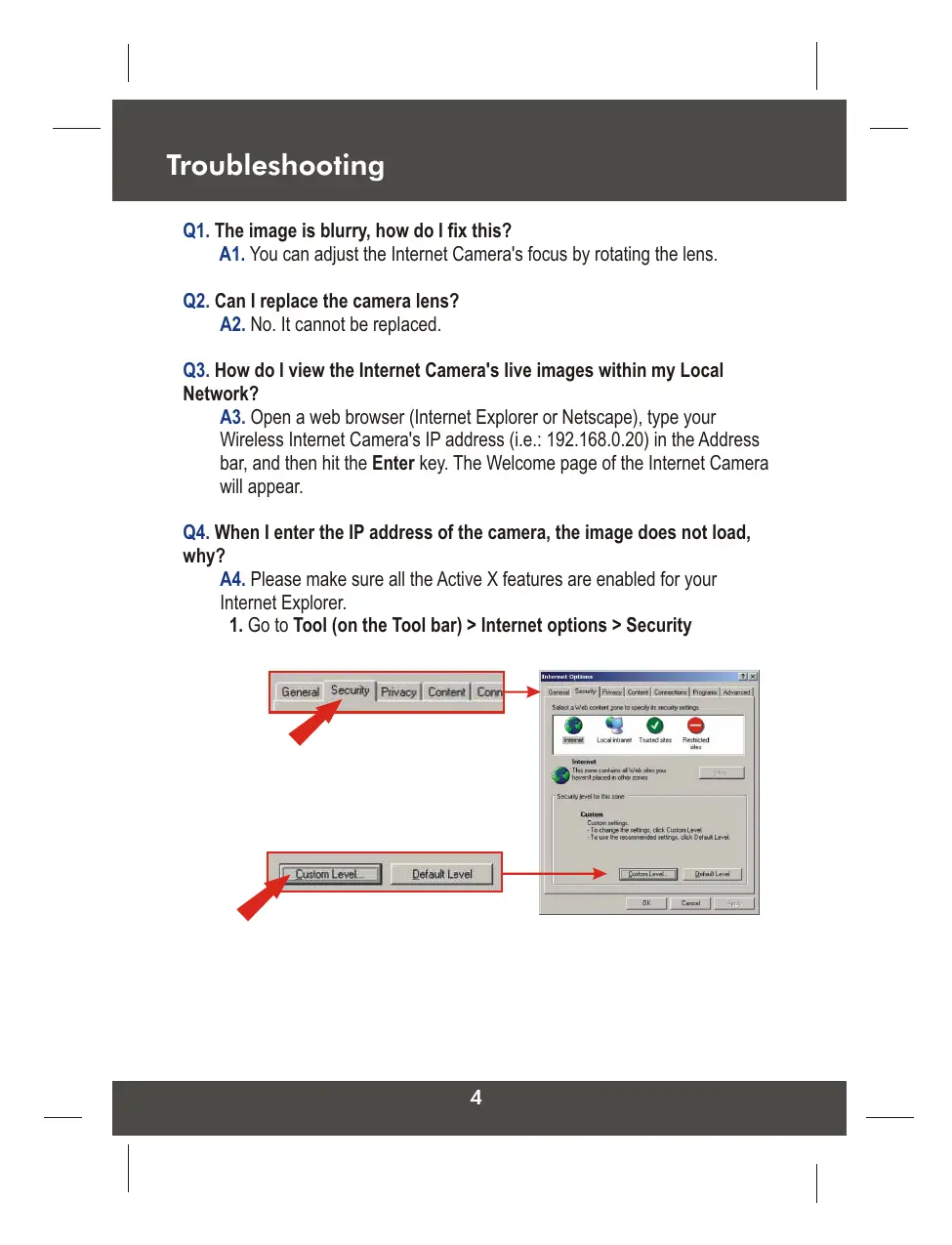
1. Go to Tool (on the Tool bar) > Internet options > Security
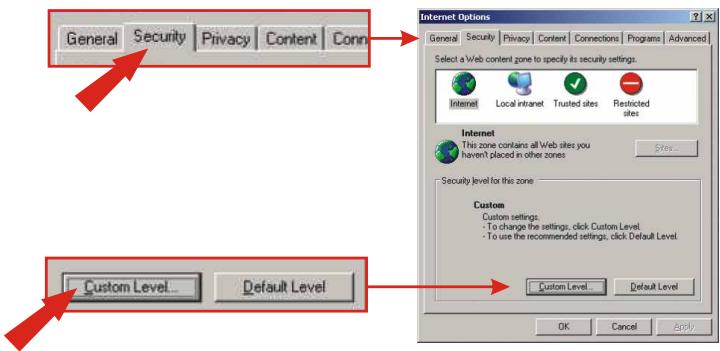
- Click on Custom Level and make sure all ActiveX controls are set to "Enable" and click OK.
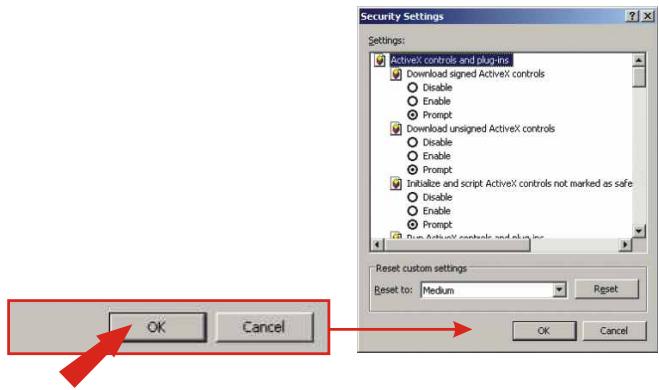
- Once you save the settings, the browser will load again and the image should appear.
Q5. How do I configure my computer's IP address?
A5. For Windows 2000/XP users:
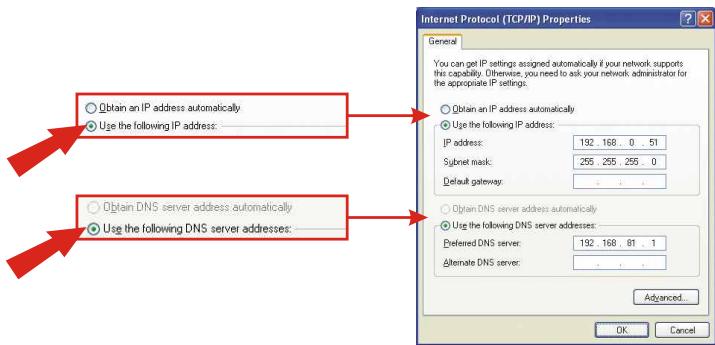
- On the Desktop, right click on My Network Places > select Properties > right click on the Local Area Connection > select Properties, the Local Area Connection Properties Window will appear
-
Under General tab, select Internet Protocol (TCP/IP) > click on Properties button, Internet Protocol (TCP/IP) Properties Window will appear
-
Select Use the following IP address option and enter the IP, Subnet Mask and Default gateway addresses.
- Click OK to complete
For Windows 98/ME users:
- On the Desktop, right click on Network Neighborhood > select Properties > right click on the Local Area Connection > select Properties, the Local Area Connection Properties Window will appear
-
Under Configuration tab, select your Network Adapter (TCP/IP protocol) > click on Properties button, TCP/IP Protocol Properties Window will appear
-
Select Specify an IP address option and enter the IP, Subnet Mask addresses.
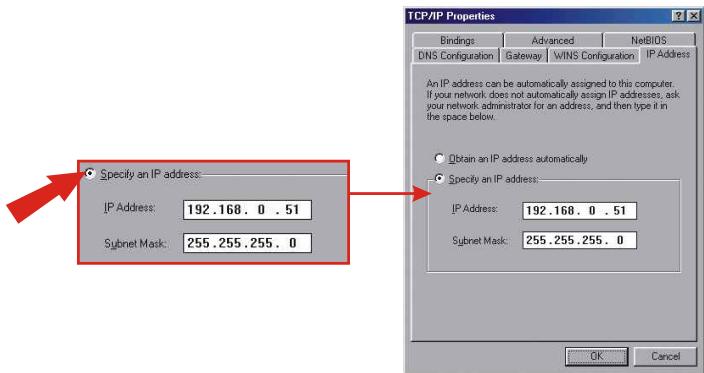
For detailed information about the TV-IP100's configuration and advanced settings, please refer to the User's Guide on the included CD-ROM or to www.TRENDnet.com.
Certifications
This equipment has been tested and found to comply with FCC and CE Rules. Operation is subject to the following two conditions:
(1) This device may not cause harmful interference.
(2) This device must accept any interference received. Including interference that may cause undesired operation.


NOTE: THE MANUFACTURER IS NOT RESPONSIBLE FOR ANY RADIO OR TV INTERFERENCE CAUSED BY UNAUTHORIZED MODIFICATIONS TO THIS EQUIPMENT. SUCH MODIFICATIONS COULD VOID THE USER'S AUTHORITY TO OPERATE THE EQUIPMENT.

TRENDnet
Product Warranty Registration
Please take a moment to register your product online. Go to TRENDnet's website at http://www.TRENDNET.com
TRENDnet Technical Support
US·Canada
Toll Free Telephone: 1(866) 845-3673
24/7 Tech Support

Europe (Germany dot France dot Italy dot Spain dot Switzerland dot UK)
Toll Free Telephone: +00800 60 76 76 6
Worldwide
Telephone: +(31) (0) 20 504 05 35
English/Espanol - 24/7
Francais/Deutsch - 11am-8pm, Monday - Friday MET
TRENDnet
3135 Kashiwa Street. Torrance, CA 90505
http://www.TRENDNET.com
Brand : TRENDNET
Model : TV-IP100
Category : IP Camera