USER MANUAL RIVA CHROME THERMOR
ELEKTRONISCHE RADIATOR VOOR HANDDDOCKEN


Thank you for your choice and your trust in us. The heated towel rail that you have bought has been rigorously checked and tested to ensure its quality and give you complete satisfaction.

Appliances bearing this symbol must not be disposed of along with the domestic rubbish; they must be collected separately and recycled.
Products that have reached the end of their useful life should be collected and recycled as instructed under local by-laws.
Keep these instructions, even after the heated towel rail has been installed.
GB
Contents
Installation
1/ Preparing to install the heated towel rail 16
2/ Connecting the heated towel rail 17
3/ Fixing the heated towel rail 18
4/ Attaching and removing the clothes hook 19
5/ Installing the control unit 20
Parameters
I/ Setting the thermostat 21
Operation 23
Use
I/ Setting the time 24
2/ Setting the temperatures 24
3/ Programming 24
4/ Automatic mode 25
5/ Absence mode 25
6/ Boost mode 25
7/ Stop mode 26
8/ Changing the batteries 26
9/ Returning to the basic settings 26
Advice
1/ Advice for use 27
2/ Advice 27
3/ Maintenance 27
4/ If there are problems 28
I/Preparing to install the heated towel rail
Location of the device
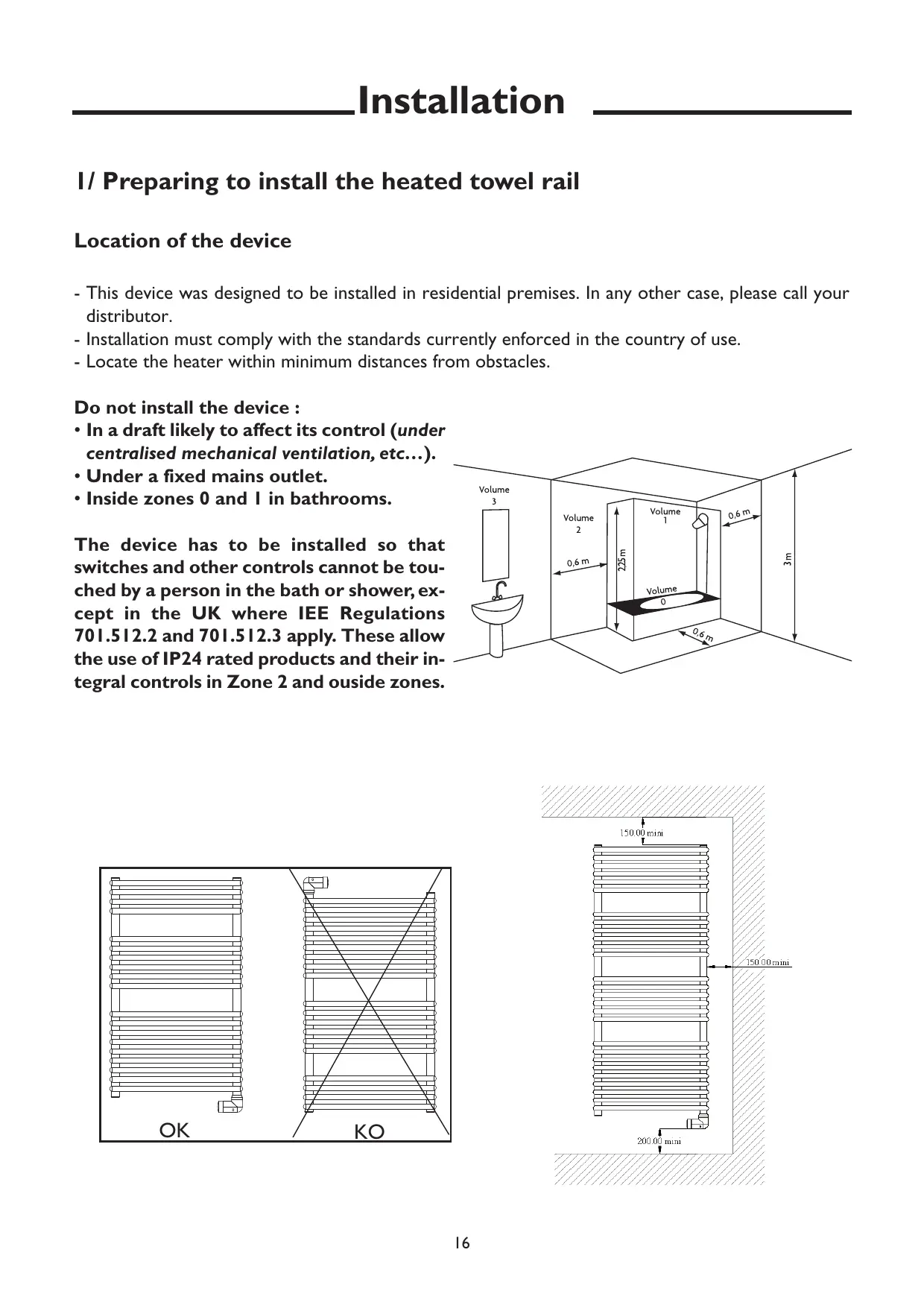
- This device was designed to be installed in residential premises. In any other case, please call your distributor.
- Installation must comply with the standards currently enforced in the country of use.
- Locate the heater within minimum distances from obstacles.
Do not install the device :
- In a draft likely to affect its control (under centralised mechanical ventilation, etc...).
- Under a fixed mains outlet.
- Inside zones 0 and I in bathrooms.
The device has to be installed so that switches and other controls cannot be touched by a person in the bath or shower, except in the UK where IEE Regulations 701.512.2 and 701.512.3 apply. These allow the use of IP24 rated products and their integral controls in Zone 2 and outside zones.


2/ Connecting the device
- The device must be supplied with 230V, 50Hz .
- Mains connection must be ensured using the 3-wire cable factory fitte to the heater, through a connecting box. In damp premises, such as bathrooms and kitchens, install the connecting box at least 25cm from the ground.
- If power cable is damaged or too short, to avoid any danger it must be replaced by a qualified electrician using special tools.
Heated towel rail wiring diagram
Switch the power off and connect the wires as shown in the following diagram:

3/ Fixing the heated towel rail to the wall
Unfasten the carton's flaps and place it against the wall with the lower flap folded back and resting flat on the floor. Prick out the four drill holes though the packaging (without drilling) and then remove the packaging.
2 Carefully mark the drilling points with a pencil (draw a cross, 4cm wide).
| Puissance | Cote A |
| 300 W | 819 mm |
| 500 W | 1209 mm |
| 750 W | 1599 mm |

3 Drill the four holes.

4 Position the four hooks and screw them tight.


5
Screw the supports onto the tubes without blocking them.
Check their position by putting them with the towel-drying radiator into the sheaths.
Once you found the right position, lock the screws for each contact.

6
Fit the towel-drying radiator on the wall in the sheaths.
Screw down each of the locking blocks. Put the caps on the end of the supports.

GB
4/ Fitting and removing the hanger
1
Fit the base with the screw behind the towel-drying radiator in the wanted position.

2
Screw the hanger onto the frame and tighten gently.

5/ Installing the control unit
Location
To correctly control the heating, the thermostat must measure an ambient temperature that is the most representative of your house. As the temperature probe is in the transmitter's unit, you must place the unit:
- in the bathroom,
- fixed on a wall placed on a shelf or a piece of furniture, that can be accessed by someone measuring 1.50m,
- away from sources of heat (fireplace, direct sunlight) and draughts (window, door),
IMPORTANT: Do not install the thermostat on an outside wall or in an unheated room (e.g. garage, etc.).

Fixing
Raise the cover with a screwdriver.
Using the screwdriver, remove the batteries delivered with the device (if fixed to the wall) or remove the battery protection tab (if fixed on stand).

Fixed to the wall
Fix the thermostat using screws and plugs or onto a wall box (1, centre-to-centre distance = 60 mm).

Put the batteries back in place, the right way round.

Fixed on a stand

Using the stand supplied, you can place the transmitter on a piece of furniture (see Location paragraph).
Parameters
I/ Setting the thermostat
Turn the knob to Stop and press the right button down for 5 seconds until H200 vx:xx is displayed (maintenance menu only to be used by the installer).
Press OK.
CF01 appears on the screen.

GB
CF01 - Correction of the ambient temperature measurement
If there is a difference between the actual temperature in the room (thermometer) and the temperature measured and displayed by the device, this menu can be used to change the probe's measurement to compensate for this difference (from -4°C to +4°C in 0.1°C steps).
Adjust the setting with + or -, then press OK to confirm and move onto the next menu.

CF02 - Temperature display in AUTO mode
| CF02
Displayed temperature | Real room
temperature |
| Instruction permanent display |
Adjust the setting with + or - , then press OK to confirm and move onto the next menu.

CF03 - Not Used
Press OK to move onto the next menu.

CF04 - Not Used
Press OK to move onto the next menu.
CF05 - Not Used
Press OK to move onto the next menu.
CF06 - Associating the receiver(s)
To associate the receiver, hold the magnet on the receiver's detection zone for about 3 seconds, until the red light flashes.


On the transmitter, in the CFO6 menu, press the + key.
The transmitter sends a frame to the receiver. The X2D symbol appears briefly.
Check that the light on the receiver has stopped blinbing.
The receiver is associated with the transmitter.
Press OK to move onto the next menu.

CF07 - Radio test
The transmitter sends a frame to the receiver every 3 seconds. The X2D symbol appears briefly.
Check that the light on the receiver blinks each time.

Using the device
You can operate your heated towel rail in several modes, whatever the type of controls you have chosen (manual or programmed):
Auto mode AUTO: your heated towel rail will automatically switch between Eco mode and comfort mode, depending on the time slots programmed for each day of the week.
Comfort mode allows you to maintain the correct ambient temperature.
Boost mode BOOST : used to start the heated towel rail in override mode for a certain period of time.
Eco mode E 0 ) : used to lower the temperature when you are not in your bathroom and therefore save energy.
Frost Protection mode : used to set a temperature when you are away for a long time

I/ Setting the time
Turn the knob to
the days blink and press + or - to choose the day of the week
(1. Monday, 2. Tuesday, 3. Wednesday. ......7. Sunday)
Press OK to confirm.
The hour blinks and press + or - to set it and press OK to confirm
Do the same thing for the minutes.
2/ Setting the temperatures
Turn the button on :
- Frost Protection (□D) to set the temperature when you are away (from 5°C to 15°C , 7°C by default),
- Eco (Eco) to set the energy-saving temperature (from 10°C to 30°C , 15°C by default),
- Comfort (♂) o set the comfort temperature (from 10°C to 30°C , 19°C by default),
Choose using ^+ or -.
Turn the knob to exit the setting mode.


3/ Programming (PROG)
When the device is first started up, the "Comfort from 6h to 23h" program is applied to every day of the week. To change the setting,
turn the knob to PROG.
The 1st time slot blinks.
Press Eco or comfort, depending on how you want to program your device.
To apply the same program to the next day, hold the OK button down for about 3 seconds until the next day's program appears.
Otherwise, press OK once and program the following days as you want.
Turn the knob to exit the programming mode.

4/ Automatic mode (AUTO)
Turn the knob to AUTO.

When the device is first started up, the programmed temperature is displayed (the symbol appears above the ° C ).
Press the i key to display the temperature measured by the thermostat.
- It is possible to reverse how the temperature is displayed (CF02 menu when the device is first started up):
- automatic mode: measured temperature
- press the i : Measured temperature by the thermostat
4/ Frost Protection Mode
Turn the knob to Frost Protection (
Use this mode to set the temperature (from 5 to 15°C ) when you are away for a long time.
Set the temperature using ^+ or-.

5/ Boost Mode
Use this mode to start the heated towel rail in override mode for a certain period of time.
When in automatic mode (AUTO), press the BOOST key.

The duration of the boost mode blinks.
Set the duration using ^+ or - (e.g. Ih00).
Confirm with OK.
The boost message appears.
To cancel the boost mode, press the C key or turn the knob.
To stop the heating (in summer for example), turn the knob to
6/ Stop Mode
The thermostat displays the measured ambient temperature.
When the low battery indicator light comes on, you have about 3 months to change the batteries (two 1.5V alkaline batteries, LR03 or AAA).


7/ Changing the batteries
Raise the cover with a screwdriver.
Some precautions must be taken:
- put the batteries the right way round (+/-) in the device.
- do not throw the used batteries away, take them to a battery sorting centre,
- do not recharge them,
- you have about 45 seconds to change the batteries before the time is reset to zero (if this happens, you will need to set the time and date again).

8/ Returning to the original settings
You can reset the device to return to the original, factory settings:
- the installer settings (greyed out in the start-up menus)
- the time and day,
- the temperatures settings,
- the default programming.
Turn the knob to Stop and press the left button down for 10 seconds until init is displayed..
You return to the stop mode.


Advice
I/ Advice for use
- There is no point in setting the heated towel rail to maximum, the bathroom will not heat up any quicker.
- For optimum heating, towels should be hung over the warm rails and dressing-gowns on the clothes hooks supplied.
2/ Advice
- Children must not climb on the towel rail.
- Do not let children lean against the towel rail or play nearby when it is on. In some circumstances its surface can get hot enough to burn, especially since their reflexes are still undeveloped or are slower than an adult's. If there is a risk, consider installing a protective grille in front of the heated towel rail.
- This heated towel rail is not intended for use by people (including children) whose physical, sensorial or mental capacities are reduced, by people who are inexperienced or unaware, unless the person responsible for their safety is supervising them, or has given them instructions in advance on how to use the heated towel rail.
- For avoid any danger for very young children, you are advised to install this appliance so that the lowest heating bar is at least 600mm from the floor.
- For safety reasons, it is strictly forbidden to re-fill the appliance. If this is needed, contact the manufacturer's after-sales department or a qualified professional.
- Any repairs to the electrical parts must be done by a qualified professional.
- Do not insert objects or paper in the heated towel rail.
- The first time the towel rail heats up a slight smell may appear, from the release of the last traces of material used in its manufacture.
3/ Maintenance
To maintain the performance of the heated towel rail, it needs dusting about twice a year with a soft cloth or a vacuum cleaner with brush attachment. Turn your heater off by moving the knob to and let it cool down.
Do not use abrasives or solvents.
4/ If there are problems
| PROBLEM
ENCOUNTERED | WHAT TO DO |
| The radiator does not heat up. | - Ensure that the mains switches are turned on, and that the load-shedding device (if you have one) has not cut off the power supply to the heated towel rail.
- Check the ambient temperature of the room: if it is too high, the heating indicator will not come on and the heated towel rail will not heat up.
- Adjust the programmed value (see the chapter on Use)
- Turn your heater off then on again, using the knob: ① |
| The radiator does not warm the bathroom enough. | - Adjust the programmed value (see the chapter on Use)
- If the temperature is turned up to the maximum (30°C), check the following points:
· Check that there is no other heater in the room.
· Ensure that your heated towel rail is only warming the one room (i.e. the door is closed).
· Have someone check the supply voltage of the radiator.
· Check that the power of your heated towel rail is suitable for the size of your room (on average we recommend 100W per cubic metre). |
| The radiator heats all the time. | - Check that the control unit is not placed in a draught (door open close by) or that the temperature setting has not been changed.
- There may be a hitch in the electrical supply. If this is the problem (a blocked thermostat for instance), switch off the supply to the heated towel rail by removing the fuse or switching off the trip-switch for about 10 minutes, then switch it back on again.
- If this happens frequently, hove your power company check the supply. |
| The surface of the radiator is very hot | It is normal that the heated towel rail will get hot when it is running, but the maximum surface temperature is limited by the French Electricity Performance standard. However, if you judge that your radiator is still too hot, check that the power is suitable for the size of your room (we recommend 100W per cubic metre) and that the heated towel rail is not in a draught which will disturb its setting. |
| Dirty marks appear on the wall around the radiator | These marks depend entirely on the quality of the air (candle smoke, cigarette smoke, poor ventilation, etc). |
| The top and bottom rails are cooler than the rest of the heated towel rail | - The top rails are not completely filled, to allow for expansion of the thermodynamic fluid. They only heat by conduction.
- The lower rails channel the return of the fluid as it cools down. |
ELEKTRONISCHE RADIATOR VOOR HANDDOCKEN