
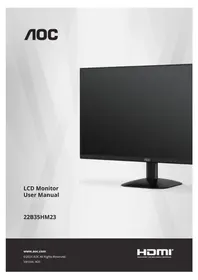
22B35HM23 - Monitor AOC - Free user manual and instructions
Find the device manual for free 22B35HM23 AOC in PDF.


Pick your language and provide your email: we'll send you a specifically translated version.
| Product Type | LED Monitor |
| Brand | AOC |
| Model | 22B35HM23 |
| Screen Size | 21.5 inches (54.6 cm) |
| Resolution | 1920 x 1080 (Full HD) |
| Aspect Ratio | 16:9 |
| Panel Type | VA |
| Refresh Rate | 60 Hz |
| Response Time | 5 ms (GTG) |
| Brightness | 250 cd/m² |
| Contrast Ratio | 3000:1 (typical) |
| Viewing Angle | 178° horizontal / 178° vertical |
| Connectivity | 1x VGA, 1x HDMI 1.4 |
| Power Consumption | Typical: 20 W, Standby: < 0.5 W |
| Dimensions (with stand) | 492.8 x 385.7 x 178.7 mm (W x H x D) |
| Weight (with stand) | 2.5 kg |
| VESA Mounting | 100 x 100 mm |
| Tilt Adjustment | -5° to +20° |
| Included Accessories | HDMI cable, power adapter, quick start guide |
| Cleaning and Maintenance | Use a soft, dry microfiber cloth. Avoid harsh chemicals or water directly on screen. |
| Safety Features | CE, RoHS, TÜV certified. Kensington lock slot for security. |
| Spare Parts and Repairability | For spare parts or repairs, contact AOC authorized service centers. The monitor has a standard 3-year warranty. |
Frequently Asked Questions - 22B35HM23 AOC
How do I connect the AOC 22B35HM23 monitor to my computer?
Connect the included HDMI cable to the HDMI port on both the monitor and your computer. Alternatively, use a VGA cable if your computer only has VGA. Make sure the correct input source is selected using the monitor's OSD menu.
What should I do if the screen remains blank after turning on the monitor?
Check that the power cable is securely plugged in and the power LED is on. Ensure the video cable (HDMI or VGA) is properly connected to both the monitor and computer. Try pressing the input source button to switch to the correct port. If the issue persists, test with another cable or device.
How can I adjust the monitor's brightness, contrast, and other display settings?
Use the OSD (On-Screen Display) menu. Press the joystick or menu button on the bottom bezel, then navigate using the controls. You can adjust brightness, contrast, color temperature, and other picture settings to your preference.
What is the correct way to clean the monitor screen?
Turn off the monitor and unplug it. Use a soft, dry microfiber cloth to gently wipe the screen. Do not use paper towels, abrasive cleaners, or spray liquids directly on the screen. For stubborn stains, lightly dampen the cloth with water or a screen-safe cleaner.
Does the 22B35HM23 support FreeSync or G-Sync?
This monitor has a 60Hz refresh rate and does not support AMD FreeSync or NVIDIA G-Sync technology. It is designed for standard office and home use, not high-refresh gaming.
How do I mount the monitor on a VESA arm or wall bracket?
The monitor supports 100 x 100 mm VESA mounting. Unscrew the four screws on the back cover, remove the stand (if attached), then attach the VESA bracket using the included screws. Follow the bracket manufacturer's instructions carefully.
Why is the text or image on my screen blurry?
Ensure the monitor is set to its native resolution of 1920 x 1080 pixels in your computer's display settings. If you are using a VGA cable, adjust the 'Clock' and 'Phase' settings in the OSD menu under 'Geometry' or 'Image'. Check that the cable is firmly connected.
Can I adjust the screen orientation (landscape/portrait)?
The stand only supports tilt adjustment, not rotation. However, you can physically rotate the monitor if you mount it on a VESA arm that supports rotation. You may also adjust the display orientation in your operating system's settings.
How do I reduce eye strain when using this monitor?
Enable the Low Blue Light feature in the OSD menu to reduce harmful blue light emission. Also, adjust the brightness to a comfortable level, maintain a proper viewing distance (arm's length), and use the 20-20-20 rule: every 20 minutes, look at something 20 feet away for 20 seconds.
What energy efficiency class is the monitor rated as?
The AOC 22B35HM23 is rated as Energy Efficiency Class E under EU regulations. Its typical power consumption is 20 W, and standby power is less than 0.5 W.
User questions about 22B35HM23 AOC
0 question about this device. Answer the ones you know or ask your own.
Ask a new question about this device
No questions yet. Be the first to ask one.
Download the instructions for your Monitor in PDF format for free! Find your manual 22B35HM23 - AOC and take your electronic device back in hand. On this page are published all the documents necessary for the use of your device. 22B35HM23 by AOC.
USER MANUAL 22B35HM23 AOC
Manual assistant
Powered by Anthropic
Waiting for your message
Product information
Brand : AOC
Model : 22B35HM23
Category : Monitor