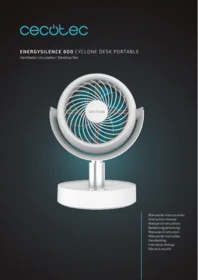
Energysilence 800 Cyclone Desk Portable - Ceiling fan CECOTEC - Free user manual and instructions
Find the device manual for free Energysilence 800 Cyclone Desk Portable CECOTEC in PDF.


| Product type | Portable desk fan |
| Brand | Cecotec |
| Model | EnergySilence 800 Cyclone Desk Portable |
| Power supply | Built-in rechargeable battery, charging via USB port |
| Power | 8 W |
| Number of speeds | 3 adjustable speeds |
| Oscillation | Yes, automatic horizontal oscillation |
| Timer | Yes, programmable up to 4 hours |
| Noise level | Approximately 35 dB at minimum speed |
| Airflow | Cyclone technology for powerful air circulation |
| Dimensions (L x W x H) | 25 x 18 x 35 cm |
| Weight | 1.3 kg |
| Material | Durable ABS plastic |
| Safety | Protective grille preventing access to the blades |
| Usage | Indoor only |
| Maintenance | Clean with a damp cloth, do not immerse |
| Spare parts | Available through the official Cecotec after-sales service |
| Warranty | 2 years |
| Package contents | Fan, USB cable, instruction manual |
| Certifications | CE, RoHS |
Frequently Asked Questions - Energysilence 800 Cyclone Desk Portable CECOTEC
User questions about Energysilence 800 Cyclone Desk Portable CECOTEC
0 question about this device. Answer the ones you know or ask your own.
Ask a new question about this device
Download the instructions for your Ceiling fan in PDF format for free! Find your manual Energysilence 800 Cyclone Desk Portable - CECOTEC and take your electronic device back in hand. On this page are published all the documents necessary for the use of your device. Energysilence 800 Cyclone Desk Portable by CECOTEC.
USER MANUAL Energysilence 800 Cyclone Desk Portable CECOTEC
Safety instructions 6
-
Parts and components 30
-
Before use 30
-
Operation 31
-
Cleaning and maintenance 31
-
Technical specifications 32
-
Disposal of old electrical and electronic appliances 32
-
Technical support and warranty 33
-
Copyright 33
SOMMAIRE
Read these instructions thoroughly before using the device. Keep this instruction manual for future reference or new users.
- All safety instructions must be closely followed when using the appliance.
- This appliance can be used by children aged 8 years and above and people with reduced physical, sensory, or mental capabilities or lack of experience and knowledge if they have been given supervision or instruction concerning use of the appliance in a safe way and understand the hazards involved. Children must not play with the appliance.
- Cleaning and user maintenance should not be carried out by unsupervised children.
- This device is designed for domestic use only and is not intended for bars, restaurants, farmhouses, hotels, motels, and offices.
- Never insert fingers, pencils, or other objects through the air outlet when the appliance is running.
- Make sure the appliance is placed on a flat, stable surface
when in use.
- Do not use the appliance near a window, as exposure to rain could cause electric shock.
- Do not touch the blades or remove them during operation.
- Keep the product away from heat sources.
- Keep hair, clothes, fingers, and other body parts away from openings and moving parts of the product.
- Do not try to repair the appliance by yourself. Contact the official Cecotec Technical Support Service.
- Make sure the fan is not placed close to curtains or other objects it may become entangled with.
- Keep this appliance and its power cable out of reach of children under the age of 8.
Battery instructions
- Non-rechargeable batteries must not be recharged.
- Do not allow children to replace the battery without adult supervision.
- Do not disassemble, open, or break the battery.
- Keep the battery out of the reach of children. In case of battery ingestion, please seek medical attention immediately.
- Do not expose the battery to heat or fire. Avoid storage in direct sunlight.
- Do not short-circuit an element or a battery. Do not store batteries in an untidy manner, in a box, or drawer where they can short-circuit each other or be short-circuited by other metal objects.
- Do not subject the battery to mechanical shock.
- Both batteries and cells can leak under extreme conditions. In the event of a battery leak, keep your skin and eyes away from the liquid. If the liquid gets into the eyes, wash them immediately with clean water for a minimum of 10 minutes
and seek medical attention. Wear gloves when handling the battery or cells and dispose of it immediately in accordance with local regulations.
- Do not leave the battery on prolonged charge when not in use.
- After long periods of storage, it may be necessary to charge and discharge the batteries or cells several times to obtain maximum performance.
- Keep the original instruction manual for future reference.
- Only use the battery for its intended purpose.
- Remove the battery from the device when not in use whenever possible.
- Dispose of the battery properly.
INSTRUCTIONS DE SÉCURITÉ
- Air outlet
- Base
- Display
- Charging port
Display. Fig. 2.
- Power button
- Oscillation button
- Increase button
- Decrease button
- Natural mode button
NOTE:
The graphics in this manual are schematic representations and may not exactly match the device.
2. BEFORE USE
- This appliance is packaged in a way as to protect it during transport. Take the device out of its box and remove all packaging materials. You can keep the original box and other packaging elements in a safe place. This will help you prevent damage to the device when transporting it in the future. In case the original packaging is disposed of, make sure all packaging materials are recycled accordingly.
- Make sure all parts and components are included and in good conditions. If there is any piece missing or in bad conditions, contact the official Cecotec Technical Support Service immediately.
Box content
- Desktop fan
- Instruction manual
- USB charging cable
3. OPERATION
Before using the fan, make sure it is completely charged.
- Press the || button to switch on the fan. By default, the mode that will start will be Normal mode. Press the power button again to switch off the fan.
- Press the increase △ and decrease ▽ buttons to set the speed. The fan has 5 speeds that will allow you to adjust airflow according to your needs.
- Press the ⏻ button to select activate the oscillation function. The fan oscillates at 60°. Press this button again to deactivate the function.
- Press the ⚪ button to activate Natural mode. Press this button again to go back to Normal mode.
NOTE: you can move the fan up or down. It has an inclination of 90° upwards and 25° downwards. You can adjust it manually to direct the air where you want it. Fig. 3
- To charge the desktop fan, use a USB cable. While charging, the indicator light will flash. When charging is complete, the indicator light will remain steady. Fig. 4
Battery removal
To facilitate proper recycling of the product, follow these steps to remove the battery:
- Remove the anti-slip stickers at the bottom of the base.
- Remove the four screws that are exposed by removing the previous parts.
- Remove the base cover.
- Disconnect the battery and remove it for proper recycling.
NOTE:
Removal of the battery should only be done for the purpose of recycling the appliance.
4. CLEANING AND MAINTENANCE
- Before cleaning the appliance, unplug it from the power socket and make sure that the fan is not running and that the blades are completely stopped.
-
Clean the external surface of the fan with a soft cloth.
-
The grille can be removed for cleaning. Just turn it counterclockwise. Fig. 5
-
After cleaning the grille, dry it and replace it by turning it clockwise.
ENGLISH
NOTE:
- Do not dispose of the appliance in fire.
- Do not allow it to come into contact with water or expose it to high temperatures.
- If the fan is not used for a long period of time, the battery may be damaged. Charge it at least once every three months.
- Charge it before using the fan.
5. TECHNICAL SPECIFICATIONS
Product reference: 08353
Product: EnergySilence 800 Cyclone Desk Portable
Input adapter: 220 V
Frequency: 50 Hz
Output adapter: DC 5V/2A
Input: DC 5V/2A
Power: 10 W
Technical specifications may change without prior notification to improve product quality. Made in China | Designed in Spain
6. DISPOSAL OF OLD ELECTRICAL AND ELECTRONIC APPLIANCES
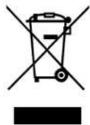
This symbol indicates that, according to the applicable regulations, the product and/or batteries must be disposed of separately from household waste. When this product reaches the end of its shelf life, you should dispose of the cells/batteries/accumulators and take them to a collection point designated by the local authorities.
Consumers must contact their local authorities or retailer for information concerning the correct disposal of old appliances and/or their batteries.
Compliance with the above guidelines will help protecting the environment.
7. TECHNICAL SUPPORT AND WARRANTY
Cecotec shall be liable to the end user or consumer for any lack of conformity that exists at the time of delivery of the product under the terms, conditions, and deadlines established by the applicable regulations.
It is recommended that repairs be carried out by qualified personnel.
If at any moment you detect any problem with your product or have any doubt, do not hesitate to contact the official Cecotec Technical Support Service at +34 96 321 07 28.
8. COPYRIGHT
The intellectual property rights over the texts in this manual belong to CECOTEC INNOVACIONES, S.L. All rights reserved. The contents of this publication may not, in whole or in part, be reproduced, stored in a retrieval system, transmitted, or distributed by any means (electronic, mechanical, photocopying, recording or similar) without the prior authorization of CECOTEC INNOVACIONES, S.L.
FRANÇAIS
1. PIÈCES ET COMPOSANTS
Img. 1.
Product: EnergySilence 800 Cyclone Desk Portable
Invoer adapter: 220V
Frequentie: 50Hz
Uitgang adapter: DC 5V/2A
Ingang: DC 5V/2A
Vermogen: 10 W
Fig./Img./Abb./Afb./Rys. 4

Fig./Img./Abb./Afb./Rys. 5
www.cecotec.es
- SOMMAIRE
- BATTERY INSTRUCTIONS
- INSTRUCTIONS DE SÉCURITÉ
- DISPLAY. FIG. 2
- NOTE
- BEFORE USE
- BOX CONTENT
- OPERATION
- BATTERY REMOVAL
- CLEANING AND MAINTENANCE
- ENGLISH
- TECHNICAL SPECIFICATIONS
- DISPOSAL OF OLD ELECTRICAL AND ELECTRONIC APPLIANCES
- TECHNICAL SUPPORT AND WARRANTY
- COPYRIGHT
- FRANÇAIS
- PIÈCES ET COMPOSANTS
- IMG. 1
Brand : CECOTEC
Model : Energysilence 800 Cyclone Desk Portable
Category : Ceiling fan