
JOYCAM - Digital Camera POLAROID - Free user manual and instructions
Find the device manual for free JOYCAM POLAROID in PDF.



| Brand | Polaroid |
| Model | JoyCam |
| Product type | Digital camera |
| Power source | Batteries (not included) |
| Built-in flash | Yes |
| Shooting distance (indoor) | 1.0 - 2.5 meters |
| Operating temperature | Above 13 °C |
| Film storage temperature | Below 24 °C |
| Photo counter capacity | 10 photos (film) |
| Warranty | 1 year (limited) |
| Dimensions (estimated) | 120 x 80 x 30 mm |
| Weight (estimated) | 200 g |
| Packaging materials | 75% recycled materials |
| Safety | Do not expose to water; supervise children |
| Maintenance | Clean with a soft, dry cloth |
| Customer service | 800-268-6970 (USA) |
| Website | www.polaroid.com |
Frequently Asked Questions - JOYCAM POLAROID
User questions about JOYCAM POLAROID
0 question about this device. Answer the ones you know or ask your own.
Ask a new question about this device
Download the instructions for your Digital Camera in PDF format for free! Find your manual JOYCAM - POLAROID and take your electronic device back in hand. On this page are published all the documents necessary for the use of your device. JOYCAM by POLAROID.
USER MANUAL JOYCAM POLAROID
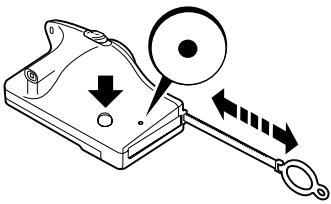
1 Press red shutter button.
Pull processing handle.
Push handle in.
Repeat until black dot shows in window.
Load Film
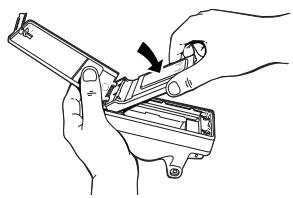
Before you load the film, make sure the picture counter shows a black dot.
1 Open door and film.
Close door and press red shutter button.
Pull handle. The film safety cover comes out.
Push handle in; counter shows 10.
Take Pictures
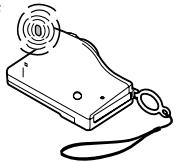
Select and charge.
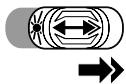
Indoors
Push selector to the right.
The ready light blinks and stays lit for one minute. If light goes off, push selector to the right again.
Repeat for every indoor picture.
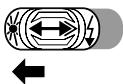
Outdoors
Push selector to the left.
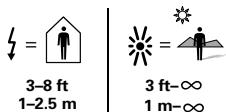
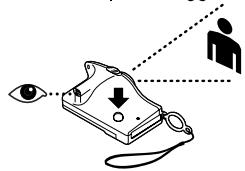
2 Aim and shoot. Best pictures 3-8 ft (1-2.5 m).

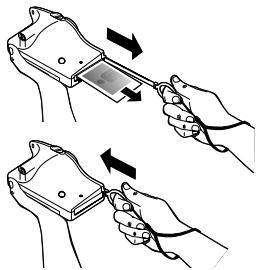
Process the picture.
Pull handle.
2 Remove picture.
Push handle in.
Tips
Black or dark pictures
Always use flash indoors. Ready light must be blinking.
Take indoor pictures between 3-8 ft (1-2.5 m).
Marks or blotches on picture
- When pulling handle, pull firmly and straight. Do not stop.
- Avoid pulling handle against your body.
Avoid extreme temperatures
Take pictures above 55^ (13^) and store film below 75^ (24^) .
If you have any questions, call us at 800-343-5000, or visit us at www.polaroid.com.
Limited Warranty: Polaroid will, at our option, repair or replace any camera found defective in manufacture within the warranty period (one year). The warranty period is determined by the date of camera purchase. Keep the receipt as proof of purchase. Otherwise the warranty period is determined by the date of manufacture. This warranty does not apply to damage caused by accident, misuse, or tampering and excludes all consequential damages except in jurisdictions not allowing such exclusions or limitations.
Caution: This camera is battery operated. Closely supervise children when they are operating the camera or when you are using it in their presence. To prevent electrical shock, the camera should not be exposed to or immersed in water or other fluids, disassembled, or operated if dropped and damaged.
The cardboard from the camera package is made from a minimum of 75% recovered material which includes at least 25% recycled post-consumer waste and can be recycled.
Copyright 1998 Polaroid Corporation, Cambridge, MA 02139 U.S.A., owner of the trademarks "Polaroid (and design)," "Polaroid JoyCam," "Captiva," and "Vision."