
TUNECAST AUTO POUR IPOD #F8V7101EABLK - Car audio accessory BELKIN - Free user manual and instructions
Find the device manual for free TUNECAST AUTO POUR IPOD #F8V7101EABLK BELKIN in PDF.


| Product Type | FM Transmitter for iPod |
| Brand | BELKIN |
| Model | TUNECAST AUTO #F8V7101EABLK |
| Category | Car Audio Accessory |
| Compatibility | iPod (dock connector) |
| Power | 12 V DC via cigarette lighter |
| Transmission | Frequency Modulation (FM) |
| Frequency Range | 88.1 – 107.9 MHz (FM band) |
| Frequency Memory | 2 presets (MI and MII) |
| Auto Shut-off | After 30 seconds without signal |
| Mounting | Adhesive mount included |
| Dimensions (approx.) | 10 x 5 x 2 cm |
| Weight (approx.) | 50 g |
| Certifications | EN 301 357, EN 301-489-9, CEPT REC 70-03 |
| Warranty | 3-year limited |
| Authorized Countries of Use | Germany, Switzerland, Iceland |
| Package Contents | TuneCast Auto, cigarette lighter adapter, mounting bracket, manual |
| Control Buttons | ↑/↓ (frequency), MI/MII (memory) |
| Power Consumption | Auto shut-off in standby |
Frequently Asked Questions - TUNECAST AUTO POUR IPOD #F8V7101EABLK BELKIN
User questions about TUNECAST AUTO POUR IPOD #F8V7101EABLK BELKIN
0 question about this device. Answer the ones you know or ask your own.
Ask a new question about this device
Download the instructions for your Car audio accessory in PDF format for free! Find your manual TUNECAST AUTO POUR IPOD #F8V7101EABLK - BELKIN and take your electronic device back in hand. On this page are published all the documents necessary for the use of your device. TUNECAST AUTO POUR IPOD #F8V7101EABLK by BELKIN.
USER MANUAL TUNECAST AUTO POUR IPOD #F8V7101EABLK BELKIN
Congratulations and thank you for purchasing the innovative TuneCast Auto from Belkin. This product is designed to power, charge, and transmit audio from your iPod to your car stereo. Please review this User Manual carefully, so that you can be sure you'll get the most from your TuneCast Auto, virtually anywhere you go.
Tunecast Auto is Certified and conforms to EN 301 357 and CPT REC 70-03
EN
-
For AUDIO and POWER: Plug the dock connector into your iPod and the cigarette-lighter adapter into your car's cigarette-lighter outlet. Press the I or II button to activate when the transmitter goes into sleep mode.
-
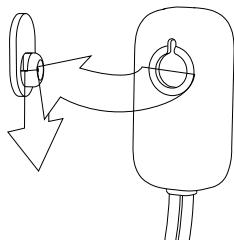
For MOUNTING: Use multi-mount socket and mount with adhesive backing to attach your TuneCast Auto to any smooth surface.
Note: To conserve power, the TuneCast Auto will automatically turn off when there is no input audio signal for approximately 30 seconds.
-
Tune your car stereo frequency to a channel with a weak broadcast signal. The ideal channel is one that is not picking up a signal from a radio station, or is doing so weakly.
-
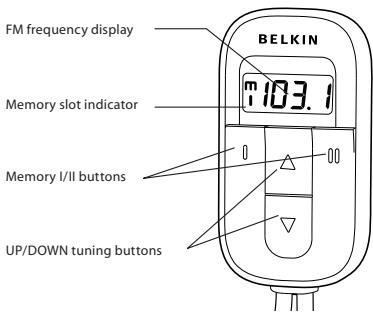
Press the or button on the TuneCast Auto to select the transmission frequency chosen in step 3, on your car for broadcast. Press and hold either button for fast-forward or backward tuning.
- Your TuneCast Auto can memorize up to two different frequencies so you can recall them quickly later.
a. Select the desired frequency using the or buttons.
b. Press and hold the MI or MII button for two seconds. When the MI or MII icon blinks, release the button.
- Adjust the volume on your iPod to a medium level.
- Adjust the volume of your FM radio to the desired listening level.*
*Due to characteristics of FM transmission, you will experience better sound quality by adjusting the volume on your car stereo when necessary, and by leaving your iPod volume at a medium level.
EN
This equipment has been tested and found to be compliant with the requirements of the R&TE Directive. These limits are designed to provide reasonable protection against harmful interference in a residential installation. This equipment generates, uses, and can radiate radio frequency energy and, if not installed and used in accordance with the instructions, may cause harmful interference to radio communications. However, there is no guarantee that interference will not occur in a particular installation. If this equipment does cause harmful interference to radio or television reception, which can be determined by turning the equipment off and on, the user is encouraged to try to correct the interference by one of the following measures:
Reorient or relocate the receiving antenna.
- Increase the separation between the equipment and receiver.
- Connect the equipment into an outlet on a circuit different from that which the receiver is connected.
- Consult the dealer or an experienced radio/TV technician for help.
Belkin Corporation Limited 3-Year Warranty
Belkin Corporation warrants this product against defects in materials and workmanship for its warranty period. If a defect is discovered, Belkin will, at its option, repair or replace the product at no charge provided it is returned during the warranty period, with transportation charges prepaid, to the authorized Belkin dealer from whom you purchased the product. Proof of purchase may be required.
This warranty does not apply if the product has been damaged by accident, abuse, misuse, or misapplication; if the product has been modified without written permission of Belkin; or if any Belkin serial number has been removed or defaced.
THE WARRANTY AND REMEDIES SET FORTH ABOVE ARE EXCLUSIVE IN LIEU OF ALL OTHERS, WHETHER ORAL OR WRITTEN, EXPRESSED OR IMPLIED. BELKIN SPECIFICALLY DISCLAIMS ANY AND ALL IMPLIED WARRANTYES, INCLUDING, WITHOUT LIMITATION, WARRANTYES OF MERCHANTABILITY AND FITNESS FOR A PARTICULAR PURPOSE.
No Belkin dealer, agent, or employee is authorized to make any modification, extension, or addition to this warranty.
BELKIN IS NOT RESPONSIBLE FOR SPECIAL, INCIDENTAL, OR CONSEQUENTIAL DAMAGES RESULTING FROM ANY BREACH OF WARRANTY, OR ANY OTHER LEGAL THEORY, INCLUDING BUT NOT LIMITED TO, LOST PROFITS, DOWNTIME, GOODWILL, DAMAGE TO OR REPROGRAMMING, OR REPRODUCING, ANY PROGRAM OR DATA STORED IN OR USED WITH BELKIN PRODUCTS.
Tunecast Auto is Compliant with and conforms to EN 301 357, EN 301 489-9 and CEPT REC 70-03 Annex 13 as a
Class 2 device (€0673)
At 3 March 2006 this device may be used in : Germany, Switzerland and Iceland please see national legislation or Recommendation 70-03 implementation table for current position http://www.ero.dk/
EN
www.belkin.com
Belkin Ltd.
Express Business Park, Shipton Way
Rushden, NN10 6GL, United Kingdom
+44 (0) 1933 35 2000
+44 (0) 1933 31 2000 fax
Belkin B.V.
Boeing Avenue 333
1119 PH Schiphol-Rijk, Netherlands
+31(0)206547300
+31 (0) 206547349 fax
Belkin GmbH
Hanebergstrasse 2
80637 Munich, Germany
+49 (0) 89 143405 0
+49 (0) 89 143405 100 fax
Belkin SAS
130 rue de Silly
92100 Boulogne-Billancourt, France
+33 (0) 1 41 03 14 40
+33 (0) 1 41 31 01 72 fax
Tech Support
Europe:0080022355460
BELKIN
Support technique
Europe: 00 800 223 55 460
Express Business Park, Shipton Way
Express Business Park, Shipton Way
Rushden, NN10 6GL, United Kingdom
+44 (0) 1933 35 2000
+44 (0) 1933 31 2000 fax
Belkin B.V.
Boeing Avenue 333
1119 PH Schiphol-Rijk, Netherlands
+31(0)206547300
+31 (0) 206547349 fax
Belkin GmbH
Hanebergstrasse 2
80637 Munich, Germany
+49 (0) 89 143405 0
+49 (0) 89 143405 100 fax
Belkin SAS
130 rue de Silly
92100 Boulogne-Billancourt, France
+33 (0) 1 41 03 14 40
+33 (0) 1 41 31 01 72 fax
Tech Support
Europe:0080022355460