
ADAPTATEUR UNIVERSEL POUR MICROPHONE #F8E478EA - Audio adapter BELKIN - Free user manual and instructions
Find the device manual for free ADAPTATEUR UNIVERSEL POUR MICROPHONE #F8E478EA BELKIN in PDF.


User questions about ADAPTATEUR UNIVERSEL POUR MICROPHONE #F8E478EA BELKIN
0 question about this device. Answer the ones you know or ask your own.
Ask a new question about this device
Download the instructions for your Audio adapter in PDF format for free! Find your manual ADAPTATEUR UNIVERSEL POUR MICROPHONE #F8E478EA - BELKIN and take your electronic device back in hand. On this page are published all the documents necessary for the use of your device. ADAPTATEUR UNIVERSEL POUR MICROPHONE #F8E478EA by BELKIN.
USER MANUAL ADAPTATEUR UNIVERSEL POUR MICROPHONE #F8E478EA BELKIN
Take your iPod experience on the road
User Manual
F8E478ea
EN
FR
DE
ES
IT

BELKIN

Made for
iPod
Universal Mic Adapter™ for iPod®
Take your iPod experience on the road
User Manual
F8E478ea
Setup Instructions
Congratulations and thank you for purchasing this innovative product from Belkin mobility. Please review this manual carefully in order to get the best performance from your Universal Mic Adapter.
To record:
- Connect the Mic Adapter to the iPod and a microphone to the 3.5mm mono-audio plug on the Adapter. The iPod will launch the "record" application when you do this. With the "Record" option highlighted, press "Play/Pause" or press the "Select" button to begin recording. To pause recording, press "Play/Pause" again or highlight "Pause" and then press the "Select" button on the iPod.
- During recording, there are two options: "Pause" and "Stop and Save". To end a recording, either press the "Menu" button or highlight the "Stop and Save" option, and then press the "Select" button. This saves your recording and lists it by date and time recorded.
- To begin another recording, go to the top of the "Voice Memos" menu and select "Record Now"; or, from the iPod menu select "Extras > Voice Memos > Record Now".
3-Level Gain Switch
The Mic Adapter includes a three-level gain switch intended to optimize the quality of your recorded audio. "Low gain" is activated by moving the switch to the left of the setting bar. "Medium gain" is activated by moving the switch to the center setting in the setting bar. "High gain" is activated by moving the switch to the right of the setting bar.
Please refer to the following to determine the best setting to select while recording:
| For normal voice dictation or high volume | Use low gain | |
| For conversation and conference | Use medium gain | |
| For lecture hall or low volume | Use high gain |
2-Colour Recording LED Indicator
The Belkin Universal Mic Adapter features an LED to help you make the best possible sounding recordings." You will need to determine the correct setting for the gain switch, which is located on the front of the Universal Mic Adapter. This LED helps determine if the gain switch is set correctly in conjunction with your microphone. A green LED indicates that the iPod is recording. The LED will begin to turn red as the peaks of the recording increase. The LED will become bright red when the sound level is exceeding the normal range of recording.
Audio that is recorded while the LED is red most of the time is very likely to produce distorted sound on playback. If you see that the LED is red constantly while you are recording, set the gain switch to the next lower setting or move the microphone further away from the source. At the optimum recording level, the LED should be mostly green and should start to turn red only during the peaks of the recording.

It is advisable to perform a quick sound check and playback before making longer recordings to ensure that you are using the most appropriate setting.
*Recording quality is dependent on the type of microphone used.
NOTE: iPod creates audio files in mono (true) WAV format.
Records at the iPod rate of 16-bit audio at 8kHz
To play back a recording:
Connect headphones or portable speakers to the 3.5mm audio out jack on the Adapter.
From the iPod menu, select "Extras > Voice Memos". Select a recording from the list and either press the "Play/Pause" button or select the "Play" option from the user interface.
EN
To transfer recordings to your computer:
Your iPod must be enabled for use as a hard disk. Connect the iPod to your computer and open the application you use to listen to audio. Through the My Computer menu, double-click the removable drive that represents the iPod. Double-click on the "Recordings" folder. Double-click on a specific audio (WAV format) file to listen to the recording.
NOTE: You can play your files directly from the iPod and/or transfer recordings to your computer by opening this folder and dragging the audio files to the desktop.
To transfer recordings using iTunes®:
Connect the iPod to your computer. Wait a few seconds while iTunes recognizes the iPod device. Once the device is recognized, iTunes will launch (it does this automatically). You will be asked if you would like to copy your voice memos to your music library. Select "Yes" or "No" to proceed. If you select "Yes", all voice memos will be copied to your iTunes Music Library. A default "Voice Memos" folder, in which all voice memos will be stored, will be created in your iPod source list.
To locate recordings on the iPod after syncing with iTunes:
Disconnect the iPod from the computer. Select "Playlists > Voice Memos".
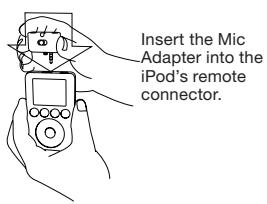
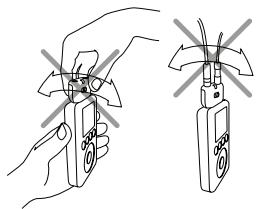
To avoid damage to the connector, do not move the Mic Adapter from front to back in the receptacle.
Information
Belkin Corporation Limited Lifetime Product Warranty
Belkin Corporation warrants this product against defects in materials and workmanship for its lifetime. If a defect is discovered, Belkin will, at its option, repair or replace the product at no charge provided it is returned during the warranty period, with transportation charges prepaid, to the authorized Belkin dealer from whom you purchased the product. Proof of purchase may be required. This warranty does not apply if the product has been damaged by accident, abuse, misuse, or misapplication; if the product has been modified without the written permission of Belkin; or if any Belkin serial number has been removed or defaced.
THE WARRANTY AND REMEDIES SET FORTHBE ARE EXCLUSIVE IN LEU OF ALL OTHERS, WHETHER ORAL OR WRITTEN, EXPRESSED OR IMPLIED. THE WARRANTY AND REMEDIES SET FORTHBETHE ELIXIS OF THE ABOVE SPECIFIED WARRANTYES, INCLUDING, WITHOUT LIMITATION, WARRANTY OF MERCHANTABILITY AND FITNESS FOR A PARTICULAR PURPOSE.
No Belkin dealer, agent, or employee is authorized to make any modification, extension, or addition to this warranty.
BELKIN IS NOT RESPONSIBLE FOR SPECIAL, INCIDENTAL, OR CONSEQUENTIAL DAMAGES RESULTING FROM ANY BREACH OF WARRANTY, OR FROM THE USE OF ANY PRODUCTS IN A LEGally Owned, MANUFACTured, OR REPRODUCTS. GOODWILL, DAMAGE TO OR REPROGRAMMING OR REPRODUCING, ANY PROGRAM OR DATA STORED IN OR USED WITH BELKIN PRODUCTS.
Some states do not allow the exclusion or limitation of incidental or consequential damages or exclusion of implied warranties, so the above limitations or exclusions may not apply to you. This warranty gives you specific legal rights, and you may also have other rights that vary from state to state.

FCC Statement
Note: This equipment has been tested and found to comply with the limits for a Class B digital device, pursuant to part 15 of the FCC Rules. These limits are designed to provide reasonable protection against harmful interference in a residential installation. This equipment generates, uses, and can radiate radio frequency energy and, if not installed and used in accordance with the instructions, may cause harmful interference to radio communications. However, there is no guarantee that interference will not occur in a particular installation. If this equipment does cause harmful interference to radio or television reception, which can be determined by turning the equipment off and on, the user is encouraged to try to correct the interference by one of the following measures:
Reorient or relocate the receiving antenna.
- Increase the separation between the equipment and receiver.
- Connect the equipment into an outlet on a circuit different from that which the receiver is connected.
- Consult the dealer or an experienced radio/TV technician for help.
CE Declaration of Conformity
We, Belkin Corporation, declare under our sole responsibility that the product FBE478, to which this declaration relates, is in conformity with Emissions Standard EN55022 and with Immunity Standard EN55024, LVP EN61000-3-2, and EN61000-3-3.
ICES
Express Business Park, Shipton Way
Rushden, NN10 6GL, United Kingdom
+44 (0) 1933 35 2000
+44 (0) 1933 31 2000 fax
Belkin B.V.
Boeing Avenue 333
1119 PH Schiphol-Rijk, The Netherlands
+31 (0) 206547300
+31 (0) 20 654 7349 fax
Belkin GmbH
Hanebergstraße 2,
80637 Munich, Germany
+49(0)891434050
+49 (0) 89 143405 100 fax
Belkin SAS
130 rue de Silly
92100 Boulogne Billancourt, France
+33 (0) 141 03 14 40
+33 (0) 141 31 01 72 fax
Belkin Tech Support
Europe: 00 800 223 55 460
© 2005 Belkin Corporation. All rights reserved.
All trade names are registered trademarks of respective manufacturers listed.
iPod is a trademark of Apple Computer, Inc., registered in the U.S. and other countries.
F8E478ea
P74890ea
BELKIN

Made for
iPod
Instructions d-installation
Express Business Park, Shipton Way
Assistance technique Belkin
Europe: 00 800 223 55 460
Express Business Park, Shipton Way
Rushden, NN10 6GL, GroBbritannien
+44 (0) 1933 35 2000
+44 (0) 1933 31 2000 fax
Belkin B.V.
Boeing Avenue 333
1119 PH Schiphol-Rijk, Niederlande
+31 (0) 206547300
+31 (0) 20 654 7349 fax
Belkin GmbH
Hanebergstraße 2,
Express Business Park, Shipton Way
Rushden, NN10 6GL, Reino Unido
+44 (0) 1933 35 2000
+44 (0) 1933 31 2000 fax
Belkin B.V.
Boeing Avenue 333
1119 PH Schiphol-Rijk, Paires Bajos
+31 (0) 206547300
+31 (0) 20 654 7349 fax
Belkin GmbH
Hanebergstraße 2,
Express Business Park, Shipton Way
Express Business Park, Shipton Way
Rushden, NN10 6GL, United Kingdom
+44 (0) 1933 35 2000
+44 (0) 1933 31 2000 fax
Belkin B.V.
Boeing Avenue 333
1119 PH Schiphol-Rijk, The Netherlands
+31 (0) 206547300
+31 (0) 20 654 7349 fax
Belkin GmbH
Hanebergstraße 2,
80637 Munich, Germany
+49(0)891434050
+49 (0) 89 143405 100 fax
Belkin SAS
130 rue de Silly
92100 Boulogne Billancourt, France
+33 (0) 141 03 14 40
+33 (0) 141 31 01 72 fax
Belkin Tech Support
Europe:0080022355460
© 2005 Belkin Corporation. All rights reserved.
All trade names are registered trademarks of respective manufacturers listed.
iPod is a trademark of Apple Computer, Inc., registered in the U.S. and other countries.
F8E478ea
P74890ea
- BELKIN
- Universal Mic Adapter™ for iPod®
- Setup Instructions
- To record:
- 3-Level Gain Switch
- 2-Colour Recording LED Indicator
- To play back a recording:
- To transfer recordings to your computer:
- To transfer recordings using iTunes®:
- To locate recordings on the iPod after syncing with iTunes:
- Information
- Belkin Corporation Limited Lifetime Product Warranty
- FCC Statement
- CE Declaration of Conformity
- ICES
- Instructions d-installation
Brand : BELKIN
Model : ADAPTATEUR UNIVERSEL POUR MICROPHONE #F8E478EA
Category : Audio adapter