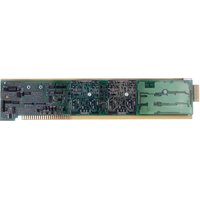
AA72-4F2 - Electronic board Daytronic - Free user manual and instructions
Find the device manual for free AA72-4F2 Daytronic in PDF.


Pick your language and provide your email: we'll send you a specifically translated version.
| Product Type | Electronic board |
| Brand | Daytronic |
| Model | AA72-4F2 |
| Category | Electronic board |
| Main Functions | Signal conditioning, data acquisition and sensor interface |
| Number of Channels | 4 |
| Input Signals | Analog voltage and current signals |
| Output Interface | Buffered analog output / bus connector |
| Mounting | Plug-in module for compatible Daytronic mainframe |
| Power Supply | +5 V DC and ±15 V DC depending on configuration |
| Dimensions | Approx. 233 x 160 mm |
| Weight | Approx. 0.5 kg |
| Operating Temperature | 0°C to +50°C |
| Storage Temperature | -20°C to +70°C |
| Input Impedance | > 1 MΩ |
| Protection | Reverse polarity and overvoltage protection per specification |
| Maintenance | Clean with dry antistatic cloth and perform periodic function checks |
| Safety | ESD-sensitive electronic assembly, handle with care |
| Spare Parts & Repairability | Authorized spare parts via Daytronic service; repair by qualified personnel only |
| Documentation | Free PDF manual available on notice-facile.com |
Frequently Asked Questions - AA72-4F2 Daytronic
How can I download the Daytronic AA72-4F2 manual?
You can download the original user manual in PDF format for free from notice-facile.com. The manual includes installation, wiring, and operating instructions.
What is the Daytronic AA72-4F2 used for?
The AA72-4F2 is an electronic board designed for signal conditioning and data acquisition, connecting sensors or analog signals to a Daytronic measurement system.
How do I install the AA72-4F2 board?
Turn off the chassis, align the board with the slot guide, slide it in firmly, and secure the mounting screws. Always see the installation section in the manual before powering up.
What type of sensors can I connect to the AA72-4F2?
The board accepts analog voltage and current signals. The exact sensor types, including wiring and range settings, are detailed in the technical specifications of the manual.
How should I clean and maintain the board?
Disconnect the board from power before cleaning. Use a dry, anti-static cloth or soft brush to remove dust. Do not use water or cleaning solvents.
What precautions should I take against electrostatic discharge?
Wear an ESD wrist strap, work on an anti-static mat, hold the board by its edges, and store it in an anti-static bag when not installed.
Where can I find spare parts for the AA72-4F2?
Spare parts must be ordered through Daytronic authorized distributors or their service department. Have the model name and serial number ready.
Can I repair the electronic board myself?
The board contains surface-mount components and requires calibration. Opening or repairing it yourself may damage the board and void the warranty; contact qualified service personnel.
What is the operating temperature range of the AA72-4F2?
The recommended operating temperature range is 0°C to +50°C. Store the board between -20°C and +70°C.
Is the AA72-4F2 manual available in other languages?
The English version is available online. On notice-facile.com you can request a translated version by selecting your language and providing your email address.
User questions about AA72-4F2 Daytronic
0 question about this device. Answer the ones you know or ask your own.
Ask a new question about this device
No questions yet. Be the first to ask one.
Download the instructions for your Electronic board in PDF format for free! Find your manual AA72-4F2 - Daytronic and take your electronic device back in hand. On this page are published all the documents necessary for the use of your device. AA72-4F2 by Daytronic.
USER MANUAL AA72-4F2 Daytronic



Manual assistant
Powered by Anthropic
Waiting for your message
Product information
Brand : Daytronic
Model : AA72-4F2
Category : Electronic board