UP-L1000E - Inverter Sven - Free user manual and instructions
Find the device manual for free UP-L1000E Sven in PDF.


Pick your language and provide your email: we'll send you a specifically translated version.
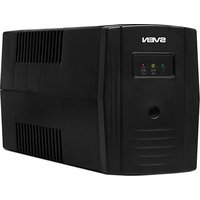
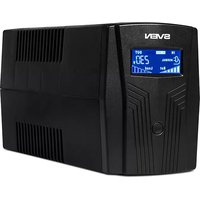
| Device type | Uninterruptible power supply (UPS) of line-interactive type |
| Model | Sven UP-L1000E |
| Output power | 1000 VA / 600 W |
| Input voltage | 165–275 V |
| Output voltage | 220 V ± 10% |
| Output waveform | Approximated sine wave (stepped) |
| Transfer time to battery | ≤ 10 ms |
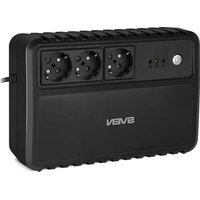
| Number of output sockets | 2 pcs. (with surge protection) |
| Built-in battery | 12 V, 9 Ah, sealed lead-acid |
| Battery charging time | 4–6 hours (up to 90% capacity) |
| Protection | Against short circuit, overload, deep battery discharge |
| Indication | LED: mains power, battery operation, charging |
| Dimensions (W×H×D) | 280 × 140 × 100 mm |
| Weight | 5.5 kg |
| Noise level | ≤ 40 dB (at a distance of 1 m) |
| Operating temperature | 0…40 °C |
| Care and cleaning | Wipe the housing with a dry soft cloth; do not allow moisture ingress |
| Safety | Overheat protection, fuse, plug grounding |
| Repair and maintenance | Battery replacement is possible without special tools; disassembly is allowed only by qualified personnel |
| Package contents | UPS, power cable, user manual |
Frequently Asked Questions - UP-L1000E Sven
How to properly connect the Sven UP-L1000E UPS?
Connect the UPS to the mains socket using the supplied cable. Make sure the switch is in the “ON” position. After switching on, the mains indicator will light up. Then connect the load to the output sockets. Do not connect devices with high starting power (e.g., laser printers) that exceed the permissible power to the UPS.
What does an intermittent beep mean?
An intermittent beep usually indicates battery operation or low mains voltage. If the beep is continuous, the battery may be discharged or faulty. Check the indicators on the housing. During battery operation, try to save data and shut down.
How to replace the battery in the UPS?
Disconnect the UPS from the mains and turn it off. Open the bottom cover, disconnect the connectors of the old battery and remove it. Install a new battery of the same capacity and voltage (12 V, 9 Ah), connect the connectors according to the marking. Close the cover and turn on the device. After replacement, calibrate: fully charge the battery, then disconnect the mains and let the UPS run until it shuts down automatically, then reconnect the mains.
Is it possible to connect a refrigerator or other inductive device to the UPS?
UPS with approximated sine wave is not recommended for use with powerful inductive loads (refrigerators, pumps), as this can lead to overload and shortened service life. Such devices require a UPS with a pure sine wave.
Why do distortions occur at the output during battery operation?
When operating on battery, the waveform may differ from a sine wave (stepped approximation). This is normal for this type of UPS. Do not connect sensitive equipment (e.g., Hi-Fi amplifiers) without filters.
How long does the battery hold a charge during a power outage?
The battery runtime depends on the load. At full load (600 W), the battery can provide operation for 1–2 minutes. At a load of 300 W, up to 5–10 minutes. For an exact calculation, use the formula: battery capacity (Ah) × voltage (12 V) / load power (W) × efficiency (~0.8). The time will be approximate.
What to do if the UPS does not turn on?
Check the mains connection and the socket condition. Make sure the cable is intact. If the indicators do not light up, the fuse may have blown. Disconnect all loads and press the power button for 3 seconds. If the device does not respond, contact a service center.
What maintenance does the device require?
Regularly clean the housing from dust with a dry soft cloth. Do not use solvents or abrasive agents. Make sure the ventilation openings are not blocked. Every 2-3 months, check the battery condition by performing a test discharge.
Can the UPS be used for a burglar alarm?
Yes, the UPS is suitable for powering security alarm and video surveillance systems, if the total power does not exceed 600 W. Make sure inductive ripples are minimal. Devices with switching power supplies operate correctly.
What to do in case of UPS overload?
When overloaded, the UPS emits a signal and may turn off the output. Disconnect some loads and press the “RESET” button (if available) or turn the device off/on. Connect only those devices whose total power does not exceed the maximum output power.
User questions about UP-L1000E Sven
0 question about this device. Answer the ones you know or ask your own.
Ask a new question about this device
No questions yet. Be the first to ask one.
Download the instructions for your Inverter in PDF format for free! Find your manual UP-L1000E - Sven and take your electronic device back in hand. On this page are published all the documents necessary for the use of your device. UP-L1000E by Sven.
USER MANUAL UP-L1000E Sven


Manual assistant
Powered by Anthropic
Waiting for your message
Product information
Brand : Sven
Model : UP-L1000E
Category : Inverter