VESS A3340S - Security Camera Promise Technology - Free user manual and instructions
Find the device manual for free VESS A3340S Promise Technology in PDF.


Pick your language and provide your email: we'll send you a specifically translated version.
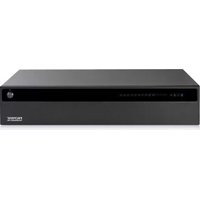
| Product Type | Network Video Recorder (NVR) / IP Security Camera |
| Brand | Promise Technology |
| Model | VESS A3340S |
| Form Factor | Rack-mountable 2U |
| Dimensions (W x H x D) | 430 x 88 x 540 mm |
| Weight | Approximately 15 kg without drives |
| Power Supply | 100-240 V AC, 50/60 Hz |
| Power Consumption | 120 W (max) |
| Number of Drive Bays | 4 bays for 3.5-inch drives |
| RAID Support | RAID 0, 1, 5, 6, 10 |
| Camera Compatibility | Support for IP cameras from major brands |
| Number of Channels | Up to 16 channels |
| Video Compression | H.264, H.265 |
| Maximum Recording Resolution | 12 MP |
| Video Outputs | VGA, HDMI |
| Key Features | Continuous recording, motion detection, remote viewing |
| Maintenance and Cleaning | Wipe with a dry cloth, avoid moisture |
| Security | Password protection, data encryption |
| Spare Parts and Repairability | Replacement of fans, power supplies, and drives is possible |
| General Information | User manual available on the manufacturer's website |
Frequently Asked Questions - VESS A3340S Promise Technology
How to install VESS A3340S into a rack?
Secure the device in the rack using the included rails. Make sure the ventilation openings are not blocked and tighten the screws.
How to connect IP cameras to the NVR?
Connect the cameras to the network via a switch, then find them through the management interface. The auto-detection function is usually used.
How to set up remote access?
Enable remote access in the settings, assign a port for forwarding on the router, and use an app or browser for viewing. It is recommended to set up DDNS.
What to do if you forgot the administrator password?
Use the reset button on the rear panel or contact the manufacturer's support service for the access recovery procedure.
Which drives are suitable for the VESS A3340S?
SATA 3.5-inch drives are suitable. For video surveillance, it is recommended to use WD Purple series drives or similar.
How to back up recordings?
Copy the files via USB port or network folder. You can configure automatic backup to an external storage device.
Does the device support PTZ cameras?
Yes, most NVRs support PTZ control via Pelco-D/P protocols or proprietary camera protocols.
How to clean the device from dust?
Turn off the power and wipe the case with a dry soft cloth. Use a can of compressed air for fans and heatsinks.
Can the fan be replaced independently?
Yes, fans are usually secured with screws. Disconnect the device from the power, remove the cover, and replace the fan with a similar one.
What is the warranty on the device?
The standard warranty is 3 years. For detailed information, contact your dealer or the official Promise Technology website.
User questions about VESS A3340S Promise Technology
0 question about this device. Answer the ones you know or ask your own.
Ask a new question about this device
No questions yet. Be the first to ask one.
Download the instructions for your Security Camera in PDF format for free! Find your manual VESS A3340S - Promise Technology and take your electronic device back in hand. On this page are published all the documents necessary for the use of your device. VESS A3340S by Promise Technology.
USER MANUAL VESS A3340S Promise Technology
Manual assistant
Powered by Anthropic
Waiting for your message
Product information
Brand : Promise Technology
Model : VESS A3340S
Category : Security Camera