
FISH450 TRICOLOR - Fish Finder NAVMAN - Free user manual and instructions
Find the device manual for free FISH450 TRICOLOR NAVMAN in PDF.



| Product Type | Fish Finder |
| Brand | NAVMAN |
| Model | FISH450 TRICOLOR |
| Display | Tricolor LCD (blue, red, green) - 160 x 80 pixels - 6-level backlight |
| Depth Range | 0.6 m to 300 m |
| Depth Accuracy | Greater than 2% |
| Transducer Frequency | 200 kHz |
| Speed Range | 1 to 50 knots (MPH, KPH) |
| Temperature Range | 0 °C to 50 °C (operating); measurement -2 °C to 37.7 °C |
| Power Supply | 10 to 16.5 V DC - Consumption 180 mA max. |
| Main Functions | Fish detection, depth measurement, temperature, speed, log, fuel management (optional), alarms, auto/manual scales, auto/manual gain, zoom, bottom tracking, history, sonar, fuel and data screen |
| Maintenance and Cleaning | Clean with a damp cloth or mild detergent. Do not use abrasives, gasoline or solvents. |
| Safety | Do not expose to more than 50 °C. Connect via a 1 A fuse. Waterproof connections by bayonet nut. |
| Spare Parts and Repairability | No user-serviceable parts. Repairs only by an authorized Talon Technology service center. |
| General Information | Ultrasonic sounder with Aquaducer transducer (speed, temperature, depth) included. Transducer cable 8 m, max 12 m. NMEA 0183 output. Weight and dimensions not specified. |
Frequently Asked Questions - FISH450 TRICOLOR NAVMAN
User questions about FISH450 TRICOLOR NAVMAN
0 question about this device. Answer the ones you know or ask your own.
Ask a new question about this device
Download the instructions for your Fish Finder in PDF format for free! Find your manual FISH450 TRICOLOR - NAVMAN and take your electronic device back in hand. On this page are published all the documents necessary for the use of your device. FISH450 TRICOLOR by NAVMAN.
USER MANUAL FISH450 TRICOLOR NAVMAN
3-2 Fish History and Zoom screens 7
3-3 Sonar screen 10
3-4 Fuel screen 11
3-5 Data screen 11
4 Setup 12
4-1 Alarms
Low Fuel, Too Shallow, Too Deep, Fish Alarm, Temp Value, Temp Rate, Low Battery 13
4-2 Fuel
Tank Full, Tank Size, Set Remaining, Clear Used, Units, Num Engines, Fuel Cal, Flow Filter 14
4-3 Depth
Units, Keel Offset 15
4-4 Temperature
Units, Temp Cal 15
4-5 Speed and Logs
Units, Speed Cal, Log Cal, Log select (Trip/Total), Zero Trip Log, Zero All Logs 15
4-6 Display
Fish Symb, Speed, Temp, Display Cal, Red Cal, Blue Cal 16
4-7 Key Beep 17
4-8 Language 17
4-9 Resetting to factory defaults 17
4-10 Simulate mode 17
5 Installation 18
5-1 What comes with your FISH450 Tricolor 18
5-2 Options and accessories 18
5-3 Mounting the Aquaducer 19
5-4 Other depth and speed/temperature transducers 20
5-5 Fuel transducers 20
5-6 Mounting the FISH450 Tricolor display unit 20
5-7 Wiring connection 21
5-8 Auto Power wiring option 21
Appendix A - Specifications 22
Appendix B - Troubleshooting 23
Appendix C - Glossary 25
Appendix D - Conditions of sale & warranty 26
Appendix E - How to contact us 26
Appendix F - Quick reference 27
Important
It is vital to the performance of the FISH450 Tricolor that the transducer is installed in the best location. Please follow instructions on transducer installation very carefully.
1 Introduction
Congratulations on choosing the NAVMAN FISH450 Tricolor fishfinder. For maximum benefit, please read this manual carefully before installation and use. Special terms are explained in Appendix C.
The NAVMAN FISH450 Tricolor
The FISH450 Tricolor is an ultrasonic fishfinder with powerful software and a three colour display. As well as detecting fish the unit measures water depth, boat speed, water temperature and battery voltage and has two distance logs (trip and total with one displayed at a time). With an optional fuel kit the FISH450 Tricolor is also a sophisticated yet easy to use fuel computer.
How the NAVMAN FISH450 Tricolor finds fish and determines the depth
An installed FISH450 Tricolor has two parts:
- a transducer attached to the hull
- the display unit.
The transducer generates an ultrasonic (sound) pulse, which travels down towards the bottom. When the sound pulse meets an object, such as a fish or the bottom, some of the pulse is reflected back up towards the boat and is received by the transducer. The depth of an object can be calculated by measuring the time between sending the pulse and receiving its echo.
The display unit analyses the reflections from each pulse, removes unwanted reflections (from bubbles and other noise) and displays what is in the water under the boat. The display shows three colours: Blue for the strongest reflections, Red for medium and Green for the weakest reflections
(see section 3 - 2). These colours help users better interpret what is in the water.
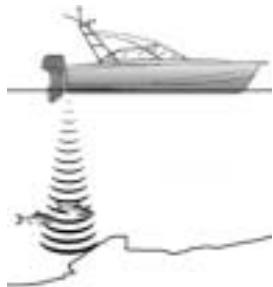
There are several reasons the returned echo strength can vary. Larger fish usually return stronger echos, as do fish in the centre of the beam where the pulse is stronger. Reasons for weak echos include the fish or object being in deep water or turbid water, or in the edge of the beam where the pulse is weaker.
The unit will detect the bottom down to 1000 feet (300 metres), depending on the clarity of the water and measures depths to an accuracy of 2% .
Assisting with navigation
The FISH450 Tricolor can be used to find fish, to locate features on the bottom such as reefs or wrecks and to help recognise favourite fishing spots from the profile of the bottom. Use the FISH450 Tricolor to assist navigation by following the depth contours marked on charts.
IMPORTANT NOTE ON USE - While the FISH450 Tricolor can be used as an aid to navigation, its accuracy can be influenced by many factors, including the location of the transducer. It is the user's responsibility to ensure the unit is installed and used correctly.
How to find fish
Underwater features like reefs, wrecks and rocky outcrops attract fish. Use the FISH450 Tricolor to find these features, then look for fish by passing over the feature slowly several times using the Zoom screen (See section 3-1). Where there is a current, the fish will often be found downstream of the feature.
For deep sea fishing, a rapid change in temperature may indicate the edge of a warm or cold current. The temperature difference may form a barrier which fish tend not to swim through. Search for fish either side of the barrier.
Cleaning and maintenance
The FISH450 Tricolor should be cleaned with a damp cloth or mild detergent. Avoid abrasive cleaners and petrol or other solvents.
Always cover or remove the stem mounted Aquaducer when repainting the hull. If painting over a through hull transducer with antifouling then use only one coat of paint. When repainting the transducer remove previous coats by lightly sanding.
Temperature warning
Do not expose the unit to temperatures exceeding 50^ (122°F) or the LCD may not be useable until it cools down.
Never leave the unit exposed to high temperatures even for a few minutes. (e.g. on the dashboard of a car).
2 Getting started
Power connection
Power is supplied through the black connector. The connectors are bayonet type, push the plug into the socket then turn the collar to lock. Make sure the collar is secure for a water tight connection.
Transducer connection
If the transducer (blue connector) is not connected when the unit is turned on, the message "No transducer detected. Enter simulation mode? Yes/ No" will appear. Press the Cursor Left or Right
key to switch between Yes and No. (More information on the simulation mode can be found in the Setup - Simulation section 4-10) When you have selected your choice, press the Menu key to exit and the startup sequence will continue. (Note: If the transducer was not intentionally disconnected, turn the unit off and refer to the section on Troubleshooting in Appendix B.)
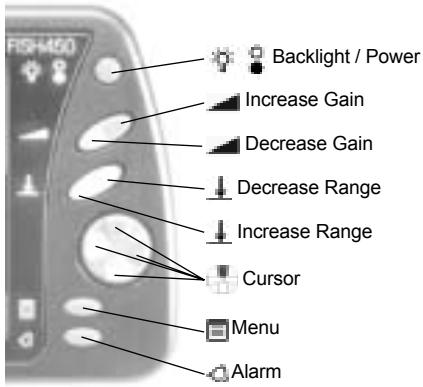
Names of keys
Definition of Press and Hold
PRESS means to push the key for less than 1 second.
HOLD means to push and hold the key down for at least 1 second.
Power on
To turn the unit on press the Power key.

Note: if the Auto Power wire is connected (See the Installation - Auto Power section 5-8), then the unit will turn on automatically when the boat's power is turned on.
A title screen briefly appears which displays basic
product information, including the software version. The FISH450 Tricolor will then display the screen from the following list that was last used: Fish History, Zoom, Sonar, Fuel or Data.
Power off
To turn the unit off, hold the Power key
A countdown box will appear. Continue holding down the Power key for 3 seconds until the unit turns off.
Note: if the Auto Power wire is connected (See Installation - Auto Power section 5-7) then the unit will turn off only when the boat's power turns off.
Changing the level of backlighting
Pressing the Backlight / Power key activates the backlight function. A bar which indicates the backlight level appears at the bottom of the screen. Each additional press increases the backlight intensity from the current level until level 6 is reached. The next press steps to level 0 (off). The bar disappears 2 seconds after the last press of the Backlight / Power key.
Language selection
To check which language is currently selected, press the Menu key to display the Main Menu.
Follow these steps to change the language:
1 Power off the unit.
2 While the unit is off, hold down the Cursor Down key.
3 Keep holding down the Cursor Down key and power on the unit.
4 The screen displays a list of languages. Press the Cursor Up or Down key to highlight a language, then press the Cursor Right key to select it. The FISH450 Tricolor will continue the startup sequence.
3 Operation
Main Menu screen
The FISH450 Tricolor is menu driven. Press the Menu key one or more times until the Main Menu screen appears. Press the Cursor Up or Down key to highlight an option, then press the Cursor Right key to select it. The FISH450 Tricolor has five main screens and a Setup menu which are summarised below and fully explained in the following sections.
MAIN MENU
FISH HISTORY
ZOOM
SONAR
DATA
SETUP
27
4.6KTS
Fish History screen (see section 3-2)
Displays echos received over time, with the most recent events on the right of the screen. Use this screen when travelling, to find reefs, wrecks and fish.
Zoom screen (see section 3-2)
This is like the Fish History screen except that the display of the water is split into two parts.
On the right is the Full Range Section and to the left is the Zoom Section. Use this screen for taking a closer look at underwater features.
Sonar screen (see section 3-3)
Displays the strength and depth of the echos returned from each ultrasonic pulse. This screen can also be used for manually setting the gain and colouration for the Fish History and Zoom screens.
Fuel screen (see section 3-4)
Displays fuel consumption, fuel used, fuel remaining, fuel economy, boat speed and water depth. Fuel Screen will be displayed on the Main Menu only if the Fuel option has been enabled (see Setup - Fuel section 4-2).
Data screen (see section 3-5)
Displays water temperature, depth, battery voltage and boat speed.
Setup menu (see section 4)
The Setup menu allows customising of the FISH450 Tricolor to individual preferences.
3-1 Alarms
Alarms can be set to suit individual preferences. Green symbols, visible at the bottom of the screen, indicate enabled alarms.
Access the Alarms menu by a single press of the Alarm key (provided the beeper is not active) or through the Setup screen.
| Symbol | Alarm Name | Beeper cycle | Alarm condition is met when: |
| L | Low Fuel | 1/2 sec | the fuel level is less than the alarm trigger value. |
| T | Too Shallow | 1/5 sec | the depth is less than the alarm trigger value. |
| D | Too Deep | 1/2 sec | the depth is greater than the alarm trigger value. |
| F | Fish Alarm | 3 short beeps | an echo matches the profile of a fish. |
| I | Temp Value | 1/2 sec | the temperature equals the alarm trigger value. |
| S | Temp Rate | 1/2 sec | the rate of change of temperature equals the alarm trigger value. |
| - | Low Battery | 1/2 sec | the battery voltage is less than the alarm trigger value. |
When an alarm condition is met the following occurs:
The beeper will sound.
The Alarms menu will be displayed on the
screen with the activated alarm(s) flashing.
- Each activated alarm's symbol will flash red. Pressing the Alarm key will acknowledge the alarm, stop the beeping, and remove the Alarms menu. This does not disable the alarm. The symbol will continue to flash red until the alarm condition is no longer present.
Note: The Fish Alarm gives three short beeps only.
Alarm automatically re-encables
For Low Fuel, Too Shallow, Too Deep, and Low Battery, the alarm is re-enabled when the value moves back outside the alarm condition.
With Temp Value, the alarm is re-enabled when the temperature is more than 0.25^ / 0.45^ above or below the trigger value.
With Temp Rate, the alarm is re-enabled when the rate of change of temperature falls below the trigger value by more than 0.1^ per minute / 0.2^ per minute.
External beeper
An external beeper may be installed when a louder secondary alarm indication is required. This can be positioned anywhere on the boat. For installation details see the Installation - Wiring (section 5-7).
3-2 Fish History and Zoom Screens
Fish History screen
The Fish History screen displays the most recent signals on the right of the screen, and the oldest signals on the left. Vertically, this screen always displays between the surface and the selected depth range. This screen is often used to find fishing spots.
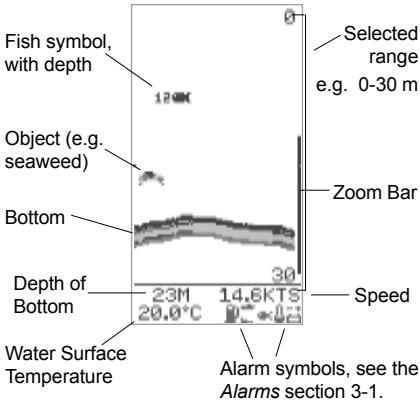
Note 1: This screen can be customised. (see Setup - Display section 4-6)
Note 2: The Depth of Bottom can be adjusted for Keel Offset. (see Setup - Depth section 4-3)
Fish detection
The FISH450 Tricolor analyses all received echos and recognises the characteristic patterns returned by fish. These echos are displayed on the screen as a fish symbol. The default setting is for an associated depth to be shown with fish symbols.
Advanced users sometimes prefer to turn off the fish symbol feature and interpret the echo patterns themselves. The following is an example with fish symbols turned off:

Zoom screen
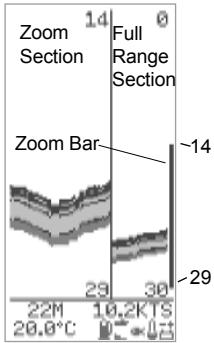
The Zoom screen is used to view greater detail in an area of interest (e.g. fish close to the bottom). The right portion is the Full Range Section and the left is the Zoom Section.
The Zoom Bar, located on the very right of the screen, determines the depth range of the Zoom Section and the amount of magnification:
The Full Range Section illustrated is 0 to 30m and the Zoom Bar is between 14 and 29m . Therefore
the area between 14 and 29m is enlarged in the Zoom Section.
To set the depth of the Zoom Section, move the Zoom Bar up or down by pressing the Cursor Up or Down key. To make the Zoom Bar smaller (to increase magnification), press the Cursor Left key. To make the Zoom Bar bigger (to decrease magnification), press the Cursor Right key.
The Zoom Bar can be adjusted in the Fish History screen before switching to the Zoom screen.
Strength of returned echos
The three colours indicate differences in the strength of the returned echo: blue is the strongest, red is medium strength and green is the weakest.
There are several reasons why the strength of the returned echo varies:
- The size of the fish, school of fish or other object.
- The depth of the fish or object.
- The location of the fish or object. The area covered by the ultrasonic beam is approximately cone-shaped and strongest in the centre.
- The clarity of water. Particles or air in the water reduce the strength of the returned echo.
- The composition or density of the object. Soft mud produces weaker echos than rock.
Planing hulls at speed produce air bubbles and turbulent water that bombard the transducer. The resulting ultrasonic noise may be picked up by the transducer and obscure the real echos.
The FISH450 Tricolor like most fishfinders displays the most recent events on the right of the screen.
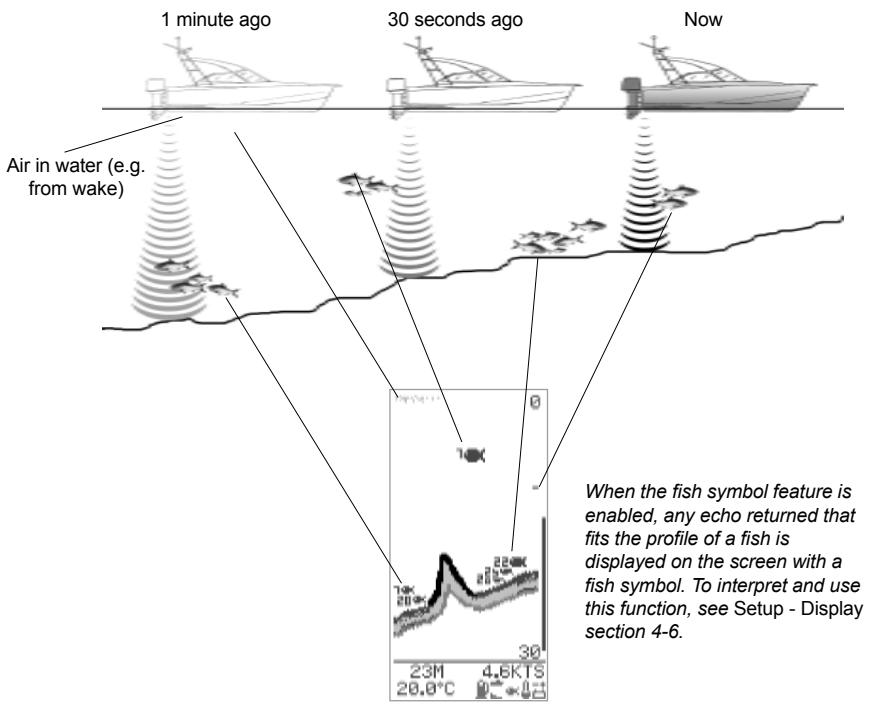
Moving boat
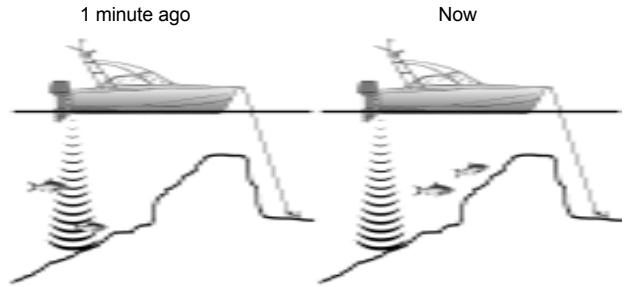
Stationary boat
When a boat is stationary, all bottom echos will come from the same small area of bottom. This will produce a flat bottom trace on the screen as shown on the right.
The appearance of the Fish History and Zoom screens can be changed to suit individual preferences. This screen has the depth reading in larger text as a result of the temperature reading being disabled (see Setup - Display section 4-6).
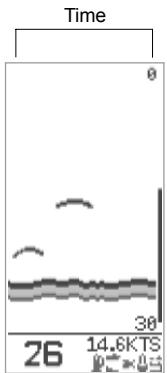
Note: times indicated are for illustration only.
Shadows
Shadows are areas where the ultrasonic beam cannot 'see'. These include hollows on the bottom or beside rocks and ledges where the strong echo returned off the rock obscures the weaker echo of the fish.
When looking for small objects including fish, users should consider that there are places where fishfinders cannot 'see'.
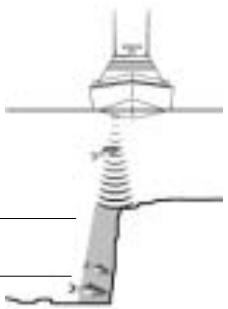
Shadow - where objects are hidden in the bottom echo.
These fish will be hidden in the bottom echo.
Range
Range is the depth of water displayed vertically. The FISH450 Tricolor has two range modes, Auto Range and Manual Range:
- In Auto Range, the unit adjusts the depth range so that the bottom is shown in the lower part of the screen. The use of Auto Range is recommended.
- In Manual Range, the range can be set by pressing the Increase Range or Decrease Range key.
To switch between Auto Range and Manual Range hold the Increase Range or Decrease Range key down until the dialogue box "Auto Range" or "Manual Range" briefly appears.
Manual Range is useful to prevent the screen redrawing when there are rapid changes in depth. (E.g. looking at the sea floor surrounding a pinnacle.)
Gain
Gain controls the amount of detail displayed on the screen. The FISH450 Tricolor has two gain modes, Auto Gain and Manual Gain.
- In Auto Gain, the gain is automatically adjusted. The use of Auto Gain is recommended.
- Manual Gain can be set between 1 and 9, low values may not show enough detail, while too high a setting may clutter the screen. When in Manual Gain the gain symbol appears followed by the gain level.
To switch between Auto Gain and Manual Gain, hold the Increase Gain or Decrease Gain key down until the dialogue box "Auto Gain" or "Manual Gain" briefly appears.
See the Sonar screen section 3-3 for more information.
Bottom Lock
Bottom Lock fixes the Zoom Bar to the bottom, so the bottom is always displayed in the Zoom Section, regardless of changes in depth.
To turn Bottom Lock on, move the Zoom Bar down until it touches the bottom and the dialogue box "Bottom Lock On" briefly appears. To turn Bottom Lock off press the Cursor Up key.
Should the bottom rise to meet the Zoom Bar when bottom lock is off, the Zoom Bar will temporarily track the bottom. This condition will cease when the depth exceeds the original depth of the Zoom Bar.
3-3 Sonar screen
The Sonar screen displays the depth and strength of the echos returned from each ultrasonic pulse.
This raw signal is enhanced by the Colouration and Gain settings and then displayed on the Fish History or Zoom screen as a single vertical row of dots.
The key to interpreting the Sonar screen is to look at the strength (stronger echos project further to the left) and the depth (distance down the screen) of the echos.
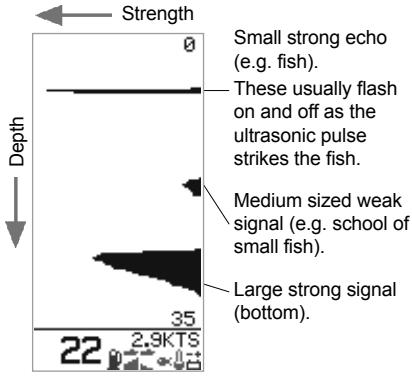
Changing the colour thresholds
The Colouration Bar determines which level (strength) of echos will be displayed in blue, red or green on the Fish History and Zoom screens. To display the colouration bar, press the Cursor Left or Right key.
- Increase the blue part of the colouration bar by pressing the Cursor Right key if there are too few blue (strong) echos being displayed.
- Decrease the blue part of the colouration bar by pressing the Cursor Left key if there are too many blue echos being displayed.
The red and green portions of the bar graph share the remaining area equally.
The bar will automatically turn off when left for four seconds.
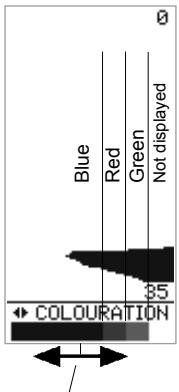
Increase the blue area by pressing the Cursor Right key or decrease by pressing the Cursor Left key
Manual Gain adjustment
The Sonar screen displays all echos returned. If the Manual Gain value is high, the Fish History or Zoom screens may become cluttered with too many weak echos. Use Manual Gain to adjust the level of received echos that are displayed.
Holding the Increase Gain or Decrease Gain key for one second or longer switches between Auto Gain and Manual Gain. A dialogue box will display "Auto Gain" or "Manual Gain".
See the Fish History screen section 3-2 for more information on Manual Gain adjustment.
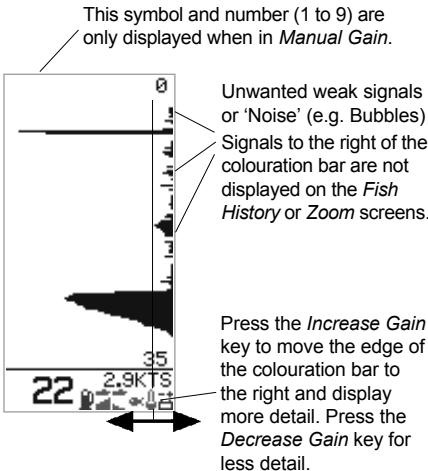
3-4 Fuel screen
Fuel screen
The FISH450 Tricolor is also a petrol fuel computer. To use these fuel features, first purchase and install the optional single or twin engine fuel kit.
If Fuel does not appear on the Main Menu screen it must be enabled in the Setup - Fuel screen. To enable all fuel functions, change Num Engines to 1 (single engine) or 2 (twin engine) as appropriate. (see Setup - Fuel section 4 - 2)
Setup the tank size and select the fuel unit (L, USGAL, IMPGAL) to be used as outlined in the Setup - Fuel section.
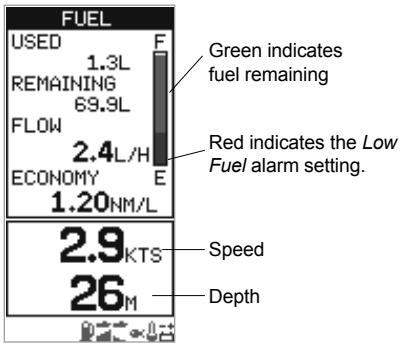
Used is the total fuel used in litres or gallons since it was last cleared. This can be reset to 0 by the Clear Used command in the Setup - Fuel menu (see section 4-2).
Remaining is the amount of fuel remaining in the fuel tank(s) displayed in litres or gallons.
Flow (fuel consumption) is shown in litres or gallons per hour. For twin engine installations, the fuel flow for each engine is shown separately. This is useful for checking that both engines are under the same load.
Economy is the distance travelled per unit of fuel used. The FISH450 Tricolor uses boat speed and fuel consumption for this calculation. The Economy units are set by the units selected for speed and fuel (e.g. NM/L, NM/G, MI/L, MPG, KM/L, KM/G). Adjust the throttle and trim for the best Economy. The bigger the number the better the economy. CAUTION: Fuel economy can change drastically depending on boat loading and sea conditions. Always carry adequate fuel for the journey plus a sufficient reserve.
Speed is the current speed of the boat.
Depth is the current depth of the bottom.
3-5 Data screen
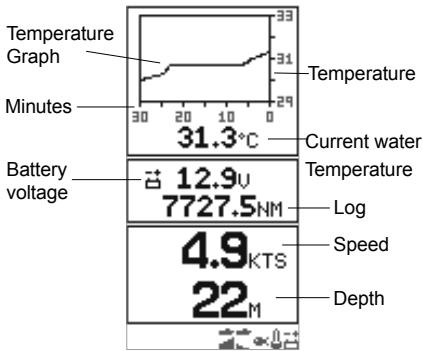
Temperature
A graph displays the last 30 minutes of water temperature and is updated every 30 seconds. The current water temperature is displayed numerically and is updated every second.
The temperature sensor is located in the Aquaducer,
(or through-hull speed transducer) and measures the water temperature at that point. An alarm for a specific temperature or rate of change of temperature may be enabled in Setup - Alarms section 4-1.
Battery
The battery voltage is displayed numerically. Monitoring this helps prevent the battery running flat without warning, particularly when using electronic devices while the battery is not charging. The battery voltage may provide an early warning of battery or alternator failure. The battery voltage will increase after the motor has started if the alternator is charging correctly.
Log
One of two distance logs can be displayed: Trip Log or Total Log. Both logs are stored in NAVMAN's NVM (non volatile memory) when the unit is switched off. To change the which log displayed see section 4-6. The Trip log must be reset manually as most users will want to start and stop during a trip.
Speed is the current speed of the boat.
Depth is the current depth of the bottom.
4 Setup
The FISH450 Tricolor is menu driven.
The Setup menu allows the FISH450 Tricolor to be customised to each user's individual preferences.
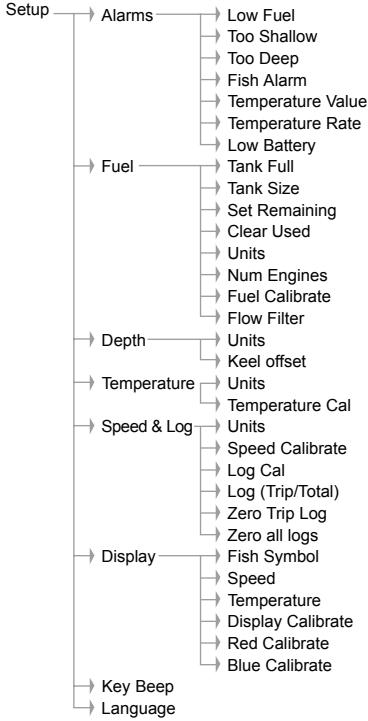
Alarms menu (see section 4-1) is used to:
Enable or disable alarms and set the trigger value for each alarm. Pressing the Alarm key from anywhere will enter the Alarm menu, provided the beeper is not active (in which case pressing the Alarm key silences the beeper).
Fuel setup (see section 4-2) is used to:
Set the Tank Size, adjust the fuel remaining value (Remaining), set the fuel remaining value equal to tank size (Tank Full), clear the fuel log (Clear Used), set the fuel units (Units) (L, USGAL, IMPGAL), set the number of engines (Num Engines), calibrate the fuel transducer (Fuel Calibration) and adjust the flow averaging period (Flow Filter).
Depth setup (see section 4-3) is used to:
Set the depth measurement units (M, FA, FT) and adjust Keel Offset.
Temperature setup (see section 4-4) is used to:
Set the Temperature measurement units (^,^) and calibrate the temperature.
Speed and Log setup (see section 4-5) are used to:
Set the boat speed units (MPH KPH KTS), calibrate the speed, reset the Trip Log and reset all logs.
Display setup (see section 4-6) is used to:
Enable or disable the display of fish symbols (Fish Symb), speed (Speed) and temperature (Temp) on the Fish History, Zoom and Sonar screens. Switch between Trip Log and Total Log displayed on the Data screen. Calibrate the display colours (Display Cal, Red Cal, Blue Cal).
Key Beep (see section 4-7) is used to:
Enable or disable a single beep which audibly confirms that a key has been pressed.
Language setup (see section 4-8) is used to:
Set the language to one of the following: English, French, German, Spanish, Italian, Dutch, Swedish or Portuguese.
Menu operation
To display the Setup screen, press the Menu key one or more times until the Main Menu screen appears. Press the Cursor Up or Down key to highlight Setup, then press the Cursor Right key to select it. Press the Cursor Up or Down key to highlight an option, then press the Cursor Right key to select it.
Exit any Setup menu item by pressing the Menu key. This will display the screen one step close
SETUP
ALARMS
FUEL
DEPTH
TEMPERATURE
SPEED + LOG
DISPLAY
KEY BEEP OFF
LANGUAGE
29

Menu structure of Setup

→Main Menu
Fish History
Zoom
Sonar
Fuel
Data
Setup
4-1 Alarms
For more information on alarms see Operation - Alarms (section 3-1).
Access the Alarms menu by a single press of the Alarm key (provided the beeper is not active) or through the Setup menu screen.
Selecting items and changing values
Press the Cursor Up or Down key to highlight an alarm, then press the Cursor Right key to select it.
An alarm screen has a trigger value and an On/Off value. Press the Cursor Up or Down key to switch between them.
The highlighted value may be changed using the Cursor Left and Right key. Press the Menu key to save and exit once both values have been set.
The alarm value is retained even when the alarm is disabled.
External beeper
An external beeper may be installed when a louder secondary alarm
indication is required. This can be positioned anywhere on the boat. For installation details see Installation - Wiring (section 6-6).
ALARMS
LOW FUEL
TOO SHALLOW
TOO DEEP
FISH ALARM
TEMP VALUE
TEMP RATE
LOW BATTERY
26 2.1KTS
LOW BATTERY
10.5u
OFF
ADJUST
SELECT
自EXIT

| Symbol | Alarm Name | Beeper cycle | Alarm condition is met when: |
| L | Low Fuel | 1/2 sec | the fuel level is less than the alarm trigger value. |
| T | Too Shallow | 1/5 sec | the depth is less than the alarm trigger value. |
| D | Too Deep | 1/2 sec | the depth is greater than the alarm trigger value. |
| F | Fish Alarm | 3 short beeps | an echo matches the profile of a fish. |
| E | Temp Value | 1/2 sec | the temperature equals the alarm trigger value. |
| U | Temp Rate | 1/2 sec | the rate of change of temperature equals the alarm trigger value. |
| O | Low Battery | 1/2 sec | the battery voltage is less than the alarm trigger value. |
4-2 Fuel
To use these fuel features first purchase and install the optional single or twin engine fuel kit.
Access the Fuel menu through the Setup menu screen.
Selecting items and changing values
Press the Cursor Up or Down key to highlight an option, then press the Cursor Right key to select it.
Once an option on the Fuel menu has been selected, its value may be changed. Press the Cursor Left and Right key to change the value, then press the Menu key to save and exit.
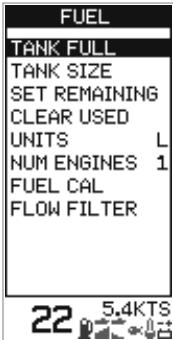
When either Units or Num Engines is highlighted, pressing the Cursor Right key will cycle through the available values.
Tank Full
Select Yes to set fuel remaining (Remaining) equal to the tank capacity. IMPORTANT: Do this each time the fuel tank is refilled or the low fuel alarm will be meaningless! When partially filling the fuel tank use Set Remaining.
Tank Size
Enters the capacity of the fuel tank into the unit for use with the Tank Full option. It is best to measure the fuel tank size by draining, then filling with fuel in the usual manner and using the fuel dispenser's meter to measure the amount. Be aware of air pockets, particularly in underfloor tanks.
Set Remaining
Changes the fuel remaining value. Use this feature when not filling the fuel tank to capacity, or when syphoning fuel out.
Clear Used
Reset the fuel used (Used) value to 0.0. Use this to start re-measuring the amount of fuel used.
Units
Sets the units of fuel to L (Litres), USGAL (US Gallons) or IMPGAL (Imperial Gallons)
Num Engines
Sets the number of engines to 1, 2 or 0. If 0 is selected the fuel features are turned off and Fuel no longer appears on the main menu.
Fuel Cal
Calibrating the fuel usage can increase the accuracy of fuel measurements from +/- 10% to better than +/- 2% . For twin engine installations calibration of each transducer is required.
Calibrating the fuel transducer requires accurate measurement of the fuel used (Used). This is easiest with a small portable tank. It should be noted that due to air pockets, it is very difficult to fill underfloor tanks to the same level twice. At least 15 litres should be used to ensure an accurate calibration. (The more fuel used, the more accurate the calibration will be.) Each transducer in a twin engine installation must be calibrated separately. This may be done at the same time with two portable tanks, or at different times using one tank at a time.
The procedure is as follows:
1) Reset the fuel used amount on the FISH450 Tricolor to 0.0 by selecting Clear Used in the Setup - Fuel menu, then selecting Yes.
2) Connect the measurement tank(s) to the engine(s) via the fuel transducer(s).
3) Run the engine(s) at normal cruising speed until at least 15 litres is indicated (30 for twin engines).
4) Check the actual amount of fuel used per engine. The easiest way to do this is to refill the tank(s) to the original level(s) and record the value(s) shown on the fuel dispenser.
5) Select Fuel Cal on the fuel menu. The amount of fuel that the FISH450 Tricolor has recorded will be displayed. Use the Cursor Left or Right key to change this to the actual fuel amount used. Press the Menu key when the value is set. (Repeat for the other engine in a twin engine installation).
Flow Filter
Sets the period over which the fuel flow is averaged. Averaging can be set from 1 to 255 seconds.
Normally engines do not draw fuel from the tank at a steady rate. They draw fuel at a high rate for a few seconds until the carburettor bowl or fuel injection reservoir is full, then draw no fuel for a few seconds. If the true flow rate were displayed, it would be too erratic to read.
Usually a value of 10-15 seconds will give a satisfactory result for carburettor engines. Fuel injected engines may require a larger value.
This setting affects the flow rate (Flow) and Economy displays. It does not affect the fuel used (Used) measurement.
4-3 Depth
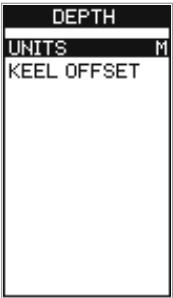
Access the Depth menu through the Setup menu screen.
Units
Pressing the Cursor Right key when Units is highlighted cycles through the options: M (metres) FT (feet) or FA (fathoms).
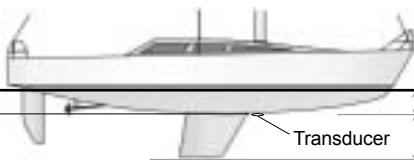
Keel Offset
Keel Offset is the distance between the
location of the depth transducer and the point the displayed depth is measured from.
Press the Cursor Up or Down key to highlight Keel Offset, then press the Cursor Right key to select it. Press the Cursor Left and Right key to change the value, then press the Menu key to save and exit.
Use Keel Offset either when the transducer is located below the water surface but
a display of total water depth is required, or when depth of water below the boat's keel is required.
Water surface Depth of transducer -


Positive value
Negative value
Note: Boat illustrated uses a through hull transducer
Enter positive values to display depth as measured from a point above the transducer (e.g. Water surface).
Enter negative values to display depth as measured from a point below the transducer (e.g. keel).
4-4 Temperature
Access the Temperature menu through the Setup menu screen.
Units
Press the Cursor Right key when Units is highlighted to switch between ^ C (Celsius) and ^ F (Fahrenheit).
Temp Cal
The temperature readout may be calibrated.
Calibration requires accurate measurement of the
water temperature at the same point as the Aquaducer (or through hull speed/temperature transducer).
Press the Cursor Up or Down key to highlight Temp Cal, then press the Cursor Right key to select it. This will display the FISH450 Tricolor's temperature measurement. Press the Cursor Left and Right key to change the value to the actual water temperature, then press the Menu key to save and exit.
4-5 Speed and Log
Access the Speed and Log menu through the Setup menu screen.
Units
Pressing the Cursor Right key when Units is highlighted will cycle through the options: KTS (knots), MPH (miles per hour) or KPH (kilometres per hour).
Speed Cal
To calibrate speed, an accurate measurement of the boat's speed is required.
Obtain the speed either from a timed run over a known distance, or from another instrument (e.g. GPS, DGPS or calibrated speedometer). The calibrated instrument may be on board or on another boat travelling alongside.
Notes for accurate calibration:
GPS speeds are only accurate enough when above 20 knots, DGPS when above 5 knots. Best results are achieved in calm conditions where there is minimal current (best at high or low tide).
- Paddlewheel devices are generally accurate enough when between 6 and 20 knots.
Continue travelling at the same speed and calibrate the speed as follows:
Press the Cursor Up or Down key to highlight Speed Cal, then press the Cursor Right key to select it. This will display the FISH450 Tricolor's uncalibrated speed measurement. Press the Cursor Left and Right key to change this to the actual speed, then press the Menu key to save and exit.
Log (Select)
Selects which log is displayed on the Data screen, both the Total and Trip logs are always kept in the FISH450 Tricolor but only the selected log is displayed.
Speed Cal
Speed may also be calibrated using Log Cal.
Log Cal
The log may also be calibrated using Speed Cal. The Trip Log is used to perform a log calibration. First zero the trip log (see below) then travel a known distance in a straight line, stop at the destination and perform calibration as soon as practical. Best results are
achieved in calm conditions where there is minimal tide (best at high or low tide). Tidal effects may be negated by making the trip twice, once in both directions.
To perform the log calibration:
Press the Cursor Up or Down to highlight Log Cal, then press Cursor Right to select it. This will display the FISH450 Tricolor's uncalibrated Trip Log. Press the Cursor Left or Right key to change the value to the known distance, then press the Menu key to save and exit. The Total Log value will not be changed by the calibration, the Trip Log will return to zero.
Zero Trip Log
Resetting the Trip Log will return the trip log value to zero. The trip log is stored in the Non-volatile memory so it retains the distance value if the unit
is switched of during a trip. Therefore, it needs to be reset manually each trip.
Press the Cursor Up or Down key to highlight Zero Trip Log, then press the cursor right key to select it. The message "Zero Trip Log?" will appear. Use the cursor left and right to switch between yes and no, then press the menu key to zero trip log and exit.
Zero All Logs
Resetting both logs will return both the trip log and the total log values to zero.
Press the Cursor Up or Down key to highlight Zero All Logs, then press the cursor right key to select it. The message "Zero All Logs?" will appear. Use the Cursor Left and Right to switch between Yes and No, then press the Menu key to reset all logs and exit.
4-6 Display
Access the Display menu through the Setup menu screen.
Selecting items and changing values
Press the Cursor Up or Down key to highlight an option. If Fish Symb, Speed or Temp is highlighted, pressing the Cursor Right key will cycle through the available values. If Display Cal, Red Cal or Blue Cal is highlighted, then pressing the Cursor Right
key will select it. Once one of these options has been selected, its value may be changed. Press the Cursor Left and Right key to change the value, then press the Menu key to save and exit.
Fish Symb
This controls how echos that match the profile of a fish are displayed on the Fish History and Zoom screens:
Off

Displays echos as dots on the screen. Displays any echos returned that match the profile of a fish as a fish symbol in one of three sizes:

Strongest echo

Average echo

Weakest echo
Echos which are not recognised as fish are displayed as dots on the screen.

Displays any echos returned that match the profile of a fish as a fish symbol in one of three sizes as above. The depth of the fish is shown to the left of the symbol. Echos which
are not recognised as fish are displayed as dots on the screen.
Speed
This turns on or off the display of speed on the Fish History, Zoom and Sonar screens.
Temp
This turns on or off the display of temperature on the Fish History, Zoom and Sonar screens.
Disabling the temperature display increases the size of the depth displayed in the Fish History, Zoom and Sonar screens.
Colour calibration
Use colour calibration to optimise the colours of the unit's display for differing light conditions.
Display Cal
This changes the balance of red, blue and green.
Red Cal
This changes red only. Blue Cal
This changes blue only.
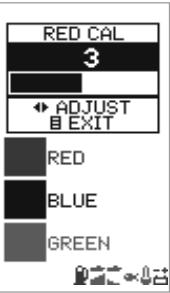
Users are advised to experiment with these values to determine the settings that best suit their individual preferences. It is essential that adjustments are made while viewing from directly in front of the screen.
Trip Log and Total Log
To switch between the Trip Log and the Total Log press cursor down to highlight Trip Log or Total Log. Press cursor left or right to change the log displayed, then press the menu key to save and exit.
Backlighting
The backlight intensity may be enabled then adjusted to suit individual preferences. See Getting
4-7 Key Beep
The Key Beep function is located on the Setup menu. It allows the user to activate an audible beep each time a key is pressed.
Pressing the Cursor Right key when the word Key Beep is highlighted switches between On and Off.
4-8 Language
Access the Language screen through the Setup menu.
To select a language, press the Cursor Up or Down key to highlight it, then press the Menu key to save and exit.
LANGUAGE
ENGLISH
FRANCAIS
DEUTSCH
ESPANOL
ITALIANO
NEDERLANDS
SUENSKA
PORTUGUES
22
4-9 Resetting to factory defaults
All settings may be reset to the manufacturer's defaults settings. (See right.)
IMPORTANT: Resetting to factory defaults will erase all settings you have made except fuel used (Used) and fuel remaining (Remaining).
To enter the Default Set screen, first power off.
Hold the Cursor Left key down and power on while continuing to hold it down.
The message "RESET TO FACTORY DEFAULTS?" will appear.
Use the Cursor Left and Right key to switch between Yes and No, then press the Menu key to continue the power on sequence.
GENERAL
Auto Gain .ON
Auto Range ON
Manual Gain 5
Bottom Lock . OFF
Key Beep .OFF
UNITS
Temperature
Depth . . . . . . . . . . . . . . . . . . . . . . . . . . . . . . . . . . . . . . . . . . . . . . . . . . . . .
Speed KTS
Fuel . . .Litres
ALARMS
Shallow Alarm OFF
Shallow Alarm Value 3.0 m
Deep Alarm .OFF
Deep Alarm Value 20.0 m
Fish Alarm OFF
Fuel Alarm .OFF
Fuel Alarm Value 20 litres
Temp. Change Alarm .OFF
Temp. Change Alm Val. ....2.0 °C
Temp. Alarm OFF
Temp. Alarm Value .........25.5 °C
Low Battery Alarm .ON
Battery Alarm Value ...11.5 Volts
DISPLAY
Fish Symbol 25
Speed Display .ON
Temperature Display .OFF
Display Cal 9
Red Cal 3
Blue Cal 3
Backlight 6
FUEL
Tank Size 70 litres
Num Engines .0
Flow Filter 10 secs
OTHER
Keel Offset .0.0 m
Logs Trip Log
Language . ENGLISH
4-10 Simulate
An internal simulator allows users to familiarise themselves with operating the FISH450 Tricolor off the water. When in Simulate mode the word "Simulate" flashes on the bottom of the screen.
When in Simulate the unit generates data so that all the main screens appear operational. Any changes made to the backlighting, alarms and display setup are saved, but the fuel log (Used)
and fuel remaining (Remaining) are not affected. To turn the Simulate mode on, power the unit off, disconnect the blue transducer plug at the rear of unit, then power the unit on.
To turn the Simulate mode off, power the unit off; reconnect the blue transducer plug at the rear of unit, then power the unit on.
5 Installation
Correct installation is critical to the performance of the unit. There are two components to install, the FISH450 Tricolor and the transducer. The transducer which comes standard with the FISH450 Tricolor is called an Aquaducer and includes three elements: speed, temperature and ultrasonic sounder.
It is vital to read the entire installation section of this manual and the documentation that comes with your transducers before attempting installation.
5-1 What comes with your FISH450 Tricolor
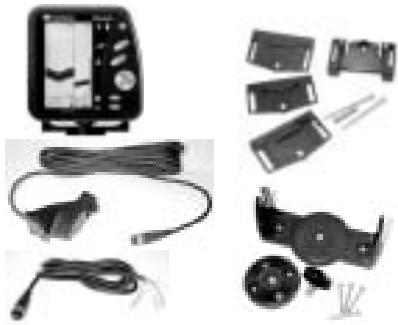
Standard configuration
FISH 450 Tricolor unit
Power cable (2m)
- Bracket (mount, bracket, three locking knobs, plus four screws for attachment)
Warranty Registration Card
This Manual
Transom mounted Aquaducer (Depth/speed/ temperature) - 8m cable included
- Bracket, wedges and three screws for the Aquaducer.
5-2 Options and accessories
Optional fuel kit
- Single engine fuel kit (petrol only)
- Fuel transducer - 8m cable included
- Power/Fuel cable - 2m (replaces standard power cable)
- Twin engine fuel kit (petrol only)
- Two fuel transducers - 8m cables included
- Power/Fuel cable - 2m (replaces standard power cable)
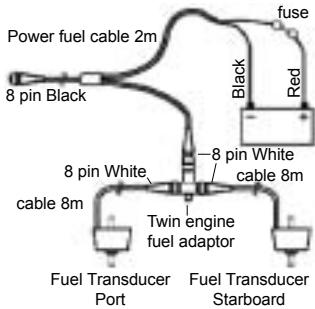
- Twin engine fuel adapter ("T" junction)
Repeater for Depth, Speed, Water Temperature, Battery Voltage. Please consult your NAVMAN dealer for more information.
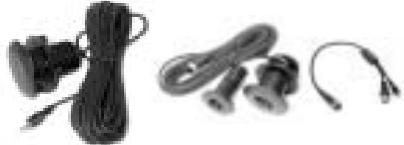
Optional through hull transducers
- Through hull transducers (replaces Transom mounted Aquaducer)
- Through hull Speed/Temperature transducer
- Through hull Depth transducer
Other options and accessories
- Extension cable
- 4m Aquaducer extension cable
- Flush mounting kit
- Replacement paddle wheel
- Dust and sun cover

Depth Repeater
5-3 Mounting the Aquaducer
The location and angle of the Aquaducer are the most critical parts of the installation. If the location and angle are not correct, the Aquaducer can't perform at its designed potential.
Transom mount Aquaducer
IMPORTANT - the Aquaducer cable cannot be cut or shortened.
The Aquaducer can be installed on any outboard or stem-drive powered boat. Inboard powered boats must be fitted with a through-hull transducer as the propeller wash interferes with the operation of transom mounted transducers. The transom mount Aquaducer has a safety "kick up" mounting bracket which will normally prevent damage to the Aquaducer should it impact the bottom or floating debris in the water.
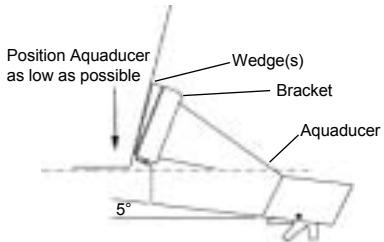
Final position of Aquaducer:
Location
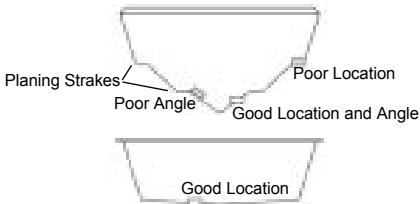
Select a position for the Aquaducer that will:
- allow the Aquaducer a smooth flow of water over its surface at all times.
- ensure a mount as deep in the water as possible.
- be clear of any interference from the trailer when launching or retrieving the boat.
- be away from planing strakes or other projections from the hull that may cause aerated water to flow over the face of the transducer.
be away from the propeller. - be at least 150 ~mm (6") away from the keel of the boat.
Mounting
- IMPORTANT - place the Aquaducer against the transom and check that the bottom surface is angled approximately 5^ forward in order to minimise the generation of bubbles through cavitation. If necessary, use one or more of the three wedges provided (one 4^ and two 8^ ) to achieve this angle.
- Position the bracket and selected wedge(s) as low as possible without any part protruding below the hull. Mark the screw hole centres on the transom through the centre of the bracket slots. Mark them so that when the screws are tightened the screw heads sit flat on the surface of the bracket.
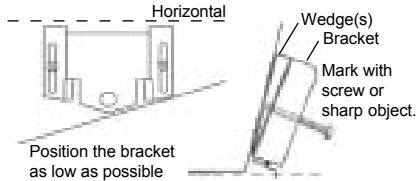
- Drill the two screw holes using a 3mm drill bit. Make sure the holes are angled so that when the screws are tightened the screw heads sit flat on the surface of the bracket.
- Insert the Aquaducer into the bracket. Use the stainless screws provided to attach the bracket and wedge(s) to the transom. Ensure again that the top of the bracket is horizontal and that the
bracket is as low as possible without protruding below the hull. Fill holes with a sealing compound before inserting screws. Tighten
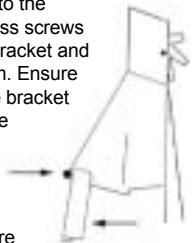
- Drill a hole and insert the third screw in the middle of the bracket.
Finally push the Aquaducer down so it clicks' into place. - Once in place test the Aquaducer is connected by turning the unit on. If the Aquaducer is not connected then the message "No transducer detected. Enter simulation mode? Yes/No" will appear. (see Simulate Mode section 4-10). Please see the section on Troubleshooting Appendix B.
5-4 Other depth and speed / temperature transducers
Correct transducer installation is critical to the performance of the unit. Most transducers come with instruction. It is important to carefully read and follow the instructions provided.
NAVMAN through-hull transducers and speed/
temperature transducers are available for the FISH450 Tricolor. These are separate transducers which require separate mounting.
Please consult your NAVMAN dealer when attempting to install other transducers.
5-5 Fuel transducers
Fuel transducers
A single or twin engine fuel kit can be purchased separately. It is supplied with the "NAVMAN Fuel flow transducer installation instructions". This transducer is for use with petrol engines only.
A fuel filter must be placed on the fuel line between
the transducer and the fuel tank.
When the installation is complete, please follow the instructions in Setup Fuel section 4-2.
Note: Before the fuel features can be used they must be enabled by setting Num Engines to either 1 or 2.
5-6 Mounting the FISH450 Tricolor display unit
Mounting the bracket
-
Select a position where the display head will be:
-
At least 300mm away from the compass.
- At least 300mm away from any radio transmitter.
- At least 1.2 metres away from the VHF antenna.
- Easy to read by the helmsman and crew while underway. Colours are best when viewed from directly in front of the unit.
- Protected from physical damage during rough sea passages.
- Easy to access the 12 volt power source.
-
Convenient to route the transducer cables.
-
Remove the round base from the centre of the bracket.
- Affix the round base using the 4 stainless screws provided.
- Orientate the bracket on the round base and screw down the central locking knob.
Note: There is also a flush mount kit available. Please consult your NAVMAN dealer.
Mounting the FISH450 Tricolor
- Attach cables.
- Slide mounting screws into the slots on the mounting bracket. The rubber washers go between the body of the fishfinder and the mounting bracket.
Removing the FISH450 Tricolor
You may remove your fishfinder after each use for protection against the environment or security reasons.
If you do remove the FISH450 Tricolor, ensure that the plugs left in the boat are not exposed to the elements. Keep the unit in a dry clean place.
5-7 Wiring connection
The FISH450 Tricolor uses a colour coded connector system:
Black connector = Power Blue connector = Aquaducer White connector = Fuel The connectors are bayonet type, push the plugs into the sockets then turn the collars to lock. Make sure the collars are secure for water tight connection.
Important
- The connection to the battery must be made via a fuse (1 amp) or circuit breaker.
If possible, route the transducer cables away from other wiring on the boat. Electrical noise from engine wiring, bilge pumps, and other equipment can affect the unit. - Connect the red wire of the two-core power cable to the positive supply and the black wire to the electrical ground.
- The shortest and most direct connection to the boat's battery helps to minimise voltage drop.
- If the Auto Power option is not used, connect the yellow Auto Power wire to the black ground wire.
Warning: The FISH450 Tricolor must be run off a 12 volt battery and must not be run off a circuit without a battery.
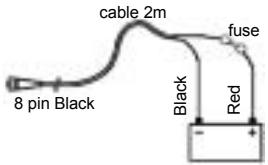
Standard power connection

Standard Transom Mount Aquaducer
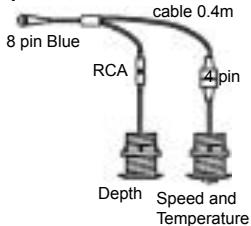
Through-Hull Transducers option
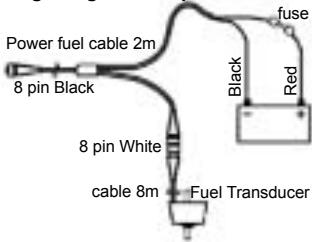
Single engine fuel option
Twin engine fuel option
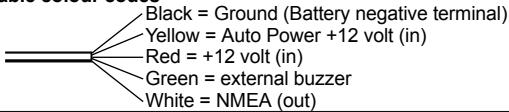
Power cable colour codes
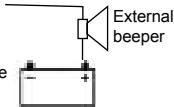
External beeper
A 12 volt external beeper with a built in drive circuit may be connected. The maximum current draw is 250mA .
Green wire of power cable
Connect beeper to positive
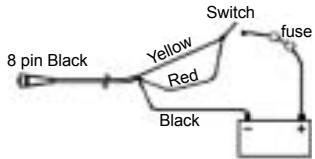
5-8 Auto Power wiring connection
To have the FISH450 Tricolor turn on automatically when the boat's power is switched on, connect both the yellow and red wires to the boat's power switch. Use this in conjunction with the fuel option to ensure that the FISH450 Tricolor is turned on and measuring fuel flow whenever the engine is running. The Backlight / Power key will no longer be able to be used to turn the unit off.
Appendix A - Specifications
Depth range
- 0.6 m (2 ft) to 300 m( 1000ft)
Display type
3 Colour LCD
- Screen resolution 160 high x 80 wide (pixels)
- White multi-level back lighting
Supply voltage
10 to 16.5 V dc
Supply current
180mA max (full backlighting)
Operating temperature
0 to 50^ (32 to 122^ )
Maximum transducer cable length
12 m (39 ft)
Supplied transducer cable length
- 8 m (26 ft)
Typical depth acquisition time from startup
2 seconds at 30 metres
Depth accuracy
Better than 2%
Transducer frequency
200 kHz
Transducer power
400 Watts nominal @ 13.8V DC (During Burst)
Receiver sensitivity
- Better than 20 micro volts RMS
Dynamic range 4.0 million to 1 (120dB)
Temperature measurement range
0-37.7°C (32-99.9°F) Resolution 0.1 units
Speed range
1-50 kn (mph, kph)
Speed resolution
0.0 to 19.9, 20 to 50
Log range
0.0 to 99999.9 units
Log resolution
0.1 units
Environment rating
- Immersion in 1 metre of water for 30 mins. (IP67)
Communications
NMEA 0183 (Ver 2.0) 4800 Baud
NMEA output
NMEA (0183 format) is a standard for interfacing marine electronic devices. The FISH450 Tricolor can output the following data:
DBT (Depth Below Transducer)
DPT (Depth and Keel offset)
TDK (Depth Talon Technology - proprietary)
TKV (Speed Talon Technology - proprietary)
VHW (Speed)
MTW (Water temperature)
- XDR (Battery voltage and fuel flow)
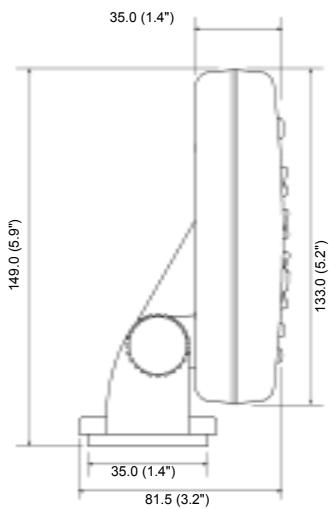
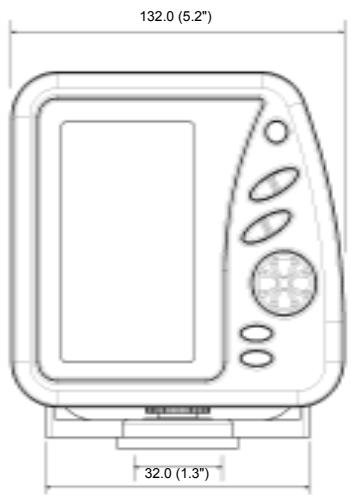
Appendix B - Troubleshooting
This troubleshooting guide is written with the assumption that the user has read and understood the relevant sections in this manual.
It is possible in many cases to solve difficulties without having to send the unit back to the manufacturer for repair. Please follow this troubleshooting section before contacting the nearest NAVMAN dealer.
There are no user serviceable parts. Specialised methods and testing equipment is required to ensure that the unit is reassembled correctly and is waterproof. Users who service the FISH450 Tricolor themselves will void the warranty (see appendix D.
Repairs to the FISH450 Tricolor may only be carried out by a service centre approved by Talon Technology. If it is found that the unit must be sent into a service centre for repair, it is essential to send in the transducer(s) at the same time.
More information can be found on our website: www.navman.com.
1. The fishfinder won't turn on:
a) The FISH450 Tricolor is designed to operate on 12 volt battery systems, where the voltage may vary from 10 to 16.5 volts. If an excessive voltage is supplied to the unit, a resettable fuse will be tripped, turning the unit off.
b) Check the power cable connector at the back of the unit is securely plugged in and the collar is locked in place. The collar must be secure for water tight connection.
c) Measure the battery voltage. If the voltage is less than 10 volts:
- the battery terminals or wiring on the terminals may be corroded.
- the battery may not be charging correctly or may need replacing.
d) Inspect the power cable from end to end for damage such as cuts, breaks or squashed sections.
e) Make certain the power cable's red wire connects to the positive battery terminal and the black wire to the negative battery terminal or ground. (If wired for Auto Power, then ensure the red and yellow wires are connected to the boat's power switch. Also check the boat's power switch circuit. See Auto Power section 5-8.)
f) Check for corrosion on the power cable connector and clean or replace if required.
g) Check fuses that are placed in line with the power cable. A fuse can be blown despite appearing to be good. Test the fuse or replace
it with a fuse known to be good.
2. The fishfinder operates erratically:
a) Check the Aquaducer does not have debris (eg weed, plastic bag etc.) caught around it.
b) The Aquaducer may have been damaged during launching, running aground or while underway with debris etc. If the Aquaducer has been impacted, it may have been kicked up on the bracket. If it has not been physically damaged, push it back down so it clicks' into place.
c) When in water less than 2 feet (0.6m) the bottom and depth readings may become inconsistent and erratic. This depth is measured from the transducer and does not allow for any Keel Offset setting.
d) Manual Gain may be set too low, which may cause weak bottom echo, or no fish signals. If you have the Auto Gain disabled try increasing the gain.
e) Ensure the bottom surface of the Aquaducer is angled approximately 5^ forward and as low as possible in order to minimise the generation of bubbles through cavitation. See Mounting the Aquaducer section 5-3.
f) Check the transducer and power cable connectors at the back of the unit are securely plugged in and the collar is locked in place. The collar must be secure for water tight connection.
g) Inspect the transducer and power cables from end to end for damage such as cuts, breaks or squashed sections.
h) Ensure there is not another fishfinder or depth sounder turned on, which may interfere with the FISH450 Tricolor.
i) Electrical noise from the boat's engine or an accessory may be interfering with the transducer(s) and/or the FISH450 Tricolor. This may cause the unit to automatically decrease the gain unless using Manual Gain. The unit thus eliminates weaker signals such as fish or even the bottom from the display. This may be checked by switching off other instruments, accessories (e.g. fridges) and the motor until the offending device is located. To stop problems from electrical noise, try:
- Rerouting the power and transducer cable(s) away from the boat's other electrical wiring.
- routing the unit's power cable directly to the battery instead of through a fuse block or ignition switch.
3. Bottom is not displayed:
a) If in Manual Range and the depth reading is displayed, check that the depth is not greater than the range selected. (see section 3-2)
b) The depth may be outside the fishfinder's range.
While in Auto Range, the unit will flash the last depth displayed, then display "---" to indicate that there is no bottom detected. A display of the bottom should reappear when it is shallower than 300m (1000 ft).
4. Bottom echo disappears or erratic digital reading while your boat is moving:
a) Ensure the bottom surface of the Aquaducer is angled approximately 5^ forward and as low as possible in order to minimise the generation of bubbles through cavitation. See Mounting the Aquaducer section 5-3.
b) The transducer may be in turbulent water. Air bubbles in the water disrupt the echos returned, interfering with the FISH450 Tricolor's ability to find the bottom or other targets. This often happens when you reverse the boat. The transducer must be mounted in a smooth flow of water in order for the unit to work at all boat speeds.
c) Electrical noise from the boat's motor can interfere with the FISH450 Tricolor. Try some suppression spark plugs.
5. Fuel Used and/or Remaining amount(s) seem incorrect:
a) Running the engine without the FISH450 Tricolor turned on will result in the fuel used (Used) not being recorded. This means that the fuel remaining (Remaining) value will read higher than what is actually in the tank. Installing the unit in the Auto Power configuration will solve this problem, as the unit is powered on and off automatically when the vessel's power is switched on and off.
b) Incorrect readings may be caused by fuel surging back and forward through the transducer in rough seas. Try installing a one way valve between the fuel transducer(s) and the fuel tank.
c) Fuel Remaining must be set to the amount of fuel on board after every refuelling.
d) Air pockets when filling the tank may have caused the tank to not fill completely.
e) Calibrate the fuel transducer after 100 litres have been run through - so the turbine shaft beds into the bearings correctly.
f) Fuel transducers wear out over time and should be replaced every 5000 litres of fuel.
g) Also check all other fuel problems listed in the troubleshooting guide.
6. No/low fuel flow (Flow) indicated:
a) Check the fuel cable connectors are securely plugged in and the collar is locked in place. The collar must be secure for water tight connection.
b) The fuel transducer(s) must be installed after a fuel filter or they may clog. To clear a clogged fuel transducer(s) remove the transducer(s) from the line and gently blow through the tranducer(s)
in the opposite direction to the fuel flow.
c) Inspect the fuel cable(s) from end to end for damage such as cuts, breaks or squashed sections.
d) Check that the fuel filter(s) in the line are clean.
e) Ensure that the fuel flow transducer(s) has not been exposed to excessive heat or vibration.
7. Only one flow rate value shown for a twin engine installation:
a) In the Setup Fuel menu Num Engines must beset to 2.
8. Erratic fuel flow readings:
a) The mounting position of the fuel flow transducer must not be too close to the fuel pump(s) and not subject to excess vibration.
b) Check for air leaks in the fuel hose(s) or fuel pick-up(s) in the tank(s).
c) The filtering level (averaging) has not been set to suit the engine(s). In the Setup Fuel menu, increase the Flow Filter value until a steady flow rate is indicated. Check the fuel flow (Flow) readings are not zero.
9. No fuel economy reading:
a) For the FISH450 Tricolor to be able to calculate an economy reading, the boat must be displaying a speed greater than zero.
b) Check the paddlewheel on the Aquaducer is spinning freely. Check that the two magnets in the paddlewheel are in place.
10. Over temperature warning message displayed:
a) Error message. "Warning: Temperature exceeding 70^ . Reduce temperature to improve colour clarity." Press the Alarm key to acknowledge message and reduce the temperature of the unit.
11. If the unit beeps when turned on but nothing is displayed:
a) The unit may be operating, but the display's calibration settings (Red Cal, Blue Cal, Display Cal. See section 4-6) may have been set too high or low. Reset the display defaults so the unit displays normally. While the unit is off, hold the Cursor Right key and while holding it, hold the Power On key. See section 4-9 for default values.
12. The unit is setup in such a way that the user is not sure what to adjust to get it operating normally:
a) The units factory defaults can be restored to reset the unit a known configuration. See Resetting to factory defaults section 4-9.
13. The wrong language is displayed:
a) See Getting Started section 2 on how to change the language without using the menu system.
b) See Setup Language section 4-8.
Appendix C - Glossary
Aquaducer is the name of NAVMAN's transducer which comes standard with the FISH450 Tricolor. It combines temperature, speed and an ultrasonic sensors to form a compact transom mounted transducer solution.
Bottom Lock is a feature of the FISH450 Tricolor for the Zoom screen which adjusts the Zoom Bar so the bottom is always displayed at the bottom of the screen regardless of changes in depth. See Fish History and Zoom Screens section 3-2.
Depth Sounder - A device for measuring the depth using ultrasonics. The FISH450 Tricolor is a depth sounder as well as a fishfinder.
DGPS - Differential Global Positioning System. A very accurate satellite and land beacon navigational tool. See your NAVMAN dealer for more information.
Gain (sensitivity) is the amount of detail (or level of echo returned) the fishfinder displays on the screen.
GPS - Global Positioning System. A satellite navigational tool. See your NAVMAN dealer for more information.
Keel Offset is the difference between the depth of the transducer, and the depth displayed.
Main Screens include Fish History, Zoom, Sonar,
Fuel and Data.
NMEA - National Marine Electronics Association
NMEA 0183 - A standard for interfacing marine electronic devices.
NVM (Non Volatile Memory) stores the settings and data in your FISH450 Tricolor. This data is stored while the unit is turned off so the data is retained when you switch it on.
Range is the depth of water displayed.
Repeater - a display that repeats information from a primary instrument (eg a FISH450 Tricolor). NMEA output for data that can be repeated is listed in the Specifications - Appendix A.
Sensitivity - see gain
Sonar - A system for detecting underwater objects using ultrasonics.
Sounder - Another name for a depth sounder.
Strakes are the ridges that run from bow to stern. Often called planing strakes.
Turbid, turbidity - used to describe water which is has a high amount of noise and is difficult to 'see' through. This can be caused by air in water (e.g. from another boats wake) or muddy water.
Ultrasonic - Sounds which are above the range of the human ear.
Appendix D - Conditions of Sale & Warranty
IMPORTANT: Some of the following terms and conditions vary from country to country. Please check with your NAVMAN dealer from whom you purchased your product.
A. Conditions of Sale
Except to the extent otherwise required by the laws of the country in which the accompanying product ("the product") is sold the manufacturer of the product Talon Research & Development Co. Limited ("Talon Technology") - has no liability in respect of the product beyond the warranty hereunder provided. Where liability may not be excluded but may be limited to repair or replacement or the supply of equivalent goods or for the payment of the cost of replacing the goods or of acquiring equivalent goods, liability is so limited.
B. Manufacturers warranty
Warranty Period - 1 year from the date of purchase.
Extent of warranty - Subject to the following conditions Talon Technology will rectify any defect occurring in the product of which notice in writing is received by Talon Technology or its approved distributor within the Warranty Period.
Conditions:
1) Repairs may only be carried out by a Service Centre approved by Talon Technology.
2) Repairs as above will be carried out at no cost to the owner subject to these conditions.
3) The cost of returning the goods to an approved dealer shall be met by the owner.
4) Warranty does not extend to accessories or defects or injuries caused or resulting from causes not attributable to faulty parts or the manufacturer of the product including, but not limited to, defect or injuries caused by or resulting from misuse, abuse, neglect, accidental damage, incorrect installation, water damage, use of consumables other than those approved by Talon Technology or any alterations to the product not approved by Talon Technology.
5) No warranty claim accepted without sales documentation.
6) Talon Technology may, at its discretion, replace the product instead of repairing it.
C. Acceptance of Conditions of Sale
In consideration of this warranty the purchaser accepts the limitations of liability as set out in the conditions of sale.
Appendix E - How to contact us
More information is available on-line at our website www.navman.com
Distributors:
Europe:
PLASTIMO INTERNATIONAL
15, rue Ingenieur Verriere, B.P.435
56325 LORIENT CEDEX -FRANCE
Tel: (33) 02 97873636 Fax: (33) 02 97873649
e-mail: plastimo.france@wanadoo.fr
Australia
Talon Technology Australia PTY. Ltd.
2/340 Darling Street, Balmain NSW 2041, Australia
Tel: (61) 29818 8382 Fax:(61) 29818 8386
Toll free fax 1300 303 105
e-mail: talonaus@msn.com.au
New Zealand
Absolute Marine Ltd. Unit B, 138 Harris Road,
East Tamaki, Auckland, New Zealand
Tel: (64) 9273 9273 Fax: (64) 9273 9099
e-mail: navman@absolutemarine.co.nz

NAVMAN
NAVMAN is a registered trademark of Talon Research and Development Company Limited. All rights reserved.
Manufacturers:
Talon Technology Limited.
PO Box 68155 Newton, Auckland, New Zealand.
Tel: (64) 9480 3129 Fax: (64) 9480 3176
e-mail: sales@talon.co.nz

TALON
TECHNOLOGY
Designers and manufacturers of GPS, communication and marine products.
Appendix F - Quick reference
An example of the Zoom screen is shown below. The Full Range Section displays the water depth (Range) between 0 to 30 metres. The Zoom Section displays a range of depth between 14 and 29 metres. Keys may have different uses in other screens.
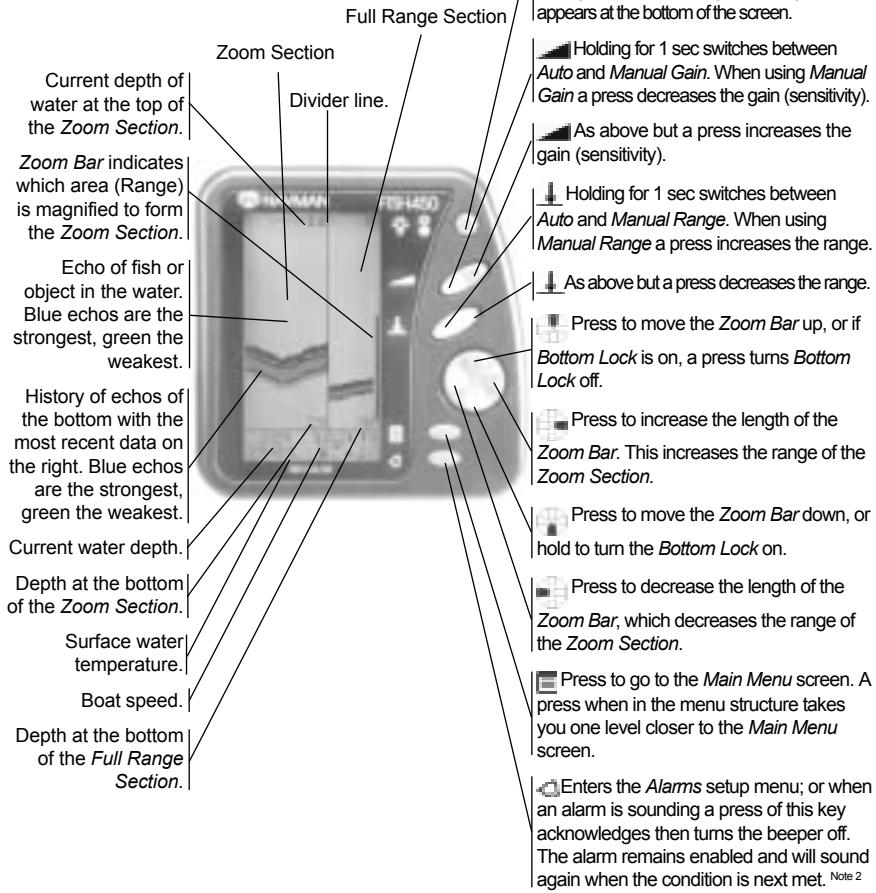
Press the Backlight/Powerkey to turn the unit on. When on, hold for 3 secs to turn the power off (Note 1) or press (1 sec. or less) to activate the backlight function. A further single press steps the backlight level from 0 to 6 then to 0 again. A bar indicating the backlight level appears at the bottom of the screen.
Holding for 1 sec switches between Auto and Manual Gain. When using Manual Gain a press decreases the gain (sensitivity).
As above but a press increases the gain (sensitivity).
Holding for 1 sec switches between Auto and Manual Range. When using Manual Range a press increases the range.
As above but a press decreases the range.
Press to move the Zoom Bar up, or if Bottom Lock is on, a press turns Bottom Lock off.
Press to increase the length of the Zoom Bar. This increases the range of the Zoom Section.
Press to move the Zoom Bar down, or hold to turn the Bottom Lock on.
Press to decrease the length of the Zoom Bar, which decreases the range of the Zoom Section.
Press to go to the Main Menu screen. A press when in the menu structure takes you one level closer to the Main Menu screen.
Enters the Alarms setup menu; or when an alarm is sounding a press of this key acknowledges then turns the beeper off. The alarm remains enabled and will sound again when the condition is next met. Note 2
Note 1: The Power on & Power off functions of this key are disabled if wired for the 'auto power option'. (see Installation - Auto Power section 5-8)
Note 2: Refer to the Setup - Alarms section for more information.
Sommaire
1 Introduction 29
2 Mise en route 30
3 Fonctionnement 31
3-1 Alarmes 31
Ecran Zoom (section 3-2)
Ecran Sonar (section 3-3)
Loch ....... Loch total
4-10 Mode Simulation
- 400 Watts nominal @ 13.8V dc
- Immersion in 1 metre of water for 30 mins. (IP67)
Interface
NMEA 0183 (Ver 2.0) 4800 bauds
Sorties NMEA
NMEA - National Marine Electronics Association
Talon Technology Australia PTY. Ltd.
2/340 Darling Street, Balmain NSW 2041, Australia
Tel: (61) 29818 8382 Fax:(61) 29818 8386
Toll free fax 1300 303 105
e-mail: talonaus@msn.com.au
New Zealand
Absolute Marine Ltd. Unit B, 138 Harris Road,
East Tamaki, Auckland, New Zealand
Tel: (64) 9273 9273 Fax: (64) 9273 9099
e-mail: navman@absolutemarine.co.nz

NAVMAN
Talon Technology Limited
PO Box 68155 Newton, Auckland, New Zealand.
Tel: (64) 9 480 3129 Fax: (64) 9 480 3176
e-mail: sales@talon.co.nz


Designers and manufacturers of GPS, communication and marine products.
Press to increase the length of the Zoom Bar. This increases the range of the Zoom Section.
Mounting the bracket
- 0,6m (2 pies) a 300m (1000pies)
Tipode pantalla
- the battery terminals or wiring on the terminals may be corroded.
- the battery may not be charging correctly or may need replacing.
Talon Technology Australia PTY. Ltd.
2/340 Darling Street, Balmain NSW 2041, Australia
Tel: (61) 29818 8382 Fax:(61) 29818 8386
Toll free fax 1300 303 105
e-mail: talonaus@msn.com.au
New Zealand
Absolute Marine Ltd. Unit B, 138 Harris Road,
East Tamaki, Auckland, New Zealand
Tel: (64) 9273 9273 Fax: (64) 9273 9099
e-mail: navman@absolutemarine.co.nz

NAVMAN
NAVMAN es unmarca registrada de talon Research and Development Company Limited. Toderosrehoceros reservados
Fabricantes:
Talon Technology Limited.
PO Box 68155 Newton, Auckland, New Zealand.
Tel: (64) 9 480 3129 Fax: (64) 9 480 3176
e-mail: sales@talon.co.nz

TALON
TECHNOLOGY
Designers and manufacturers of GPS, communication and marine products.
Press to move the Zoom Bar down, or
I hold to turn the Bottom Lock on.
O visor (Selectionar)
Ind. Perc. e Ind. Tot.
Azul = Sensor Aquático (Aquaducer)
Branco = Combustivel
400 Watts nominal @ 13.8V DC (Na Explosion)
Sensibilitadodoreceptor
- Superior a 20 micro volts RMS
- Intervalo dinamico 4,0 milhoes para 1 (120dB)
- the battery terminals or wiring on the terminals may be corroded.
- the battery may not be charging correctly or may need replacing.
NMEA - National Marine Electronics Association
NMEA 0183 - É um padrão de interface para dispositivos electrónicos maritimos.
Talon Technology Australia PTY. Ltd.
2/340 Darling Street, Balmain NSW 2041, Australia
Tel: (61) 29818 8382 Fax:(61) 29818 8386
Toll free fax 1300 303 105
e-mail: talonaus@msn.com.au
New Zealand
Absolute Marine Ltd. Unit B, 138 Harris Road,
East Tamaki, Auckland, New Zealand
Tel: (64) 9273 9273 Fax: (64) 9273 9099
e-mail: navman@absolutemarine.co.nz

NAVMAN
Talon Technology Limited.
PO Box 68155 Newton, Auckland, New Zealand.
Tel: (64) 9480 3129 Fax: (64) 9480 3176
e-mail: sales@ talon.co.nz

TALON
TECHNOLOGY
Designers and manufacturers of GPS, communication and marine products.
- Important
- Introduction
- The NAVMAN FISH450 Tricolor
- How the NAVMAN FISH450 Tricolor finds fish and determines the depth
- Assisting with navigation
- How to find fish
- Cleaning and maintenance
- Temperature warning
- Getting started
- Power connection
- Transducer connection
- Definition of Press and Hold
- Power on
- Power off
- Changing the level of backlighting
- Language selection
- Follow these steps to change the language:
- Operation
- Main Menu screen
- MAIN MENU
- FISH HISTORY
- Fish History screen (see section 3-2)
- Zoom screen (see section 3-2)
- Sonar screen (see section 3-3)
- Fuel screen (see section 3-4)
- Data screen (see section 3-5)
- Setup menu (see section 4)
- 3-1 Alarms
- When an alarm condition is met the following occurs:
- Alarm automatically re-encables
- External beeper
- 3-2 Fish History and Zoom Screens
- Fish History screen
- Fish detection
- Zoom screen
- Strength of returned echos
- Shadows
- Range
- Gain
- Bottom Lock
- 3-3 Sonar screen
- Changing the colour thresholds
- Manual Gain adjustment
- 3-4 Fuel screen
- Fuel screen
- 3-5 Data screen
- Temperature
- Battery
- Log
- Setup
- Menu operation
- SETUP
- Menu structure of Setup
- 4-1 Alarms
- Selecting items and changing values
- ALARMS
- LOW FUEL
- LOW BATTERY
- 10.5u
- 4-2 Fuel
- Tank Full
- Tank Size
- Set Remaining
- Clear Used
- Units
- Num Engines
- Fuel Cal
- Flow Filter
- 4-3 Depth
- Keel Offset
- 4-4 Temperature
- Temp Cal
- 4-5 Speed and Log
- Speed Cal
- Notes for accurate calibration:
- Log (Select)
- Log Cal
- Zero Trip Log
- Zero All Logs
- 4-6 Display
- Fish Symb
- Speed
- Temp
- Colour calibration
- Display Cal
- Red Cal
- Trip Log and Total Log
- Backlighting
- 4-7 Key Beep
- 4-8 Language
- LANGUAGE
- ENGLISH
- 4-9 Resetting to factory defaults
- GENERAL
- DISPLAY
- FUEL
- OTHER
- 4-10 Simulate
- Installation
- 5-1 What comes with your FISH450 Tricolor
- Standard configuration
- 5-2 Options and accessories
- Optional fuel kit
- Optional through hull transducers
- Other options and accessories
- 5-3 Mounting the Aquaducer
- Transom mount Aquaducer
- Location
- Mounting
- 5-4 Other depth and speed / temperature transducers
- 5-5 Fuel transducers
- Fuel transducers
- 5-6 Mounting the FISH450 Tricolor display unit
- Mounting the bracket
- Mounting the FISH450 Tricolor
- Removing the FISH450 Tricolor
- 5-7 Wiring connection
- 5-8 Auto Power wiring connection
- Appendix A - Specifications
- Depth range
- Display type
- Supply voltage
- Supply current
- Operating temperature
- Maximum transducer cable length
- Supplied transducer cable length
- Typical depth acquisition time from startup
- Depth accuracy
- Transducer frequency
- Transducer power
- Receiver sensitivity
- Temperature measurement range
- Speed range
- Speed resolution
- Log range
- Log resolution
- Environment rating
- Communications
- NMEA output
- Appendix B - Troubleshooting
- The fishfinder won't turn on:
- The fishfinder operates erratically:
- Bottom is not displayed:
- Bottom echo disappears or erratic digital reading while your boat is moving:
- Fuel Used and/or Remaining amount(s) seem incorrect:
- No/low fuel flow (Flow) indicated:
- Only one flow rate value shown for a twin engine installation:
- Erratic fuel flow readings:
- No fuel economy reading:
- Over temperature warning message displayed:
- If the unit beeps when turned on but nothing is displayed:
- The unit is setup in such a way that the user is not sure what to adjust to get it operating normally:
- The wrong language is displayed:
- Appendix C - Glossary
- Appendix D - Conditions of Sale & Warranty
- Conditions of Sale
- Manufacturers warranty
- Conditions:
- Acceptance of Conditions of Sale
- Appendix E - How to contact us
- Distributors:
- Europe:
- Australia
- New Zealand
- NAVMAN
- Manufacturers:
- Appendix F - Quick reference
- Sommaire
- Ecran Zoom (section 3-2)
- Ecran Sonar (section 3-3)
- 4-10 Mode Simulation
- Interface
- Sorties NMEA
- Tipode pantalla
- Fabricantes:
- O visor (Selectionar)
- Ind. Perc. e Ind. Tot.
- Sensibilitadodoreceptor
Brand : NAVMAN
Model : FISH450 TRICOLOR
Category : Fish Finder