HCM-1 - Camera HuddleCamHD - Free user manual and instructions
Find the device manual for free HCM-1 HuddleCamHD in PDF.


Pick your language and provide your email: we'll send you a specifically translated version.
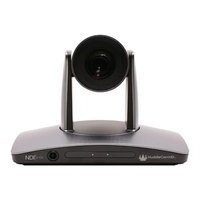
| Product Type | PTZ Video Conferencing Camera |
| Resolution | 1080p Full HD (1920x1080) |
| Optical Zoom | 10x |
| Field of View | 72.5° (wide angle) |
| Sensor | 1/2.8-inch CMOS |
| Frame Rate | 30 fps |
| Pan Range | ±170° |
| Tilt Range | -30° to +90° |
| Connectivity | USB 3.0, HDMI 1.4, RS-232 |
| Control Options | IR remote, RS-232, USB |
| Mounting | Wall, ceiling, or tripod mount compatible |
| Power Supply | 12V DC, 2A adapter included |
| Power Consumption | 12W (typical) |
| Dimensions (W x H x D) | 250 mm x 150 mm x 150 mm |
| Weight | 1.4 kg |
| Operating Temperature | 0°C to 40°C |
| Included Accessories | IR remote control, power adapter, USB 3.0 cable |
| Maintenance | Clean the lens with a soft, dry cloth; do not use chemicals |
| Safety | Use only the provided power adapter to prevent damage |
| Spare Parts & Repairability | Replacement cables, remote control, and power supplies are available from authorized resellers |
Frequently Asked Questions - HCM-1 HuddleCamHD
How do I connect the HCM-1 camera to my computer?
Connect the included USB 3.0 cable from the camera to your computer. The camera will be recognized as a standard UVC (USB Video Class) device, no additional drivers are required for most operating systems.
Can I use the HCM-1 without the USB connection?
Yes, the HCM-1 also supports HDMI output for direct connection to a display or video switcher. Use the IR remote to control the camera and switch between USB and HDMI output modes.
How do I zoom in and out using the IR remote?
Use the 'Zoom +' and 'Zoom -' buttons on the remote control to adjust the optical zoom. The camera offers 10x optical zoom, allowing you to get close-up views of speakers or objects.
Is the HCM-1 camera suitable for large conference rooms?
The HCM-1 is designed for huddle rooms and small to medium-sized conference spaces. Its 72.5° field of view and 10x zoom provide good coverage, but for very large rooms, consider a camera with higher optical zoom.
How do I mount the camera on a wall or ceiling?
The camera has a standard tripod mount thread (1/4-20) on the bottom and a mounting hole pattern on the top for ceiling mounting. Use appropriate screws and anchors suitable for your mounting surface.
What should I do if the camera is not detected by my computer?
First, ensure the USB cable is securely connected and the power adapter is plugged in. Try a different USB port, ideally a USB 3.0 port. If the issue persists, restart your computer and check the device manager for unrecognized devices.
How can I clean the camera lens safely?
Use a soft, dry microfiber cloth to gently wipe the lens. Avoid using any cleaning chemicals or abrasive materials. If the lens is heavily soiled, lightly dampen the cloth with water or a lens cleaning solution specifically designed for optics.
Can I control the HCM-1 with a third-party controller or software?
Yes, the HCM-1 supports RS-232 control using the VISCA protocol, and it also works with many video conferencing software applications that recognize UVC PTZ cameras. You can control pan, tilt, and zoom via these interfaces.
How do I reset the camera to factory settings?
Press and hold the 'Reset' button on the bottom of the camera for about 5 seconds, or use the IR remote to navigate to the reset option in the on-screen menu. This will restore default settings for pan, tilt, zoom, and exposure.
What is the warranty period for the HCM-1?
The HuddleCamHD HCM-1 comes with a standard 1-year limited warranty covering defects in materials and workmanship. You can extend the warranty by registering the product on the HuddleCamHD website within 30 days of purchase.
User questions about HCM-1 HuddleCamHD
0 question about this device. Answer the ones you know or ask your own.
Ask a new question about this device
No questions yet. Be the first to ask one.
Download the instructions for your Camera in PDF format for free! Find your manual HCM-1 - HuddleCamHD and take your electronic device back in hand. On this page are published all the documents necessary for the use of your device. HCM-1 by HuddleCamHD.
USER MANUAL HCM-1 HuddleCamHD

Manual assistant
Powered by Anthropic
Waiting for your message
Product information
Brand : HuddleCamHD
Model : HCM-1
Category : Camera