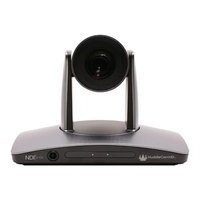
SimplTrack3 - Video conferencing system HuddleCamHD - Free user manual and instructions
Find the device manual for free SimplTrack3 HuddleCamHD in PDF.


Pick your language and provide your email: we'll send you a specifically translated version.
| Product Type | Video Conferencing PTZ Camera with Auto-Tracking |
| Dimensions (H x W x D) | 6.7 x 4.5 x 4.5 inches (170 x 114 x 114 mm) |
| Weight | 3.5 lbs (1.6 kg) |
| Power Supply | PoE+ (IEEE 802.3at) or DC 12V |
| Video Resolution | 1080p Full HD (1920x1080) up to 60 fps |
| Optical Zoom | 10x |
| Pan/Tilt Range | Pan: ±170°, Tilt: -30° to +90° |
| Auto-Tracking | Yes, with speaker tracking and motion tracking modes |
| Connectivity | HDMI, USB 3.0, 3G-SDI, Ethernet (PoE+) |
| Operating Temperature | 32°F to 104°F (0°C to 40°C) |
| Cleaning Instructions | Wipe with a soft, dry cloth. Avoid solvents. |
| Safety Certifications | CE, FCC, RoHS compliant |
| Spare Parts Availability | Contact HuddleCamHD for replacement parts; not user-serviceable |
| Warranty | 3 years limited |
| General Information | Designed for HuddleCamHD; model SimplTrack3; includes remote control and mounting bracket |
Frequently Asked Questions - SimplTrack3 HuddleCamHD
How do I set up the SimplTrack3 for auto-tracking?
Ensure the camera is connected via PoE+ and powered on. Use the included remote or web interface to select tracking mode (speaker or motion). The camera will automatically follow the active speaker or moving subject.
Can I use the SimplTrack3 without a network connection?
Yes, the camera supports local HDMI and USB 3.0 outputs for direct connection to a display or computer. However, auto-tracking features may require initial configuration via the web interface.
What video conferencing platforms are compatible?
The SimplTrack3 works with any software that supports USB cameras, such as Zoom, Microsoft Teams, Google Meet, and Skype. For HDMI/SDI use, it's compatible with most video switchers.
How do I update the firmware?
Download the latest firmware from HuddleCamHD's support page. Access the web interface via the camera's IP address, go to System > Firmware Update, and upload the bin file.
What is the maximum tracking distance?
The auto-tracking feature works optimally at distances up to 20 feet (6 meters) for clear subject detection. Performance may vary with lighting and background.
Can I mount the camera on a ceiling or tripod?
Yes, the camera has a standard 1/4-20 tripod mount on the base. For ceiling mounting, use the included bracket or an optional ceiling mount kit.
How do I reset the camera to factory settings?
Press and hold the reset button on the rear panel (near the Ethernet port) for 10 seconds using a paperclip. The camera will reboot with default settings.
What is the warranty coverage?
The SimplTrack3 comes with a 3-year limited warranty covering defects in materials and workmanship. Contact HuddleCamHD support for claims.
Does the camera support Power over Ethernet (PoE)?
Yes, it supports PoE+ (IEEE 802.3at) for both power and data over a single Ethernet cable. Alternatively, it can be powered via a 12V DC adapter.
How do I clean the camera lens?
Use a lens cleaning cloth or a soft, lint-free cloth slightly dampened with water. Gently wipe the lens in a circular motion. Avoid using alcohol or abrasive cleaners.
User questions about SimplTrack3 HuddleCamHD
0 question about this device. Answer the ones you know or ask your own.
Ask a new question about this device
No questions yet. Be the first to ask one.
Download the instructions for your Video conferencing system in PDF format for free! Find your manual SimplTrack3 - HuddleCamHD and take your electronic device back in hand. On this page are published all the documents necessary for the use of your device. SimplTrack3 by HuddleCamHD.
USER MANUAL SimplTrack3 HuddleCamHD


Manual assistant
Powered by Anthropic
Waiting for your message
Product information
Brand : HuddleCamHD
Model : SimplTrack3
Category : Video conferencing system