
HuddlePod Air2 Duo - Camera HuddleCamHD - Free user manual and instructions
Find the device manual for free HuddlePod Air2 Duo HuddleCamHD in PDF.


| Product Type | Dual PTZ Camera System |
| Brand | HuddleCamHD |
| Model | HuddlePod Air2 Duo |
| Camera Count | 2 |
| Dimensions (each camera) | 20.0 x 15.0 x 15.0 cm |
| Weight (total package) | 1.5 kg |
| Power Supply | 12V DC or PoE (Power over Ethernet) |
| Pan Range | 340° |
| Tilt Range | 120° |
| Optical Zoom | 10x |
| Resolution | 1920 x 1080p (Full HD) |
| Frame Rate | 60 fps |
| Video Output | HDMI, USB 3.0, IP Streaming |
| Audio Input | Built-in microphone array |
| Control Interface | IR remote, RS-232, IP |
| Mounting | Desktop stand or wall mount (included) |
| Maintenance | Clean lens with microfiber cloth; avoid liquid cleaners |
| Safety | Use only provided power adapter; keep away from moisture |
| Spare Parts Availability | Contact HuddleCamHD support for replacement cables or stands |
| General Information | Designed for conference rooms and collaboration spaces |
Frequently Asked Questions - HuddlePod Air2 Duo HuddleCamHD
User questions about HuddlePod Air2 Duo HuddleCamHD
0 question about this device. Answer the ones you know or ask your own.
Ask a new question about this device
Download the instructions for your Camera in PDF format for free! Find your manual HuddlePod Air2 Duo - HuddleCamHD and take your electronic device back in hand. On this page are published all the documents necessary for the use of your device. HuddlePod Air2 Duo by HuddleCamHD.
USER MANUAL HuddlePod Air2 Duo HuddleCamHD
natural_image
Two HuddleCam speakers with speaker control buttons and a microphone, no visible text or symbols on the devices themselves.
HuddleCamHD
152 Robbins Rd, Downingtown, PA, 19335, USA - HuddleCamHD.com | 1 800 - 486-5276
Precautions
Safety Tips
- Please be aware any deviation from these tips may void your warranty
- Please read this manual carefully before using the Huddle Pod.
- Avoid damage from stress, violent vibration or liquid intrusion during transportation, storage, or installation.
- Take care of the Huddle Pod during installation to prevent damage to the camera case, ports, lens, or tilt mechanism.
- Keep the Huddle Pod away from strong electromagnetic sources.
- Do not clean the Huddle Pod with any active chemicals or corrosive detergents.
- Do not disassemble the Huddle Pod or any of the Huddle Pod's components. If problems arise, please contact your authorized HuddleCamHD dealer.
- After long term operation, moving components may wear down. Please contact your authorized HuddleCamHD dealer for repair.
What's in the Box
Supplied Hardware

HuddleCamHD
152 Robbins Rd, Downingtown, PA, 19335, USA - HuddleCamHD.com | 1 800 - 486-5276
Physical Description
Front View of the HuddlePod
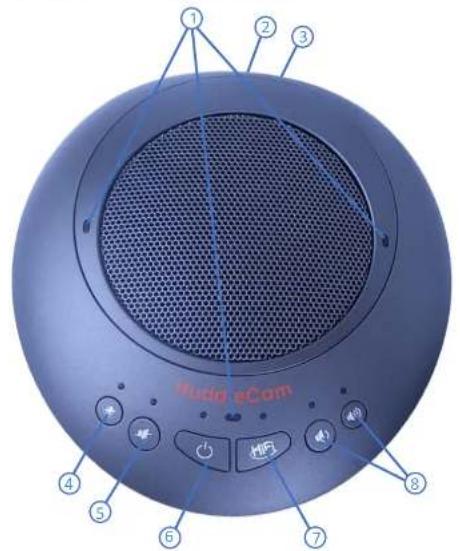
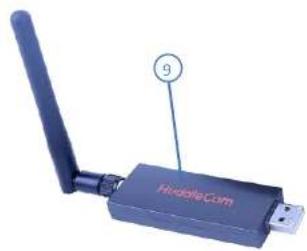
natural_image
Close-up of a wireless router device with a USB port and antenna, labeled 'HideCom' (no additional text or symbols visible)
HuddleCamHD
152 Robbins Rd, Downingtown, PA, 19335, USA - HuddleCamHD.com | 1 800 - 486-5276
Set-up Guide
- Connect Mini USB 2.0 cable from HuddlePod(s) to PC or USB power supply for charging (Orange LED is lit when charging. A full charge may take up to 5 hours to complete)
- Once fully charged press the power button on each chat pod to turn the chat pod(s) on
- Connect wireless receiver directly to Windows, Mac, or Linux computer in an available USB 2 / 3 port and allow the drivers to fully install
USB Power Supply & Charging
- This device is provided with a built-in rechargeable lithium ion battery. Before use of the device for the first time, charge the battery fully (may take up to 5 hours for a full charge)
- When one end of the USB cable is inserted into the USB port on the device and the other end to the USB port on the computer, or to a USB power supply, power will be supplied to the device and the built-in battery will begin charged. At the same time, the device will be automatically powered on
- When charging is complete you can disconnect the USB cable from the device for portability. Remember to always turn off the device before storing or travel
- In the event of a low battery while in use 6 orange LEDs above the buttons will begin to flash
- Lithium ion batteries should not be left in a fully discharged state for a significant period or damage to the battery, resulting in the voltage dropping below the battery protection circuit shutoff point, can occur rendering the battery un-chargeable. Whenever the HuddlePod Air2 shuts down due to battery discharge please recharge as soon as possible
Note: A full recharge is not required to maintain battery life, however while lithium ion batteries will

HuddleCamHD
152 Robbins Rd, Downingtown, PA, 19335, USA - HuddleCamHD.com | 1 800 - 486-5276
Achieving Best Performance
- Install the product(s) in a dry place with good ventilation, avoiding direct sunlight, vibration, moisture, and cold. Keep away from heat sources and dust
- Keep the product(s) far from motors, transformers, and other electronic equipment to avoid electronical or magnetic interference
- Never install the product(s) near electrical appliances such as induction cookers or microwave ovens to prevent operation failure caused by electromagnetic waves or magnetic fields
- Keep hands dry when connecting or disconnecting any cables to prevent electrical shock
- Never use brute force when connecting cables, which may cause a fire, electric shock, product damage, a short or open circuit
• Unplug all cables and turn product(s) to the off state before cleaning - Never use any chemical solvent to clean the product
- Never loosen the screws on the product, which may cause poor sealing, reduce the functional qualities and violate the warranty
- Please do not put device into a fire, which may cause an explosion
- If there is any leakage from the unit, please do not touch the battery or the leaking substance, as the battery may be damaged
- Never try to repair the product by yourself. If you find any problems, please contact your authorized HuddleCamHD dealer
Troubleshooting
Audio is not coming out of the HuddlePod Air Duo Speaker
• Is the HuddlePod turned on?

HuddleCamHD
152 Robbins Rd, Downingtown, PA, 19335, USA - HuddleCamHD.com | 1 800 - 486-5276
Specifications
Model Number: HC-HPAIR2-DUO
Microphone Features
- Echo Cancellation
256 ms echo cancellation
- Audio Output
Max 18dB w/ auto level control
- Noise Cancellation
Intelligent NC up to 16 dB
- Digital EQ
Built-in digital EQ for stable audio
- Battery Life
8-9 hours battery life, 4-5 hours charge time
- Interface
USB 2.0 & 3.5mm audio output
Wireless Speakerphone Specifications (per unit)
• Weight: 1 lbs. (0.45 kg)
- Dimensions:
7" L x 6" W x 1.5" H (178mm L x 152mm W x 35mm H)
• Operating Temperature:
Temp 32 - 1.4°F (0\~40°C), Humidity 20% \~ 85%
- Compatibility:
Windows 7/8/8.1/10, Mac 10.5+, Android 4.4+
- USB Cable:
Supplied for power & charging only
• RF frequency range:
2.4 GHz - 2.4835 GHz
- Certifications:
CE Mark (R & TTE Directive), FCC
Brand : HuddleCamHD
Model : HuddlePod Air2 Duo
Category : Camera