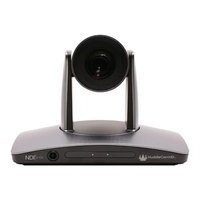
SimplTrack2 - Camera HuddleCamHD - Free user manual and instructions
Find the device manual for free SimplTrack2 HuddleCamHD in PDF.


Pick your language and provide your email: we'll send you a specifically translated version.
| Product Type | PTZ Camera |
| Model | SimplTrack2 |
| Brand | HuddleCamHD |
| Dimensions (H x W x D) | 7.0 x 4.5 x 4.5 in |
| Weight | 2.2 lbs |
| Power Supply | 100-240V AC, 50/60Hz, 12V DC adapter |
| Image Sensor | 1/2.8-inch CMOS |
| Resolution | 1920 x 1080 p @ 60 fps |
| Optical Zoom | 12x |
| Horizontal Viewing Angle | 72.5° (wide) |
| Pan/Tilt Range | Pan: ±170°, Tilt: -30° to +90° |
| Preset Positions | 255 |
| Video Output | HDMI, 3G-SDI, USB 2.0 |
| Control Interface | RS-232, RS-485, IR remote |
| Supported Protocols | VISCA, Pelco-D, Pelco-P |
| Audio Input | 3.5mm line-in |
| Operating Temperature | 32°F to 104°F (0°C to 40°C) |
| Mounting | Tabletop or ceiling mount (bracket included) |
| Cleaning Instructions | Gently wipe lens with dry microfiber cloth; avoid liquids |
| Safety | Use only provided power adapter; keep away from moisture |
| Spare Parts Available | Remote control, power adapter, mounting bracket |
| General Information | Designed for huddle rooms and small to medium-sized spaces |
Frequently Asked Questions - SimplTrack2 HuddleCamHD
How do I connect the SimplTrack2 to my computer?
Use the built-in USB 2.0 port to connect directly to your computer. The camera is recognized as a UVC device, so no extra drivers are needed on Windows, Mac, or Linux.
Can I control the camera remotely?
Yes, you can control it via RS-232 or RS-485 using VISCA, Pelco-D, or Pelco-P protocols. It also supports IR remote control for basic functions.
What is the maximum resolution and frame rate?
The camera outputs up to 1920x1080 at 60 frames per second (1080p60) via HDMI, 3G-SDI, or USB.
How do I clean the camera lens?
Use a dry, soft microfiber cloth to gently wipe the lens. Do not use any liquids or sprays, as they may damage the sensor.
Does the camera support auto-tracking?
No, the SimplTrack2 is a manual PTZ camera. It does not have built-in auto-tracking; you need to control it manually or via presets.
What is the warranty period?
HuddleCamHD typically offers a 2-year limited warranty. Check your purchase documentation for exact terms.
Can I use the camera for streaming?
Yes, it works well with streaming software like OBS, Zoom, and Teams when connected via USB. The HDMI output can also be captured with a capture card.
Does it support Power over Ethernet (PoE)?
No, the SimplTrack2 uses a dedicated 12V DC power adapter. PoE is not supported.
How do I mount the camera on a ceiling?
The camera includes a ceiling mount bracket. Secure the bracket to the ceiling with screws (not included), then attach the camera and tighten the locking screw.
What are the available video outputs?
It has HDMI, 3G-SDI, and USB 2.0 outputs. You can use all simultaneously if desired.
User questions about SimplTrack2 HuddleCamHD
0 question about this device. Answer the ones you know or ask your own.
Ask a new question about this device
No questions yet. Be the first to ask one.
Download the instructions for your Camera in PDF format for free! Find your manual SimplTrack2 - HuddleCamHD and take your electronic device back in hand. On this page are published all the documents necessary for the use of your device. SimplTrack2 by HuddleCamHD.
USER MANUAL SimplTrack2 HuddleCamHD


Manual assistant
Powered by Anthropic
Waiting for your message
Product information
Brand : HuddleCamHD
Model : SimplTrack2
Category : Camera