
IVENTURE A200 TRAVEL SPEAKER - Portable speakers SAITEK - Free user manual and instructions
Find the device manual for free IVENTURE A200 TRAVEL SPEAKER SAITEK in PDF.


| Brand | Saitek |
| Model | Iventure A200 Travel Speaker |
| Category | Portable 2.1 speaker |
| Product type | Portable stereo 2.1 speaker with subwoofer |
| Technology | EAVS system (Expanded Air Volume System) |
| Total RMS power | 2 x 3 W (tweeters) + 1 x 3 W (subwoofer) |
| Connectivity | 3.5 mm jack socket |
| Power supply | 4 AAA (LR03) batteries or included AC adapter |
| Battery life | More than 24 hours |
| Indicator light | Charge indicator: green (full), orange (3/4), red (discharged) |
| Controls | Volume (+/-), EAVS activation, On/Off via EAVS |
| Magnets | Neodymium |
| Compatibility | Computers, MP3 players, CD, DVD, PSP, etc. |
| Included accessories | 3.5 mm audio cable, AC adapter, protective carrying case |
| Maintenance | Wipe with a dry soft cloth |
| Safety | Do not listen at high volume for extended periods to avoid hearing damage |
| Note | The speakers do not operate at maximum volume without the AC adapter |
| Rechargeable batteries | Can be used but must be removed for charging |
Frequently Asked Questions - IVENTURE A200 TRAVEL SPEAKER SAITEK
User questions about IVENTURE A200 TRAVEL SPEAKER SAITEK
0 question about this device. Answer the ones you know or ask your own.
Ask a new question about this device
Download the instructions for your Portable speakers in PDF format for free! Find your manual IVENTURE A200 TRAVEL SPEAKER - SAITEK and take your electronic device back in hand. On this page are published all the documents necessary for the use of your device. IVENTURE A200 TRAVEL SPEAKER by SAITEK.
USER MANUAL IVENTURE A200 TRAVEL SPEAKER SAITEK
The Saitek A-200 Portable 2.1 speaker system allows you to easily play high-quality audio from the music library on your laptop or PC, or from any portable media player. The unique EAVS® (Expanded Air Volume System - Patent pending) chamber expands to increase available air volume, boosting bass performance.
BATTERIES
Open the battery compartment on the back of your Saitek Portable Speaker System. Insert four AAA batteries in the direction shown. Replace the battery compartment cover.




ENGLISH
CONNECTING THE SPEAKER SYSTEM
On your computer, CD-player, iPod or other MP3 player, insert one end of the supplied connection cable into the 3.5mm jackplug audio socket and the other end into the 3.5mm socket on the rear right-hand side of the portable speaker system.
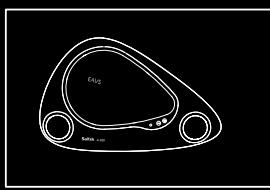


On top of the Portable speaker system press down the EAVS woofer enclosure to release it and to turn on the speaker system. The speaker system will not work until the woofer enclosure is open.
CONTROLLING MUSIC
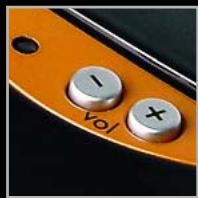
Press "+ to increase the portable speaker system's volume
Press “-” to decrease the portable speaker system's volume
Note: if you are no longer using the portable speaker system, press down the EAVS woofer enclosure to turn the speaker system off.



ENGLISH
BATTERIES AND AC ADAPTER
Your Portable 2.1 speaker system requires 4 × AAA batteries. With normal use these should last for up to 24hrs play. The LED indicator on the top of your speaker system is green when the batteries are full, amber when a quarter full and red when they are about to expire. When the batteries have expired (or when there are no batteries inserted) the speaker system will not "remember" its last volume setting.
Please note that you can also use rechargeable batteries in your speaker system – these must be taken out of the battery compartment to be recharged.
To save battery life or when the batteries have expired, if you are near a mains power source you can power the speaker system using the AC Adapter supplied. Simply plug it into a mains power supply and then plug the cable into the power socket on the rear right-hand side of the speaker system.
Note that the A-200 portable speaker system will only function at its highest volume when connected to the AC Adapter.
WARNING: Prolonged use at high volume may damage your hearing.
TROUBLESHOOTING
My MP3 player or PC is playing music, the portable speaker system is turned on but I cannot hear any sound.
Check that the portable speaker system volume is not at 0. Press the "+" button to increase volume until you can hear the music.
Check that your music player's volume setting in not at 0. If it is, increase it to the desired level.
Check that the connector cable's jackplugs are properly inserted in the speaker system and your music source.
Check that the batteries have not run out. If the LED is red or not lit up at all, replace the batteries with new ones.
TECHNICAL INFORMATION
True 2.1 stereo delivered through two 3W tweeters and 3W sub-woofer
- Unique EAVS® (Expanded Air Volume System) expands in use to provide impressive bass range and clarity
- Neodymium speaker magnets increase efficiency and reduce magnetic interference
- Integrated volume and on/off controls, plus EAVS® activation
- Connect to all portable media players (MP3, CD, DVD, MPEG4, Sony PSP) and laptops via 3.5mm jack audio cable (provided)
- Requires 4 x AAA batteries (for up to 24hrs play). Includes AC adapter and protective travel-case
FRANCAIS
A-200 PORTABLE 2.1 SPEAKER SYSTEM
GUIDE DE DEMARRAGE RAPIDE


Brand : SAITEK
Model : IVENTURE A200 TRAVEL SPEAKER
Category : Portable speakers