
ESPRIMO P3500 (I945G) - Desktop computer FUJITSU SIEMENS - Free user manual and instructions
Find the device manual for free ESPRIMO P3500 (I945G) FUJITSU SIEMENS in PDF.


User questions about ESPRIMO P3500 (I945G) FUJITSU SIEMENS
0 question about this device. Answer the ones you know or ask your own.
Ask a new question about this device
Download the instructions for your Desktop computer in PDF format for free! Find your manual ESPRIMO P3500 (I945G) - FUJITSU SIEMENS and take your electronic device back in hand. On this page are published all the documents necessary for the use of your device. ESPRIMO P3500 (I945G) by FUJITSU SIEMENS.
USER MANUAL ESPRIMO P3500 (I945G) FUJITSU SIEMENS
Are there any technical problems or other questions you need clarified?
Please contact:
- your sales partner or your sales outlet
- our hotline for customers who have purchased the mainboard as a single delivery unit: +49(0) 180 3777 005
The latest information and updates (e.g. BIOS update) on our mainboards can be found on the Internet under: "http://www.fujitsu-siemens.com/mainboards"
Intel, Pentium and Celeron are registered trademarks of Intel Corporation, USA.
Microsoft, MS, MS-Dos and Windows are registered trademarks of Microsoft Corporation.
PS/2 and OS/2 Warp are registered trademarks of International Business machines, Inc.
All other trademarks referenced are trademarks of their respective owners, whose protected rights are acknowledged.
All rights, including rights of translation, reproduction by printing, copying or similar methodologies, even of parts are reserved.
Offenders will be liable for damages.
All rights, including rights created by patent grant or registration of a utility model or design, are reserved. Delivery subject to availability.
Right of technical modification reserved.
| Features | D2610 |
| Chipset | Intel 945 G |
| Board size | μBTX |
| VGA | ✓ |
| Audio / 8-channel /S/PDIF /HDA | ✓ | - | - | ✓ |
| Buzzer / int. Speaker Support | ✓ | - |
| LAN 1 Gbit / 100 Mbit/ 10 Mbit | ✓ | ✓ | ✓ |
| LAN ASF / Aol / Wol / Boot | - | - | ✓ | ✓ |
| SATA / ATA / RAID | ✓ | - | - |
| FireWireTM / USB 2.0 | - | ✓ |
| FAN monitored FANPS/FAN1/FAN2/FAN3 | - | ✓ | ✓ | - |
| FAN controlled FANPS/FAN1/FAN2/FAN3 | - | ✓ | ✓ | - |
| TEMP monitored CPU /Inside / System / HDD | ✓ | ✓ | ✓ | - |
| SmartCard SystemLock (USB) | ✓ |
| Special Features | D2610 |
| Silent Fan / Silent Fan LT / System Guard / Silent Drives | - / √ / √ / √ |
| Recovery BIOS / Desk Update / Multi Boot / Safe Standby | √ / √ / √ / √ |
| HDD Password | √ |
| Logo Boot / Intel On Screen Branding | √ / √ |
| Silent Fan LT | Independent temperature related processor and fan supervision and control |
| System Guard | View and adjust Silent Fan LT |
| Silent Drives | Noise reduction for optical and hard disk drives |
| Recovery BIOS | Restores a corrupted BIOS |
| Desk Update | Simple driver update with DU CD |
| Multi Boot | Comfortable boot from any boot device |
| HDD Password | Access protection for ATA5/ATAPI5 disk drives |
| Power Supply Requirements - for onboard components (worst case) | |||
| Source | Voltage | Maximal variation | Mainboard current Typical (Maximal) |
| Main Power Supply | + 12 V | + / - 5 % | 10.0 A |
| - 12 V | + / - 10% | 0.05 A | |
| + 5 V | + / - 5 % | 6.0 A | |
| + 3.3 V | +/- 5 % | 4.0 A | |
| Aux. Power Supply | + 5 V | + 5 % - 3% | 2.0 A |
Information about boards

Be sure to observe the following for boards with ESD:
- You must always discharge static build up (e.g. by touching a grounded object) before working.
- The equipment and tools you use must be free of static charges.
- Remove the power plug from the mains supply before inserting or removing boards containing ESDs.
Always hold boards by their edges. - Never touch pins or conductors on the board.
An overview of the features is provided in the data sheet.
Special features
Your mainboard is available in different configuration levels. Depending on the configuration, your mainboard is equipped with or supports special features.
This manual describes the most important properties of this mainboard.
Additional information on mainboards is contained in the "Basic information on mainboard" manual on the "User Documentation" or "OEM Mainboard" CDs, or on the Internet.
Ports and connectors
The location of the ports and connectors of your mainboard is specified at the beginning of the manual.
The components and connectors marked are not necessarily present on the mainboard.
External ports
The location of the external ports of your mainboard is specified at the beginning of the manual.
| PS/2 keyboard port, purple (optional) | PS/2 mouse port, green (optional) |
| LAN port (RJ-45) | Microphone jack, pink |
| Audio input (Line in), light blue | USB - Universal Serial Bus, black |
| Audio output (Line out), light green | VGA, blue |
| Serial interface, turquoise |

The external USB ports on the back may be loaded with up to max. 2A in total.
Installing/removing processor (with heat sink)

Disconnect the system from the mains voltage before performing any of the tasks described below. Details are contained in the operating manual of your system.
Technical data
Intel Core Duo with 800 or 1066 MHz front side bus in the LGA775 design (FMB06-65W)
Intel Pentium 4 / Pentium D with 533/800 MHz front side bus (FMB05A, max. 95 W) in LGA775 design
Intel Celeron D with 533 MHz front side bus in the LGA775 design
- A current list of the processors supported by this mainboard is available on the Internet at: "www.fujitsu-siemens.com/mainboards".

Never touch the underside of the processor. Even minor soiling such as grease from the skin can impair the processor's operation or destroy the processor. Place the processor in the socket with extreme care, as the spring contacts of the socket are very delicate and must not be bent.
If one or more spring contacts are bent, do not insert the processor in any case as it may be damaged by doing so. Please contact the responsible vendor.
Procedure

The processor socket ist covered with a protective cap to protect the spring contacts In a warranty case the mainboard can only be taken back by Fujitsu Siemens Computers with the protective cap secured!
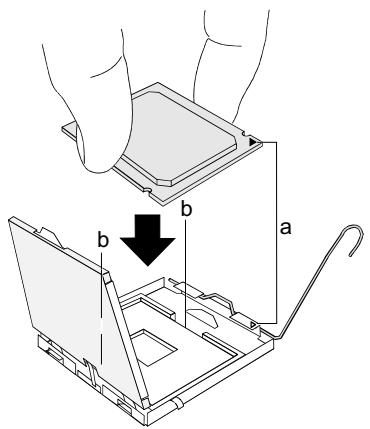
Remove the heat sink.
Press down the lever and unhook it.
Fold up the frame.
Hold the processor between your thumb and index finger and insert it into the socket (b) so that the marking of the processor is aligned with the marking on the socket (a).
Press the lever downward until it is hooked in again.
Remove the protective cap and keep it.

Please note that, depending on the heat sink used, different heat sink mounts are required on the mainboard.
Depending on the configuration variant, you must pull a protective foil off the heat sink or coat the heat sink with heat conducting paste before fitting it.
- Secure the heat sink - depending on the model - with four screws or push it into the mounts.
Installing/removing main memory
Technical data
| Technology | DDR2 400/533/667 unbuffered DIMM modules 240-Pin; 1.8V; 64Bit |
| Total size | 256 Mbytes to 4 Gbyte |
| Module size | 256, 512, 1024 or 2048 Mbyte for one module |
A current list of the memory modules recommended for this mainboard is available on the Internet at: "www.fujitsu-siemens.com/mainboards".
At least one memory module must be installed. Memory modules with different memory capacities can be combined.

You may use only unbuffered 1.8 V memory modules without ECC.
DDR2-memory modules must meet the PC2-4200U, PC2-5300U or PC2-3200U specification.

With a memory configuration of 4 Gbytes the visible and usable main memory can be reduced down to 3 Gbytes (depending on the system configuration).
The installation/removal is described in the "Basic information on mainboard" manual.
PCI bus interrupts - Selecting correct PCI slot
Extensive information on this section is contained in the "Basic information on mainboard" manual.

To achieve optimum stability, performance and compatibility, avoid the multiple use of ISA IRQs or PCI IRQ Lines (IRQ sharing). Should IRQ sharing be unavoidable, then all involved devices and their drivers must support IRQ sharing.
Which ISA IRQs are assigned to the PCI IRQ Lines is normally automatically specified by the BIOS (see "BIOS update", Page 6 description).
Monofunctional expansion cards
PCI/PCI Express expansion cards require a maximum of one interrupt, which is called the PCI interrupt INT A. Expansion cards that do not require an interrupt can be installed in any desired slot.
Multifunctional expansion cards or expansion cards with integrated PCI-PCI bridge
These expansion cards require up to four PCI interrupts: INT A, INT B, INT C, INT D. How many and which of these interrupts are used is specified in the documentation provided with the card.
The assignment of the PCI interrupts to the IRQ Lines is shown in the following table:
On board controller
| PCI INT LINE | 1 (A) | 2 (B) | 3 (C) | 4 (D) | 5 (E) | 6 (F) | 7 (G) | 8 (H) |
| USB 1.1 | ||||||||
| 1 st | - | - | - | - | - | - | - | X |
| 2 nd | - | - | - | - | - | - | X | - |
| 3 rd | - | - | - | - | - | X | - | - |
| 4 th | - | - | - | - | X | - | - | - |
| USB 2.0 | - | - | - | - | - | - | - | X |
| SMBus | - | - | - | X | - | - | - | - |
| HD Audio | - | - | X | - | - | - | - | X |
| LAN | - | - | - | X | - | - | - | - |
Mechanical slot
| PCI INT LINE | 1 (A) | 2 (B) | 3 (C) | 4 (D) | 5 (E) | 6 (F) | 7 (G) | 8 (H) |
| PCIe x1 | C | D | B | A | - | - | - | - |
| PCIe x16 | A | B | - | - | - | - | - | - |
| PCI 1 | - | - | D | C | - | B | A | - |
| PCI 2 | - | - | C | D | - | A | B | - |
First use PCI/PCI Express slots that have a single PCI IRQ Line (no IRQ sharing). If you must use another PCI/PCI Express slot with IRQ sharing, check whether the expansion card properly supports IRQ sharing with the other devices on this PCI IRQ Line. The drivers of all cards and components on this PCI IRQ Line must also support IRQ sharing.
BIOS update
When should a BIOS update be carried out?
Fujitsu Siemens Computers makes new BIOS versions available to ensure compatibility with new operating systems, new software or new hardware. In addition, new BIOS functions can also be integrated.
A BIOS update should also always be carried out when a problem exists that cannot be solved with new drivers or new software.
Where can I obtain BIOS updates?
The BIOS updates are available on the Internet at "www.fujitsu-siemens.com/mainboards".
BIOS update under DOS with bootable BIOS update floppy disk - brief description
Download the update file from our website to your PC.
Insert an empty floppy disk (1.44 Mbyte).
Run the update file (e.g. 2461103.EXE).
A bootable update floppy disk is created. Leave this floppy disk in the drive.
Restart the PC.
Follow the instructions on screen.

Detailed information on the BIOS update under DOS is provided in the "BIOS Setup" manual ("Drivers & Utilities" CD).
BIOS update under Windows with DeskFlash utility
A BIOS update can also be carried out directly under Windows with the DeskFlash utility. DeskFlash is located on the "Drivers & Utilities" CD (under DeskUpdate).
KpaTKoe OINscaHne MaTePNHcKOIJIaTbI
Yka3aHnno moDyIam

Длma ModyneI c EGB oba3aTeIbHo yuHTbIaIte cIeMyUOJIee:
Ipeed pa6oToC moUyMaM Tpe6yeTcra StaHueckn pa3paNtB CBoe TeNo (Haepimep nocpeDCTBOM kacaHna KaKoro-Ni6o 3aemJeHHoro npdeMeTa).
- IcklouHTe BO3MOxHOCt b CTaTHeCKOrO 3apraIa IcNoIb3yEmbIX yCTpOiCTB IN IHCTpyMeHTOB.
Ipeed yctaHOBKoIN CHrTHeM MoDyNeB BbIHbTe BnIKy CeTeBOrO Ka6eJIa n3 po3eTKN.
KacaiTeCbToIbKO KpOMoK MoUyne.
He npikacaiTeCb K UItbIpBkoBbIM BblOaM INI NeaTHbIM IPOBOHnKAM MOyJ.
O630 npo13BODCTBeHHbIX nokaTeNei Bbl NaIeTe B TexHnueckom nacOpTe.
OTnHHTeJIbHbIe OcO6eHHoCTn
Bb mokeTe npno6peCTn BaUy MaTePNHCKYU PnAty B pa3NnHyX KOHpyrpaOnHOhIX nCIOHNHeHx. Ba7a MaTePNHCKA PnAta B 3aBNCIMoCTn OT CBOe KOnPnrypaunO6IaJaet ONpeDeneHHbIMn NOKa3aTeJMaMn IIN NODepKJBNAe NTX.
B 3TOM PykoBoDCTBeNo 3KcPnyatauNn Bbl HaIeTe OINcaHne BaXHeiShnx CBOIcTB 3ToM MaTePHCKoI PJIaTbI.
PomeHHbIe KOMNoHEnTbI n pa3BeMbI MOrY T OTCyTCTBOBaTb Ha MaTePHHcKo INaTe.
Bheunne npTbi
HΦopMaζI O paCπoIoxeHn BHeUHnx nopTob Ha BaSeMATEpHckO nnate Bb HauTe B hauaPe PykoBODCTBa no 3Kcπnyatau.