DCHT - Microphone Lectrosonics - Free user manual and instructions
Find the device manual for free DCHT Lectrosonics in PDF.


Pick your language and provide your email: we'll send you a specifically translated version.
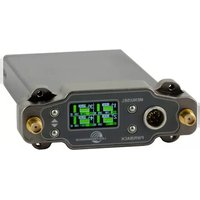
| Product type | Digital hybrid wireless belt-pack transmitter |
| Brand | Lectrosonics |
| Model | DCHT |
| Category | Wireless microphone system component |
| Frequency range | 470–614 MHz (UHF TV band, varies by block) |
| RF power output | 50 mW or 100 mW, switchable |
| Audio input | Lavalier microphone via 4-pin Lemo connector |
| Power source | 2 AA alkaline or lithium batteries |
| Battery life | Approximately 10 hours on alkaline batteries |
| Dimensions | 3.0 x 2.0 x 0.7 in (76 x 51 x 18 mm) |
| Weight | 4.2 oz (119 g) without batteries |
| Display | Backlit LCD for menu and parameter settings |
| Encoding | 24-bit digital audio with Digital Hybrid Wireless |
| Compatibility | All Lectrosonics Digital Hybrid Wireless receivers |
| Housing material | Machined aluminum with steel cover |
| User controls | Power switch, menu navigation, gain adjustment |
| Recommended use | Professional film, video, and broadcast applications |
| Cleaning instructions | Wipe with a dry cloth, avoid solvents and water |
| Storage conditions | Store in a dry, cool place; remove batteries for long storage |
| Repairability | Serviceable by authorized technicians; no user-replaceable parts except batteries |
Frequently Asked Questions - DCHT Lectrosonics
How do I turn on the Lectrosonics DCHT transmitter?
The power switch is located on the side panel. Slide it to the ON position to power up. The LCD will display the current frequency and audio level.
How do I replace the batteries?
To replace batteries, gently press the latch and remove the battery cover. Insert two AA batteries with correct polarity, as indicated inside. Reattach the cover and verify the LCD shows fresh batteries.
How do I set the operating frequency?
Use the member buttons to navigate to the frequency menu. Press the MENU button, select Frequency, then use the arrow keys to choose the desired channel or enter a specific frequency. Confirm by pressing the set button.
What type of microphone can I connect?
The DCHT accepts lavalier microphones with a 4-pin Lemo connector. The input supports both dynamic and electret condenser microphones with a bias voltage of 5V or 7V, selectable in the menu.
Which receivers are compatible with DCHT?
The transmitter is compatible with all Lectrosonics Digital Hybrid Wireless receivers, including the UCR series and other models with the DH designation. Always verify compatibility in the receiver's manual.
How do I clean and maintain the transmitter?
Clean the exterior with a soft dry cloth. Do not use water, solvents, or abrasive cleaners. Check the input connector and battery contacts for corrosion periodically. Remove batteries when not in use for extended periods.
What is the maximum battery life?
With two AA alkaline batteries, the DCHT typically operates for up to 10 hours. Using lithium batteries can extend this to about 14 hours. Battery life depends on RF power and audio signal.
Can I use the DCHT with a camera-mounted receiver?
Yes, it works with any compatible Lectrosonics receiver, including compact models designed for camera mounting. Ensure the receiver's frequency settings match the transmitter to achieve proper reception.
What is the RF power setting and how do I change it?
The RF power can be set to 50 mW or 100 mW using the menu. Lower power increases battery life, while higher power extends range. Navigate to RF Power in the menu, select the desired value, and confirm.
How should I store the device when not in use?
For storage, remove the batteries and keep the unit in a dry, dust-free environment. Avoid exposure to extreme temperatures or direct sunlight. Protect the connector with the supplied cap if available.
User questions about DCHT Lectrosonics
0 question about this device. Answer the ones you know or ask your own.
Ask a new question about this device
No questions yet. Be the first to ask one.
Download the instructions for your Microphone in PDF format for free! Find your manual DCHT - Lectrosonics and take your electronic device back in hand. On this page are published all the documents necessary for the use of your device. DCHT by Lectrosonics.
USER MANUAL DCHT Lectrosonics

Manual assistant
Powered by Anthropic
Waiting for your message
Product information
Brand : Lectrosonics
Model : DCHT
Category : Microphone