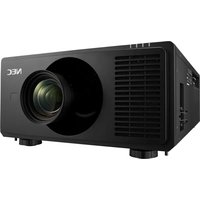
XV-Z20000 - Video projector SHARP - Free user manual and instructions
Find the device manual for free XV-Z20000 SHARP in PDF.


Pick your language and provide your email: we'll send you a specifically translated version.
| Product Type | Video Projector |
| Brand | Sharp |
| Model | XV-Z20000 |
| Projection Technology | DLP (Digital Light Processing) |
| Native Resolution | 1920 x 1080 (Full HD) |
| Brightness | 800 ANSI Lumens |
| Contrast Ratio | 3000:1 |
| Aspect Ratio | 16:9 |
| Lamp Power | 200 W |
| Lamp Life (Normal / Eco) | 2000 / 3000 hours |
| Zoom | Motorized, 1.5x |
| Video Inputs | HDMI, Component (Y/Pb/Pr), S-Video, Composite, RGB |
| Noise Level | 26 dB (Eco mode) |
| Power Consumption | 350 W (max) |
| Weight | 13.6 kg |
| Dimensions (W x H x D) | 405 x 155 x 468 mm |
| Remote Control | Backlit remote included |
| Projection Distance | 1.4 - 15.0 m |
| Keystone Correction | Digital (vertical) |
| Mounting Options | Tabletop / Ceiling mount |
Frequently Asked Questions - XV-Z20000 SHARP
How do I replace the lamp module?
Turn off and unplug the projector. Wait 30 minutes for the lamp to cool. Open the lamp cover, unscrew the lamp unit, and pull it out. Insert the new lamp and reset the lamp timer via the menu.
Why does the projector not turn on?
Check that the power cord is firmly connected and the wall outlet works. Ensure the lamp cover is closed securely. If the warning LED stays on, the lamp or thermal sensor may need service.
How do I clean the air filter?
Clean the air filter every 200 hours of use. Remove the filter cover, take out the filter, and wash it with a vacuum cleaner or water. Let it dry completely before reinstalling.
What video inputs are available?
The XV-Z20000 offers HDMI, Component (Y/Pb/Pr), S-Video, Composite, and RGB inputs, allowing connection to Blu-ray players, cable boxes, and computers.
Can I mount the projector on the ceiling?
Yes, the XV-Z20000 supports ceiling mount installation. Use a compatible mount bracket and follow the instructions in the manual for proper ventilation and safety.
How do I adjust the image size?
Use the zoom and focus rings on the lens. Move the projector closer or farther from the screen to fine-tune the image size. The projector also features vertical keystone correction.
Why is the image blurry?
Adjust the focus ring until the image is sharp. If blurring persists, check if the lens is clean or the projector is at the correct distance. Use the test pattern from the menu.
How do I connect a PC to the projector?
Connect the PC to the projector using a VGA (RGB) cable. Select the corresponding input source and set the PC resolution to 1920x1080 for best results.
How do I reset the lamp usage timer?
After replacing the lamp, go to the Setup menu, select Lamp Timer Reset, and confirm. This ensures accurate maintenance tracking.
Is the projector 3D capable?
The XV-Z20000 is not designed for 3D content. It supports standard 2D 1080p projection only. For 3D, you would need a projector with 3D technology.
User questions about XV-Z20000 SHARP
0 question about this device. Answer the ones you know or ask your own.
Ask a new question about this device
No questions yet. Be the first to ask one.
Download the instructions for your Video projector in PDF format for free! Find your manual XV-Z20000 - SHARP and take your electronic device back in hand. On this page are published all the documents necessary for the use of your device. XV-Z20000 by SHARP.
USER MANUAL XV-Z20000 SHARP
Manual assistant
Powered by Anthropic
Waiting for your message
Product information
Brand : SHARP
Model : XV-Z20000
Category : Video projector