PLDN70U - Car Radio Pyle - Free user manual and instructions
Find the device manual for free PLDN70U Pyle in PDF.


Pick your language and provide your email: we'll send you a specifically translated version.
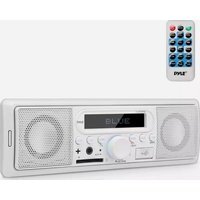
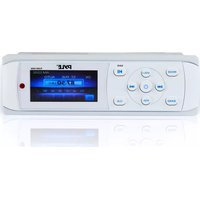
| Product Type | Car Stereo Receiver (Double-DIN) |
| Display | 7-inch Touchscreen LCD |
| Screen Resolution | 800 x 480 pixels |
| Supported Media | DVD, CD, MP3, WMA, JPEG |
| Radio Tuner | AM/FM Stereo with 30 presets |
| Bluetooth Connectivity | Hands-free calling and audio streaming |
| USB Port | Front USB for flash drives |
| SD Card Slot | Yes, for media playback |
| Audio Power Output | 4 x 50 watts maximum |
| Equalizer | Preset EQ (Pop, Rock, Jazz, Classic, Flat) |
| Subwoofer Output | Yes, RCA preamp output |
| Remote Control | Included wireless remote |
| Steering Wheel Control Ready | Yes, with optional adapter |
| Power Requirement | 12V DC (11-16V) |
| Dimensions (W x H x D) | 178 x 100 x 155 mm (approx.) |
| Weight | 1.77 kg (3.9 lbs) |
| Operating Temperature | -20°C to +60°C |
| Mounting Standard | Double-DIN (ISO) |
| Accessories Included | Wiring harness, mounting screws, remote control |
| Cleaning Instructions | Use a soft dry cloth; avoid liquids and abrasives |
| Safety Precaution | Check correct fuse rating (10A) before installation |
| Spare Parts Availability | Replacement fuses, remote, brackets via Pyle customer support |
Frequently Asked Questions - PLDN70U Pyle
How do I connect my phone via Bluetooth?
Turn on Bluetooth on your device, press the BT button on the unit, search for "PLDN70U" and pair. For calls and music streaming, select the appropriate mode.
How can I set the clock?
Press the SET button, use the touchscreen or dial to adjust hours and minutes, then confirm with ENTER.
What media formats are supported?
The unit supports DVD, CD, MP3, WMA, JPEG, and MP4 (via USB/SD).
How do I adjust the sound equalizer?
Go to the audio menu, select EQ, choose preset modes (Pop, Rock, Jazz, etc.) or customize with bass and treble controls.
Can I connect a backup camera?
Yes, use the RCA video input and wiring harness for reverse signal. The unit will automatically switch to the camera when gear is engaged.
Why is there no sound from my speakers?
Check that the mute function is off, volume is up, speaker wires are properly connected, and the fader/balance settings are centered.
How do I use steering wheel controls?
This unit is steering wheel control ready. Connect an optional adapter to the rear input and program the buttons according to the adapter's instructions.
What should I do if the unit shuts down unexpectedly?
Verify the car's voltage is within 12V DC, check for short circuits in speakers, and inspect the fuse (recommended 10A).
How do I clean the touchscreen?
Use a soft, dry microfiber cloth. Do not use abrasive cleaners or apply liquids directly to the screen.
Where can I find replacement parts like the remote?
Contact Pyle customer support for authorized spare parts. Take note of the model number and part descriptions from the manual.
User questions about PLDN70U Pyle
0 question about this device. Answer the ones you know or ask your own.
Ask a new question about this device
No questions yet. Be the first to ask one.
Download the instructions for your Car Radio in PDF format for free! Find your manual PLDN70U - Pyle and take your electronic device back in hand. On this page are published all the documents necessary for the use of your device. PLDN70U by Pyle.
USER MANUAL PLDN70U Pyle
Manual assistant
Powered by Anthropic
Waiting for your message
Product information
Brand : Pyle
Model : PLDN70U
Category : Car Radio