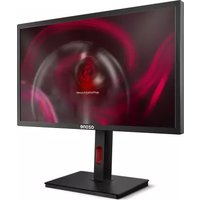
DSP 28 IPS - Monitor Ozone - Free user manual and instructions
Find the device manual for free DSP 28 IPS Ozone in PDF.


Pick your language and provide your email: we'll send you a specifically translated version.
| Product type | Desktop monitor |
| Brand | Ozone |
| Model | DSP 28 IPS |
| Screen size | 28 inches |
| Resolution | 3840 x 2160 (4K UHD) |
| Panel type | IPS |
| Aspect ratio | 16:9 |
| Brightness | 300 cd/m² |
| Contrast | 1000:1 |
| Response time | 5 ms (GTG) |
| Viewing angle | 178° / 178° |
| Connection ports | HDMI 2.0, DisplayPort 1.2 |
| Power supply | 100-240V, 50/60Hz |
| Power consumption | 45 W (typical), 0.5 W (standby) |
| Dimensions (with stand) | 640 x 450 x 200 mm |
| Weight | 5.5 kg |
| Main features | Preset image modes, brightness and contrast adjustment, color temperature control, headphone input |
| Maintenance and cleaning | Clean with a soft dry cloth; do not use solvents or liquids directly on the screen |
| Safety | Do not open the housing; use a grounded power outlet |
| Spare parts and repairability | Contact the official technical service for replacement of internal parts |
Frequently Asked Questions - DSP 28 IPS Ozone
How do I adjust the brightness and contrast on the Ozone DSP 28 IPS?
Use the control buttons located on the front of the monitor. Press the menu button and navigate to Image settings. There you can modify the brightness and contrast according to your preferences. Confirm with the OK button.
What connection ports does the DSP 28 IPS include?
The monitor includes HDMI 2.0 and DisplayPort 1.2, as well as a 3.5 mm audio connector for headphones. See the manual for more details on port distribution.
How do I activate game mode?
Access the OSD menu and select Game mode. You can choose from various profiles such as FPS, RTS, or racing. FPS mode improves visibility in dark scenes.
Is it compatible with VESA mounts?
Yes, the Ozone DSP 28 IPS is compatible with the VESA 100x100 mm standard. Make sure to use appropriate screws to attach the monitor to an arm or mount.
How do I properly clean the screen?
Turn off the monitor and unplug it. Use a slightly damp microfiber cloth with water, without chemical products. Gently wipe from top to bottom. Avoid excessive pressure.
What do I do if the monitor does not turn on?
First check the power cable and that the power outlet works. Also verify the connection of the signal cable to the computer. If it persists, try another device or contact technical support.
How do I change the monitor's refresh rate?
The frequency depends on the resolution and the graphics card. In Windows, go to Display settings and then Adapter properties. Select the maximum supported frequency, usually 60 Hz at 4K.
Does the monitor have built-in speakers?
No, the Ozone DSP 28 IPS does not have built-in speakers. You must connect headphones or external speakers via the audio connector or through the outputs of your device.
What advantages does the IPS panel offer?
The IPS technology provides more accurate colors and a wide viewing angle (178°), ideal for graphic design and for viewing content from any position.
Where can I download the user manual in PDF?
You can get the manual on the official Ozone website or on documentation platforms such as notice-facile.com. Search for the reference DSP 28 IPS and download the PDF in Spanish.
User questions about DSP 28 IPS Ozone
0 question about this device. Answer the ones you know or ask your own.
Ask a new question about this device
No questions yet. Be the first to ask one.
Download the instructions for your Monitor in PDF format for free! Find your manual DSP 28 IPS - Ozone and take your electronic device back in hand. On this page are published all the documents necessary for the use of your device. DSP 28 IPS by Ozone.
USER MANUAL DSP 28 IPS Ozone


Manual assistant
Powered by Anthropic
Waiting for your message
Product information
Brand : Ozone
Model : DSP 28 IPS
Category : Monitor