Rage - Headphones Ozone - Free user manual and instructions
Find the device manual for free Rage Ozone in PDF.


Pick your language and provide your email: we'll send you a specifically translated version.
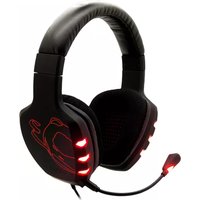
| Product Type | Over-ear gaming headset |
| Brand | Ozone |
| Model | Rage |
| Colour | Black |
| Dimensions | 200 x 180 x 90 mm |
| Weight | 350 g |
| Power Supply | Wired, no battery required |
| Main Functions | Gaming audio, voice communication, volume control |
| Driver Unit | 50 mm neodymium |
| Frequency Response | 20 Hz - 20 kHz |
| Impedance | 32 Ohm |
| Sensitivity | 110 dB |
| Microphone | Boom microphone |
| Cable Length | 2.5 m |
| Connectors | 3.5 mm audio and microphone jacks |
| Compatibility | PC, Mac, PlayStation, Xbox, Nintendo Switch |
| Maintenance & Cleaning | Wipe with soft dry cloth, clean ear pads with mild detergent |
| Safety | Use moderate volume to prevent hearing damage |
| Spare Parts & Repairability | Replaceable ear pads, cable and microphone |
| General Information | Warranty supported by Ozone, 2 years |
Frequently Asked Questions - Rage Ozone
How do I connect the Ozone Rage headset to my PC?
Plug the 3.5mm audio and microphone jacks into the corresponding ports on your PC. For most computers, use the green port for audio and the pink port for the microphone. If your PC has a single combo port, you may need a splitter cable.
Can I use the Rage headset with my smartphone?
Yes, if your smartphone has a 3.5mm headset jack. The headset's 3.5mm connectors are compatible with most mobile devices. Keep in mind that the microphone may not work with phones that use a TRRS (single jack) configuration unless you use a splitter adapter.
How do I clean the ear cushions?
Detach the ear cushions gently from the ear cups. Hand wash them in lukewarm water with mild soap, then rinse and air dry completely before reattaching. Avoid using harsh chemicals or submerging the headset itself.
The sound is only coming from one side. What should I do?
Check that the audio cable is fully inserted into the headphone jack and your device. Test with another audio source. If the issue persists, the internal wiring may be damaged. In that case, contact Ozone customer support for repair or replacement.
Is the microphone detachable?
Yes, the boom microphone can be detached from the headset. This is useful when using the headset for pure audio listening without voice communication.
How long is the warranty period?
The Ozone Rage headset comes with a 2-year warranty from the date of purchase. Keep your receipt or invoice to validate the warranty.
Can I replace the cable?
The cable is detachable in most models. You can replace it with a standard 3.5mm headset cable if needed. Contact Ozone customer service for replacement parts.
How do I adjust the microphone volume?
The volume can be adjusted through your operating system's sound settings. In Windows, right-click the speaker icon, open Volume Mixer, and adjust the Microphone slider. In-game voice chat settings will also control mic sensitivity.
What are the main features of the Rage headset?
The headset features 50 mm neodymium drivers for immersive sound, a noise-cancelling boom microphone, plush ear cushions, and an adjustable headband for comfortable gaming sessions.
Is the headset compatible with game consoles?
Yes, it is compatible with PlayStation, Xbox, and Nintendo Switch via the 3.5mm jack. For older consoles that use a different audio connection, you may need an adapter.
User questions about Rage Ozone
0 question about this device. Answer the ones you know or ask your own.
Ask a new question about this device
No questions yet. Be the first to ask one.
Download the instructions for your Headphones in PDF format for free! Find your manual Rage - Ozone and take your electronic device back in hand. On this page are published all the documents necessary for the use of your device. Rage by Ozone.
USER MANUAL Rage Ozone


Manual assistant
Powered by Anthropic
Waiting for your message
Product information
Brand : Ozone
Model : Rage
Category : Headphones