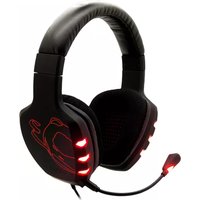
Rage 7HX - Headphones Ozone - Free user manual and instructions
Find the device manual for free Rage 7HX Ozone in PDF.


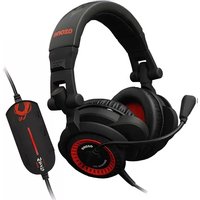
| Product Type | Over-Ear Gaming Headset |
| Brand | Ozone |
| Model | Rage 7HX |
| Connectivity | Wired (3.5mm jack, USB for virtual 7.1) |
| Driver Diameter | 50 mm |
| Frequency Response | 20 Hz - 20 kHz |
| Impedance | 32 ohms |
| Microphone | Detachable, flexible boom mic, unidirectional |
| Surround Sound | Virtual 7.1 via USB sound card |
| Weight | 320 g |
| Dimensions (W x H x D) | 200 x 180 x 90 mm |
| Cable Length | 2.5 m |
| Controls | In-line remote with volume wheel and mic mute |
| Compatibility | PC, PS4, PS5, Xbox One (via adapter), Nintendo Switch, mobile devices |
| Cleaning | Wipe with a soft, dry cloth. Do not use chemicals. |
| Earpad Replacement | Replaceable earpads available as spare parts |
| Safety Notes | Avoid prolonged high volume to prevent hearing damage |
| Warranty | 2 years (subject to local regulations) |
Frequently Asked Questions - Rage 7HX Ozone
User questions about Rage 7HX Ozone
0 question about this device. Answer the ones you know or ask your own.
Ask a new question about this device
Download the instructions for your Headphones in PDF format for free! Find your manual Rage 7HX - Ozone and take your electronic device back in hand. On this page are published all the documents necessary for the use of your device. Rage 7HX by Ozone.
USER MANUAL Rage 7HX Ozone
Software Installation
- Before installation, please be sure to save other open applications and then exit, to avoid data loss after installation.
- Before installing the driver please connect the USB headset to your computer, then in windows explorer find "Setup.exe". Double-click it for installation.
- When starting installation application, click "NEXT"

(pic 1)

(pic 2)
1
(pic 5)
- You need to reboot system in order to complete the installation, please click "Finish" to reboot your computer.
(1). Please use the same USB plug which you had used for installation, because you need to reinstall the driver if you take off the USB and reinsert a different USB plug.
(2). If you unplug the USB cable while the media is playing, it might cause driver system errors, we suggest you close the media application before you unplug the USB cable.
2
OZONE RAGE 7HX
(1). In the tray, click the OZONE logo to pop-up the RAGE 7HX Gaming Surround 7.1 panel:

(pic 6)
(2) Setting Interface
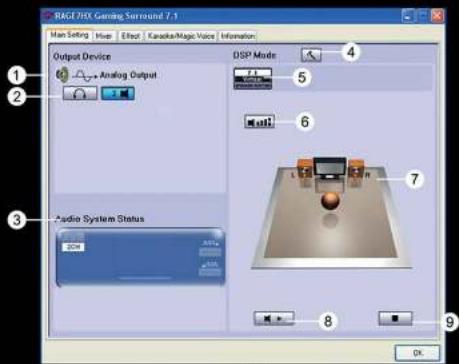
(pic 7)
1). Analog output: selected this button to choose the channel model of analog output
2). Mode of analog channel: you can choose the kind of headphone setting: 2,4,6 or 8 speakers. Pls choose 6 speakers
3). Display connection of audio and microphone, but you can change it, it's just for your reference
4). DSP mode: click DSP setting, change it to DSP use mode
5). Switching the actual speaker: open the speaker setting then choose what you like
6). Digital volume control: you can adjust volume for each channel
7). Display channel and speaker to begin sound test
8). Automatic sound test: each channel can be tested automatically
9). Stop the sound test
2. Mixer
(1) Operating interface of Mixer, you can adjust volume of waverform and microphone.

(pic 8)
1). Balance control
9). Software synthesizer volume switch
2). Volume control
10). CD player volume balance
3). Volume switch
11). CD player volume control
4). Waveform volume balance
12). CD player volume switch
5). Waveform volume control
13). Microphone balance
6). Waveform volume switch
14). Microphone control
7). software synthesizer volume balance
15). Microphone switch
8). Software synthesizer volume control
16). Microphone advanced setting
OZONE RAGE 7HX
(2) Microphone Settings
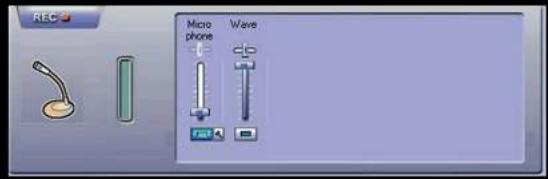
(pic 9)
1) Microphone volume control
4). Waveform volume balance
2) Microphone switch
5). Waveform volume control
3) Microphone Enhanced Module
6). Waveform switch
- Effects

(pic10)
5
(pic11)
6
OZONE RAGE 7HX
1) On/Off: click to open and close karaoke function
2) Reset: click this button to return to original settings
3) Open the echo function of the microphone, pop-up a dialog, click "ok" to control the echo function of the microphone
4) Echo height controller
5) Pull-down menu of alchemy voice
6) Tone control switch
7) Volume control
8) Singing cancelling switch
9) Singing cancelling control
Magic voice
We can see some effect buttons

(pic12)
10) Default
11) Virtual monster effect
12) Virtual cartoon effect
13) Virtual man's voice
14) Virtual woman's voice
NOTE: Please click "on" when you're not using the microphone /magic voice to avoid noise caused by this fuction.
(pic13)
OZONE RAGE 7HX
2. Main Setting, please see pic 15,
(1) System audio source, they are 2CH, 4CH, 6CH, 8CH for your choices, use as following:
please choose the channel that you prefer.
Normal setting suggestion:
MP3, WMA, AAC, CD, VCD: 2CH
DVD with Dol by Digital or DTS, WMA-Pro: 6CH
DVD with Dol by Digital EX or DTS ES: 8CH
3D Games: 8CH
Attention:
Vista operating system will transmit the audio data to the audio device according to your data settings, impertinent settings might cause abnormal audio data transmission.
(2) DSP mode & setting effect bottom
(3) Out put mode, click combobox, you have earphones and 2 speaker for your choices.
(4) Out put device testing area, click any speaker it you have sound coming from the corespoding one.

(pic 15)
OZONE RAGE 7HX
- Mixer, volume control and mute control

1) Volume control
5) Microphone recording volume control
2) Volume switch
6) Microphone recording switch
3) Microphone volume
7) Microphone enhance settings
4) Microphone switch
4. Effect, please refers- to pic 17\~18, this interface is seperated in the following:
(1) Enviroment: they are general, ward, living room ect you have 23 choices.
(2) Space choices: large, middle, small.
(3) Equalizer : Default, Dance, Bass ect 12 choices for your consideration.
(Remark: For more function specifications please refers to page 6)

( pic 17)

(pic 18)
OZONE RAGE 7HX
(1) Turn on - Adjust/turn off Microphone Mixer
(2) Turn on - Adjust/ turn off tone control
(3) Turn on - Adjust/ turn off cancel song
(For more function specifications please refers to page 7, 8)

(pic 19)
- Information of VGA Chipset & Driver version
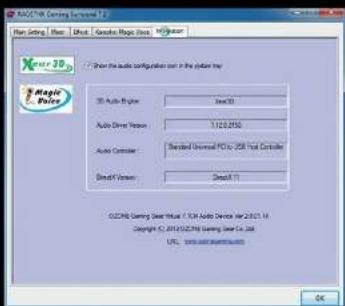
(pic 20)
13
Windows 7 Operating Interface
- Icon
natural_image
Windows XP desktop wallpaper showing the Blue and Orange Windows logo against a blue sky (no text or symbols on the screen)(pic 21)
14
OZONE RAGE 7HX
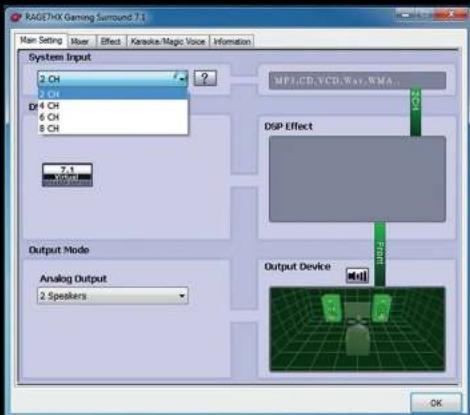
2. Main Setting, please refers to pic 22
(1) System audio source, they are 2CH, 4CH, 6CH, 8CH for your choices, use as following indications:
please choose the channel that you prefer.
Normal setting suggestions:
MP3, WMA, AAC, CD, VCD: 2CH
DVD with Dol by Digital or DTS, WMA-Pro: 6CH
DVD with Dol by Digital EX or DTS ES: 8CH
3D Games: 8CH
Attention:
Wihndows 7 operating system will transmit the audio data to the audio device according to your data settings, impertinent settings might cause abnormal audio data transmission.
(2) DSP mode & setting effect button
(3) Out put mode, click combobox, you have earphones and 2 speakers for your choices.
(4) Out put device testing area, click any speaker to have sound come from the corespoding one.

(pic 22)
(pic 24)
OZONE RAGE 7HX
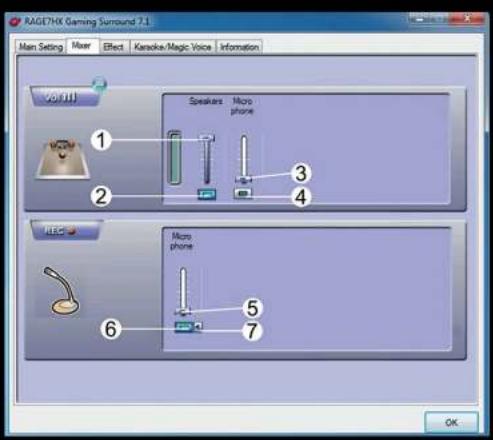
3. Mixer, supply volume control or mute control
(pic 25)
1) Volume control
5) Microphone recording volume control
2) Volume switch
6) Microphone recording switch
3) Microphone volume
7) Microphone enhance setting
4) Microphone switch
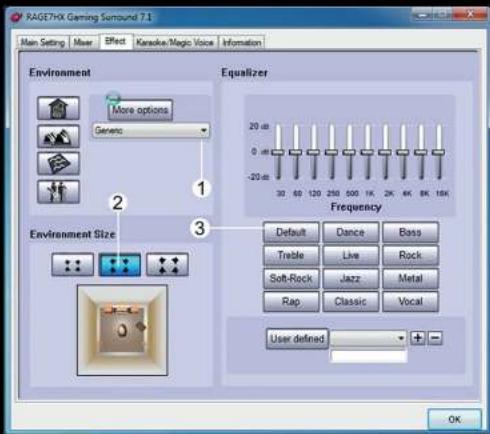
4. Effects, please refers- to pic 17\~18, this interface is seperated as follows:
(1) Environment: they are general, ward, living room ect you have 23 choices.
(2) Space choices: large, middle, small.
(3) Equalizer : Default, Dance, Bass ect 12 choices for your consideration.
(Remark: For more function specifications please refers to page 6)

(pic 26)
(pic 27)
18
OZONE RAGE 7HX
5. Karaoke/ magic sound
(1) Turn on - Adjust/turn off Microphone Mixer
(2) Turn on - Adjust/ turn off tone control
(3) Turn on - Adjust/ turn off cancel song
(For more function specifications please refers to page 7, 8)

(pic 28)
6. Information of VGA Chipset & Driver version
Directivity ...... Omni-directional
Impedance 2.2KΩ
Speaker
Diameter 040mm
Sensitivity 99dB(At1.0 kHz)
Impedance 32Ω
Frequency Response 20Hz\~20KHz
Cable Length 2.9M
Plug .... USB
Net Weight 344g
21
Accessories List
- Headset 1 pc
- Driver Disk 1 pc
- User Manual 1 pc
- Quick Guide 1 pc
- Package Box 1 set
If you have any questions regarding technical problems please contact us via our website:
www.ozonegaming.com
WARNING:
Adjust headset to a proper volume. Loud volume may damage your ears. For your traffic safety, please do not use the headset while riding a bike, motor bike or while driving a car.
OZONE reserves the right for any modifications in text and/or images.
22

natural_image
Abstract red line drawing on black background, resembling a stylized '3' or coiled ribbon (no text or symbols)ozone
GAMING GEAR
it's all about evolution


- Software Installation
- OZONE RAGE 7HX
- Mixer
- Magic voice
- Main Setting, please see pic 15,
- Attention:
- Effect, please refers- to pic 17\~18, this interface is seperated in the following:
- Windows 7 Operating Interface
- Main Setting, please refers to pic 22
- Mixer, supply volume control or mute control
- Effects, please refers- to pic 17\~18, this interface is seperated as follows:
- Karaoke/ magic sound
- Information of VGA Chipset & Driver version
- Speaker
- Accessories List
- WARNING:
- ozone
- GAMING GEAR
Brand : Ozone
Model : Rage 7HX
Category : Headphones