EC-PM-5895x - Printer EC Line - Free user manual and instructions
Find the device manual for free EC-PM-5895x EC Line in PDF.


Pick your language and provide your email: we'll send you a specifically translated version.
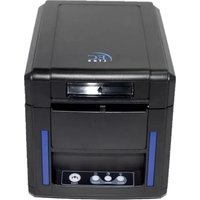
| Product Type | Thermal Receipt Printer |
| Brand | EC Line |
| Model | EC-PM-5895x |
| Printing Technology | Direct Thermal Printing |
| Print Speed | 90 mm/s |
| Printing Width | 48 mm (58 mm paper width) |
| Paper Width | 58 mm |
| Interface | USB and serial (RS-232) connectivity |
| Power Supply | DC 12V / 2A |
| Dimensions (W x D x H) | Approx. 185 x 145 x 120 mm |
| Weight | 0.8 kg |
| Supported Commands | ESC/POS |
| Functions | Print receipts, barcode printing, graphic printing |
| Maintenance | Clean the print head regularly with a cotton swab and isopropyl alcohol |
| Safety | Do not touch the print head while printing; use only the provided power adapter |
| Spare Parts and Repairability | Print head, rubber roller, and main controller board are replaceable |
| Documentation | Free PDF user manual, 8 pages, English |
Frequently Asked Questions - EC-PM-5895x EC Line
How do I install the EC-PM-5895x thermal printer?
Connect the power adapter to the DC 12V input and the USB or serial cable to your computer. Install the thermal paper roll correctly with the printable side facing the print head. Download the driver from the manual page and set the printer as the default device.
What type of paper does the EC-PM-5895x use?
It uses standard 58 mm wide thermal paper rolls. The paper core diameter is typically 13 mm, and the outer diameter should not exceed 60 mm for best results.
How can I clean the print head?
Turn off the printer and open the paper cover. Use a cotton swab dipped in isopropyl alcohol to gently clean the thermal print head. Allow it to dry completely before closing the cover.
What should I do if the printer stops working?
Check the power supply and cable connections first. Make sure the paper roll is loaded properly and the cover is closed. If the error light blinks, refer to the troubleshooting section of the manual.
How do I connect the printer to my computer?
The EC-PM-5895x offers both USB and serial (RS-232) interfaces. For most systems, use the USB port with the included driver. On Windows, the driver can be installed from the CDs or downloaded from the manufacturer's support page.
Can I print barcodes with this printer?
Yes, it supports ESC/POS commands for barcode printing. You can generate Code 39, Code 128, EAN-13, and other common barcodes by sending the appropriate command sequences.
What is the print speed of the EC-PM-5895x?
The printer can print at a speed of 90 mm per second, making it suitable for fast customer receipts in retail and hospitality environments.
How do I adjust the paper roll?
Open the cover, place the paper roll in the paper compartment, and pull the paper out over the tear bar. Ensure the paper is straight and not snagged. Close the cover until it clicks into place.
Is the EC-PM-5895x compatible with ESC/POS commands?
Yes, it fully supports the ESC/POS standard instruction set. You can control all printing functions, including character size, alignment, and cutting, using a standard ESC/POS library.
Where can I find spare parts for the EC-PM-5895x?
Spare parts such as the print head, rubber roller, and main controller board are available through authorized EC Line distributors. You can also contact the support service for ordering information.
User questions about EC-PM-5895x EC Line
0 question about this device. Answer the ones you know or ask your own.
Ask a new question about this device
No questions yet. Be the first to ask one.
Download the instructions for your Printer in PDF format for free! Find your manual EC-PM-5895x - EC Line and take your electronic device back in hand. On this page are published all the documents necessary for the use of your device. EC-PM-5895x by EC Line.
USER MANUAL EC-PM-5895x EC Line
Manual assistant
Powered by Anthropic
Waiting for your message
Product information
Brand : EC Line
Model : EC-PM-5895x
Category : Printer