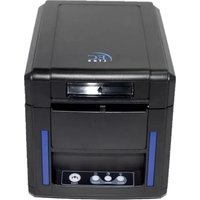
EC-PM-80340 - Printer EC Line - Free user manual and instructions
Find the device manual for free EC-PM-80340 EC Line in PDF.


| Product Type | POS Receipt Printer |
| Brand | EC Line |
| Model | EC-PM-80340 |
| Printing Speed | 300 mm/sec |
| Paper Width | 43 / 58 / 70 / 80 / 82 mm |
| Paper Roll Diameter (Max) | 83 mm |
| Auto Cutter | Partial cut |
| Interface Options | Serial+USB+Ethernet / USB+WiFi / USB+Bluetooth |
| Barcode Support | UPC-A, UPC-E, EAN13, EAN8, CODE39, ITF, CODABAR, CODE93, CODE128, QR Code, PDF417 |
| Print Command Sets | EPSON ESC/POS, Star command sets |
| Character Size | Font A: 12×24 dots, Font B: 9×17 dots, Chinese: 24×24 dots |
| Reliability | 150 km |
| Power Supply | DC 24V / 2A (Adapter: AC 110-220V, 50-60Hz) |
| Cash Drawer Output | DC 24V / 1A |
| Operating Environment | Temperature: 0-45°C, Humidity: 10-80% |
| Storage Environment | Temperature: -10-60°C, Humidity: 10-90% |
| Dimensions (W×D×H) | 156 × 217 × 160 mm |
| Features | High-speed printing, front paper exit, auto cutter, network printing, OPOS driver, 2D barcode printing, low power consumption |
| Safety Features | Overheat protection, paper-out detection, cutter error detection |
| Included Accessories | Printer, power adapter, serial interface cable, CD disk, warranty sheet |
Frequently Asked Questions - EC-PM-80340 EC Line
User questions about EC-PM-80340 EC Line
0 question about this device. Answer the ones you know or ask your own.
Ask a new question about this device
Download the instructions for your Printer in PDF format for free! Find your manual EC-PM-80340 - EC Line and take your electronic device back in hand. On this page are published all the documents necessary for the use of your device. EC-PM-80340 by EC Line.
USER MANUAL EC-PM-80340 EC Line
natural_image
Line drawing of a desktop computer case with ventilation slots and control panel (no text or symbols)Proficient in Commercial POS Receipt Printers
1. Safety Notice:
* Install the printer on stable place, choose a firm, level surface where avoid vibration.
* Do not use and store the printer under high temperature, humid or seriously polluted environment.
* Connect AC power adapter to a proper power outlet. Avoid to use the same outlet with other large electric machines which generate voltage fluctuation.
* Do not let water or conducting material (eg. metal) into the printer.
* Do not print when it is out of paper, which will seriously damage the printer head and rubber roller.
* We recommend that you unplug the printer from the power outlet whenever you do not plan to use it for a long period.
* Do not try to disassemble, repair or remodel the printer by yourself.
* Only use the power supply that is come along with the printer.
* We recommend that you use good paper to deliver high quality receipts and to ensure the printer's lifespan.
* Make sure that printer is off when connecting or disconnecting the plug, always hold the plug - notthe cord.
* Please keep this manual for your reference.
2. Applications:
* POS system Receipts
* EFT POS system Receipts
* Gym, post, hospital, civil aviation system Receipts
* Inquiry, Service system Receipts
* Instrument test Receipts
* Tax, Tab Receipts
3. Unpacking
After unpacking the unit, check that all the necessary accessories are included in the package.
| CD Disk | 1 PC |
| Printer | 1 PC |
| Serial interface cable | 1 PC |
| Power Adapter (include power cord) | 1 SET |
| Warranty Sheet | 1 PC |
4. Features
* 300mm/sec high printing speed
* Support 2D barcode printing
* Support kitchen printing and network printing
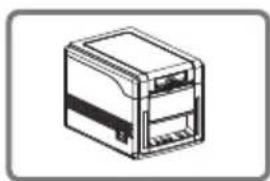
* Support front paper dispensing and auto cutter, stopping paper from jamming
* Support bar code printing
* Ports:Serial+USB+Ethernet ; USB+Wifi ; USB+Bluetooth
* 83mm Large Paper Roll Capacity
* Rational construction, easy maintenance
* Built in data buffer which can receive new task when printing is in progress
* Characters can be enlarged, bonded, underlined, line space and character space can be adjusted
* Support different density NV logo and download printing
* Low power consumption and low operation cost
* Compatible with EPSON ESC/POS and Star command sets
* Character and columns per line are optional by using DIP switches
* Support print status monitoring, multilink print, OPOS driver
* Support printer identification, software bundle, high speed driver printing mode
* Support various international characters
natural_image
Line drawing of a rectangular electronic device with internal components (no text or symbols)Front Paper Exit

natural_image
Silhouette of a running person with motion lines (no text or symbols)High Speed Printing

Bar Code Printing

natural_image
Three computer monitors connected in a bidirectional communication diagram (no text or symbols)Network Printing

natural_image
Isometric illustration of a computer monitor with 'OPOS' label, no other text or symbols presentOPOS Driver

natural_image
Simple line drawing of a rolled paper or scroll with a downward arrow indicating compression (no text or symbols)120mm Large Roll
- Specification
| Model | EC-80340 |
| Printing speed | 300mm/sec |
| Paper roll | Paper Width:43/58/70/80/82mmPaper Diameter:83mm max.Roll diameter: Inside: 12mmOutside: 18~26mm |
| Dot density | 512/576 dots/line |
| Character size ANK Character, | Font A: 12×24dots,Font B: 9×17dots,Chinese Character: 24×24dots |
| Print command | Compatible with EPSON ESC/POSand Star command sets |
| Interface | Serial+Ethernet+USB; USB+Wifi; USB+Bluetooth |
| Auto cutter | Partial |
| Reliability | 150Km |
| Barcode mode | UPC-A/UPC-E/JAN13(EAN13)/JAN8(EAN8)/CODE39/ITF/CODABAR/CODE93/CODE128/QRCODE/PDF417 |
| Paper thickness | 0.06~0.08mm |
| Powersupply | DC 24V/2A |
| Power adapter | Input: AC110V-220V, 50~60HZOutput: DC 24V/2A |
| Cash drawer | DC 24V/1A |
| Work environment | Temperature: 0~45°C, Dampness: 10~80% |
| Storage environment | Temperature: -10~60°C, Dampness: 10~90% |
| Dimension | 156×217×160mm(W×D×H) |
6. Printer Connection
a. Plug the power adapter cable into the printer's power port.
b. Plug the interface cable securely into the printer's Serial/USB/Ethernet port.
c. Plug the cash drawer's RJ-11 phone jack into the printer RJ-11 socket.
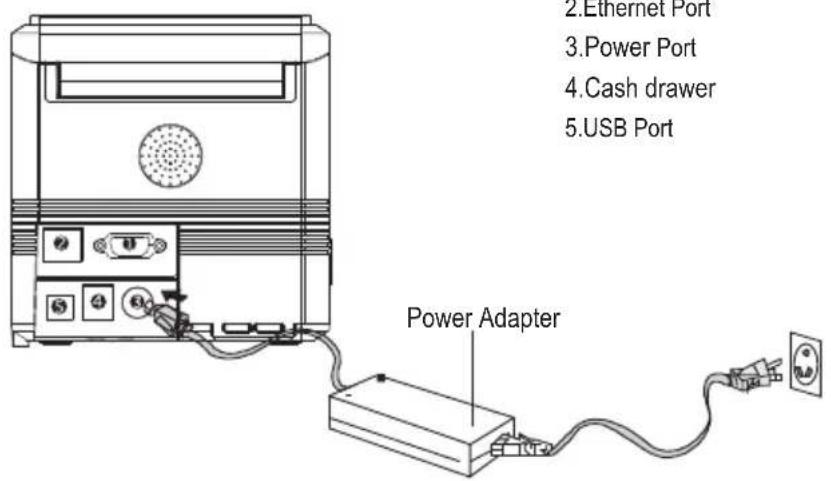
7. Paper Installation
a. Press the button to open the printer cover.
b. Put the paper roll into the hollow (pay attention to the paper direction).
c. Pull the leading edge of the roll outside of the printer and then close the cover.
d. Press the center of printer cover firmly to prevent paper misloading, then tear off the paper outside.
a | b  |
c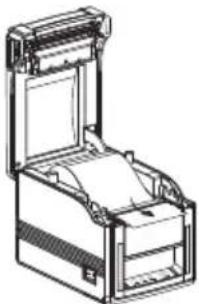 | d |
8. Print Mode S(ΩtRngwitches)
Users can select the auto cutter, language, printing speed, beep, print density by using DIP switches to set the printer.

- Remove the DIP switches cover on the bottom of the printer.
9. Three-view Drawing

natural_image
Simple line drawing of a rectangular frame with a small protrusion at the bottom (no text or symbols)Top view

Side view

Front view
10. Cutter Maintenance
If step 1 failed, follow the below instructions
I. Open the printer cover as showing
III. Press the "FEED" again, cutter will return to its home position.
⚠ Attention: Do not use force to separate the printer cover in case of any damage to the print head and auto cutter.
11. Button and Indicators

12. Function of button and indicators
(1) ERROR Indicator
ON may indicate paper out, cutter error, print head overheated.
OFF indicates normal status
(2) PAPER Indicator
PAPER & ERROR are both ON, indicating printer is out of paper;
PAPER & ERROR are both OFF, indicating printer is in normal status.
(3) POWER Indicator
ON indicates printer power is on
OFF indicates printer power is off.
(4) FEED Button
Press the FEED button to feed the paper roll.
13. Professional Performance
a. 300mm/sec high printing speed
b. Support front paper exit and auto cutter
c. Support bar code printing
d. 83mm large roll paper
e. Support various paper width printing
Manufacturer: EC LINE
Thank you very much for using EC Line product
For service, please contact service@ecline.com.hk
www.ecline.com.mx / www.ecline.com.hk
Brand : EC Line
Model : EC-PM-80340
Category : Printer