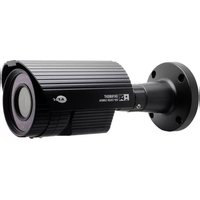
KPC-HDV120F - Security Camera KT&C - Free user manual and instructions
Find the device manual for free KPC-HDV120F KT&C in PDF.


Pick your language and provide your email: we'll send you a specifically translated version.
| Product Type | Security Camera (CCTV) |
| Brand | KT&C |
| Model | KPC-HDV120F |
| Image Sensor | 1/2.8" Progressive Scan CMOS |
| Effective Pixels | 1920 (H) x 1080 (V) - 2 Megapixels |
| Video Output | HD-TVI / AHD / CVI (switchable) |
| Minimum Illumination | Color: 0.01 Lux / B/W: 0.001 Lux (with IR) |
| Shutter Speed | 1/30 to 1/50,000 seconds |
| Lens Type | Fixed focal 3.6mm |
| Lens Mount | M12 |
| Angle of View | 90° (horizontal) |
| Day/Night | Removable IR-cut filter |
| Infrared Range | 30 meters (with 24 IR LEDs) |
| Weatherproof Rating | IP66 |
| Power Supply | DC 12V ±10% |
| Power Consumption | Max 4W (IR on) |
| Operating Temperature | -20°C to +50°C |
| Dimensions | Ø70mm x 160mm (bullet type) |
| Weight | 450g |
| Main Functions | 3D DNR, WDR, Motion detection, Privacy masking |
| Maintenance | Clean lens with soft dry cloth; check connections every 6 months |
| Safety | Use correct DC adapter; mount securely; avoid direct rain unless rated |
| Spare Parts | DC adapter, mounting bracket, lens |
| Warranty | 1 year limited |
Frequently Asked Questions - KPC-HDV120F KT&C
What power supply does the KPC-HDV120F require?
The camera requires a 12V DC power supply. Ensure the adapter provides at least 500mA to support IR operation.
Can the KPC-HDV120F be used outdoors?
Yes, it has an IP66-rated housing, making it weatherproof against rain and dust.
What is the maximum resolution of this camera?
It supports 1080p Full HD (1920x1080) at up to 30fps.
How do I clean the camera lens?
Use a soft, lint-free cloth slightly dampened with pure water or mild lens cleaning solution. Avoid abrasive chemicals.
Does the camera have night vision?
Yes, it includes 24 infrared LEDs with a range of up to 30 meters in complete darkness.
What video output types are supported?
The camera supports HD-TVI, AHD, and CVI output, selectable via DIP switches or menu.
How can I mount the camera?
The package includes a wall-mounting bracket. Secure the bracket to a solid surface, then attach the camera and adjust the angle.
What is the operating temperature range?
The camera operates from -20°C to +50°C (-4°F to 122°F).
Does the camera support motion detection?
Yes, it has real-time motion detection that can trigger alarms or recording.
How do I reset the camera to factory defaults?
Press and hold the reset button inside the housing for 5 seconds. This restores the factory settings.
User questions about KPC-HDV120F KT&C
0 question about this device. Answer the ones you know or ask your own.
Ask a new question about this device
No questions yet. Be the first to ask one.
Download the instructions for your Security Camera in PDF format for free! Find your manual KPC-HDV120F - KT&C and take your electronic device back in hand. On this page are published all the documents necessary for the use of your device. KPC-HDV120F by KT&C.
USER MANUAL KPC-HDV120F KT&C
Manual assistant
Powered by Anthropic
Waiting for your message
Product information
Brand : KT&C
Model : KPC-HDV120F
Category : Security Camera