K7-e800 - Security Camera KT&C - Free user manual and instructions
Find the device manual for free K7-e800 KT&C in PDF.


Pick your language and provide your email: we'll send you a specifically translated version.
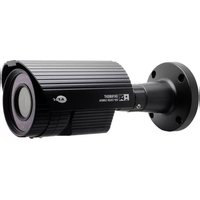
| Product Type | Security Camera (Bullet) |
| Brand | KT&C |
| Model | K7-e800 |
| Dimensions (approx.) | 70 mm (D) x 180 mm (L) |
| Weight | 0.5 kg |
| Power Supply | 12V DC, 1A |
| Resolution | 1920 x 1080 pixels (Full HD) |
| Image Sensor | 1/2.8" CMOS |
| Lens | 2.8 mm fixed lens |
| Night Vision | Up to 30 meters (IR LEDs) |
| Weatherproof Rating | IP66 |
| Video Compression | H.265+/H.265/H.264 |
| Field of View | Horizontal: 105° |
| Main Functions | Motion detection, IR cut filter, two-way audio (optional), microSD slot (up to 128 GB) |
| Maintenance | Clean lens with soft dry cloth; avoid moisture ingress |
| Safety Notes | Use only provided power adapter; mount securely to prevent falls |
| Spare Parts & Repairability | Standard mounting bracket, IR LEDs replaceable by technician; warranty 1 year |
| General Information | Manual available in PDF (87 pages); includes installation and troubleshooting |
| In the Box | Camera, mounting kit, power adapter, user manual |
Frequently Asked Questions - K7-e800 KT&C
How do I reset the K7-e800 camera to factory settings?
Press and hold the reset button on the camera for 10 seconds until the indicator blinks. The camera will reboot with default settings.
What is the maximum storage capacity for the microSD card?
The K7-e800 supports microSD cards up to 128 GB (Class 10 or higher recommended).
Can I use the camera outdoors without a protective housing?
Yes, the camera has an IP66 weatherproof rating, meaning it is dust-tight and protected against powerful water jets. However, avoid submersion.
How far can the camera see at night?
The infrared LEDs provide night vision up to 30 meters in complete darkness.
What video compression formats are supported?
The camera supports H.265+, H.265, and H.264 compression for efficient bandwidth and storage usage.
How do I mount the camera to a wall?
Use the included mounting bracket and screws. Drill holes according to the template, attach the bracket, then screw the camera onto the bracket.
Does the camera support audio?
Yes, the K7-e800 has a built-in microphone and speaker for two-way audio communication. You need to enable it in the settings.
What should I do if the camera is not connecting to the network?
Check the Ethernet cable connection, ensure the router's DHCP is enabled, and try a power cycle of both camera and router. Also verify the IP address settings.
How do I update the camera firmware?
Download the latest firmware from the KT&C website, place it on an FAT32 formatted USB or access via web interface, and follow the upgrade instructions in the manual.
Is the camera compatible with third-party NVRs?
Yes, the K7-e800 supports ONVIF Profile S, so it can work with most standard NVRs. You may need to enable ONVIF in the camera settings.
User questions about K7-e800 KT&C
0 question about this device. Answer the ones you know or ask your own.
Ask a new question about this device
No questions yet. Be the first to ask one.
Download the instructions for your Security Camera in PDF format for free! Find your manual K7-e800 - KT&C and take your electronic device back in hand. On this page are published all the documents necessary for the use of your device. K7-e800 by KT&C.
USER MANUAL K7-e800 KT&C
Manual assistant
Powered by Anthropic
Waiting for your message
Product information
Brand : KT&C
Model : K7-e800
Category : Security Camera